


A city page (also called a location page or service area page) is a page on your website about your service in one town, built from things only that town’s customers would recognise: jobs you did there, reviews from people who live there, local problems you solve and how fast you get there. If you can swap the town name for another one and the page still reads fine, Google can treat it as a doorway page. If the swap makes the page wrong, you have built a city page worth ranking.
This guide shows you which towns deserve a page, the seven parts every good one has, and how to build and check yours today. It includes a free builder that writes the title, outline and schema for you, plus what we found when we checked 52 Phoenix plumbers’ websites.
Jump to: What a city page is · Doorway pages · Our study · How many to build · Free builder · 8 steps · Template · FAQs
What is a city page in SEO?
A city page is a page that answers one question for one town: “Can this business help me here?” It targets searches like plumber in Mesa or roof repair Chandler AZ, where your homepage alone usually is not specific enough.
People use three names for two different jobs, so it helps to know which one you need:
| Page type | Who builds it | What makes it real |
|---|---|---|
| Location page | A business with an address customers visit in that town (a shop, clinic, office) | The address, hours, parking, staff and photos of that branch |
| Service area page | A business that travels to customers (plumber, cleaner, roofer) | Jobs, reviews and local know-how from that town |
| City page | Either of the above. It is the everyday name for both | The same: proof that only fits one town |
If you have several branches with their own addresses, our guide to local SEO for multiple locations covers the Google Business Profile side. This guide focuses on the page itself.
Why bother? In Whitespark’s 2026 Local Search Ranking Factors survey of local SEO experts, “Dedicated Page for Each Service” ranked #1 for local organic results and “Geographic (City/Neighborhood) Keyword Relevance of Content” ranked #2 (Whitespark). And the page is often where the decision happens: BrightLocal’s 2026 survey found 54% of consumers visit a business’s website after reading positive reviews, up from 32% in 2019 (BrightLocal).
Are city pages doorway pages?
Only when they are built to catch searches instead of helping people. Google’s spam policies define doorway abuse as pages “created to rank for specific, similar search queries” that lead users to pages “that aren’t as useful as the final destination.” One of Google’s listed examples is “having multiple domain names or pages targeted at specific regions or cities that funnel users to one page” (Google Search Central, checked 5 Nov 2026).
So the problem is never the city page. It is the copy-paste city page. Google also lists “creating substantially similar pages that are closer to search results than a clearly defined, browseable hierarchy” as a doorway sign, and its scaled content policy covers pages made with AI tools “without adding value for users” (Google).
The fastest way to check your own pages is the swap test.

Open one of your city pages, mentally swap the town for the next one over, and read it again. Every sentence that still makes sense is a sentence that is not helping. Every sentence that breaks (a neighbourhood, a review, a job, a local rule) is doing the work.
What we found on 52 Phoenix plumber websites
We wanted to know how real local businesses handle this, so on 5 November 2026 we checked the websites behind the Google Maps results for “plumber Phoenix AZ”. Sixty listings had a website; 52 loaded for our crawler.

What the numbers tell you:
- City pages are normal, not risky. 40 of the 52 sites had at least one city page, and 33 had pages for five or more towns. Your competitors are already doing this.
- About one in four look like copies. For 33 sites we compared two city pages after removing menus and footers and swapping the town names. On 9 of 33 pairs, more than half the wording was the same. On 5, more than 90% was.
- Everyone does the easy part. All 66 pages we read had the town in the title, and 63 had it in the H1. That is no longer an edge.
- Fewer do the parts that need effort. 46 of 66 embedded a Google map, 37 named the town in
areaServedschema and 17 had FAQ schema.
How we measured: city pages are URLs on the site (from homepage links and XML sitemaps) whose address names a Phoenix-area town. “Same wording” means shared 8-word phrases after swapping town names, as a share of the shorter page. This is our sample of one trade in one metro, not an industry average. Download the anonymised data (CSV).
How many city pages should you create?
Build a full page only for towns where you have real proof, and group the rest. The number is set by your evidence, not by a list of every suburb on the map.
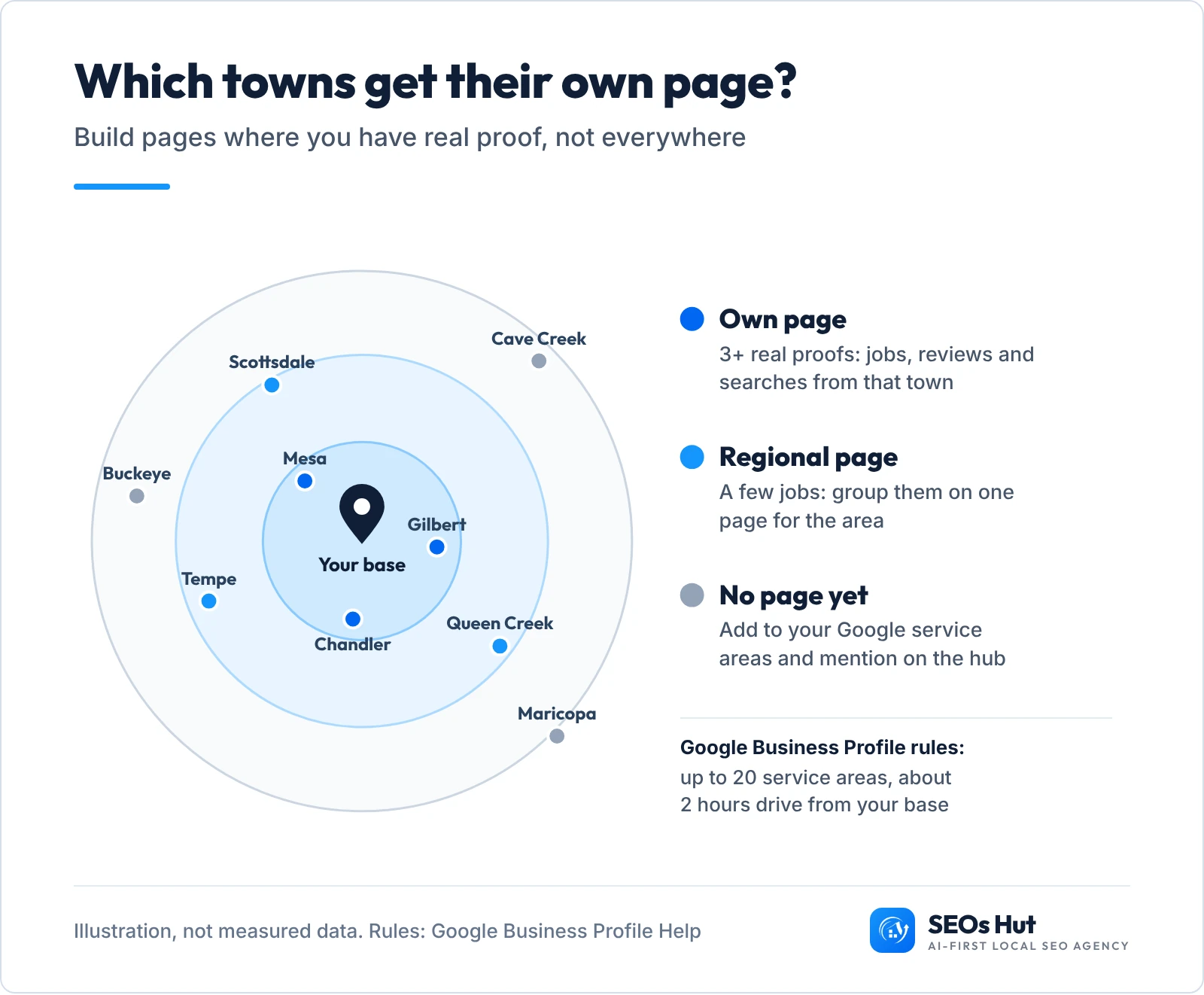
A simple rule we use: a town gets its own page when you can fill at least three of these with real material from that town:
- Jobs you have done there (ideally with photos)
- Reviews from customers who live there
- Neighbourhoods or roads you can name from experience
- A local problem, rule or permit you know how to handle
- People searching for your service there (you can see this in Search Console or Google Ads)
Two Google rules set the outer edge (both checked 5 Nov 2026). A Business Profile can have up to 20 service areas, and the overall area “shouldn’t be more than about 2 hours of driving time” from your base (Google Business Profile Help). If you are a service-area business, Google also says you should have one profile with a designated service area, not one per town (Google). City pages are how you show up in the other towns without breaking that rule.
Not sure where you already show up? Run our free Local Rank Grid for your main service. Towns where you sit just outside the top 3 are often good first candidates for a city page.
Build your city page with our free builder
Fill in what you really have for one town. The builder tells you whether the town deserves its own page yet, then writes the URL, title, meta description, H1, page outline and schema code from your own facts. Nothing is sent anywhere; it all runs in your browser.
City page builder
Free, no signup, runs in your browser. Example values are filled in so you can see the result; replace them with yours.
Your proof from this town
Prefer paper first? Download the free city page brief (PDF, one page) and fill it in with your team before you write.
How to create a city page that ranks: 8 steps
Here is the full process for one town. The first page takes the longest; later ones go faster because the layout is done.
Step 1. Collect proof from that town
Before you write a word, gather the material only that town has: three recent jobs (address area, problem, fix, photo), two or three reviews that mention the town or a neighbourhood, the areas you cover, and one local issue you know well (older pipes in a certain estate, a permit rule, hard-to-reach streets). If you cannot find three of these, the town goes on a regional page for now.
Step 2. Pick the URL, title and H1
Keep the address short and readable, under the service it belongs to, for example /plumbing/mesa-az/ or /plumber-mesa-az/. Then write:
- Title: service + town + a reason to click, under about 60 characters. Google asks for “distinct text that describes the content of the page” for each page and says to “avoid repeated or boilerplate text” in titles (Google).
- H1: plain words a customer would say: “Plumber in Mesa, AZ”.
- Meta description: one sentence with a local proof point. Google notes that “identical or similar descriptions on every page of a site aren’t helpful” (Google).
Step 3. Write an answer-first opening
In two or three sentences, say what you do in this town, which areas you cover and how fast you usually arrive. That opening is what a customer reads first, so let it answer their question on its own.
Step 4. Add your jobs and photos from that town
Write three short job stories: where (neighbourhood, not the customer’s address), what was wrong, what you did. Add your own photos. This is the part copy-paste pages can never fake, and it is what makes the swap test fail in your favour.
Step 5. Show reviews from that town
Quote real reviews from customers in that town, with their first name and area, and link to your Google profile. Google’s own local ranking help says prominence takes into account “how many reviews you have” (Google). Need more? Our guide on how Google reviews help SEO shows how to ask.
Step 6. Embed a map and list the areas you cover
In Google Maps, search the town or your business, click Share, then Embed a map, and paste the code into your page. The Maps Embed API “is free to use with unlimited requests” (Google, checked 5 Nov 2026). Under the map, list the neighbourhoods you really serve in a sentence or two, not a block of 30 place names.
Step 7. Add schema and link the page in
Paste the JSON-LD from the builder (or the template below) into the page. Then link to the city page from your main service page and from a short “Areas we serve” hub. Google says “every page you care about should have a link from at least one other page on your site” (Google), and its 2015 doorway update asked whether pages exist as an “island” that is hard to reach (Google). Use descriptive anchor text like “plumbing in Mesa”, not “click here”. Our internal links guide explains why.
Step 8. Check it worked
- Swap test: read the page with another town’s name in your head. Rewrite any sentence that still works.
- Schema: paste the URL into Google’s Rich Results Test or our Schema Markup Analyzer and fix any errors.
- Indexing: in Search Console, paste the URL into the top search bar and click Request indexing, or check it with our Google Index Checker.
- Results: after four to six weeks, open Search Console, go to Performance, add a Page filter for the city page and look at the queries and impressions. Calls and form fills from that page matter more than rankings.
City page template you can copy
Use this layout for every town, then fill each part with that town’s own facts. Sharing a layout is fine; sharing the words is not.
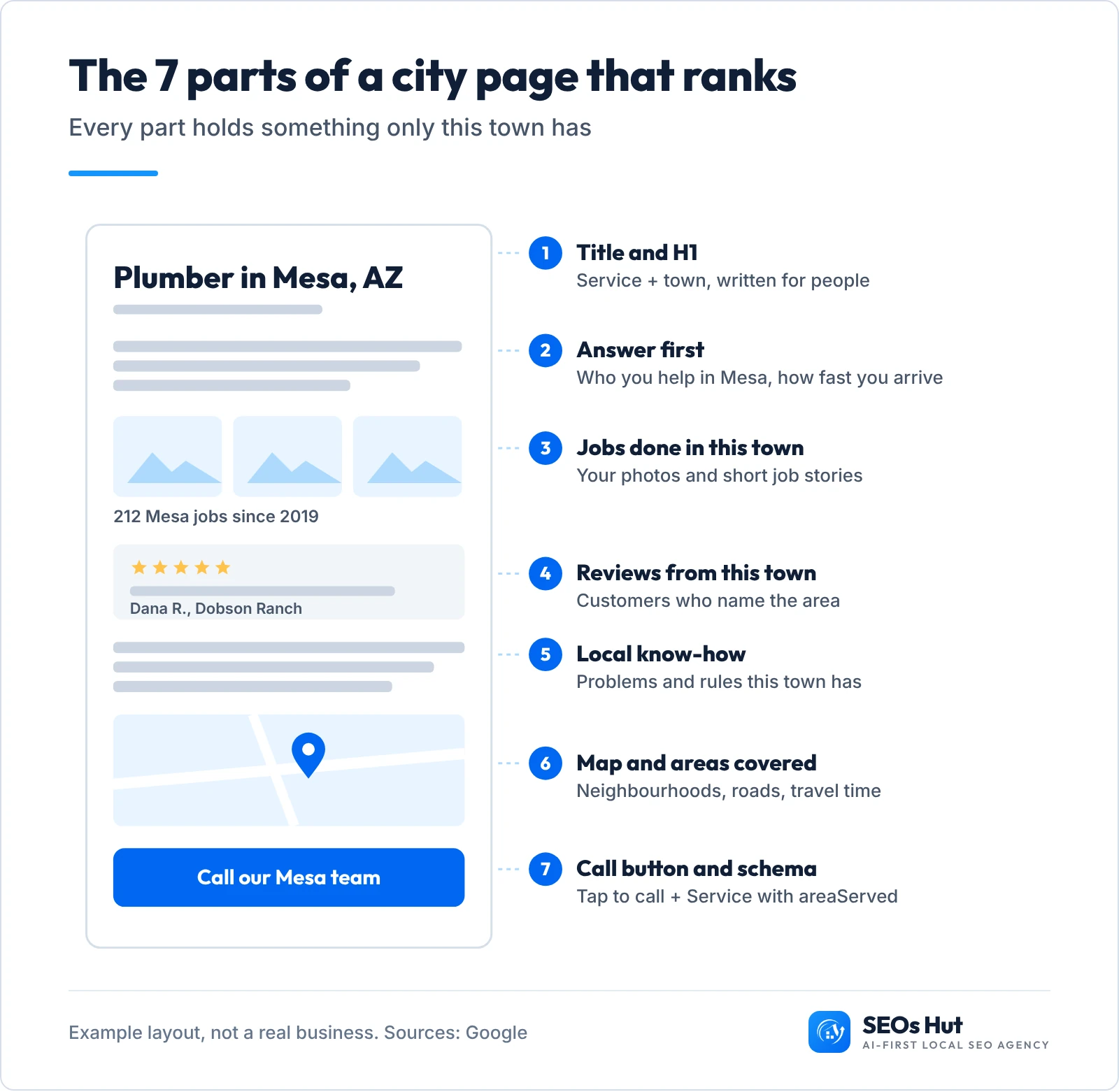
- H1: [Service] in [Town], [State]
- Opening (2 to 3 sentences): what you do here, areas covered, usual arrival time
- Recent jobs in [Town]: three short stories with your photos
- What [Town] customers say: two or three reviews with first name and area
- [Service] problems we see in [Town]: the local know-how only you would write
- Areas we cover in [Town]: map plus a sentence naming the neighbourhoods
- Questions [Town] customers ask: two or three real questions
- Call or book: tap-to-call button and a short form
Schema for a business that travels to customers (no public address needed):
<script type="application/ld+json">
{
  "@context": "https://schema.org",
  "@type": "Service",
  "name": "Plumber in Mesa, AZ",
  "serviceType": "Plumbing",
  "url": "https://example.com/plumbing/mesa-az/",
  "provider": {
    "@type": "Plumber",
    "name": "Example Plumbing",
    "telephone": "+1-480-555-0100",
    "url": "https://example.com/"
  },
  "areaServed": {
    "@type": "City",
    "name": "Mesa",
    "containedInPlace": { "@type": "State", "name": "Arizona" }
  }
}
</script>
Schema.org defines areaServed as “the geographic area where a service or offered item is provided” (schema.org). Google does not show a special search result for this markup; it simply states what you do and where, in a format machines read.
If customers visit you at an address in that town, use the most specific LocalBusiness type instead (Plumber, Dentist, AutoRepair). Google’s only required properties are name and address, and it recommends telephone, url, geo and openingHoursSpecification (Google). Never put an address on a page for a town where you have no real premises. Our LocalBusiness schema guide walks through every field, and the AI-Ready Schema Generator writes it for you.
Mistakes that turn city pages into doorway pages
- Swapping only the town name. The 9 of 33 compared sites in our sample that shared over half their wording across towns are the pattern to avoid.
- Pages that only funnel. If every city page just says “call us” and links to the homepage, it matches Google’s doorway example of pages that “funnel visitors” elsewhere.
- Mass-producing pages with AI. Google asks: “Are you using extensive automation to produce content on many topics?” (Google). AI can help you write up your own jobs; it cannot invent them.
- Island pages. City pages only reachable from the footer or a sitemap, with no links from your service pages.
- Fake addresses or a profile per town. Google’s guidelines say a service-area business should hide its address and keep one profile.
- Stuffing every suburb into one paragraph. Name the areas you really serve, in normal sentences.
Do city pages still matter with AI search?
Yes, and the bar is higher. When we checked Google’s AI Overview for “location pages seo” on 5 November 2026, it listed the same basics (local keywords, unique content, map, schema, internal links) and cited guides from Semrush, BrightLocal and Screaming Frog. A city page full of real local proof gives search engines and AI answers something specific to quote, which a copy-paste page cannot. Google’s own helpful content questions ask whether a page provides “original information, reporting, research, or analysis” (Google). Your jobs and reviews in that town are exactly that. To see whether AI assistants already mention you, try our free AI Visibility Checker.
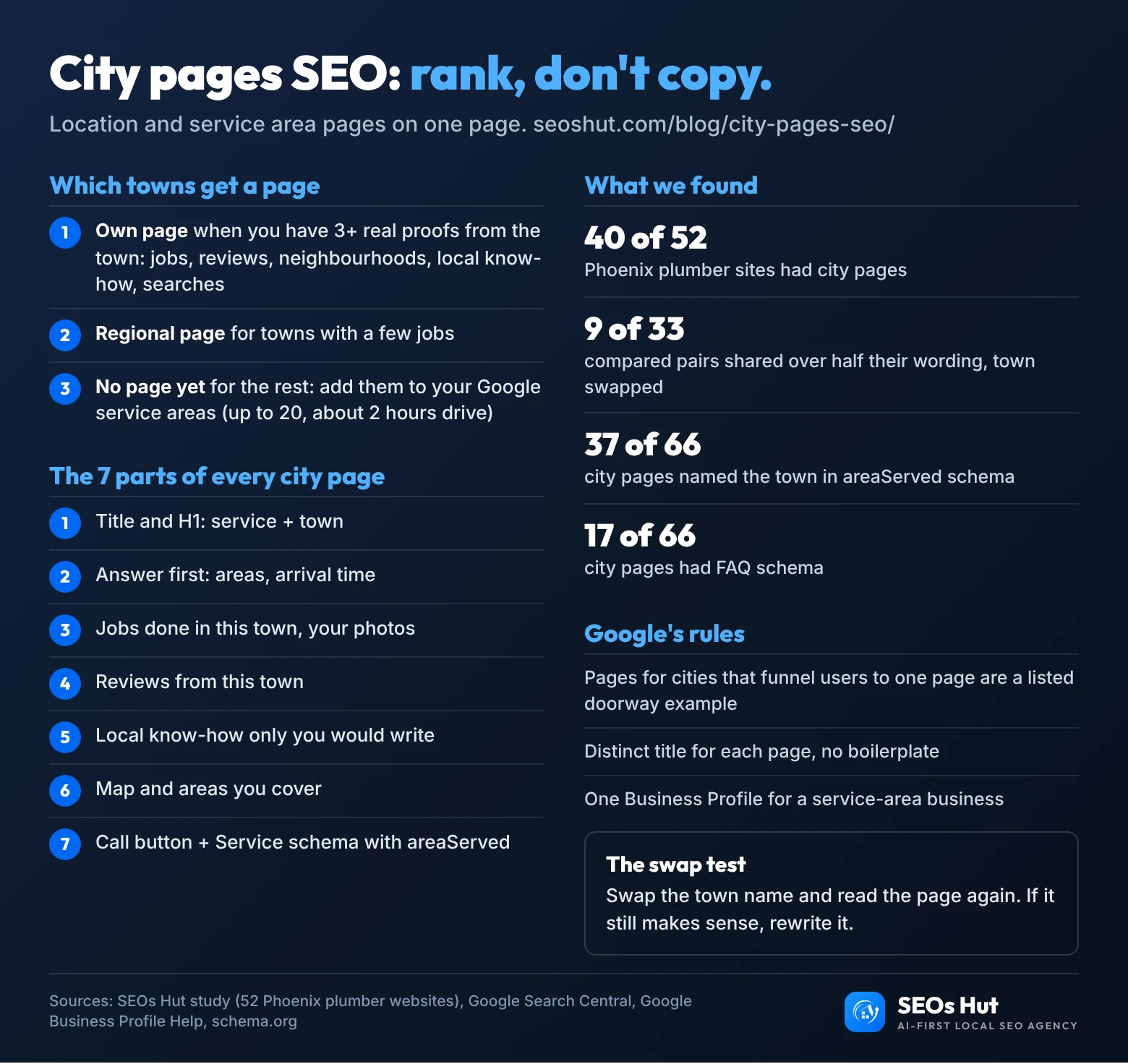
City pages SEO cheat sheet
Everything above on one page. Save it, print it, or share it with whoever builds your website.
FAQs
How many city pages should I create?
Create one for each town where you have at least three kinds of real proof: jobs, reviews, neighbourhoods you know, a local issue you solve, or clear search demand. For most single-base service businesses that means a handful, not dozens. Group the other towns on a regional page and keep them in your Google service areas, which allow up to 20.
Are city pages bad for SEO?
No. Copy-paste city pages are the problem. Google’s spam policies list pages “targeted at specific regions or cities that funnel users to one page” as doorway abuse, but a page with real jobs, reviews and local detail for one town is useful content. Run the swap test: if the page still makes sense with another town’s name, rewrite it.
Can I use the same template on every city page?
Yes. A consistent layout helps visitors and is not a problem. What must change is the content inside it: the jobs, photos, reviews, neighbourhoods and local know-how. In our study of 52 Phoenix plumber websites, 9 of 33 compared pairs shared over half their wording once the town names were swapped. That is the part to avoid.
Should a service area business put an address on city pages?
Only your real business address, and only if you show it publicly. Google says service-area businesses should hide their address on their Business Profile if they do not serve customers there. Never invent an address in each town. Use Service schema with areaServed for the town instead, and keep your name and phone the same everywhere.
How long should a city page be?
Long enough to hold your real local proof, and no longer. There is no word count Google rewards. In our Phoenix sample, half the city pages we compared had more than 1,300 words, but a 600-word page with three real jobs and two local reviews beats a 2,000-word page that would work for any town.
Want city pages that bring calls, not penalties?
Our team builds city pages from your real jobs and reviews, sets up the schema and links, and tracks calls by town. See our local SEO services, or start with a website audit to find which of your current pages fail the swap test.
Sources
- Google Search Central: Spam policies (doorway abuse, scaled content abuse)
- Google Search Central Blog: An update on doorway pages (2015)
- Google Search Central: Creating helpful, reliable, people-first content
- Google Search Central: LocalBusiness structured data
- Google Search Central: Title links and snippets
- Google Search Central: Make your links crawlable
- Google Business Profile Help: Service areas, guidelines, local ranking
- Google Maps Platform: Maps Embed API usage and billing
- Schema.org: areaServed, Service
- Whitespark: 2026 Local Search Ranking Factors
- BrightLocal: Local Consumer Review Survey 2026
- SEOs Hut study: 52 Phoenix plumber websites, 5 Nov 2026 (data)