


Anchor text is the clickable words in a link. It tells people what they will get if they click, and it tells Google what the page on the other side is about. Google sums up good anchor text in three words: descriptive, reasonably concise and relevant.
Here is the one test that settles almost every anchor text question: read the link on its own. Does it say where it goes? “Click here” fails. “Furnace repair prices” passes. Google, the W3C accessibility rules and Mozilla’s HTML guide all use this same test, and it is the thread that runs through this whole guide.
In the next few minutes you will learn the 7 types of anchor text (with real-world examples), see how 51 Chicago HVAC companies label the links on their homepages, and check your own links with a free tool. No ratios pulled from thin air, no jargon.
What is anchor text?
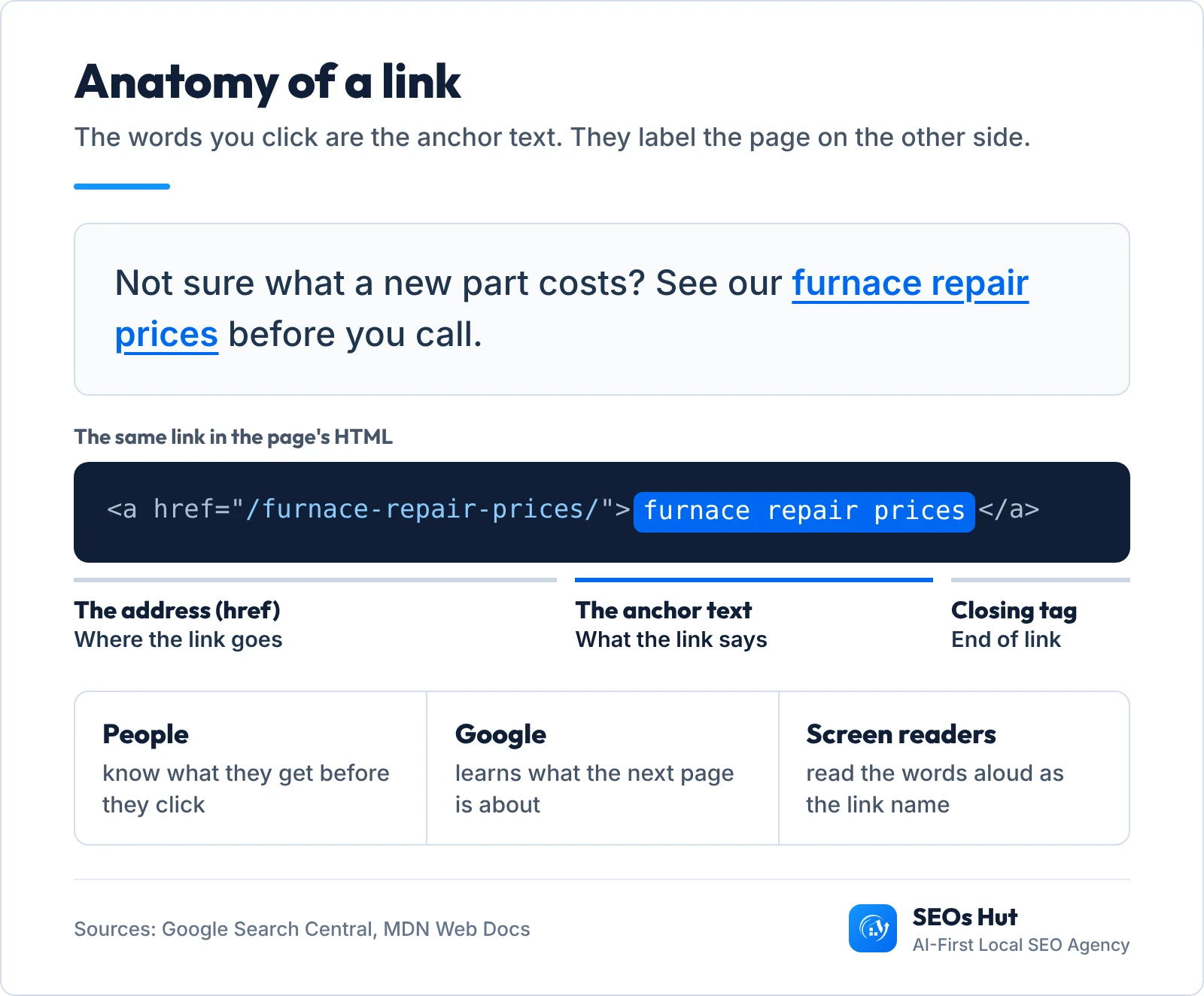
Anchor text is the visible, clickable text of a hyperlink. Google’s own definition is short: “Anchor text (also known as link text) is the visible text of a link.” In the HTML of a page it sits between the opening and closing a tags:
<a href="https://example.com/furnace-repair/">furnace repair prices</a>The href part is the address. The words in the middle are the anchor text. A reader sees “furnace repair prices” underlined in blue, and Google reads the same words as a short description of the page it points to.
Three details catch most business owners out:
- Image links have anchor text too. When an image is the link, Google says it “uses the alt attribute of the img element as anchor text”. No alt text means a link with no words.
- Icon links are often empty. A Facebook or phone icon with no text gives Google and screen readers nothing to read. Google can fall back on the
titleattribute “if the <a> element is for some reason empty”, but that is a fallback, not a plan. - Links point both ways. You write the anchor text on your own pages (internal links). Other websites choose the anchor text of links pointing to you (backlinks). You control the first and can only influence the second.
Why anchor text matters for SEO (and for people)
Google’s SEO Starter Guide says link text “tells users and Google something about the page you’re linking to.” The same guide notes that “the vast majority of the new pages Google finds every day are through links.” So every link is two things at once: a road for Google to find a page, and a label that says what is at the end of the road.
Anchor text is also an accessibility rule. WCAG 2.4.4 “Link Purpose (In Context)” is a Level A requirement, the most basic level: the purpose of each link must be clear from the link text, or from the text around it. Screen reader users often jump from link to link, so a page full of “Learn more” sounds like a list of identical buttons.
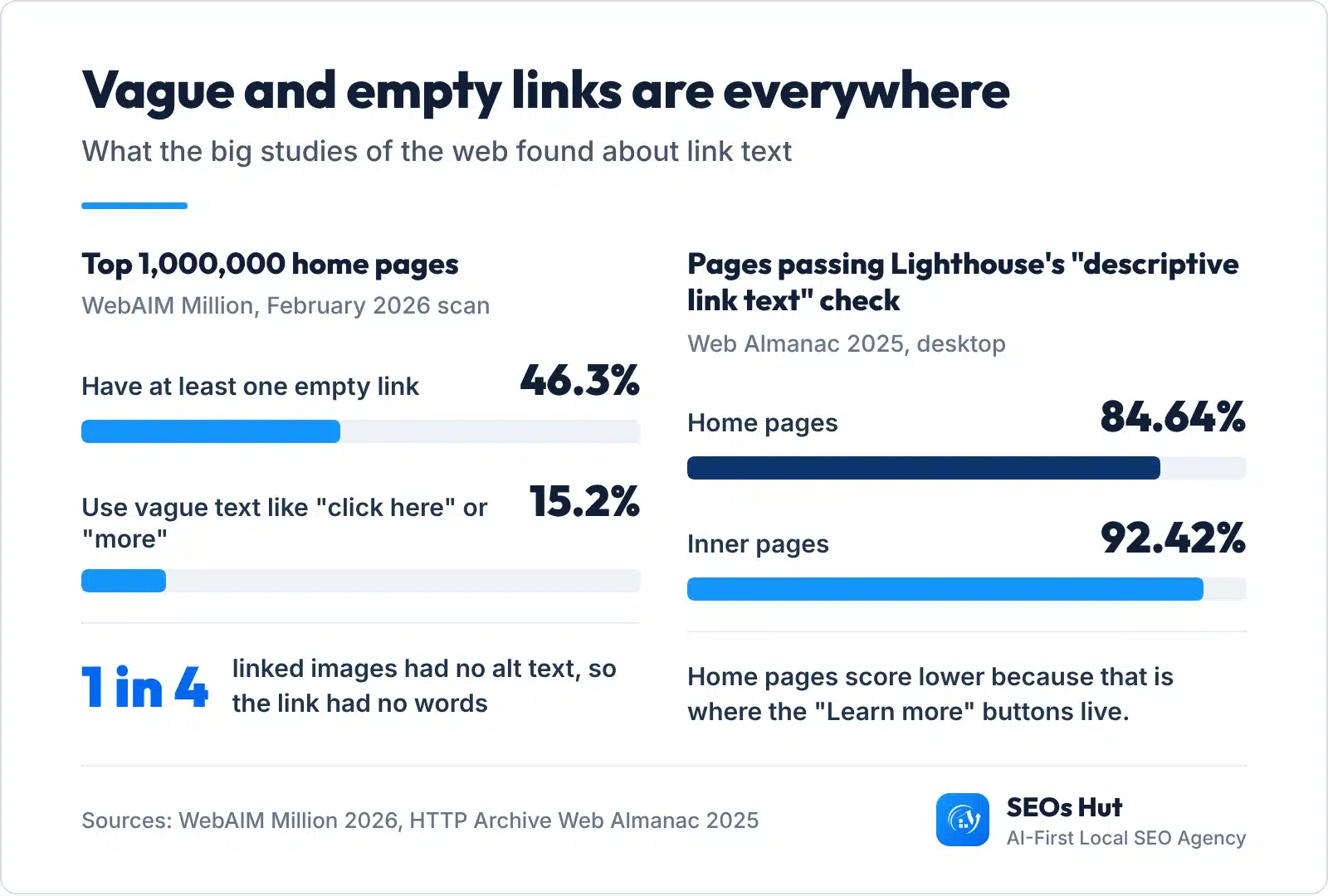
The web as a whole still gets this wrong. The WebAIM Million 2026 report, which tests the home pages of the top 1,000,000 websites, found empty links on 46.3% of them and ambiguous link text such as “click here” or “more” on 15.2%. It also found that one out of every four linked images was missing alternative text. The HTTP Archive Web Almanac 2025 shows the same pattern from the SEO side: home pages pass Lighthouse’s “descriptive link text” check on 84.64% of desktop sites, while inner pages pass on 92.42%. Home pages, where the “Learn more” buttons live, are the weak spot.
The 7 types of anchor text (with examples)
Every anchor falls into one of seven buckets. Imagine a link pointing to a heating company’s furnace repair page, and here is how each type would look:
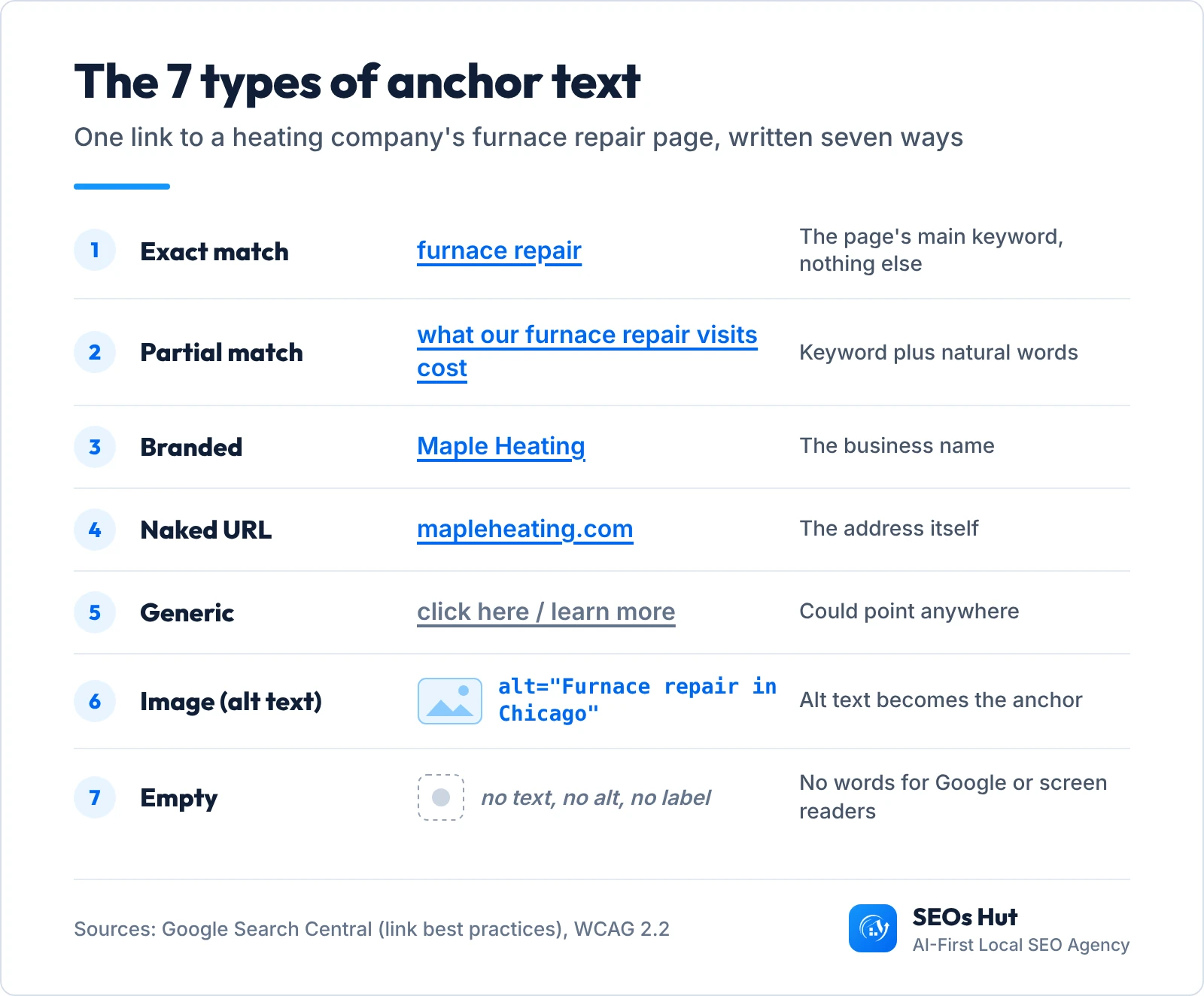
- Exact match: the page’s main keyword, nothing else. “furnace repair”. Clear and useful, but the easiest type to overdo when you ask other sites for links.
- Partial match: the keyword plus natural words around it. “what our furnace repair visits cost”. This is what normal writing produces most of the time.
- Branded: the business name. “Maple Heating”. Most links to your homepage from directories, reviews and press look like this.
- Naked URL: the address itself. “mapleheating.com”. Common in citations and social bios. Fine, just not very descriptive.
- Generic: words that could point anywhere. “click here”, “learn more”, “read more”. Google’s own examples list “Click here” and “Read more” as bad anchor text.
- Image (alt text): a linked photo or logo, where the alt text becomes the anchor. alt=”Maple Heating furnace repair”.
- Empty: a link with no text, no alt and no label. Usually a social or menu icon. Google and screen readers get nothing.
You will also see “brand + keyword” (“Maple Heating furnace repair”) and “long-tail” listed as extra types. They are mixes of the ones above. The type matters less than the test: read the words alone and see if they say where the link goes.
Anchor text examples: bad vs good
Google’s documentation gives its own pair. Bad: “Click here”, “Read more”, “website”, “article”, and a whole sentence stuffed into one link. Good: “list of cheese types”. The fix is rarely about SEO tricks. It is about moving the link onto the words that describe the destination.

| Weak anchor | Better anchor | Why it is better |
|---|---|---|
| Click here to see our prices | See our AC repair prices | The link names the page, so it works when read alone. |
| Learn more (under 4 service boxes) | Learn more about boiler service | Four identical “Learn more” links become four clear ones. |
| Read our guide on how to choose the right size furnace for an older Chicago home | Read our furnace sizing guide | Concise. Google warns against links that run a whole sentence. |
| (Facebook icon with no label) | Icon + aria-label="Maple Heating on Facebook" |
The link now has a name for screen readers and a fallback for crawlers. |
| best furnace repair Chicago cheap furnace repair | our furnace repair team | Reads like a person wrote it. Keyword stuffing breaks Google’s spam policies. |
How to write good anchor text: 7 rules
- Describe the destination. Use the words a visitor expects to find on the next page. Google: good anchor text is “descriptive, reasonably concise, and relevant to the page that it’s on and to the page it links to.”
- Keep it short. A few words, not a sentence. If you cannot say it in about 2 to 6 words, the link probably sits on the wrong part of the sentence.
- Run the read-alone test. Cover the rest of the sentence. If “here” or “this” is all that is left, rewrite. WCAG’s guidance adds that any extra context “will be most usable if it precedes the link.”
- Give every image and icon link a name. Use alt text on linked images and an
aria-labelon icon links. Copy-paste versions are below. - Do not stuff keywords. Google’s page on links says plainly that “keyword stuffing is a violation of our spam policies.”
- Do not chain links next to each other. Google’s advice is “Don’t chain up links next to each other”. Put each link inside a sentence that gives it context.
- Never buy keyword anchors. Google’s spam policies list “links with optimized anchor text in articles, guest posts, or press releases distributed on other sites” as link spam, along with buying links and excessive link swaps.
Copy-paste code for the two most common fixes:
<!-- Linked image: the alt text becomes the anchor text -->
<a href="/furnace-repair/"><img src="furnace.jpg" alt="Furnace repair in Chicago"></a>

<!-- Icon link: aria-label gives it a name -->
<a href="https://facebook.com/yourpage" aria-label="Maple Heating on Facebook"><svg ...></svg></a>
What we found on 51 Chicago HVAC homepages
To see how real local businesses handle this, we pulled the first 100 Google Maps results for “hvac contractor” in Chicago on 21 November 2026, opened every homepage that loaded in a real browser, and read the name of every link on it. That left 51 homepages and 3,803 unique links.

The good news first: 91.1% of all the links had descriptive names, mostly menu items like “Furnace Repair” and “AC Installation”. The problems hide in the small stuff:
- 29 of 51 homepages (56.9%) had at least one empty link: social icons, logos and images with no alt text.
- 18 of 51 (35.3%) used generic anchors. “Learn more” appeared 35 times and “Read more” 19 times.
- 12 of 51 (23.5%) used the same generic words to point at two or more different pages, so the link text alone could not tell them apart.
- 36 of 51 (70.6%) had at least one empty or generic link.
None of this is hard to fix. On most sites it is one afternoon: name the icons, rewrite the service-box buttons, add alt text to linked images. This is our own sample from one city and one trade, not an industry-wide number. The method and raw counts are at the end of this guide.
Check your anchor text (free tool)
Paste the HTML of any page, or a list of anchors with one per line. Add your brand name and main keyword if you want the brand and keyword types counted. The checker sorts every link into the 7 types and tells you what to fix. Nothing is uploaded; it runs in your browser.
Where to get the input:
- For one of your own pages: open the page, right-click, choose “View page source”, select all and copy. Paste that into the checker.
- For links from other websites: open Google Search Console and go to Links, then External links, then Top linking text. Google describes it as a way to “see which link text is used in backlinks to your site”. Use the export button and paste the column of link text.
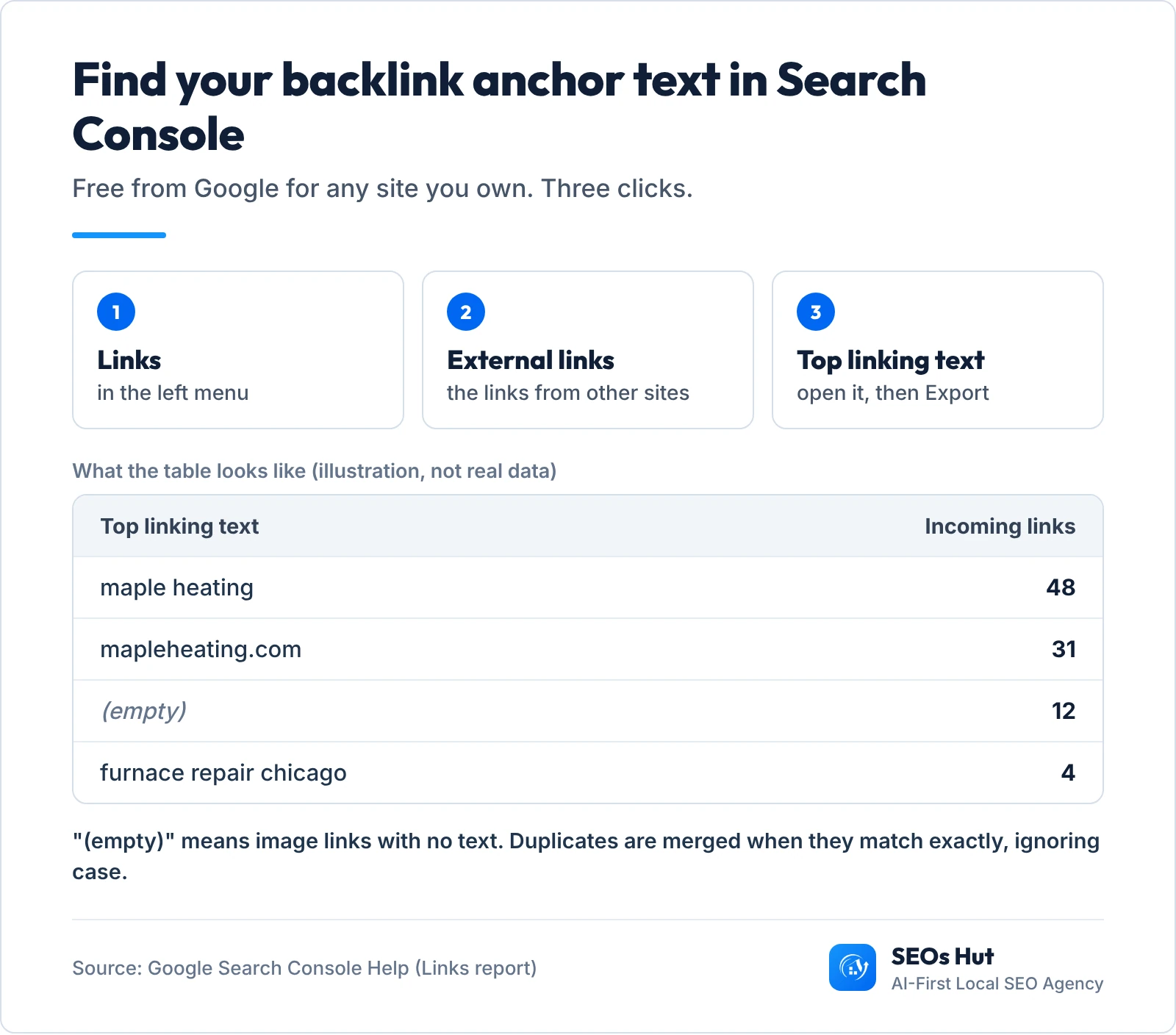
Two quirks of that Search Console table are worth knowing: duplicates are combined “where a duplicate is a case-insensitive exact match”, and links with no text, like image links, show up as “(empty)”. For a bigger crawl of your own site, our free Broken Link Checker lists the links on your pages, and the Backlink & Domain Rank Checker shows who links to you.
How to change anchor text on your website
Changing anchor text never changes the link address. You are only editing the words. In almost every website builder it works the same way:
- Open the page in your editor (WordPress, Wix, Squarespace, Shopify or any other).
- Click into the linked words and type the new words over them. Keep the cursor inside the link so the new text stays linked.
- To move a link onto better words, select the old words and remove the link (the broken-chain icon in most editors), then select the new words and add the same address with the link icon.
- For linked images, open the image settings and fill in the alt text field.
- For buttons such as “Learn more”, edit the button label in the button settings, for example “See boiler service”.
- Save, then re-check the page with the checker above.
And for links from other sites? You cannot edit them, but you can ask. If a partner or local directory links to you with an empty or odd anchor, a polite email with the exact words you would like (“Maple Heating, furnace repair in Chicago”) usually does the job. If a spammy site links to you with keyword anchors you never asked for, do not panic: when Google folded Penguin into its core algorithm in 2016, it said Penguin now “devalues spam by adjusting ranking based on spam signals, rather than affecting ranking of the whole site.”
Building links for a local business? Our guide to local SEO link building shows where good local links come from, and which anchor text to ask for.
Is there a safe anchor text ratio?
No. Google has never published one. The “70% branded, 5% exact match” rules you see on many SEO blogs are rules of thumb, not data from Google. The closest thing to evidence is an Ahrefs study of 384,614 web pages (published 2019, updated 2020) that found “a relatively weak correlation between the percentage of exact-match anchored links and rankings.”
What Google does say is clear: optimized anchor text in placed articles, guest posts and press releases is link spam. So the practical rule is simple. On your own site, use descriptive anchors, including your keywords where they naturally describe the page. For links from other sites, let them happen naturally and never pay for a keyword anchor. If our checker shows the same keyword phrase on a big share of your backlinks, that is a pattern worth looking into.
Internal vs external anchor text
Internal links are the ones you write, from one page of your site to another, so you have full control. This is where good anchor text pays off fastest: your menu, service pages and blog posts can all tell Google exactly what each page is about. Google’s advice is that “every page you care about should have a link from at least one other page on your site.” Our guide to internal links shows how to plan them for a service business.
External links (backlinks) are written by other people. You influence them by making pages worth linking to and by asking politely, as above. When you link out to other sites, you can tell Google what kind of link it is: rel="sponsored" for paid placements, rel="ugc" for comments and forum posts, and rel="nofollow" when neither applies and you would rather Google not associate your site with the page.
What we see in client work
On Music Specialists, an online music store in Maitland, NSW, the starting audit found “Product and category pages with no keyword targeting and thin internal links”. Alongside the technical fixes, the work included “internal links tying related products and categories together”, and page-one keywords went from 115 to 1,500+ in 6 months. Links with clear words were one part of that whole job, not a magic switch, and that is the honest way to think about anchor text.
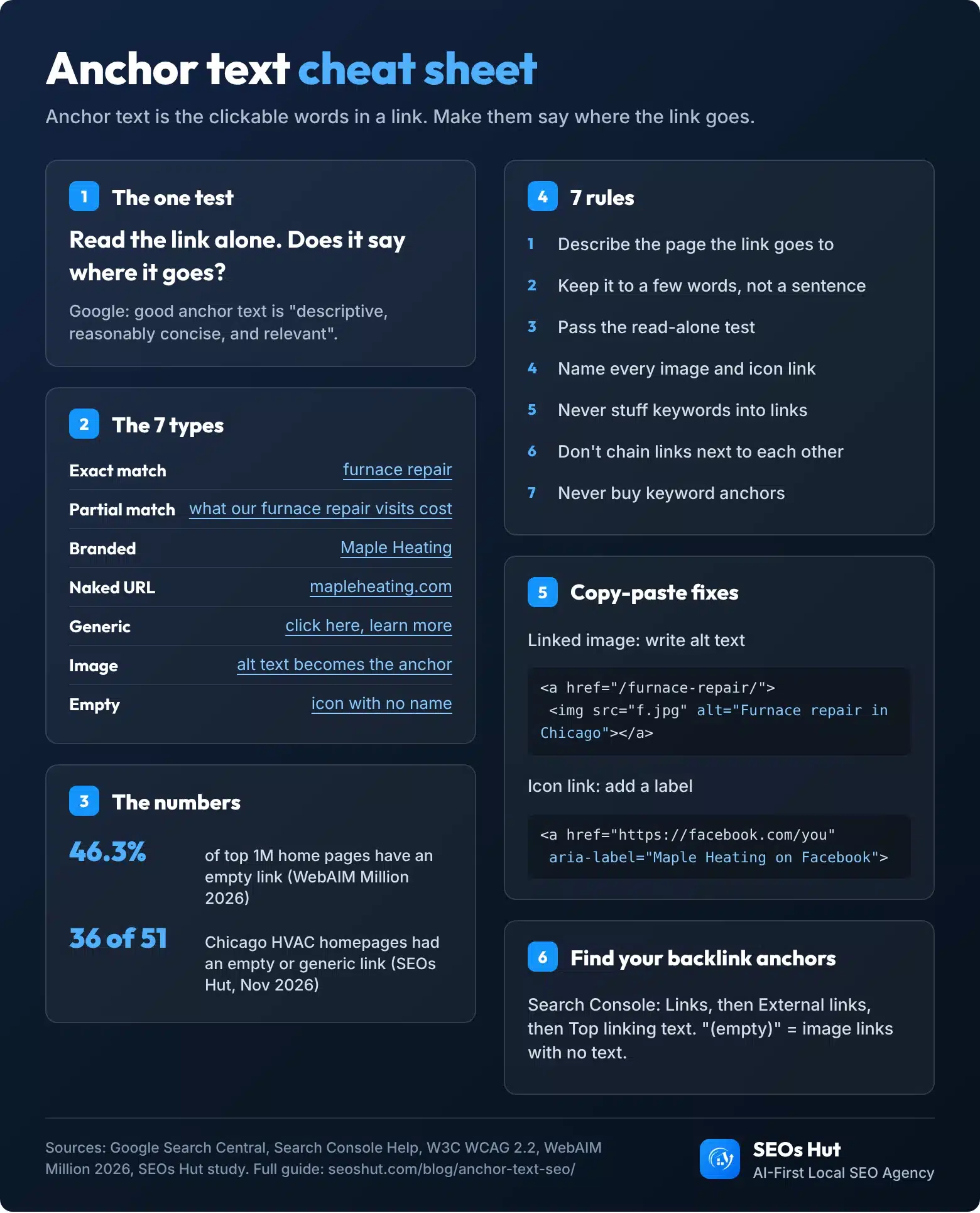
Anchor text cheat sheet
Everything above on one image. Download it, pin it next to your editor, or embed it on your own site with the code button.
FAQs
Is anchor text a Google ranking factor?
Anchor text helps Google understand what a linked page is about. Google’s SEO Starter Guide says link text “tells users and Google something about the page you’re linking to.” It is one signal among many, not a switch. Clear, descriptive anchors on your own pages help, while keyword-stuffed anchors on placed links break Google’s spam policies.
How long should anchor text be?
Short enough to scan, long enough to describe the page: usually about 2 to 6 words. Google asks for anchor text that is “reasonably concise” and shows a whole sentence wrapped in a link as a bad example. If you need a full sentence to explain the link, put the explanation before the link and keep only the key words clickable.
What is an example of good anchor text?
Good anchor text names the destination. “See our AC repair prices” with “AC repair prices” linked is a good example; “click here to see our prices” is not. Google’s own good example is “list of cheese types”. Read the linked words alone: if they still tell you where the link goes, the anchor text is good.
Can too many exact-match anchors hurt my site?
They can when they come from links you built on purpose. Google’s spam policies name “links with optimized anchor text in articles, guest posts, or press releases distributed on other sites” as link spam. Exact-match anchors in your own menu and internal links are normal. Google publishes no safe percentage, so judge the pattern, not a ratio.
What is the difference between anchor text and alt text?
Anchor text is the clickable words in a text link. Alt text is the description written for an image. When an image is used as a link, they meet: Google says it uses the image’s alt attribute as the anchor text. So a linked logo or photo without alt text is a link with no words at all.
Want a second pair of eyes? Our website audit checks every link, anchor and image on your site and hands you a fix list in plain English. If you would rather have it all done for you, see how SEOs Hut runs SEO for local businesses.
Study method and sources
Chicago HVAC study, 21 Nov 2026: Google Maps search “hvac contractor”, Chicago, IL (US English), first 100 results. Removed duplicate domains and social-only listings, opened each homepage in Chromium, skipped sites that were blocked, broken or had fewer than 5 links: 51 homepages, 3,803 unique links. A link’s name is its aria-label, text, linked image alt, SVG title or title attribute, in that order. “Generic” uses the Lighthouse list (click here, here, more, learn more and similar) plus close variants such as “read more” and “view details”. Results describe this sample only; no business is named.
- Google Search Central: Link best practices (anchor text)
- Google Search Central: SEO Starter Guide
- Google Search Central: Spam policies (link spam)
- Google Search Central: Qualify your outbound links
- Search Console Help: Links report
- Google Search Central Blog: Penguin is now part of our core algorithm (2016)
- W3C: Understanding WCAG 2.2, Link Purpose (In Context)
- WebAIM: The WebAIM Million 2026
- HTTP Archive: Web Almanac 2025, SEO chapter
- Chrome for Developers: Lighthouse link text audit
- MDN: The anchor element
- Ahrefs: Anchor text study (2019, updated 2020)