
The report
Find every dead link fast
This free broken link checker opens a page and tests every link and image on it, live. In seconds you see which ones are broken, which redirect, and which only look broken because the other site blocks robots. No signup, no install, no captcha.
Each problem comes with its link text, its status code (404, 410, 500), the part of the page it sits in and its line in the page source, so you can find it and fix it in a minute.
Every report opens with one plain answer: No broken links found, things to improve, or links to fix. Six checks sit under it, each marked green, amber or red, and anything that needs work is explained in one line right there.
Use it after you publish a page, move or delete pages, or before you send a client a report.
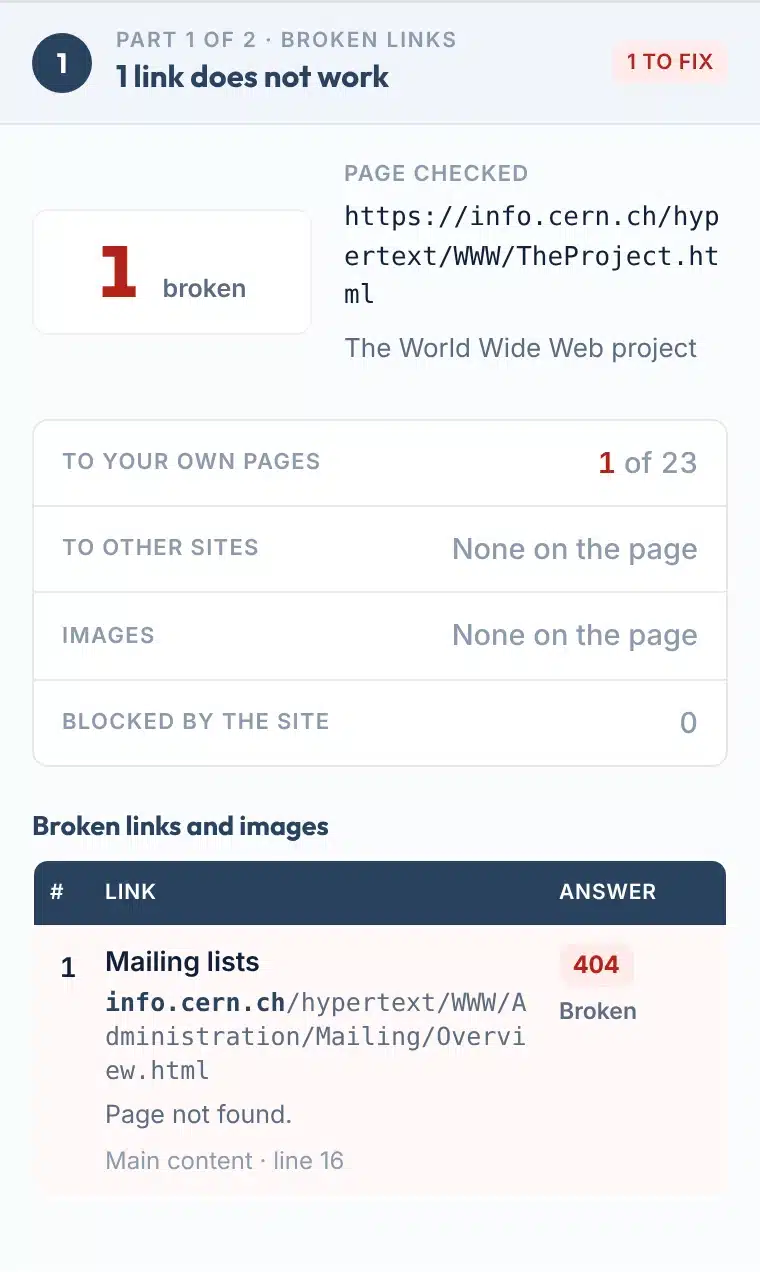
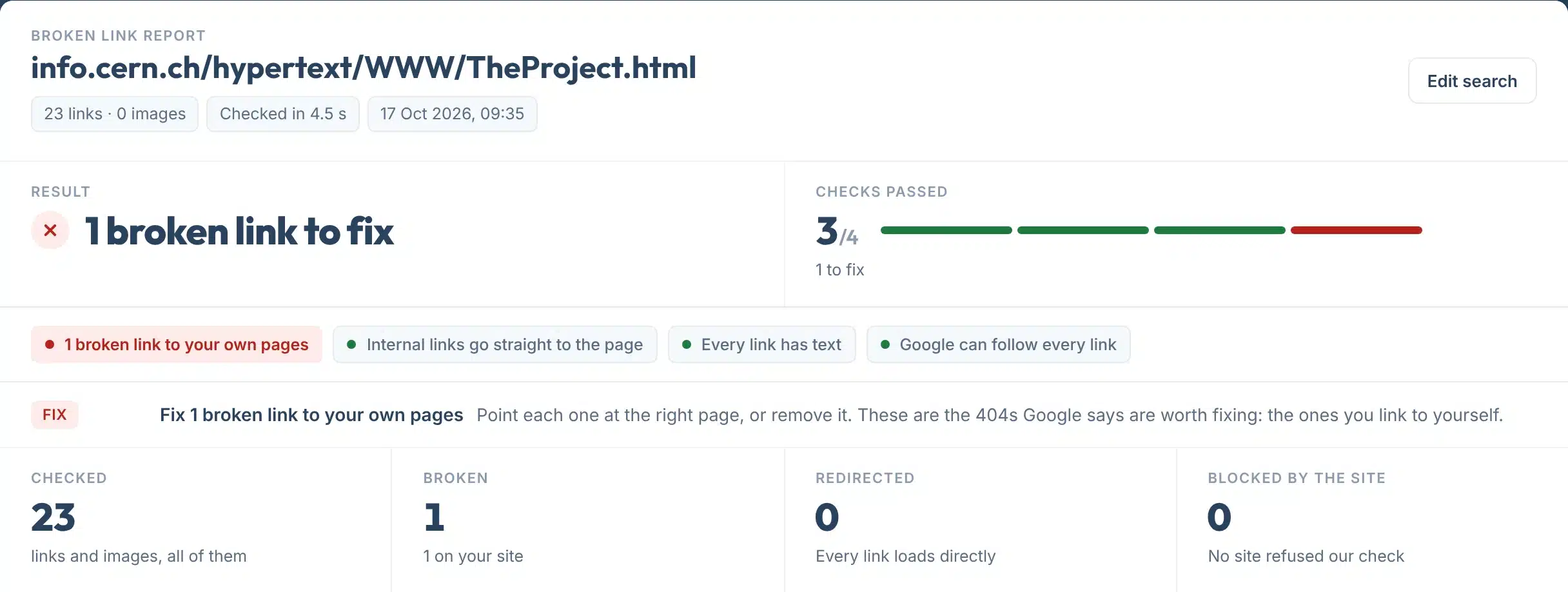
A live check of info.cern.ch, the first website ever published: 23 links, one of them now answers 404.
How to use it
How to check a page for broken links
One box, five small steps.
- 1Paste the page address
Type or paste one page, for example yoursite.com/services. Leave out https if you like: we add it.
- 2Press Check my links
We open the page, read every link and image in it and check up to 150 of them at the same time. Most pages take 5 to 20 seconds.
- 3Fix the red rows first
Broken links to your own pages come first. Each row shows the link text, the status code, and where it is on the page.
- 4Then tidy the amber ones
Internal links that redirect, links with no text and links Google cannot follow still work, but are worth a quick fix.
- 5Check again, or share it
Press Edit search to run it again after a fix, or copy the link to send the report to whoever edits the site.
Your report, explained
What each part of the report means
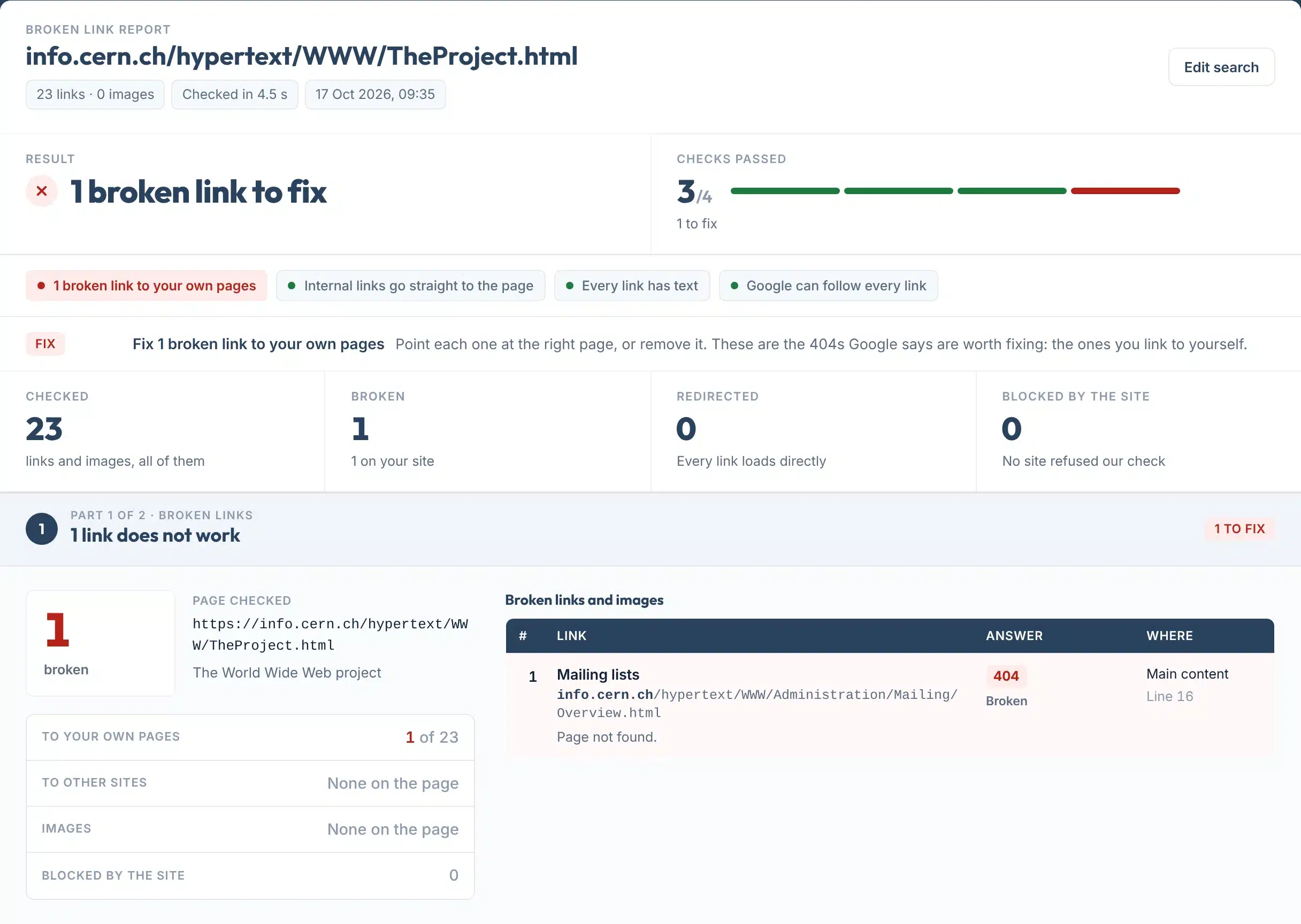
Here is the real report for the first website, with each part numbered.
 123456
- 1The answer in one line
No broken links found, things to improve, or the number of broken links to fix.
- 2Checks passed
How many of the six checks passed, with one coloured bar for each.
- 3One tag per check
Problems first: broken links to your pages, to other sites, images, redirects, missing link text and links Google cannot follow.
- 4What to do
One line for each problem, saying what to change. A clean page shows no extra line.
- 5The totals
How many links and images we checked, how many are broken, redirected, or blocked by the other site.
- 6Each broken link
Its link text, address, status code, the part of the page it sits in and its line in the page source.
Answer labels:
Features
What it checks
- Broken and blocked kept apartA site that refuses robots (403, 429, LinkedIn’s 999, a login wall) is marked Blocked by the site, never broken.
- Images tooEvery image on the page is opened as well, so a missing photo shows up next to the dead links.
- Where to find itEach link shows its text, the part of the page (header, menu, main content, sidebar, footer) and its source line.
- Redirects followed to the endA link that redirects to a 404 counts as broken. One that ends on a working page counts as a redirect.
- Your pages firstLinks to your own site are split from links to other sites, because those are the ones Google says to fix.
- Copy link or save a PDFCopy a link to the result, or save it as a one-page PDF to send to whoever edits the site.
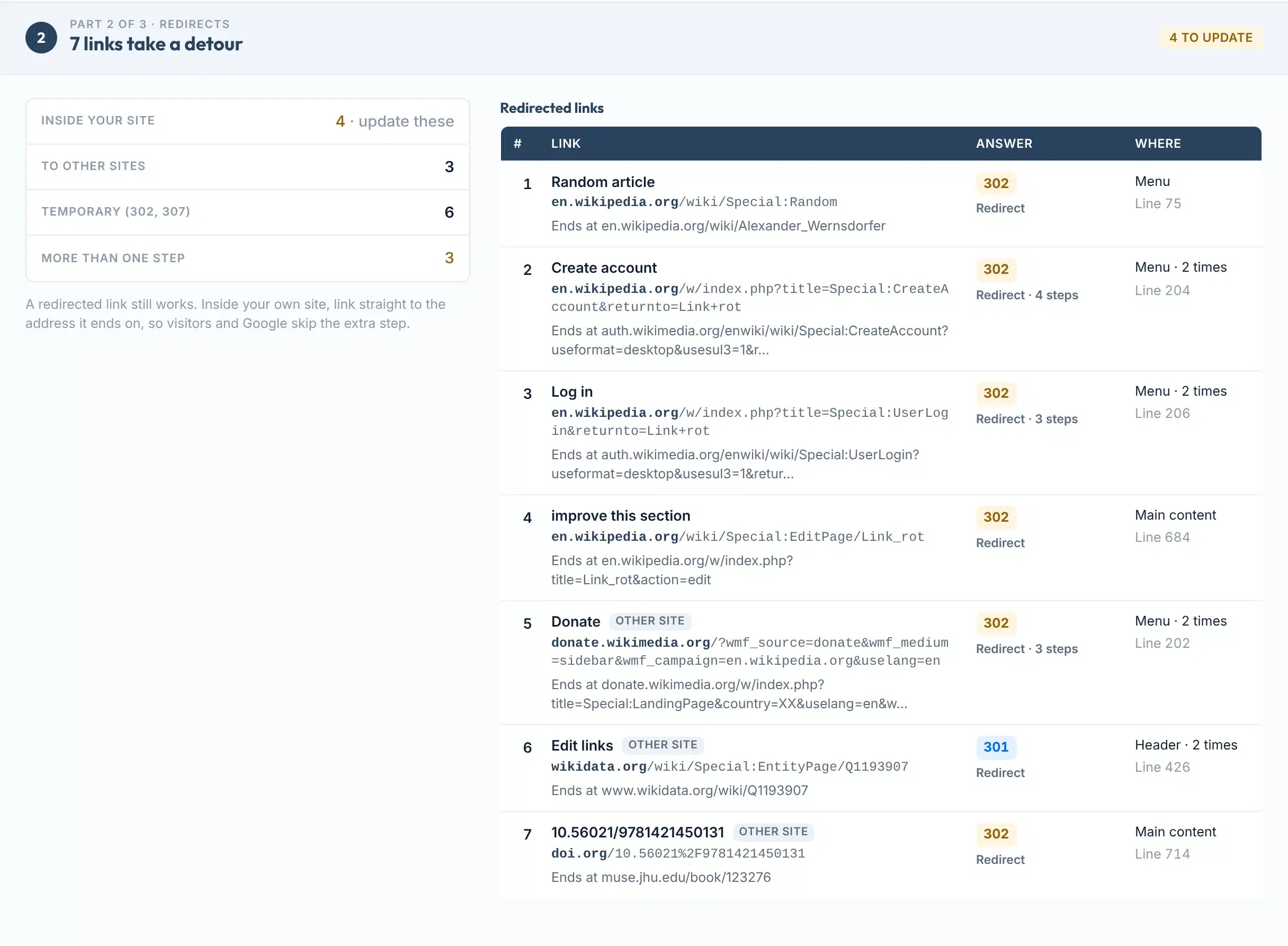
Redirected links on the Wikipedia Link rot article: the first status code, the number of steps and the address each one ends on.

Status codes
Broken or just blocked?
Most false alarms in link checkers are sites that refuse robots. We keep them apart.
| Answer | Means | We mark it | What it tells you |
|---|---|---|---|
| 404 | Not found | Broken | No page at this address. Google treats all 4xx answers (except 429) the same and drops the address from its index. |
| 410 | Gone | Broken | Removed on purpose. The standard says it signals the owner wants links to it removed. |
| 5xx | Server error | Broken | The other server failed. If it keeps happening, Google eventually drops those pages. Check again later. |
| No address | Name does not resolve | Broken | The domain does not exist any more, so nothing can load. |
| 403 | Forbidden | Blocked by site | The server understood the request but refused it. Often a firewall that blocks robots, not visitors. |
| 429 | Too many requests | Blocked by site | Rate limiting: the site asked us to slow down. Google treats it like a server error. |
| 999 | LinkedIn only | Blocked by site | A non-standard code LinkedIn sends to automated requests. Open the link yourself to confirm. |
Sources: Google, HTTP status codes and network errors; RFC 9110 (403, 404, 410); RFC 6585 (429).
Do broken links hurt SEO?
Google says: “If some URLs on your site 404, this fact alone does not hurt you or count against you in Google’s search results” (Google Search Central). The cost is visitors who hit a dead end, and links on your own site that send them, and Google, nowhere.
Which ones to fix first
Search Console Help: “we recommend fixing only 404 errors that you link to yourself or list in a sitemap. If a page has been moved, you should return a 3XX redirect to the new page” (Google). That is why your own links come first in the report.
The amber checks
Links that work, but could work better
Three checks flag links that load fine but still cost you something.
Internal links that redirect. Each one adds a step before the page loads. Point the link at the address it ends on. Google’s crawlers follow “up to 10 redirect hops” (Google), but visitors feel every one.
Links with no text. Google calls empty link text “Bad” and says good anchor text is “descriptive, reasonably concise, and relevant”. For an image link it uses the image’s alt text (Google Search Central). Screen readers need the same words: WCAG 2.2 asks that the purpose of each link can be told from its text (W3C).
Links Google cannot follow. Google “can only crawl your link if it’s an <a> HTML element ... with an href attribute”. A javascript: link or a click handler is not followed (Google).
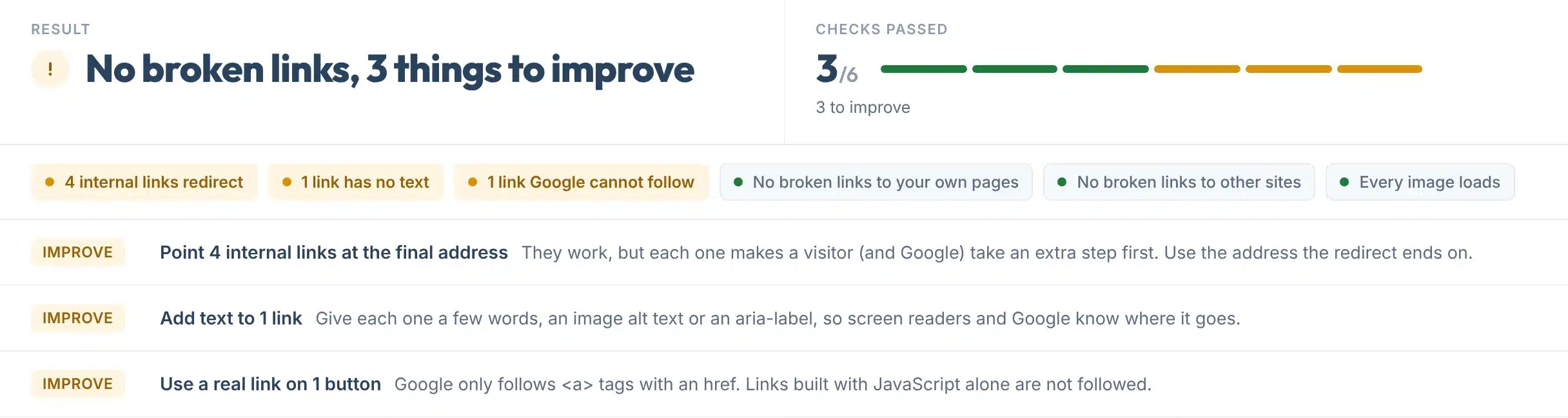
The Wikipedia Link rot article: no broken links in the 150 we checked, 3 things to improve.
Limits
What this tool can’t do
If your browser shows something different, one of these is usually why.
Use it to
- Find every broken link and image on one page in seconds
- Tell real 404s apart from sites that block robots
- See which links redirect, and where they end up
- Find links with no text, and links Google cannot follow
- Check a competitor’s or a client’s page, no access needed
- Share a dated report with whoever edits the site
It won’t
- A whole-site crawl. It checks one page at a time. For every page on your site, use Search Console’s Page indexing report or a crawler.
- More than 150 links. Very long pages are capped at 150 different links and images. The report says when it stopped.
- Links added by JavaScript. We read the HTML the server sends. Links that only appear after scripts run are not seen.
- Pages behind a login. Members-only pages and pages that need cookies answer differently to us than to you.
- Soft 404s. A page that says “not found” but answers 200 OK is counted as working.
- Sites that block our server. If the page itself refuses robots, the report says so and checks nothing.
Next steps
What to do with your result
Links break on their own over time. Pew Research Center found that 38% of webpages that existed in 2013 were no longer available ten years later, and that 23% of news pages contain at least one broken link (Pew Research Center, 2024).
So a page that was clean last year may not be clean today. Google suggests looking at Search Console “around once every month, or when you make changes to the site’s content” (Google); checking your key pages here on the same rhythm keeps them tidy.
How common broken links are
Source: Pew Research Center, When Online Content Disappears, May 2024. Pages checked in October 2023.
Your next step, by result
Point the link at the right page, or remove it. If the page moved, add a 301 redirect from the old address so other sites’ links keep working.
Find the page’s new address on that site, link to another good source, or remove the link.
Re-upload the image or remove it. Then give it alt text that says what it shows.
Copy the address it ends on and use that in the link. Long chains are worth fixing first.
Open the link yourself. If it loads, leave it. A 403, 429 or 999 to a robot is not a broken link.
If a page you link to has dropped out of search, check whether Google can still index it.
Want every page of your site checked and fixed?
Our team runs full technical audits for businesses in the US and UK, broken links included.
FAQs
FAQs
What is a broken link checker?
A broken link checker opens a web page and tests every link on it to see whether it still leads somewhere. Links that answer with an error such as 404 Not found, 410 Gone or a server error are broken. This one also checks every image, follows redirects to their end, and marks sites that block robots separately.
How do I check a page for broken links?
Paste the page address into the box above and press Check my links. We open the page, read every link and image, and test up to 150 of them at once. Broken ones come first, each with its link text, status code and where it sits on the page, so you can find and fix it quickly.
Is this broken link checker free?
Yes. It is free with no signup, no email and no captcha. Each visitor gets 25 page checks a day, and each check covers up to 150 different links and images. Checking the same page again within 10 minutes shows the saved result.
Do broken links hurt SEO?
Not directly. Google says a page returning 404 “does not hurt you or count against you” in its search results. The real cost is visitors who hit a dead end and internal links that lead Google nowhere. Search Console Help recommends fixing the 404 errors you link to yourself or list in a sitemap.
What does a 404 error mean?
A 404 means the server found no page at that address. The page may have been deleted, moved without a redirect, or the link may have a typo. Fix it by pointing the link at the right page, or by adding a 301 redirect from the old address to the new one if the page moved.
What is the difference between 404 and 410?
Both say the page is not there. A 410 Gone adds that it was removed on purpose and is likely gone for good. Google’s documentation treats all 4xx answers, except 429, the same way, so for search the two behave alike. This tool marks both as broken.
Why does a link show as blocked instead of broken?
Some sites refuse automated checks while working fine for people. A 403 Forbidden, a 429 Too many requests or LinkedIn’s non-standard 999 usually means a firewall blocked our server, not that the page is gone. We mark these Blocked by the site and never count them as broken. Open them yourself to be sure.
Does it check images and redirects?
Yes. Every image on the page is opened as well. Links that redirect are followed for up to five steps: if the last step loads a page it counts as a redirect, and if it ends on an error it counts as broken. Internal links that redirect are flagged so you can link straight to the final address.
Can it check my whole website?
It checks one page per run, which is usually what you need after publishing or editing a page. For every page at once, Google Search Console’s Page indexing report lists the 404s Google found in the past month, or use a site crawler. Check your most important pages here first.
How often should I check for broken links?
Check a page whenever you publish or change it, and your key pages about once a month. Links break on their own: Pew Research Center found 38% of webpages from 2013 were no longer available in 2023. Google suggests looking at Search Console around once a month too.
Sources
- Google Search Central BlogDo 404s hurt my site? (2011)
- Google Search CentralHow HTTP status codes and network errors affect Google Search
- Search Console HelpPage indexing report: Not found (404) and which 404s to fix
- Google Search CentralMake your links crawlable: href, anchor text and alt text
- Google Search CentralRedirects and Google Search
- Pew Research CenterWhen Online Content Disappears (May 2024)
- W3C, WCAG 2.2Understanding Success Criterion 2.4.4: Link Purpose
- RFC 9110 and RFC 6585HTTP status codes 403, 404, 410 and 429
More free tools
More free SEO tools
Once the links are clean, these check what sits around them.
Read the guides: web design color theory and a free palette builder, website header examples and what to put in yours, sitemap examples and how to make one, how to fix a 5xx server error and How to check redirects and fix redirect chains.