
The result
Find and test your sitemap
This free sitemap checker finds your website’s XML sitemap the way search engines do, checks that Google can read it, and opens a sample of the pages inside it. Type your website. No sign-up, no email.
It looks in your robots.txt file first, then at the usual sitemap addresses. It reads every file in a sitemap index, checks the size limits, the addresses and the update dates, and tells you in plain words what to fix.
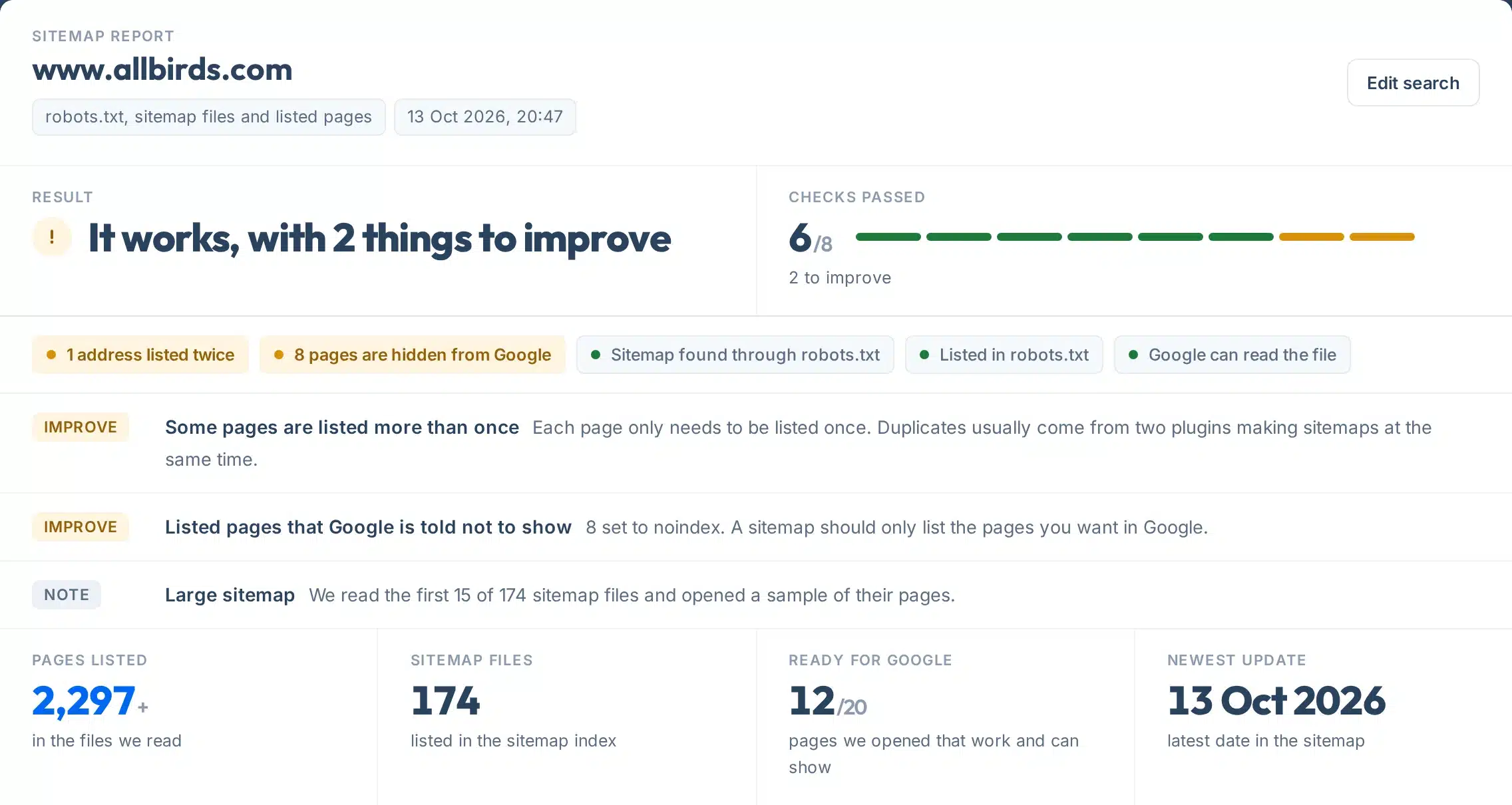
The report opens with one plain answer, so you know in two seconds whether something is wrong.
A real check of allbirds.com, a Shopify store: the sitemap works, with two things to improve.
How to use it
How to check your sitemap
Five steps, under a minute.
- 1Type your website
For example yoursite.com. You can also paste the address of one sitemap file, such as yoursite.com/post-sitemap.xml, to check only that file.
- 2Press Check my sitemap
The tool reads robots.txt, finds the sitemap, opens the files and tests up to 20 pages. It takes about 5 to 15 seconds.
- 3Read the result first
One line tells you if there is a problem, and the coloured tags show which checks passed.
- 4Fix what the rows say
Each Fix or Improve row says what is wrong and what to do. Part 3 lists the exact pages behind a problem.
- 5Check again and submit
Run the check again after a fix, then submit the sitemap in Google Search Console and Bing Webmaster Tools.
Your report, explained
What each part of the report means
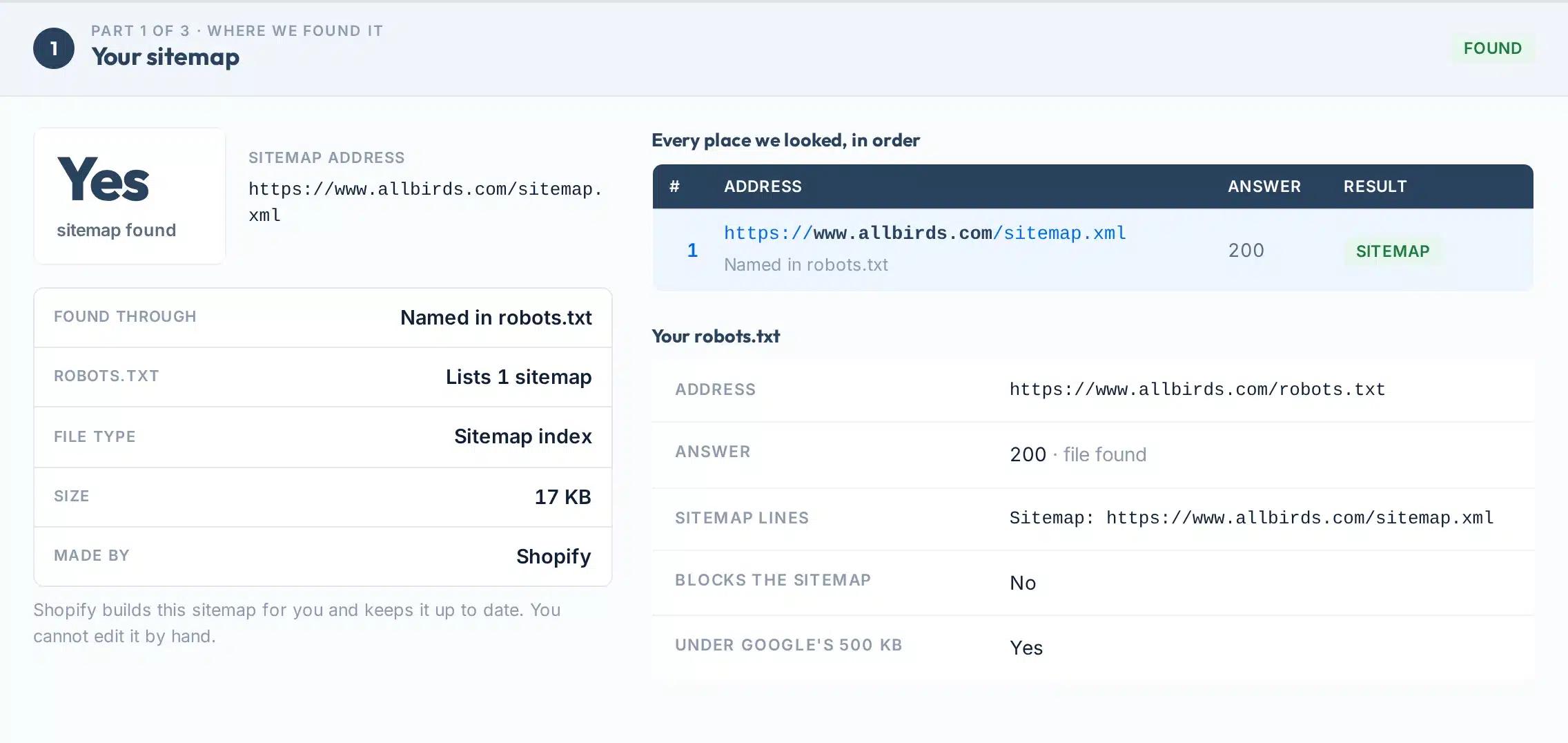
Part 1 shows where your sitemap is and how search engines find it. Here is a real one, numbered.
 123456
- 1Sitemap found
Yes means we found a sitemap file that opens as real XML. No means none of the places search engines look held one.
- 2Sitemap address
The exact address of the sitemap we read. This is the one to submit in Google Search Console.
- 3Found through
How we found it: named in robots.txt, at a standard address, or the address you typed. Robots.txt is the way every search engine can find it.
- 4Made by
The website builder or SEO plugin that made the sitemap, when the file says so, with where to change it.
- 5Every place we looked
Each address we tried, in order, with the answer it gave. A web page or a 404 here means there is no sitemap at that address.
- 6Your robots.txt
Whether the file exists, the Sitemap lines in it, and whether it blocks Google from fetching your sitemap.
The other parts:
- The result at a glanceOne plain answer, the number of checks passed, a tag per check and one row per problem with what to do.
- Part 2: what it listsHow many pages the sitemap lists, every file in a sitemap index with its page count and date, and whether each one opens.
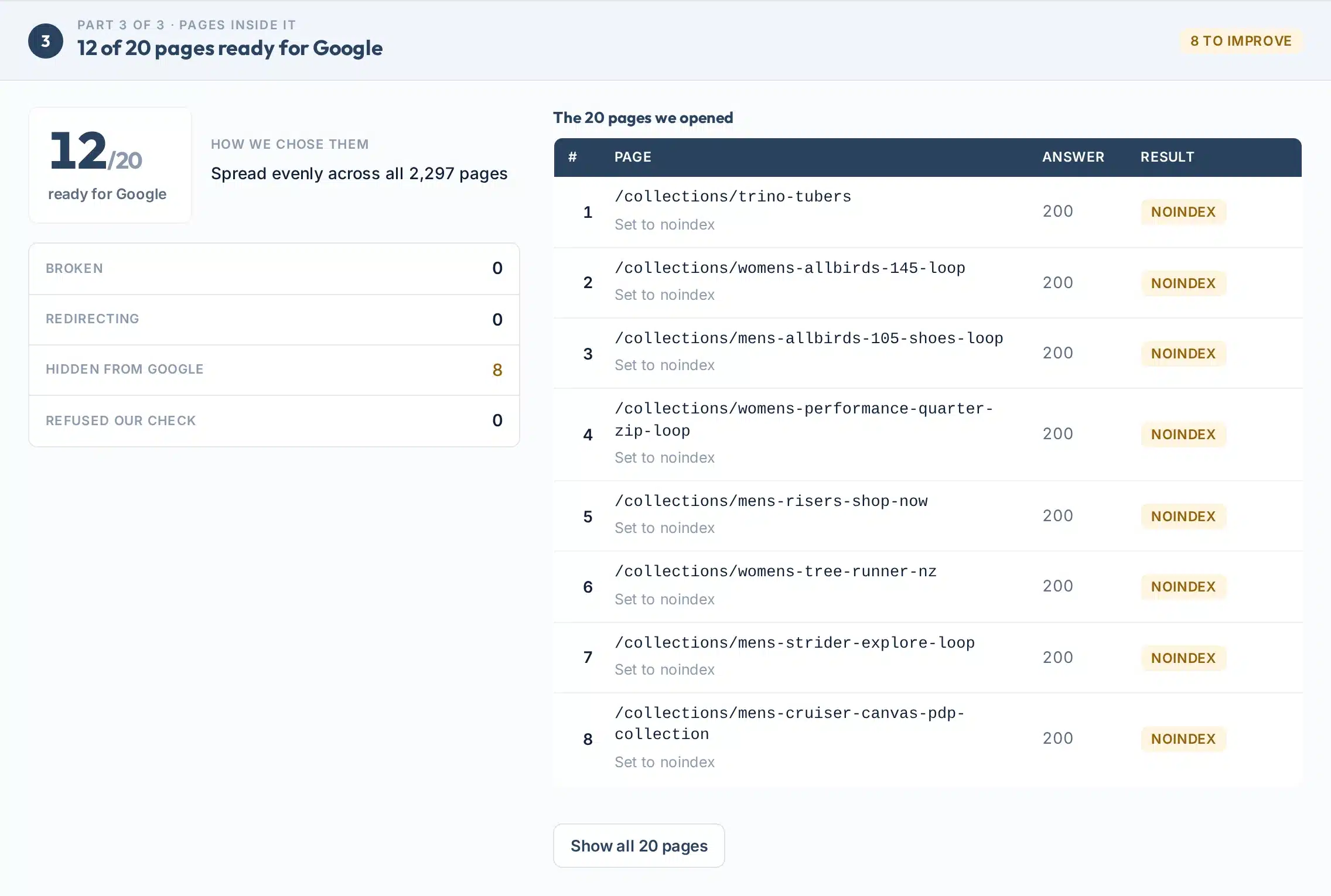
- Part 3: pages inside itUp to 20 pages picked evenly across the whole sitemap, each with its answer: works, redirects, broken, noindex, another canonical or blocked by robots.txt.
What we check
The eight checks in every report
Each check is a yes or no fact we measured on your site. Optional things, such as missing dates, never count as a problem.
| Check | What we look at | Why it matters |
|---|---|---|
| Sitemap found | robots.txt first, then /sitemap.xml, /sitemap_index.xml, /wp-sitemap.xml and three more usual addresses. | A search engine can only use a sitemap it can find. |
| Listed in robots.txt | A Sitemap: line that points to a working sitemap. | Google and Bing both read sitemaps listed in robots.txt (Google). |
| Google can read the file | It answers 200, is XML (not a web page), opens when compressed and is not blocked by robots.txt. | Google respects robots.txt when it fetches sitemaps (Search Console Help). |
| Within the size limits | Each file at most 50,000 addresses and 50MB uncompressed, and no index inside an index. | The limits of the sitemap protocol (sitemaps.org). |
| Every address is on your site | Full addresses on the same host and https as the sitemap, each listed once. | Addresses from another host are dropped (sitemaps.org). |
| Pages work | The sample pages answer 200, not an error or a redirect. | Google suggests listing the final address, not one that redirects (Google). |
| Pages can be shown on Google | No noindex, no canonical pointing elsewhere, not blocked by robots.txt. | List the pages you want in Google’s results (Google). |
| Update dates look right | lastmod dates in the W3C format, none in the future, not all the same day. | Google uses lastmod only when it is accurate (Google). |
Where to find it
How to find the sitemap of a website
Open yoursite.com/robots.txt and look for a line that starts with Sitemap:. If there is none, try the usual address for your platform.
| Your website is built with | Usual sitemap address | Source |
|---|---|---|
| WordPress with Yoast SEO or Rank Math | /sitemap_index.xml | Live check of sites using each plugin |
| WordPress on its own (5.5 and later) | /wp-sitemap.xml | WordPress.org |
| Shopify | /sitemap.xml | Shopify Help |
| Squarespace | /sitemap.xml | Squarespace Help |
| Wix | /sitemap.xml | Live check, 13 Oct 2026 |
| Any site | The Sitemap: line in /robots.txt |
Do you need a sitemap?
Google says sites of about 500 pages or fewer that are well linked inside may not need one, but “in most cases, your site will benefit from having a sitemap”. If you use WordPress, Wix or Shopify, one is usually made for you already (Google).
A sitemap is a hint, not a promise
Google says a sitemap helps it discover your pages but does not guarantee that every page in it will be crawled or indexed (Google). Use the Google Index Checker to see which pages are in Google.
Tell search engines
How to submit your sitemap to Google and Bing
Three ways that still work in 2026.
- 1Add it to robots.txt
Add one line anywhere in the file:
Sitemap: https://yoursite.com/sitemap.xml. Every search engine that reads robots.txt can then find it, and you can list as many sitemaps as you need (Google). - 2Submit it in Google Search Console
Open Indexing, then Sitemaps, paste the sitemap address and press Submit. The report then shows whether Google could read it and how many pages it found (Google).
- 3Submit it in Bing Webmaster Tools
Bing fetches a submitted sitemap straight away and then usually at least once a day. Bing also reads the robots.txt line (Bing).
The “ping” no longer works
Some older tools still offer to “ping Google” with your sitemap. Google switched that off: pings now return a 404 error. Use robots.txt and Search Console instead (Google, June 2023).
Limits
What this tool can’t do
Clear limits, so you know what the result is and what it isn’t.
Use it to
- Find a site’s sitemap the way search engines do
- See in seconds whether Google can read it
- Spot broken, redirecting and hidden pages in a sample
- Check the size limits, addresses and update dates
- Check any public website, not only your own
It won’t
- Not every page. We open up to 20 pages spread across the sitemap, not all of them.
- Large indexes in part. For a sitemap index we read the first 15 files and say so.
- Not what Google indexed. A good sitemap does not mean every page is in Google. Search Console shows that.
- Some sites block checks. Pages that refuse our request are marked as refused and not counted as broken.
- Unusual addresses. A sitemap at an odd address that robots.txt does not mention can be missed.
- No sitemap builder. It checks sitemaps. Your website builder or SEO plugin makes them.
Next steps
What to do with your result
A clean sitemap helps search engines find your pages faster. Bing says the lastmod date in a sitemap is a key signal for how quickly updates show in search results and in AI answers (Bing, July 2025).
Bing also says it may ignore dates that are always set to today, and Google says it stops trusting dates that do not match when a page really changed (Google).
What Bing found in sitemaps
Source: Bing Webmaster Blog, February 2023. First bar: share of hosts; the others: share of those sitemaps.
Your next step, by result
Switch on the sitemap in your website builder or SEO plugin, add the Sitemap: line to robots.txt, then check again.
Remove deleted pages from the sitemap or put them back, and point old addresses to the right page.
Decide for each page: if you want it in Google, remove the noindex; if not, take it out of the sitemap.
Add one Sitemap: line to robots.txt. It takes a minute and every search engine can then find the file.
Submit the sitemap in Search Console, then check which pages Google actually shows.
Want us to fix your site’s technical SEO?
Our team fixes sitemaps, indexing and site health problems for businesses in the US and UK.
FAQs
FAQs
What is a sitemap checker?
A sitemap checker finds a website’s XML sitemap and tests it. This one looks in robots.txt and at the usual addresses, checks that Google can read the file, checks the size limits, addresses and dates, and opens a sample of the pages it lists.
How do I find the sitemap of a website?
Open the site’s robots.txt file, for example yoursite.com/robots.txt, and look for a line that starts with Sitemap:. If there is none, try /sitemap.xml or /sitemap_index.xml, or type the site into the tool above and it tries every usual address for you.
Does every website have a sitemap?
No. Many sites have one because WordPress, Shopify, Wix and Squarespace make it automatically, but some sites have none. Google says small, well-linked sites may not need one, though most sites benefit from having one.
Is this sitemap validator free?
Yes. It is free with no sign-up, email or card. Each visitor gets 30 new checks a day, and checking the same site again within 10 minutes reuses the last result.
What makes a sitemap invalid?
Common problems are a sitemap address that shows a web page instead of XML, broken XML, the wrong namespace, more than 50,000 addresses or 50MB in one file, addresses from another site, and an index that lists another index.
How many URLs can a sitemap have?
Each sitemap file can hold at most 50,000 addresses and be at most 50MB uncompressed. Bigger sites split their pages over several files and list them in a sitemap index, which can itself list up to 50,000 sitemaps.
Should every page be in my sitemap?
No. List the pages you want people to find in Google, one version of each. Leave out pages set to noindex, pages that redirect and duplicate versions. Google treats every listed page as a suggested canonical.
Do priority and changefreq matter?
No. Google ignores the priority and changefreq values in a sitemap, and Bing says the same. The lastmod date does matter, but only when it is accurate.
How do I submit my sitemap to Google?
In Google Search Console open Indexing, then Sitemaps, paste the sitemap address and press Submit. Also add a Sitemap: line to robots.txt. The old ping method no longer works.
Why does my sitemap show a 404 or a web page?
Your site may not make a sitemap at that address. Check robots.txt for the right address, switch the sitemap on in your website builder or SEO plugin, or ask your developer. Many sites send unknown addresses to the home page, which looks like a page instead of a sitemap.
Sources
- sitemaps.orgSitemaps XML format (the protocol)
- Google Search CentralLearn about sitemaps
- Google Search CentralBuild and submit a sitemap
- Google Search CentralManage your sitemaps with a sitemap index file
- Google Search CentralHow Google interprets the robots.txt specification
- Google Search Central BlogSitemaps ping endpoint is going away (June 2023)
- Search Console HelpManage your sitemaps using the Sitemaps report
- Google Search CentralHow to specify a canonical URL
- Bing Webmaster BlogKeeping content discoverable with sitemaps in AI powered search (July 2025)
- Bing Webmaster BlogThe importance of setting the lastmod tag (February 2023)
- WordPress.orgNew XML sitemaps functionality in WordPress 5.5
- Shopify Help CenterFinding and submitting your sitemap
More free tools
More free technical SEO tools
A sitemap is one part of being found. These cover the rest.
Read the guides: sitemap examples and how to make one and How to find a website’s sitemap.