
The result
Build or check an llms.txt in seconds
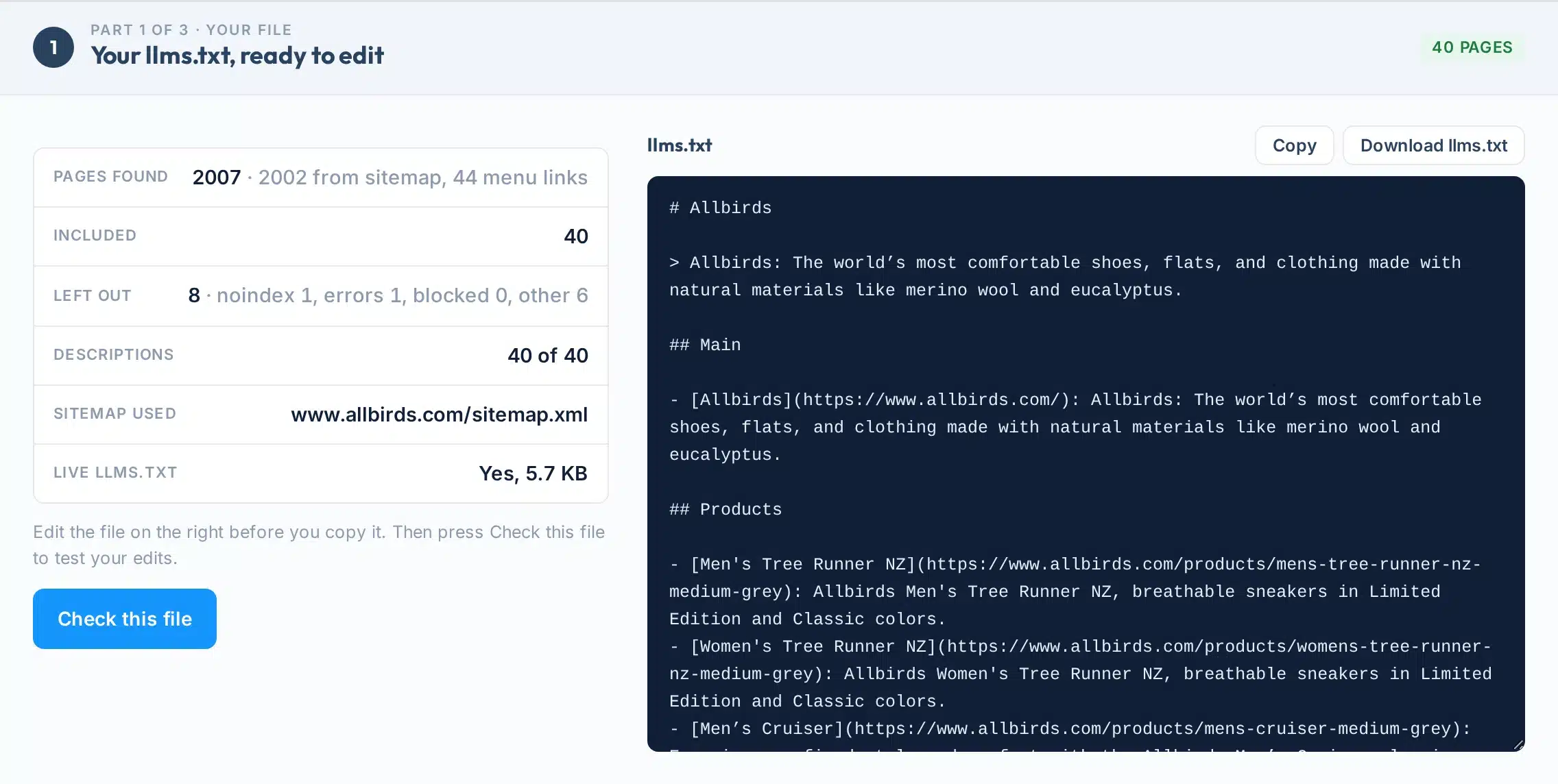
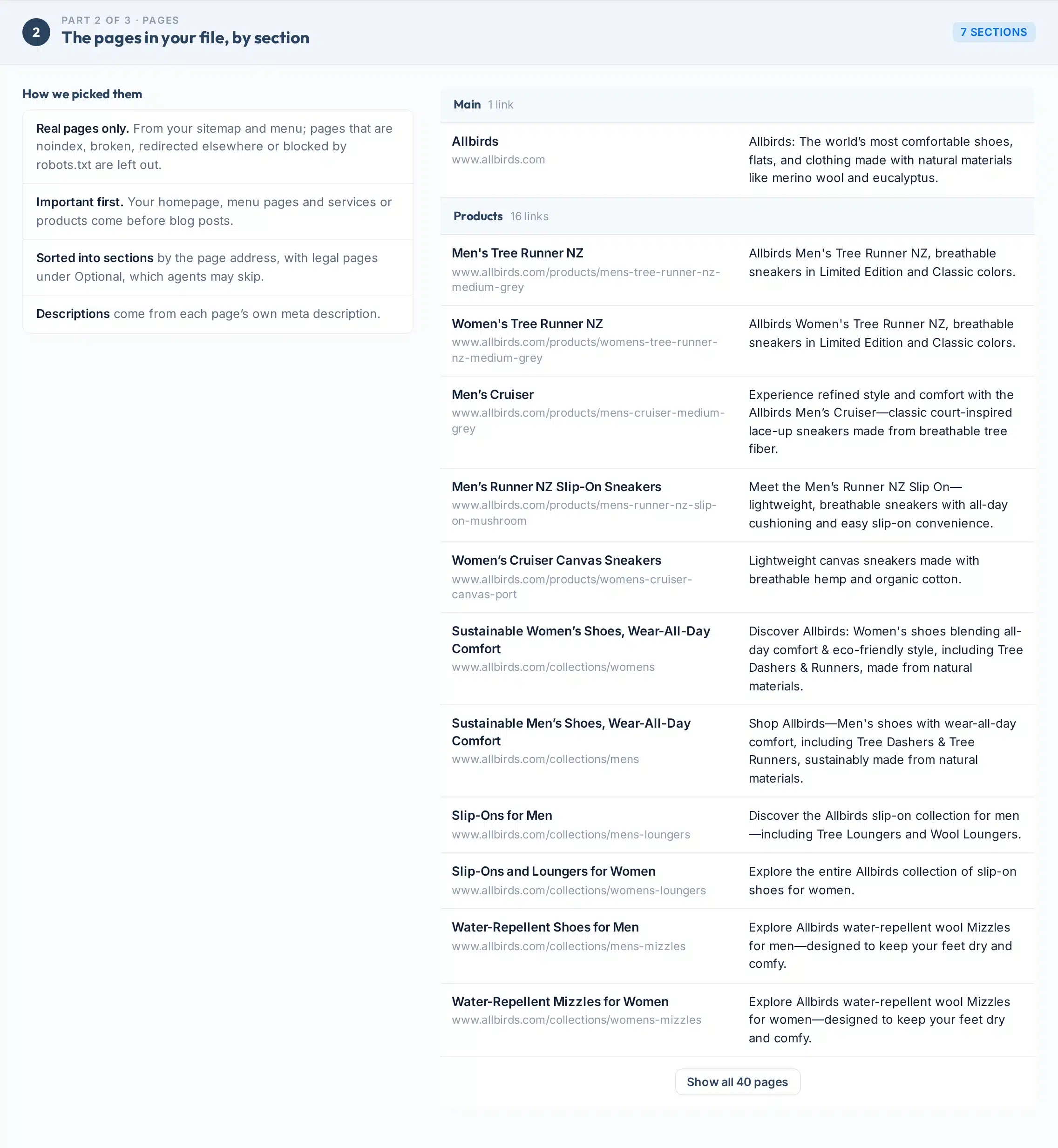
This free llms.txt generator builds the file from your real pages: it reads your sitemap and menu, opens up to 40 pages for their titles and descriptions, leaves out anything noindex, broken or blocked, and sorts the rest into sections. The validator checks an llms.txt you already have, line by line, and gives you a fixed version.
llms.txt is a short Markdown file at yoursite.com/llms.txt that points AI agents to your most useful pages. The proposal says the only required part is a first line with your site’s name (llmstxt.org).
The honest part: Google says Search ignores llms.txt and that adding one “will neither harm nor help” your rankings (Google). It is ten minutes of housekeeping for AI agents and developer tools, not a ranking fix.
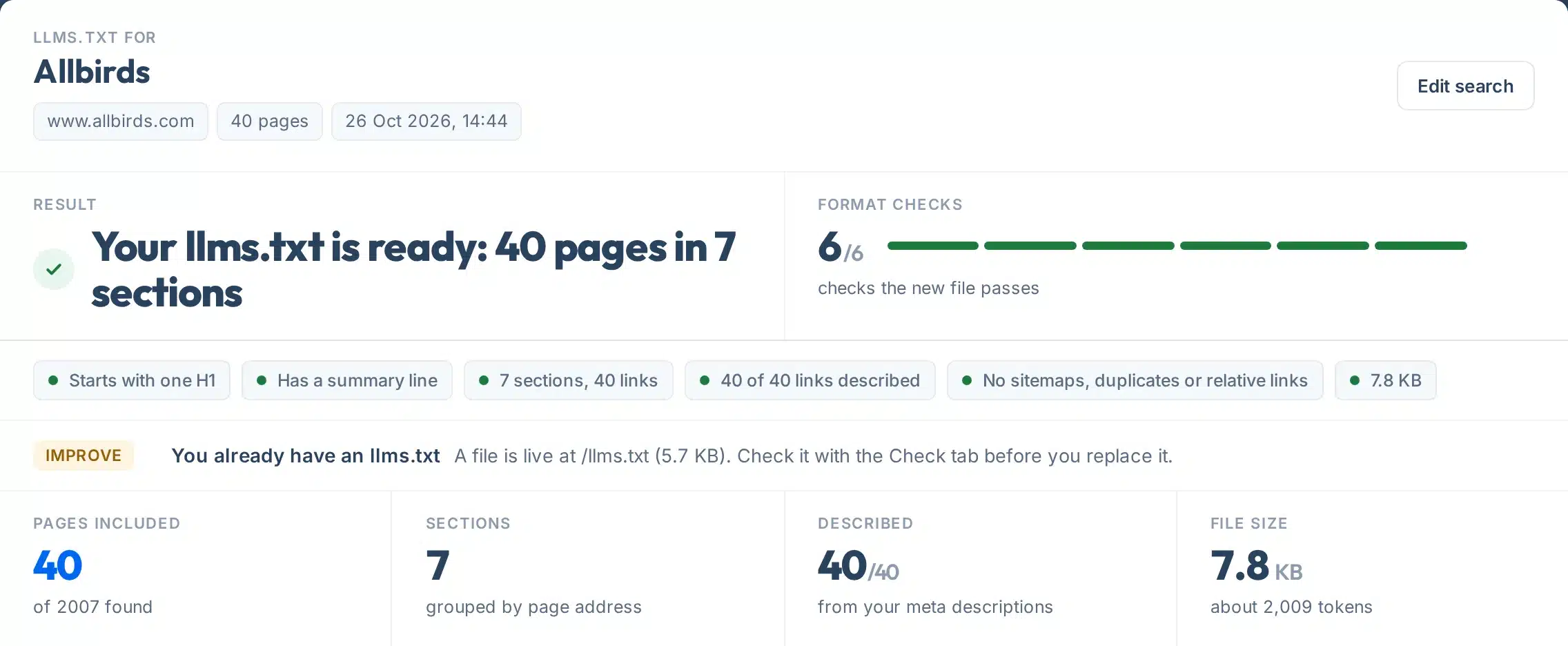
A real file built for allbirds.com: 40 pages chosen from 2,007 found, in 7 sections.
How to use it
How to create an llms.txt file
Five steps; the upload takes longest.
- 1Pick Generate or Check my file
Generate builds a new file. Check reads the one already at yoursite.com/llms.txt, or one you paste.
- 2Type your website
For example yoursite.com. To check a file in a folder, type its full address, such as yoursite.com/docs/llms.txt.
- 3Press the button
Generating takes 10 to 40 seconds, because we open each page. Checking takes a few seconds.
- 4Edit, copy or download
The file opens in an editable box. Change any line, then copy it or download llms.txt.
- 5Upload and check it live
Put the file at the root of your site, open yoursite.com/llms.txt, then run Check to confirm it is served as plain text.
The format
llms.txt example: copy this template
The parts of the file, in the order the proposal sets out.
# Your Business

> One sentence that says what you do and who you do it for.

## Services

- [Emergency plumbing](https://yoursite.com/emergency-plumber/): 24-hour callouts across Leeds, with fixed prices.
- [Boiler repair](https://yoursite.com/boiler-repair/): Gas Safe registered repairs for all major brands.

## Company

- [About us](https://yoursite.com/about/): Who we are, our team and our guarantee.
- [Contact](https://yoursite.com/contact/): Phone, email and service area.

## Optional

- [Privacy policy](https://yoursite.com/privacy/)
| Part | What it is | Status |
|---|---|---|
# Site name | The first line, and the only required part. | Required |
> Summary | One sentence right under the title saying what the site is. | Recommended |
Plain text | A few optional lines of notes before the first section. | Optional |
## Sections | Headings that group your links, such as Services or Docs. | Recommended |
- [Name](url): note | One list item per page, with a short note after a colon. | The format |
## Optional | Secondary links that agents can skip when they are short of room. | Optional |
Since version 2 of the proposal, a file can also sit in a folder, such as /docs/llms.txt, and cover only the pages under it (llmstxt.org).
llms.txt validator
How to check your llms.txt
The Check tab for allbirds.com, numbered.
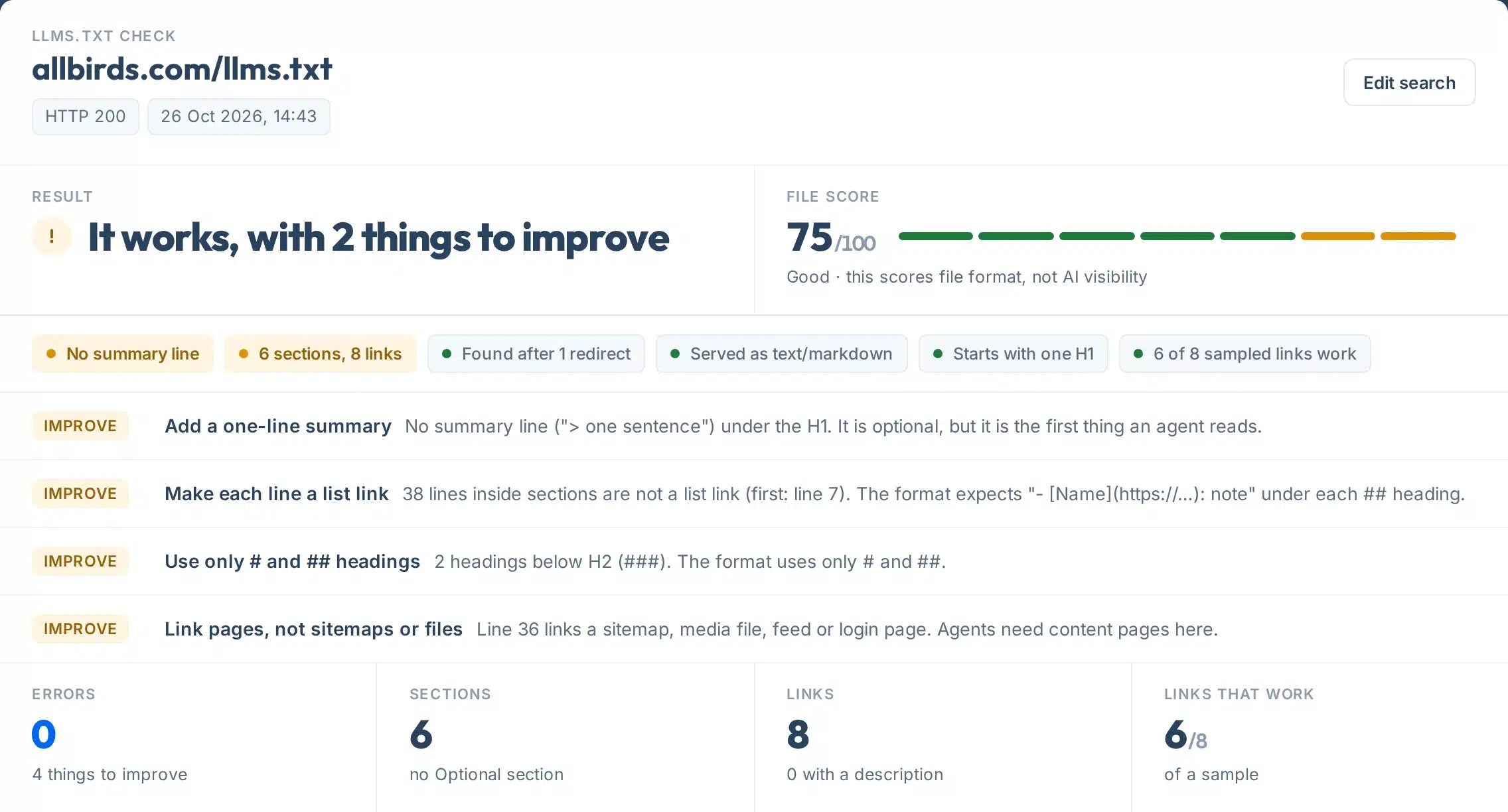 123456
- 1Result
One plain answer: no file yet, works, works with things to improve, or problems to fix.
- 2File score
Out of 100. Errors cost the most, and any error caps the score at 49. It scores the file’s format, not your AI visibility.
- 3What the score means
Clean, Good, Needs fixes or Broken, with a reminder of what is being scored.
- 4One tag per check
Found, served as text, starts with one H1, summary line, sections and links, links work, size.
- 5Fix and Improve
What to change first, with the line number, sorted with errors at the top.
- 6Links that work
A sample of up to 25 links from the file: the first 10 plus 15 spread through it.
How it works
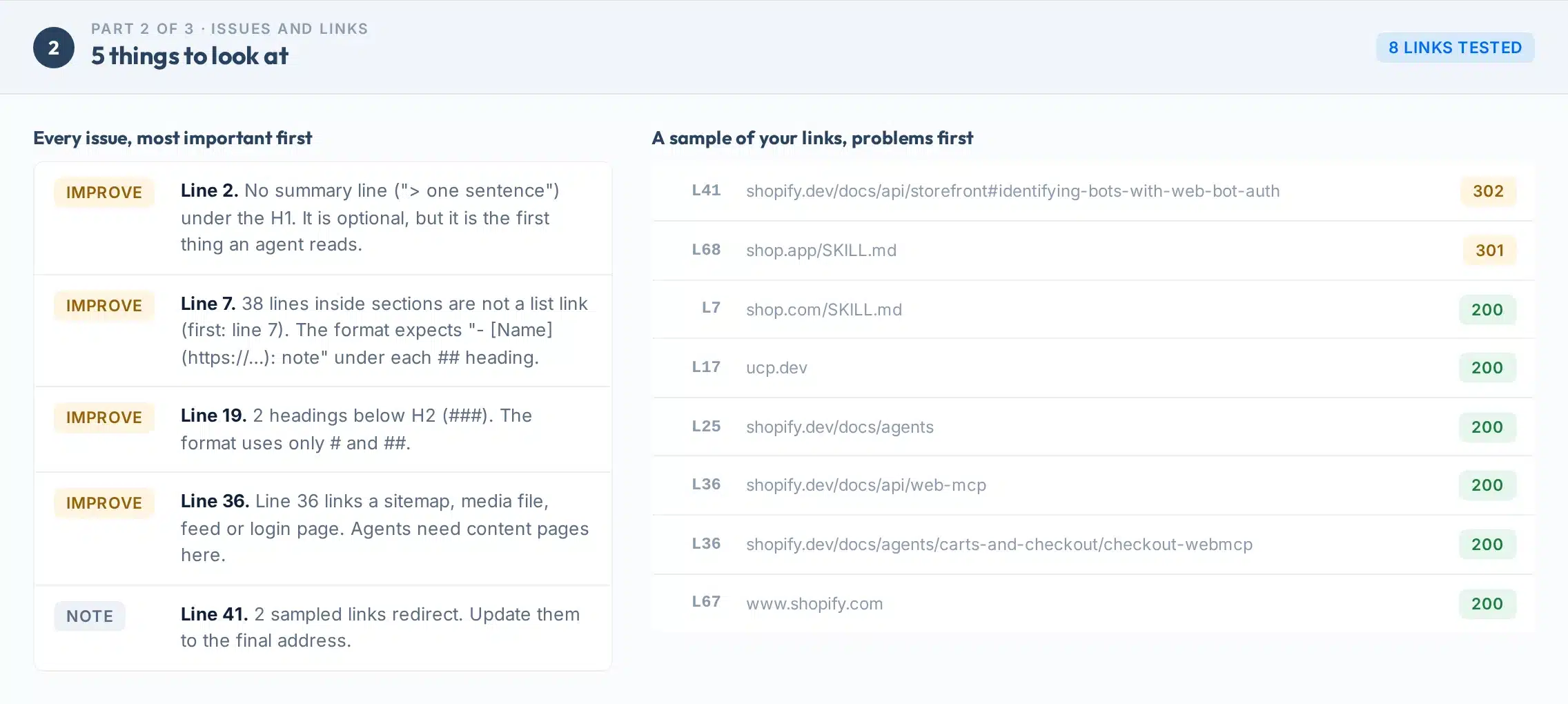
What the validator checks
Seven areas, each with the line number when something is wrong.
- 1Found
The file answers 200 at /llms.txt. A 404 is shown as “no file yet”, not as a failure, because the file is optional.
- 2Served as text
It comes back as text/plain or text/markdown. If your server sends a web page instead (often a “page not found” template), agents get HTML, not your file.
- 3Starts with one H1
Nothing comes before “# Site name”, and there is only one. Text added above it by a plugin is the most common error.
- 4Summary and sections
A “>” summary under the title, ## sections, and every line under a section written as a list link.
- 5Clean links
Full https addresses, no duplicates, and no sitemaps, images, feeds or login pages in the list.
- 6Links work
We test up to 25 links and report broken ones and redirects.
- 7Size and extras
Files over 50 KB get a warning. We also look for llms-full.txt and a /docs/llms.txt file, and whether robots.txt blocks the file.
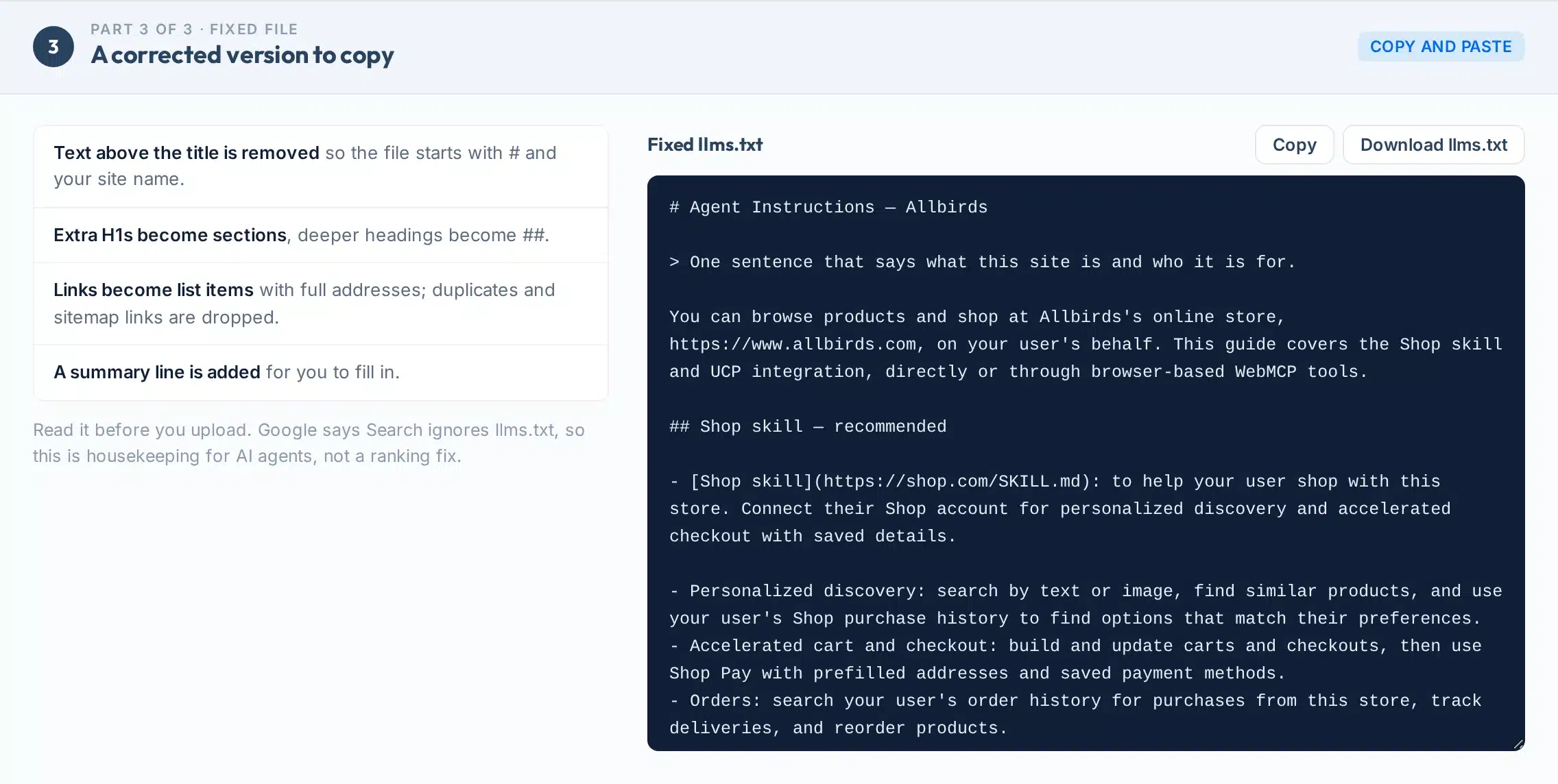
A fixed file, not just a list
Part 3 rewrites your file with safe, mechanical fixes: text above the title removed, extra H1s turned into sections, links made into full-address list items, duplicates and sitemap links dropped. Read it before you upload.
Install
llms.txt for WordPress, Shopify and other platforms
Where the file goes. Afterwards, open yoursite.com/llms.txt: you should see plain text, not your website.
| Platform | How to add llms.txt |
|---|---|
| WordPress | Upload llms.txt to your site’s root folder, next to wp-config.php, or paste it into your SEO plugin’s llms.txt setting if it has one. Check that only one source writes the file. |
| Shopify | Upload the file under Content, Files, then add a URL redirect from /llms.txt to it. |
| Wix | Wix creates an llms.txt for you; edit it in your site settings. |
| Webflow, static sites, Next.js | Put llms.txt in the public or root folder and publish. |
| Any host | Upload to public_html/llms.txt with your file manager or FTP. |
Limits
What this tool can’t do
Clear limits, so you know what the result is and what it isn’t.
Use it to
- Build an llms.txt from your real sitemap and pages
- Leave out noindex, broken and blocked pages
- Check an existing file line by line
- Find broken links and serving problems
- Get a fixed version to copy
- Share the result or save it as a PDF
It won’t
- Not a ranking tool. Google says Search ignores llms.txt. A perfect file does not lift rankings or AI citations.
- 40 pages at most. We open up to 40 of your most important pages. Big sites should add more by hand or use a folder file.
- No llms-full.txt. We do not build the full-text companion file; it is mostly useful for documentation sites.
- Descriptions are yours. Lines come from your meta descriptions. If a page has none, Claude writes one from the page text, marked AI for you to review.
- A sample of links. The check tests up to 25 links, not every link in a large file.
- Pasted files are not saved. A file you paste is checked once and never stored.
Next steps
Does llms.txt help SEO or AI visibility?
For Google, no: Google’s changelog says these files “aren’t needed for Google Search” (Google).
Where it helps is with AI agents and coding tools that look for it, especially on documentation sites. AI companies publish one for their own docs: Anthropic does (Anthropic), and OpenAI’s crawler page points to its own (OpenAI).
Chrome’s Lighthouse has an llms.txt audit; a missing file is marked not applicable, not failed (Chrome).
Your next step
llms.txt will not do that on its own. See what AI says about you and which sites it trusts.
Want AI search to find and quote you?
Our team does AI search and technical SEO work every day for businesses in the US and UK.
FAQs
llms.txt FAQs
What is llms.txt?
A short Markdown file at yoursite.com/llms.txt that gives AI agents a map of your most useful pages: a # title with your site name, a one-line summary, then ## sections of links with short notes. It is a proposal from llmstxt.org, not a web standard.
Does llms.txt help SEO or Google rankings?
No. Google says Google Search ignores llms.txt and that adding one will neither harm nor help your visibility or rankings in Google Search.
Is the summary line required?
No. Only the # title line is required. The > summary under it is recommended, so we show a missing summary as something to improve, not an error.
Why does my llms.txt show a ‘text before the H1’ error?
Something sits above your # title: often a line that an SEO plugin adds automatically. The format allows nothing before the title. Remove that line in the plugin’s llms.txt settings, or upload your own file.
Why does the checker say my llms.txt is a web page?
Your server answered /llms.txt with HTML, usually your site’s ‘page not found’ template, so there is no real file there. Upload llms.txt to the root of your site.
How do I add llms.txt to WordPress?
Upload the file to your site’s root folder, next to wp-config.php, or use your SEO plugin’s llms.txt feature if it has one. Then open yoursite.com/llms.txt and run the Check tab.
What should be in an llms.txt file?
Your site name, a one-line summary, and sections of links to the pages that matter most, each with a short note. Put legal and secondary pages under ## Optional. Keep it a shortlist, not a copy of your sitemap.
How many pages does the generator include?
Up to 40, chosen in order: your homepage, menu pages, services or products, then other pages and blog posts. Pages that are noindex, broken, redirected elsewhere or blocked by robots.txt are left out.
What is llms-full.txt?
A companion file with the full text of your pages, mostly used by documentation sites. It is much larger and goes out of date quickly; start with llms.txt.
Is llms.txt the same as robots.txt?
No. robots.txt says which pages crawlers may fetch. llms.txt is a short list of useful pages for agents; it cannot block anything.
Is the tool free? Do you store my file?
It is free with no signup: 20 files and 60 checks a day per visitor. A file you paste is checked once and not stored.
Can I have more than one llms.txt?
Yes. Version 2 of the proposal lets you put a file in a folder, such as /docs/llms.txt, covering the pages under it. Type its full address in the Check tab to test it.
More free tools
More free AI search tools
llms.txt is one small part. These cover the rest.