
The result
Is your robots.txt blocking anyone it shouldn’t?
This free robots.txt checker reads your file the way Google and the robots.txt standard (RFC 9309) do, then tests 17 crawlers against your page: Googlebot, Bingbot, ChatGPT’s OAI-SearchBot and GPTBot, Claude, Perplexity, Apple, Meta and Common Crawl. You see which are allowed or blocked, and the exact line that decides it.
It keeps search crawlers and training crawlers apart. Blocking a search crawler can take you out of answers: OpenAI says sites that block OAI-SearchBot are not shown in ChatGPT search answers (OpenAI). Blocking a training crawler such as GPTBot is your choice and does not.
It also flags errors, checks your sitemap line and your CSS and JavaScript, tests a draft before you publish it, and gives you a fixed file to copy.
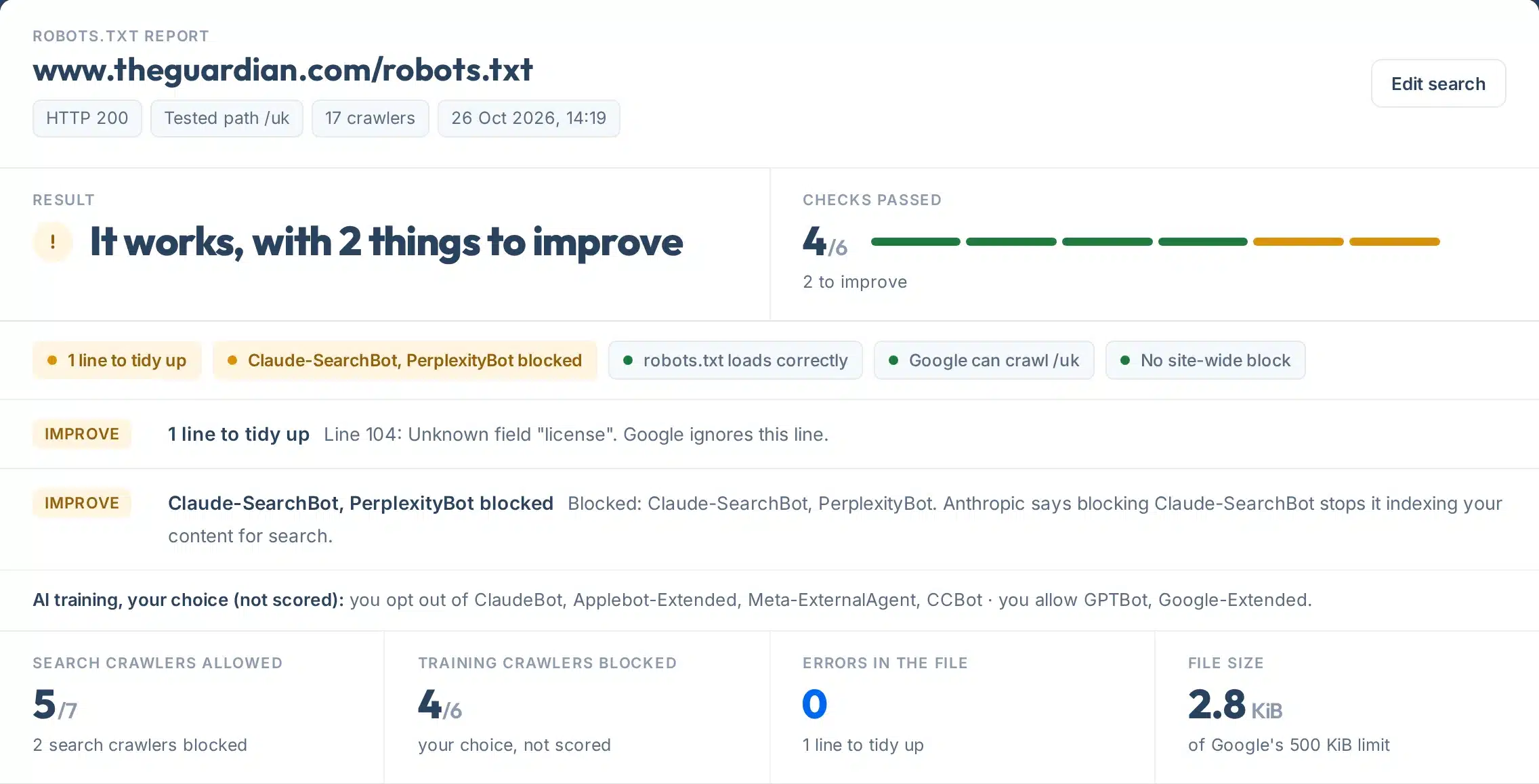
A real check for theguardian.com: Google and ChatGPT are allowed; Claude-SearchBot and PerplexityBot are blocked by line 102.
How to use it
How to test your robots.txt
Five steps, a few seconds.
- 1Type your website or a page
For example yoursite.com or yoursite.com/blog/. A page address becomes the path we test.
- 2Press Check my robots.txt
We fetch /robots.txt, follow any redirects and test every crawler. It takes a few seconds.
- 3Read the result first
One line says whether anything is wrong, then one tag per check, problems first.
- 4Test another path or a draft (optional)
Open “Test another path or a draft file” to check a second address, or paste a new robots.txt to see what would change before you publish it. Drafts are never stored.
- 5Copy the fixed file
Part 3 gives a corrected version of your own file, with three choices for AI crawlers.
Your report, explained
What each part of the report means
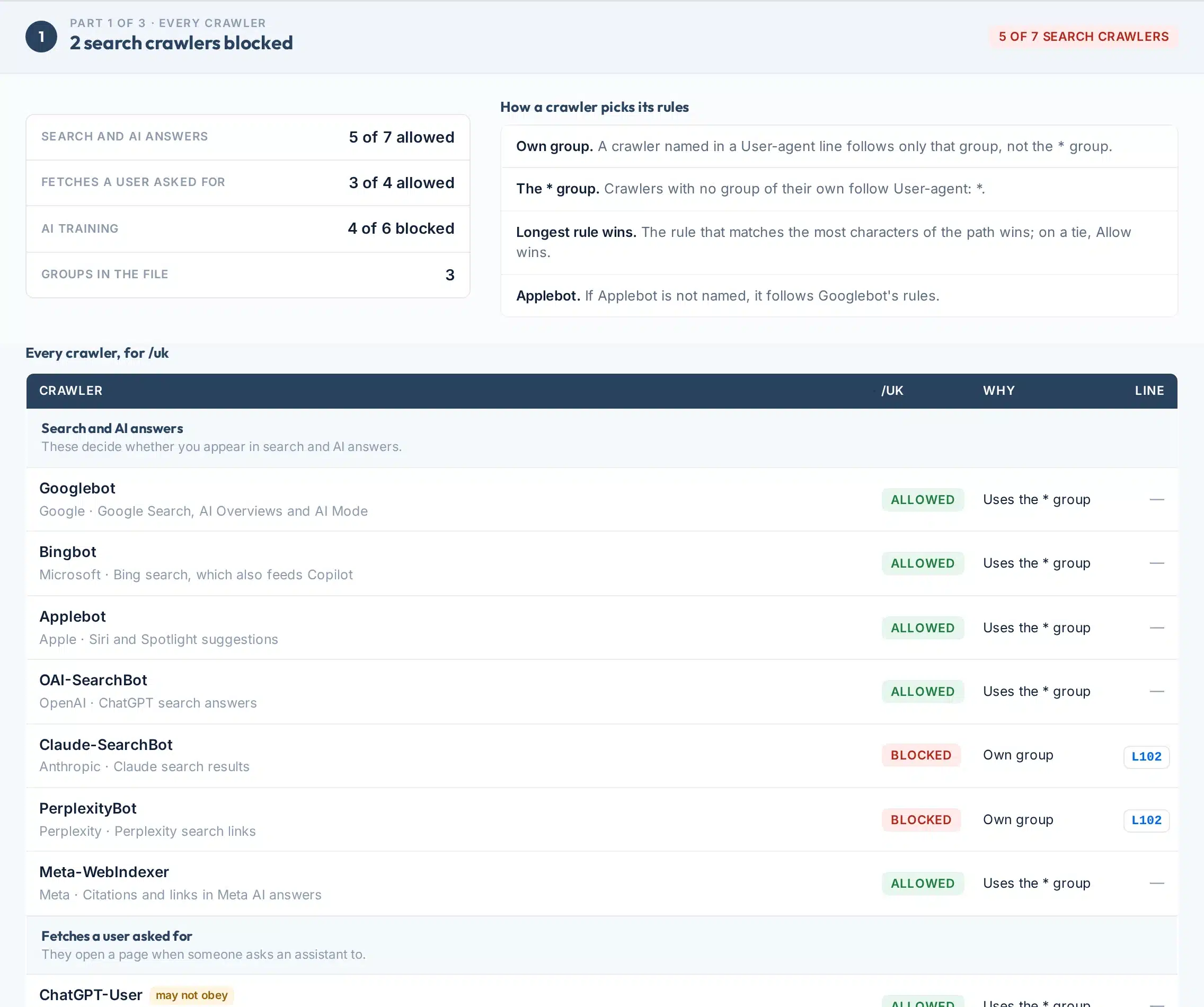
Part 1 for theguardian.com, numbered.
 123456
- 1Totals by kind
How many search, user-triggered and training crawlers are allowed or blocked for the page you tested.
- 2How the rules are picked
The four rules every crawler follows to decide which lines apply to it, in plain words.
- 3The crawler
Its name in robots.txt, the company behind it and what it is used for.
- 4Allowed or blocked
The verdict for the exact path you tested. Training crawlers show in neutral colours, because blocking them is a choice, not a mistake.
- 5Why
Whether the crawler has its own group, follows the * group, borrows Googlebot’s rules (Applebot) or has no rules at all.
- 6The line
The line number of the rule that decided it. Click it to jump to that line in your file.
The rest of the report:
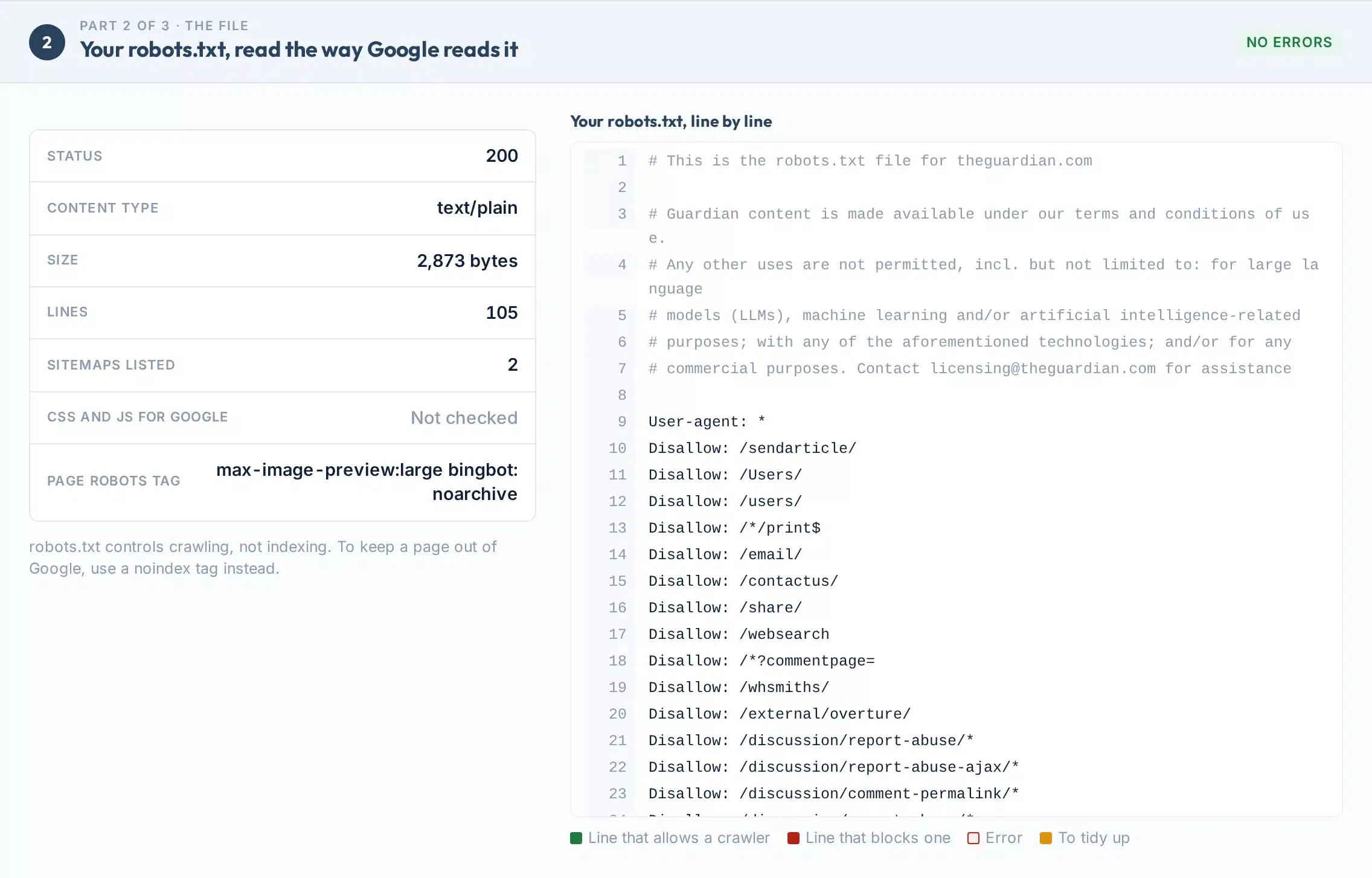
- Result at a glanceSix or seven checks: the file loads, no syntax errors, Google can crawl the page, no site-wide block, AI search crawlers allowed, sitemap listed, CSS and JavaScript allowed.
- Part 2: the fileYour robots.txt with line numbers, the lines that block or allow highlighted, and every error explained.
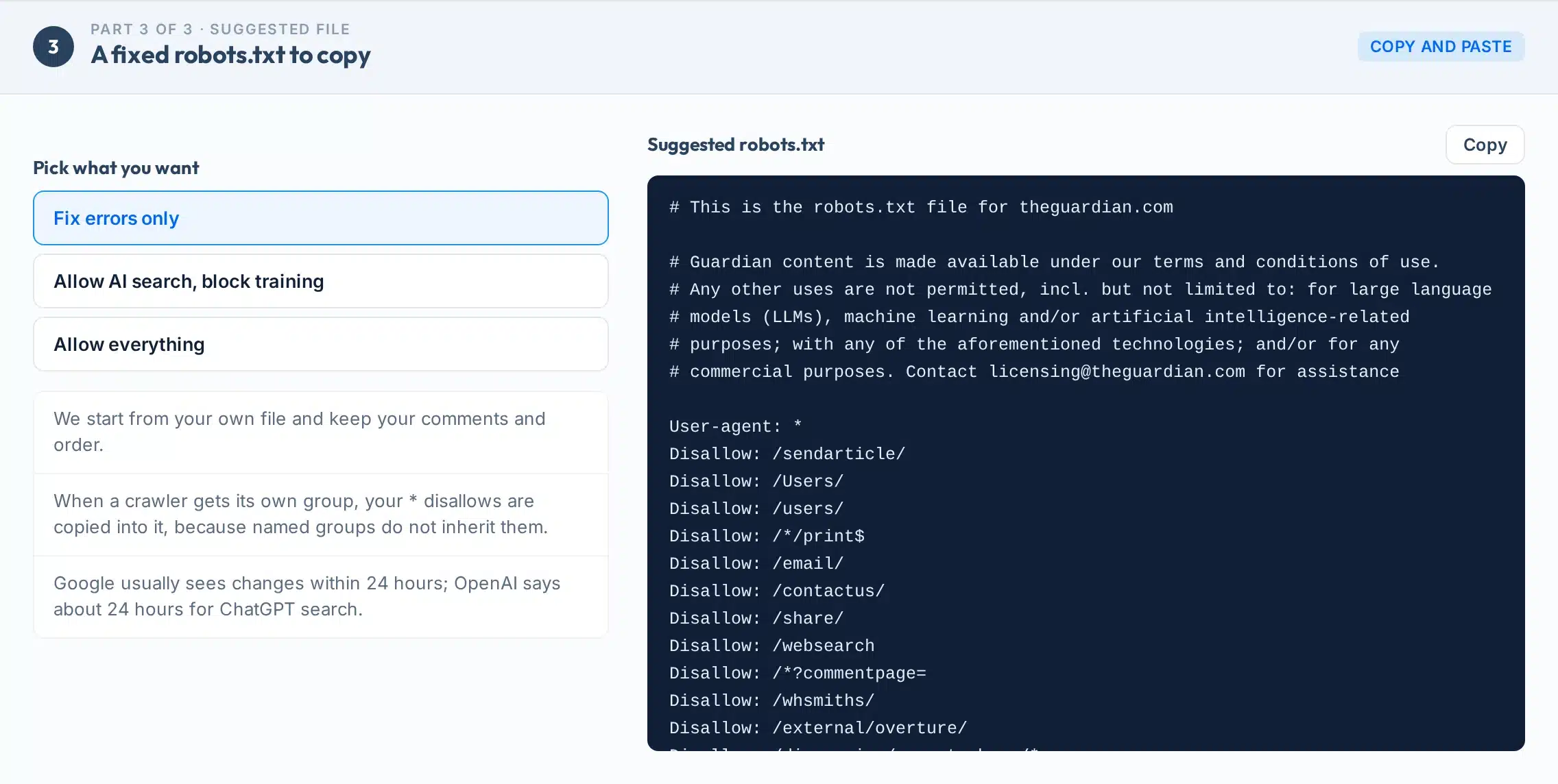
- Part 3: a fixed fileYour own file with errors fixed, in three versions: fix errors only, allow AI search but block training, or allow everything.
AI crawlers
Is my site blocking AI crawlers? Which ones matter
Every crawler the tool tests, in the words of the company that runs it.
| Crawler | Used for | Kind | Source |
|---|---|---|---|
| Googlebot · Google | Google Search, AI Overviews and AI Mode | Search | |
| Bingbot · Microsoft | Bing search, which also feeds Copilot | Search | Bing |
| OAI-SearchBot · OpenAI | ChatGPT search answers | Search | OpenAI |
| Claude-SearchBot · Anthropic | Claude search results | Search | Anthropic |
| PerplexityBot · Perplexity | Perplexity search links; not used for training | Search | Perplexity |
| Applebot · Apple | Siri and Spotlight; follows Googlebot’s rules if not named | Search | Apple |
| Meta-WebIndexer · Meta | Citations and links in Meta AI answers | Search | Meta |
| ChatGPT-User · OpenAI | Opens a page a user asked for; may not follow robots.txt | User | OpenAI |
| Claude-User · Anthropic | Opens a page a user asked for | User | Anthropic |
| Perplexity-User · Perplexity | Opens a page a user asked for; generally ignores robots.txt | User | Perplexity |
| GPTBot · OpenAI | Model training; independent of ChatGPT search | Training | OpenAI |
| ClaudeBot · Anthropic | Model training | Training | Anthropic |
| Google-Extended · Google | Gemini training and grounding; does not affect Google Search | Training | |
| Applebot-Extended · Apple | Apple model training; does not crawl | Training | Apple |
| Meta-ExternalAgent · Meta | Meta AI model training | Training | Meta |
| CCBot · Common Crawl | Open web dataset used to train many models | Training | Common Crawl |
How it works
How a robots.txt validator should read your file
The rules this checker follows, from the standard and from Google.
| Rule | What it means | Source |
|---|---|---|
| Each crawler follows one group | A crawler named in a User-agent line uses only that group. Others use User-agent: *. With neither, everything is allowed. | RFC 9309 |
| The longest rule wins | The rule matching the most characters of the path wins. On a tie, Google uses the least restrictive rule (Allow). | |
| 500 KiB limit | Google ignores anything after the first 500 KiB of the file. | |
| Missing file means allow | A 404 or other 4xx (except 429) is treated as if there were no robots.txt: crawl everything. | |
| Server errors pause crawling | On a 5xx error Google stops crawling the site for 12 hours while it retries. | |
| Changes take up to a day | Google caches robots.txt for up to 24 hours; OpenAI says about 24 hours for ChatGPT search. | Google, OpenAI |
| Crawl-delay is not for Google | Google supports only user-agent, allow, disallow and sitemap. Anthropic supports Crawl-delay. | Google, Anthropic |
| robots.txt is not noindex | Blocking crawling does not keep a page out of Google. Use a noindex tag instead. |
A common trap: when you give a crawler its own group, it stops reading the * group. If * blocks /wp-admin/ and you add a group for ClaudeBot without that line, /wp-admin/ is open to ClaudeBot. The report warns you when this happens.
Fix it
How to fix "Blocked by robots.txt" and other problems
The five fixes the report suggests most often.
- 1Remove an accidental "Disallow: /"
A single "Disallow: /" under User-agent: * blocks the whole site for every crawler. It is often left over from a staging site.
- 2Unblock the AI search crawlers you want
Delete their Disallow lines, or give them their own group with Allow: /, and copy in any * lines you still need.
- 3Fix lines Google ignores
Rules before any User-agent line, unknown fields and typos are ignored. The file view marks each one.
- 4List your sitemap
Add "Sitemap:" with the full address, starting with https://.
- 5Let Google load CSS and JavaScript
Google needs them to see the page as visitors do. The report checks the files on your page.
Limits
What this tool can’t do
Clear limits, so you know what the result is and what it isn’t.
Use it to
- See which of 17 crawlers can reach any page
- Find the exact line that blocks or allows each one
- Catch syntax errors, typos and site-wide blocks
- Test a draft robots.txt before publishing
- Get a fixed file to copy
- Share the result or save it as a PDF
It won’t
- Not a firewall test. A firewall or CDN can block a crawler that robots.txt allows. Check those settings separately.
- Not every crawler obeys. ChatGPT-User, Perplexity-User and Meta-ExternalFetcher fetch for a person and may ignore robots.txt.
- Not indexing. robots.txt controls crawling. It cannot remove a page from Google.
- One host. Each subdomain has its own robots.txt. Check each one.
- No live crawl. We test the rules; we do not crawl your whole site.
- Drafts are not saved. A pasted draft is tested once and never stored, so the share link shows your live file.
Next steps
Need a robots.txt generator?
Part 3 of the report is a generator built on your own file. It keeps your comments and order, fixes what is broken and lets you pick one of three AI policies.
When it gives a crawler its own group, it copies your * disallows into it, so nothing you blocked opens up by accident.
Upload the new file to the root of your site, then run the check again.
Your next step, by result
Unblock OAI-SearchBot, Claude-SearchBot and PerplexityBot, then check what AI says about you.
Want help with crawling and AI search?
Our team does technical SEO and AI search work every day for businesses in the US and UK.
FAQs
Robots.txt checker FAQs
How do I test my robots.txt file?
Type your website above and press Check my robots.txt. The tool reads the live file, tests 17 crawlers against your page and shows the exact line that allows or blocks each one. Google’s own robots.txt report in Search Console also shows when it last read the file.
How do I fix “Blocked by robots.txt”?
Find the line that blocks the page in Part 1 of the report, remove or narrow it, upload the file and ask Search Console to recrawl it. Google usually picks up changes within 24 hours.
Where is the robots.txt file on my website?
At the root of each host, for example yoursite.com/robots.txt. Each subdomain and protocol has its own file.
Does blocking GPTBot remove me from ChatGPT?
No. GPTBot is for training. ChatGPT search uses OAI-SearchBot, and OpenAI says the two are independent. Sites that block OAI-SearchBot are not shown in ChatGPT search answers.
Does blocking Google-Extended affect Google Search or AI Overviews?
Google says Google-Extended does not affect inclusion in Google Search and is not a ranking signal. AI Overviews and AI Mode are controlled by Googlebot’s rules.
How do I stop AI from training on my site?
Block the training crawlers, such as GPTBot, ClaudeBot, Google-Extended, Applebot-Extended, Meta-ExternalAgent and CCBot. Part 3 of the report builds this for you while keeping search crawlers allowed.
Which AI bots ignore robots.txt?
Fetchers that open a page a person asked for. OpenAI says robots.txt may not apply to ChatGPT-User, Perplexity says Perplexity-User generally ignores it, and Meta says Meta-ExternalFetcher may bypass it.
Does Google support crawl-delay?
No. Google supports only user-agent, allow, disallow and sitemap. Anthropic says it supports crawl-delay.
What happens if my robots.txt returns 404 or 500?
A 404 is treated as no file, so crawlers may crawl everything. A 5xx error makes Google stop crawling your site for 12 hours while it retries.
Is there a size limit for robots.txt?
Yes. Google reads the first 500 KiB and ignores the rest.
Can robots.txt keep a page out of Google?
No. Google says it is not a way to keep a page out of Google. Use a noindex tag, or password protection, instead.
What happened to Google’s robots.txt Tester?
Google replaced it with the robots.txt report in Search Console. This tool gives you the line-by-line test, for Google and 16 other crawlers.
Sources
- IETFRFC 9309: Robots Exclusion Protocol
- GoogleHow Google interprets the robots.txt specification
- Google Search CentralIntroduction to robots.txt
- Google Search CentralAI features and your website
- GoogleGoogle common crawlers (Google-Extended)
- OpenAIOverview of OpenAI crawlers
- AnthropicAnthropic crawlers and how to block them
- PerplexityPerplexity crawlers
- AppleAbout Applebot
- MetaMeta web crawlers
- Common CrawlCCBot
- Microsoft BingBingbot user agent
More free tools
More free technical and AI search tools
Crawling is step one. These cover the rest.