
The report
See where a web address really goes
This free redirect checker follows a web address from the first request to the final page. It shows every redirect on the way, the status code of each one (301, 302, 307, 308), what changed at each step and how long it took. No signup.
It also opens every version of your home page, with and without https and www, and tells you whether they all end at one address.
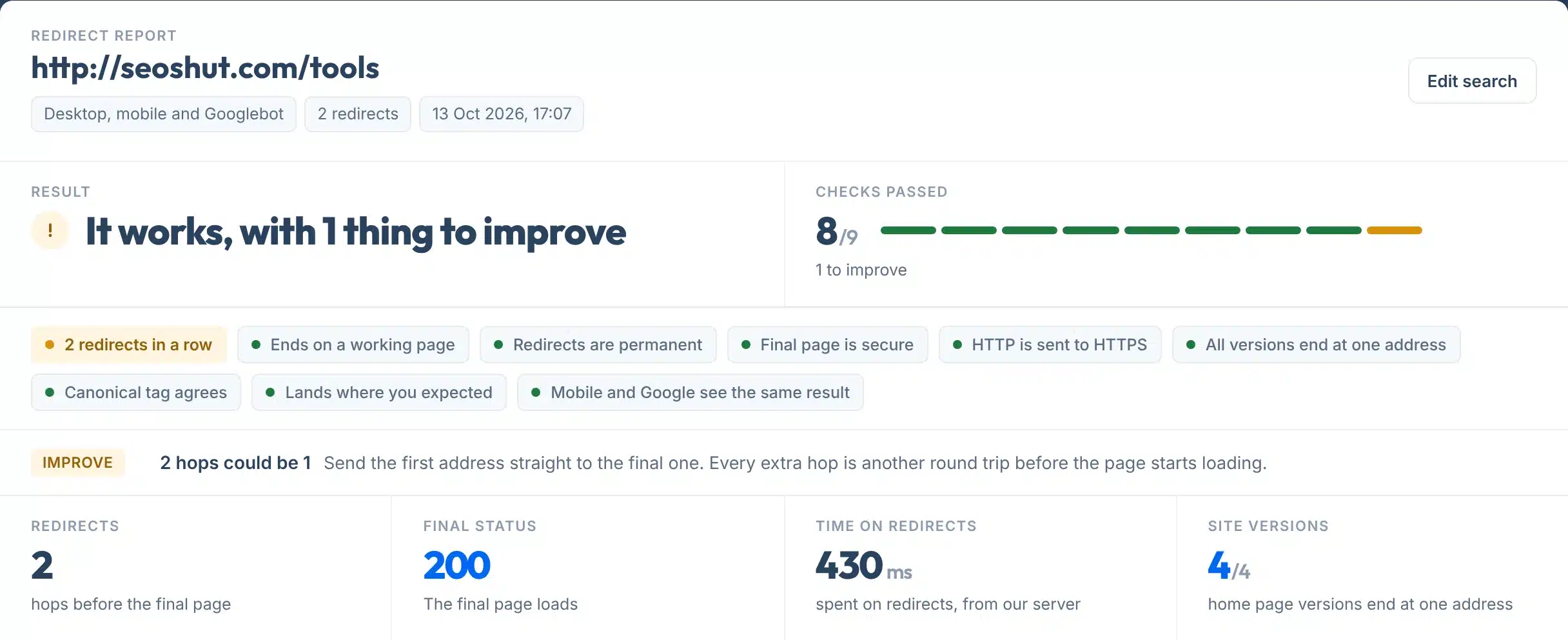
Every report opens with one plain answer: No issues found, things to improve, or problems to fix. Up to nine checks sit under it, each marked green, amber or red, so you can see what is fine without reading the detail. Anything that needs attention is explained in one line right there.
Use it after you move a page, change a domain, switch to HTTPS, or when a link does not land where you expect.
A live check of seoshut.com/tools, typed without https or the closing slash: 2 redirects, then a page that loads.
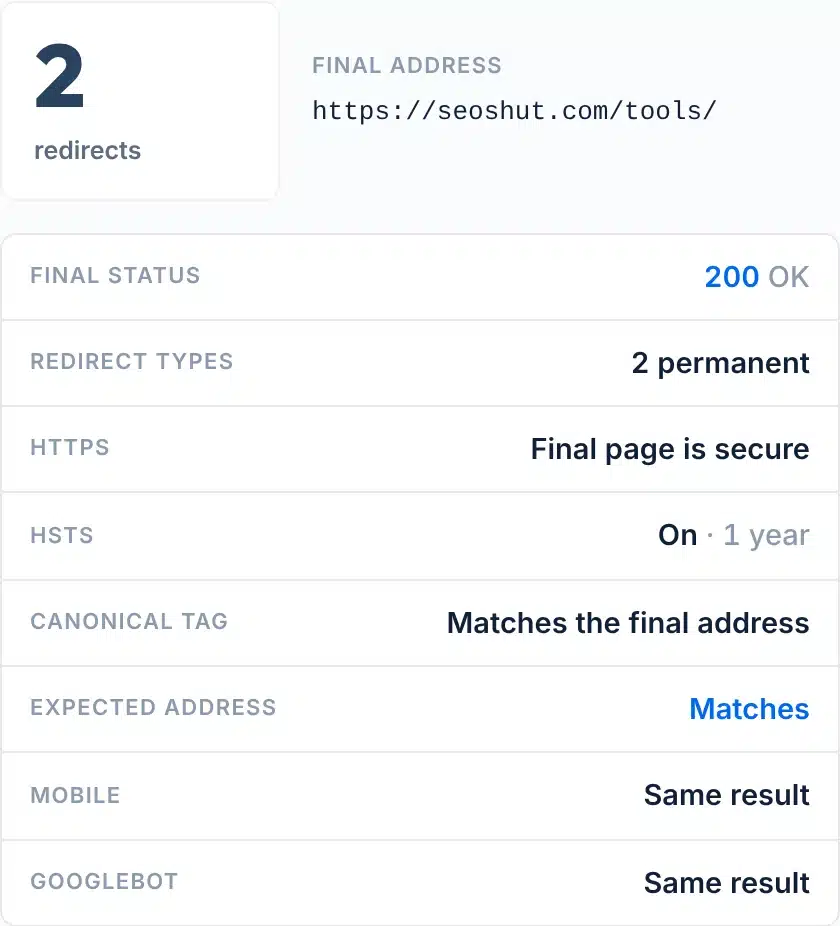
How to use it
How to check a redirect
Two boxes, four small steps.
- 1Paste the address
Type or paste any page, for example yoursite.com/old-page. A short link works too.
- 2Leave out https to test the full path
An address typed without https:// starts at http://, so you also see whether your site sends visitors to the secure version.
- 3Add where it should end, if you know
Moved a page? Put the new address in Should end at, for example yoursite.com/new-page. The report tells you whether visitors really land there. Leave it empty to simply see where the address goes.
- 4Press Check redirects
The report appears below the form: the path first, then every version of your home page. Copy the link to share it.
Your report, explained
What each part of the report means
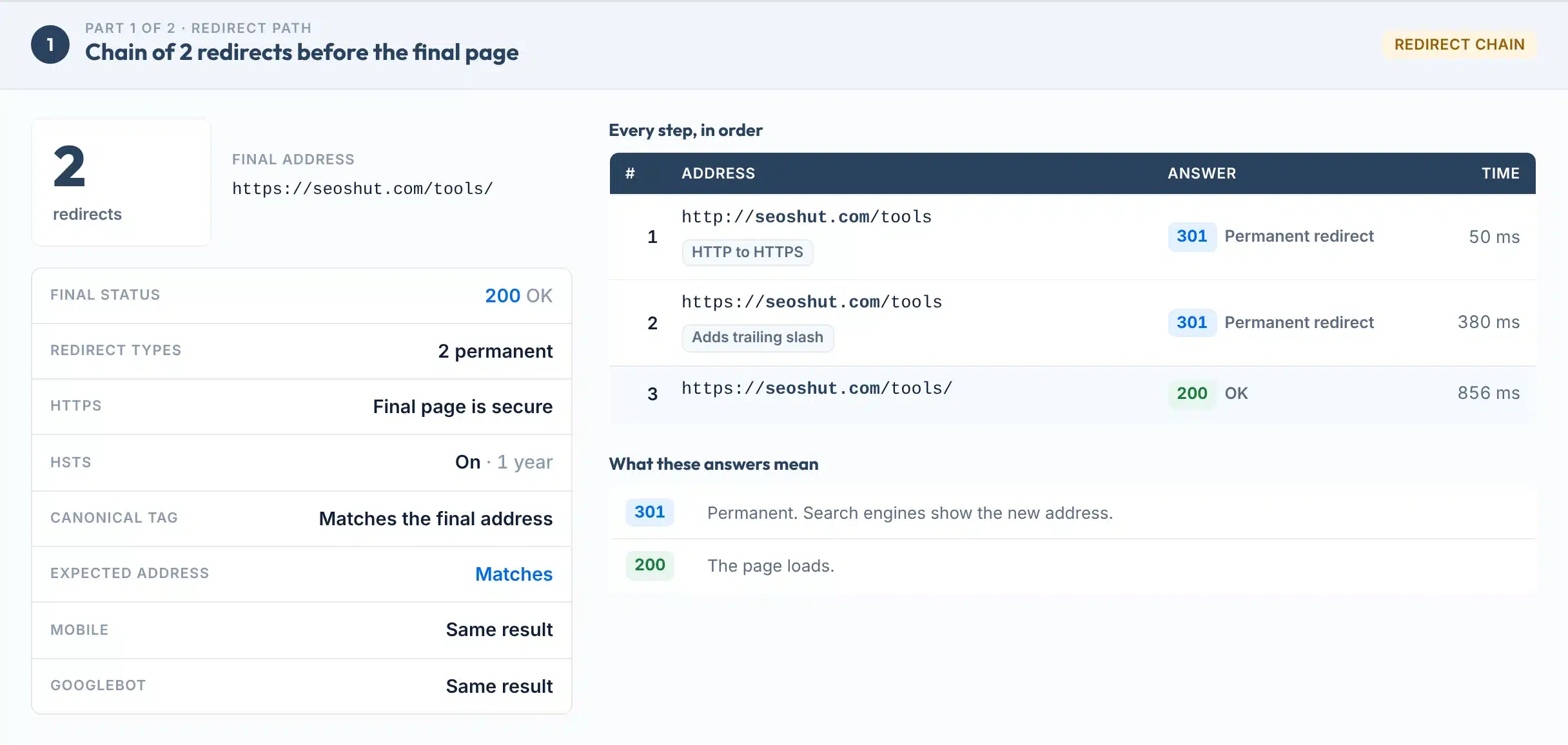
Part 1 is the path of the address you typed. Here is a real one, with each part numbered.
 12345
12345- 1The answer in one line
A plain sentence that says what happened: no redirect, one redirect, a chain, an error page or a loop.
- 2Redirects and final address
How many hops it took and the exact address a visitor ends on.
- 3The facts behind the result
The final status code, redirect types, HTTPS, HSTS and the canonical tag, then whether the address matches the one you expected and whether a mobile browser and Googlebot get the same result.
- 4Every step, in order
Each address, the answer it gave, what changed (HTTPS, www, a slash, a new path or domain) and the time it took from our server.
- 5What these answers mean
A short key for the status codes that appear in your path, so you do not need to look them up.
Result labels:
Under every report: copy a link to the result, or save it as a one-page PDF. Both show when it was checked.

Part 2 of the report
Why every version should end in one place
Your home page can be reached four ways: with http or https, and with or without www. To a search engine those are four addresses until redirects say otherwise.
Google’s advice is to “pick one of those URLs as your canonical URL, and use redirects to send traffic from the other URLs to your preferred URL” (Google Search Central). It lists redirects first among its signals: “a strong signal that the target of the redirect should become canonical.”
Part 2 opens all four and marks each one: Main address, Ends here, Ends elsewhere or Check failed. A subdomain such as blog.yoursite.com is checked on http and https only.
It also reads the HSTS header, which “informs browsers that the host should only be accessed using HTTPS” (MDN). More on that in our guide to HTTPS and SEO.
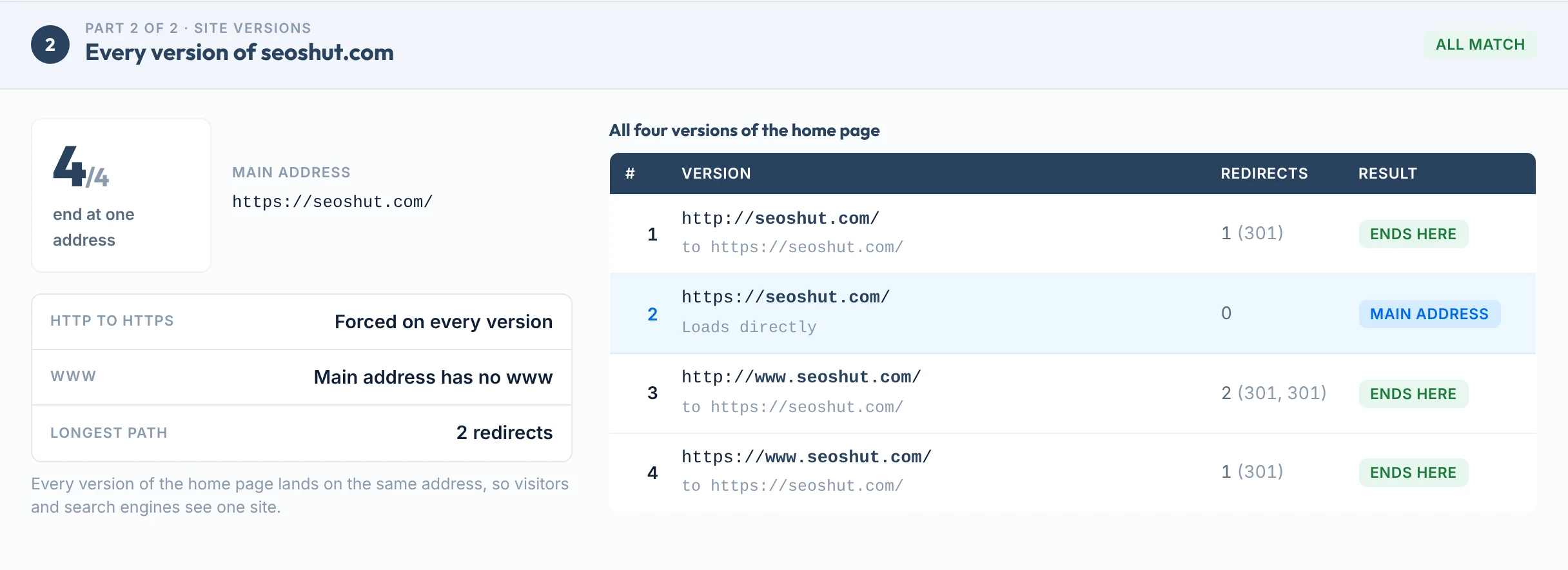
All four versions of seoshut.com end at one address, so the result is 4/4.
Redirect types
301, 302, 307 or 308: which one to use
Use a permanent redirect when the old address is not coming back, and a temporary one when it is.
| Code | Name | Type | What Google does | Form data |
|---|---|---|---|---|
| 301 | Moved permanently | Permanent | Shows the new address in results. A strong signal that the new address is the main one. | May switch a POST to a GET |
| 308 | Permanent redirect | Permanent | Treated the same as a 301. | Keeps the method |
| 302 | Found | Temporary | Keeps showing the old address in results. A weak signal. | May switch a POST to a GET |
| 307 | Temporary redirect | Temporary | Treated the same as a 302. | Keeps the method |
| 303 | See other | Temporary | Treated as a temporary redirect. | Always follows with a GET |
| Meta refresh | In the page’s HTML | Depends on the delay | Instant counts as permanent, delayed as temporary. | Runs in the browser |
Sources: Google, Redirects and Google Search; Google, HTTP status codes; RFC 9110; MDN.
Example: one old link, three stops
An illustration, not a real site. One rule from the first address to the last would replace all three hops.
Do redirects lose ranking power?
Google’s site move guide says “301 and other permanent redirects don’t cause a loss in PageRank” (Google Search Central).
Server redirect or JavaScript?
Google says a server-side redirect “has the highest chance of being interpreted correctly” and to use JavaScript redirects only if you cannot do server-side or meta refresh redirects (Google).
Redirect chains
How many redirects is too many?
One is fine. Past that, each extra hop costs time, and long chains can stop being followed at all.
What Google says
“By default, Google’s crawlers follow up to 10 redirect hops” (Google). For site moves it advises to “keep the number of redirects in the chain low, ideally no more than 3 and fewer than 5,” because chaining “adds latency for users” (Google).
What it costs visitors
Chrome’s Lighthouse documentation says a page fails its redirect audit “when it has two or more redirects,” and that each extra trip “can delay the loading of the resource by hundreds of milliseconds” (Chrome for Developers).
How long to keep a redirect: Google says to keep redirects “for as long as possible, generally at least 1 year” (Google). Our step-by-step guide covers how to fix redirect chains.
Limits
What this tool can’t see
If your browser shows something different, one of these is usually why.
Use it to
- Follow any address to its final page, hop by hop
- See whether a redirect is permanent (301, 308) or temporary (302, 303, 307)
- Catch chains, loops and redirects that end on an error page
- Confirm that http, https, www and non-www all end at one address
- Confirm an old address lands on the new page you meant
- Share a dated report with a developer or a client
It won’t show
- JavaScript redirects. We read HTTP redirects and meta refresh. A redirect that only runs in a browser’s JavaScript will not show.
- Redirects that depend on the visitor. Rules based on country, cookies or login can send your visitors somewhere different from our server.
- Sites that block tools. Some firewalls answer automated requests with 403 or a challenge page. When that happens the report says so.
- Real Googlebot. The Googlebot comparison sends Google’s crawler name from our server. It is not a visit from Google, and some firewalls block it. When that happens the report says “Blocked by the site” and does not count it.
- Every page on your site. Part 2 tests the home page versions. Other pages are checked one address at a time.
- Bulk lists. One address per check. There is no upload for hundreds of URLs.
Next steps
What to do with your result
Your next step, by result
Nothing to change. If you expected a redirect here, the rule is not live yet or does not match this exact address.
This is the clean result. Check that it is a 301 or 308 if the move is permanent, then update your own links to point at the final address.
Point the first address straight at the last one. The usual cause is one rule for HTTPS, another for www and a third for the new page.
The redirect works but the destination does not. Send it to a page that loads, then confirm Google can index that page.
Two rules are sending visitors back and forth. Look for a plugin, a server rule and a CDN setting that each try to fix the same thing.
Choose one main address and redirect the other versions to it. Then make sure the canonical tag on the page names that same address.
Time spent on redirects is added before the page starts to load. Remove hops first, then measure the page itself.
Moving a site or cleaning up old redirects?
Our team plans and checks redirects for businesses in the US and UK, so rankings survive the move.
FAQs
FAQs
What is a redirect checker?
A redirect checker follows a web address and shows every redirect on the way to the final page. For each step you see the status code, such as 301 or 302, and where it points next. It answers one question quickly: when someone opens this address, where do they really end up, and how many hops does it take?
How do I check if a URL redirects?
Paste the address into the box above and press Check redirects. The report lists every step in order with its status code, the final address and the final status. Type the address without https to start from http, which also shows whether your site sends visitors to the secure version.
What is the difference between a 301 and a 302 redirect?
A 301 is permanent and a 302 is temporary. Google says permanent redirects show the new address in search results, while temporary redirects keep showing the old one. It calls a 301 a strong signal and a 302 a weak signal that the new address should be used. Use a 301 when the old address is not coming back.
What are 307 and 308 redirects?
They are the stricter versions of 302 and 301. A 307 is temporary and a 308 is permanent, and both keep the request method, so a submitted form is not turned into a plain page request. Google’s documentation treats a 307 as equivalent to a 302 and a 308 as equivalent to a 301.
How many redirects is too many?
Keep it to one where you can. Google’s crawlers follow up to 10 redirect hops by default, but its site move guide advises keeping chains low, ideally no more than 3 and fewer than 5. Chrome’s Lighthouse documentation says a page fails its redirect audit when it has two or more redirects.
What is a redirect chain?
A redirect chain is two or more redirects in a row: address A sends you to B, and B sends you to C. Chains often build up over time, for example one rule for HTTPS, one for www and one for a new page. Google notes that chaining redirects adds latency for users.
What is a redirect loop?
A loop is a path that returns to an address it already visited, so it never reaches a page. Browsers stop and show an error instead. It usually means two rules disagree, such as one that adds a closing slash and another that removes it. This tool marks the step where the path repeats.
Do 301 redirects hurt SEO?
A single permanent redirect to the right page does not. Google’s site move documentation states that 301 and other permanent redirects don’t cause a loss in PageRank. Problems come from long chains, loops, temporary redirects used for permanent moves, and redirects that end on an error page.
How long should I keep a redirect in place?
Google advises keeping redirects for as long as possible, generally at least 1 year, and suggests keeping them indefinitely for the sake of users. People keep following old links and bookmarks long after a move, so removing a redirect early sends them to an error page.
Why does my browser show something different from this tool?
The check runs from our server, not your device. Redirects that depend on country, cookies or login can differ, and redirects made by JavaScript are not run. Some sites also block automated requests. Results are reused for 2 minutes, so a change you just made may take a moment to appear.
Sources
- Google Search CentralRedirects and Google Search: permanent, temporary, meta refresh and JavaScript redirects
- Google Search CentralHow HTTP status codes affect Google Search: 10 redirect hops, strong and weak signals
- Google Search CentralSite moves with URL changes: chain length, PageRank, how long to keep redirects
- Google Search CentralConsolidate duplicate URLs: redirects as a canonical signal
- RFC 9110, HTTP SemanticsDefinitions of 301, 302, 303, 307 and 308
- MDN Web DocsRedirections in HTTP: how request methods are handled
- Chrome for DevelopersLighthouse: Avoid multiple page redirects
- MDN Web DocsStrict-Transport-Security (HSTS) header
More free tools
More free SEO tools
Once the redirects are clean, these check what sits behind them.
Read the guides: sitemap examples and how to make one, how to fix a 5xx server error, How to check redirects and fix redirect chains and Canonical tags, explained.