
The report
How old is that domain?
This free domain age checker asks the domain’s own registry when it was registered, then shows its exact age in years, months and days. You also see when it expires, who it is registered with, its status codes in plain English, and what the Wayback Machine has saved of its past. No signup.
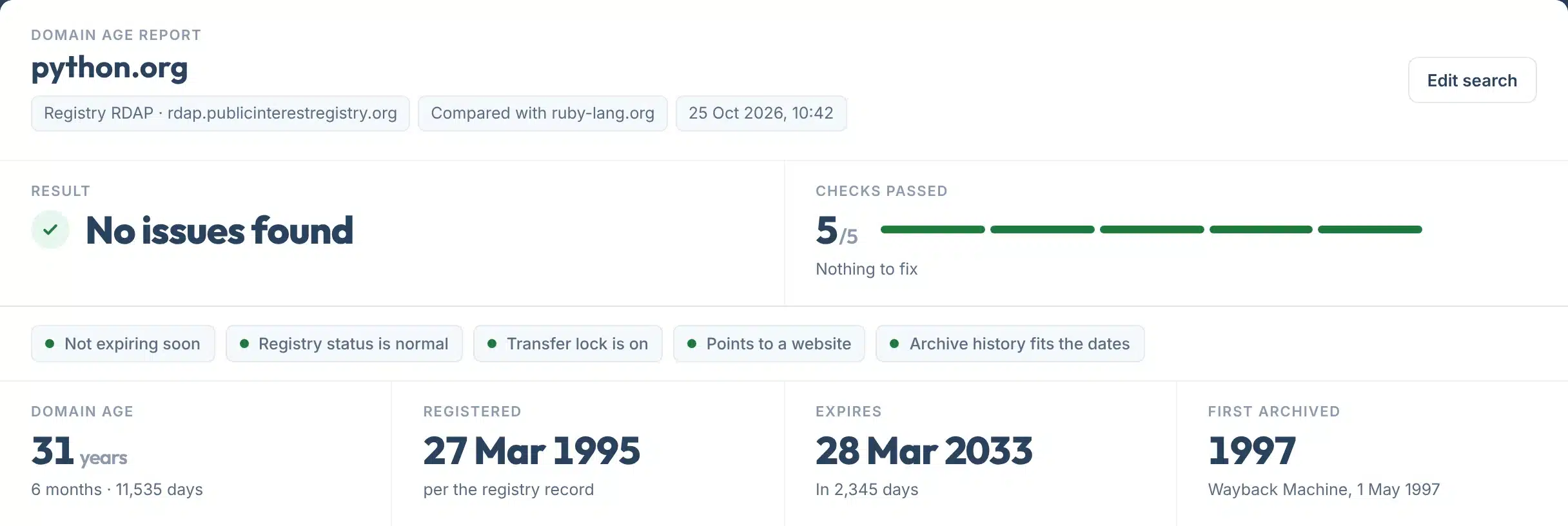
Every report opens with one plain answer, No issues found, things to check, or problems to fix, with up to five checks marked green, amber or red. Anything that needs attention gets one line saying what to do.
Add a second domain to compare, for example your site and a competitor’s, side by side.
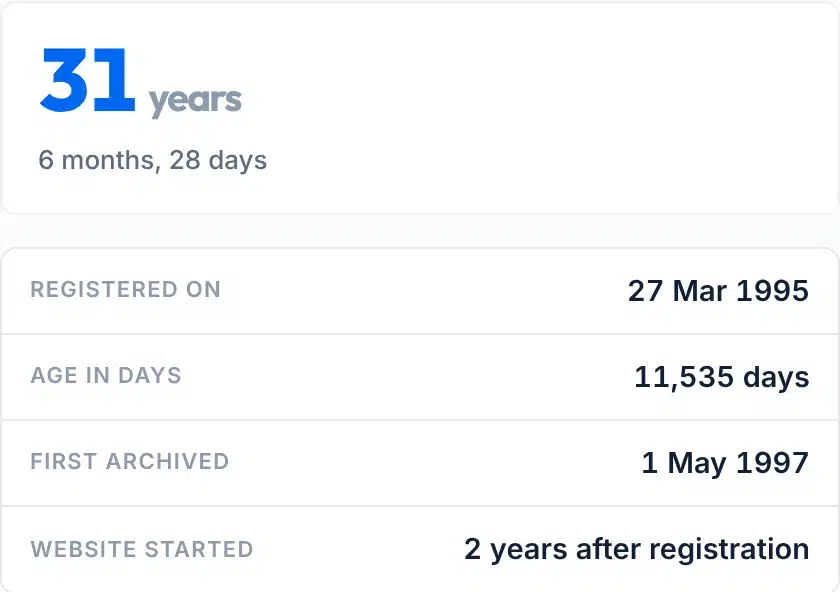
A live check of python.org: registered on 27 March 1995, 31 years ago.
How to use it
How to check a domain’s age
One box, one optional box, five small steps.
- 1Type the domain
For example yoursite.com. You can paste a full web address: we keep only the domain and drop www and the page path.
- 2Add a domain to compare, if you like
Optional. Type a competitor or a name you are thinking of buying, and both appear side by side.
- 3Press Check domain age
We ask the registry, the Wayback Machine and public DNS. It usually takes a few seconds.
- 4Read the result first
The top line says whether anything needs attention: expiry, status, transfer lock, DNS and past use.
- 5Copy the link or save a PDF
Send the report to a client or a seller, or keep it with your records.
Your report, explained
What each part of the report means
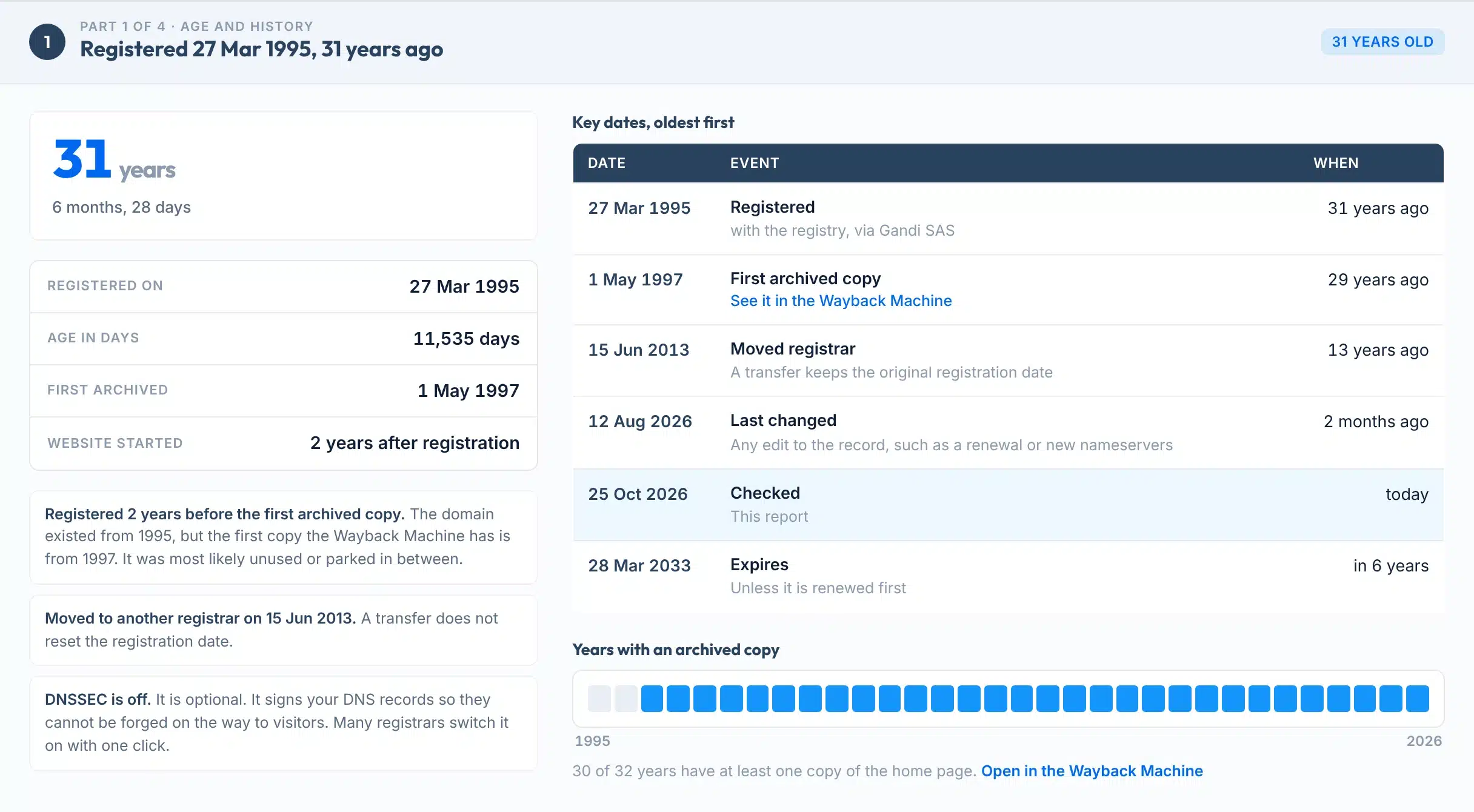
The report has up to four parts: age and history, registration and renewal, DNS today, and the comparison. Here is part 1 for python.org, with each piece numbered.
 123456
- 1Domain age
Years since the current registration, with the months and days under it. It counts from the registry’s registration date.
- 2The dates in brief
Registered on, age in days, the first archived copy, and how long after registration the website started.
- 3Notes
Things worth knowing that need no action, such as a registrar transfer or a long gap before the site went live.
- 4Key dates
Every date the registry and the archive give us, oldest first, from registration to expiry, with how long ago each was.
- 5Expiry
When the registration runs out unless it is renewed first. Within 60 days it turns amber in the result.
- 6Archived years
One block per year. Blue means the Wayback Machine saved the home page at least once that year. Grey gaps can mean the site was parked or offline.
Labels:
Features
What it checks
- Straight from the registryWe find the right registry through IANA’s RDAP list and read its record live. WHOIS is only a fallback for registries without RDAP.
- Exact ageYears, months and days, plus the total in days, counted from the registration date. Nothing is rounded or guessed.
- Domain age and website ageThe first Wayback Machine copy sits next to the registration date, so you can see when the site actually started.
- Spots earlier ownersIf the archive has copies from before the current registration, the name was most likely dropped and registered again. We flag it.
- Status codes in plain EnglishclientTransferProhibited, redemptionPeriod, pendingDelete and the rest, each explained in one line.
- Copy link or save a PDFCopy a link to the result, or save it as a one-page PDF to send on.
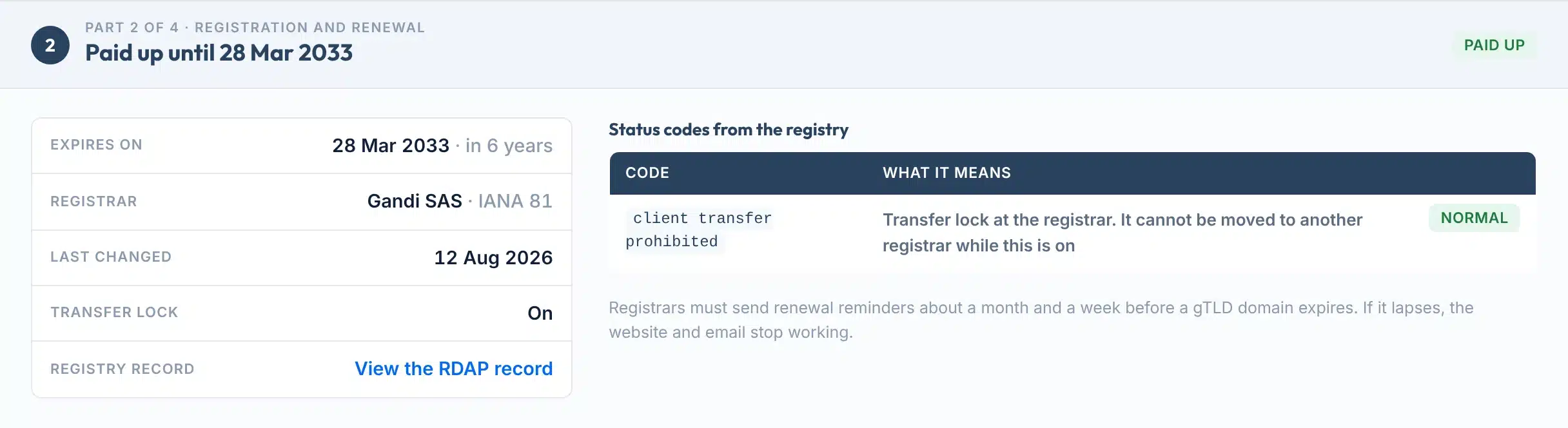
Part 2 for python.org: paid up until 2033, registrar Gandi, transfer lock on, and a link to the registry’s own record.
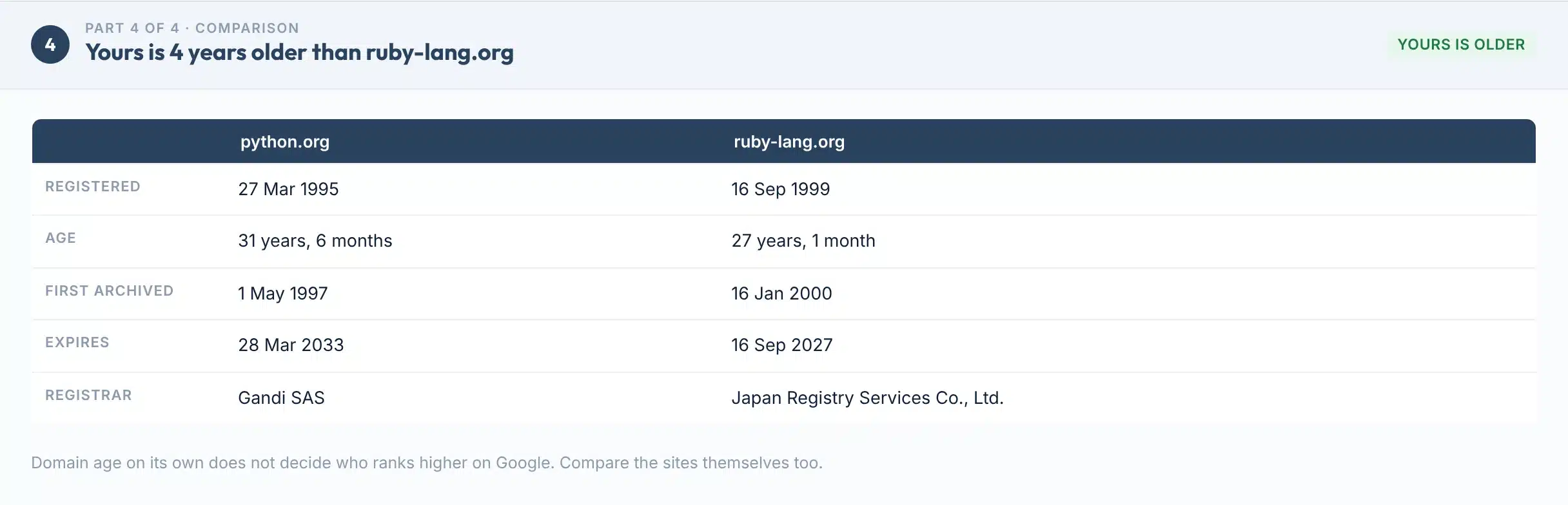
The comparison: python.org is 4 years older than ruby-lang.org.

The rules
The dates that matter, and why
What each date and code means, from ICANN and the registries, and what this tool shows for it.
| Date or field | What it means | What we show |
|---|---|---|
| Registration date | The day the current registration began. A transfer or renewal keeps it. If the name expires, is deleted and is registered again, it starts over. | Registered on, age, total days |
| Expiry date | The day the registration ends unless renewed. Registrars must send reminders about a month and a week before a gTLD domain expires. | Days left, amber within 60 days |
| Last changed | The last edit to the registry record, such as a renewal or new nameservers. | Shown in key dates |
| Status codes | Short codes the registry and registrar set. ok means no pending operations or prohibitions. clientHold means the domain does not resolve. | Each code with its meaning |
| Transfer lock | clientTransferProhibited tells the registry to refuse moves to another registrar. Most country registries do not use it. | On, off, or not used |
| First archived copy | The oldest saved copy of the home page in the Wayback Machine. Not every site is archived. | Date, archived years, earlier use |
Sources: ICANN, EPP status codes; ICANN, Expired Registration Recovery Policy; Internet Archive help.
WHOIS is now RDAP
RDAP is the newer way to read registration data, and it gives dates in a fixed format. ICANN says that for gTLDs such as .com, registries and registrars “as of 28 January 2025 … are no longer required to provide WHOIS services” (ICANN). That is why this tool asks RDAP first.
Does domain age help SEO?
Not on its own. Google says: “It’s fine to use an old domain name for a new, original site that’s designed to serve people first” (Google, March 2024). But buying an expired domain “primarily to manipulate search rankings” with low-value content breaks its spam policy (Google).
Limits
What this tool can’t do
Knowing the limits helps you trust the dates you do get.
Use it to
- See exactly when any domain was registered and how old it is
- Check when your own domain expires, and whether it is locked
- Find out if a name you want to buy was used before
- Compare your domain’s age with a competitor’s
- Read status codes without decoding them yourself
- Share a dated report with a client or a seller
It won’t
- See past owners. Personal owner details in gTLD records such as .com have been redacted for privacy since 2018, and we never show personal data.
- Show dates every registry hides. Some country registries, such as DENIC for .de, do not publish the registration date. We say so and show what they do publish.
- Count earlier registrations. Age counts from the current registration. Older use only shows through the archive dates.
- Prove a site was offline. The Wayback Machine does not save every site. A grey year means no copy, not proof of downtime.
- Check many domains at once. One domain per check, plus one to compare.
- Promise rankings. An older domain does not guarantee better positions on Google.
Next steps
What to do with your result
The date that matters most is the expiry date. A lapsed domain takes your website and email down with it, and after the grace periods anyone can register it.
For .com, the registry agreement sets an auto-renew grace period of 45 days, a redemption period of 30 days and a pending delete period of five days (ICANN, .com agreement). Every gTLD registry must offer the 30-day redemption period (ICANN). Other endings can differ.
What happens after a .com expires
Source: ICANN, .com registry agreement, Appendix 7. ICANN says the auto-renew grace period can last anywhere from 1 to 45 days (ICANN, 2018).
Your next step, by result
Turn on auto-renew, check the card on file and make sure the account email still reaches you. Renewing early keeps the original registration date.
Contact the registrar today. In the redemption period a domain can usually still be restored, for a fee. After pending delete, anyone can register it.
Ask your registrar to switch on Domain Lock. It takes a minute and stops unwanted transfers.
Open the old copies in the Wayback Machine. Look for spam, adult or unrelated content, and check the links pointing at the domain before you build on it.
A new domain is fine. Focus on a useful site, a complete Google Business Profile if you serve locals, and links from real businesses.
It may be free. Check the price at a registrar: some names are reserved or sold as premium names.
Buying a domain or rebuilding an old one?
Our team checks a domain’s history and links before you build on it, for businesses in the US and UK.
FAQs
FAQs
What is a domain age checker?
A domain age checker shows when a domain name was registered and how old it is. This one reads the date live from the domain’s own registry over RDAP, then adds the expiry date, registrar, status codes, the first copy in the Wayback Machine and what public DNS shows today.
How do I find out when a domain was registered?
Type the domain into the tool above and press Check domain age. The registration date comes straight from the registry’s record, with the age in years, months and days. You can also open the raw registry record from the report, under Registry record.
Is this domain age checker free?
Yes. It is free, with no signup and no email. Each visitor gets 40 checks a day, and each check can compare two domains. Checking the same domain again within six hours shows the saved result.
Does domain age affect SEO?
Not on its own. Google says it is fine to use an old domain for a new, original site made for people. It also says buying an expired domain mainly to manipulate rankings with low-value content is spam, called expired domain abuse. A useful site matters more than the date.
Does domain age reset when a domain is sold or renewed?
No. A renewal or a transfer to a new owner or registrar keeps the original registration date. It only starts again if the domain expires, is deleted and someone registers it fresh. That is why we compare the date with the Wayback Machine, which can show earlier use.
What is the difference between domain age and website age?
Domain age counts from when the name was registered. Website age is when a site actually went live, which can be years later if the name was parked. We show both: the registration date from the registry and the first archived copy from the Wayback Machine.
Why can’t I see the registration date or owner?
For gTLDs such as .com, personal owner details have been redacted for privacy since ICANN’s temporary specification took effect on 25 May 2018. Dates are usually public, but some country registries, such as DENIC for .de, do not publish the registration date. In that case we show the dates they do publish.
What is RDAP?
RDAP, the Registration Data Access Protocol, is the newer replacement for WHOIS. It returns registration data in a fixed, machine-readable format. ICANN says gTLD registries and registrars are no longer required to provide WHOIS since 28 January 2025, so RDAP is now the main source.
What happens when a domain expires?
It stops working, so the website and email go down. For .com, the registrar may keep it for up to 45 days of auto-renew grace. Once deleted, it enters a 30-day redemption period, when it can usually be restored for a fee, then five days of pending delete before anyone can register it.
What is the oldest domain name?
symbolics.com is the oldest .com. Verisign says it was the first .com ever registered, on 15 March 1985. You can check it in the tool above: the registry still lists 15 March 1985 as its registration date.
Sources
- ICANNRegistration Data Access Protocol (RDAP) and the end of the WHOIS requirement
- ICANNLaunching RDAP, sunsetting WHOIS (27 January 2025)
- IETF RFC 9082RDAP query format (June 2021)
- IANARDAP bootstrap registry for domain names
- ICANNEPP status codes: what they mean
- ICANNExpired Registration Recovery Policy
- ICANN.com registry agreement, Appendix 7 (grace and redemption periods)
- ICANN BlogDo you have a domain name? Here is what you need to know (December 2018)
- ICANNRegistration Data Policy (effective 21 August 2025)
- Google Search Central BlogCore update and new spam policies, including expired domain abuse (March 2024)
- Google Search CentralSpam policies for Google web search
- DENIC.de whois service: what is published
- Internet ArchiveUsing the Wayback Machine (what is not archived)
- Internet ArchiveWayback Machine APIs and the CDX server
- VerisignVerisign marks 25 years of .com (symbolics.com, 1985)
More free tools
More free SEO tools
Once you know how old a domain is, these show what it is worth.
Read the guides: how much it costs to build a website, year 1 vs year 2, How to check your website keyword rankings.