
The report
See which profiles exist
This free social profile finder checks 12 platforms for an account at your business name, live, and tells you which ones answered. Add your website and it also lists the social profiles your site links to and whether your schema names them. No signup.
It is built for business owners and the people who look after their marketing. Use it to find old or forgotten accounts, spot a profile you do not control, and make sure your website points to the right ones.
Every row shows how we know. A profile is Found only when the platform itself answers. Where a platform hides profiles from tools, the row says Check by hand and gives you the link, so nothing here is a guess.
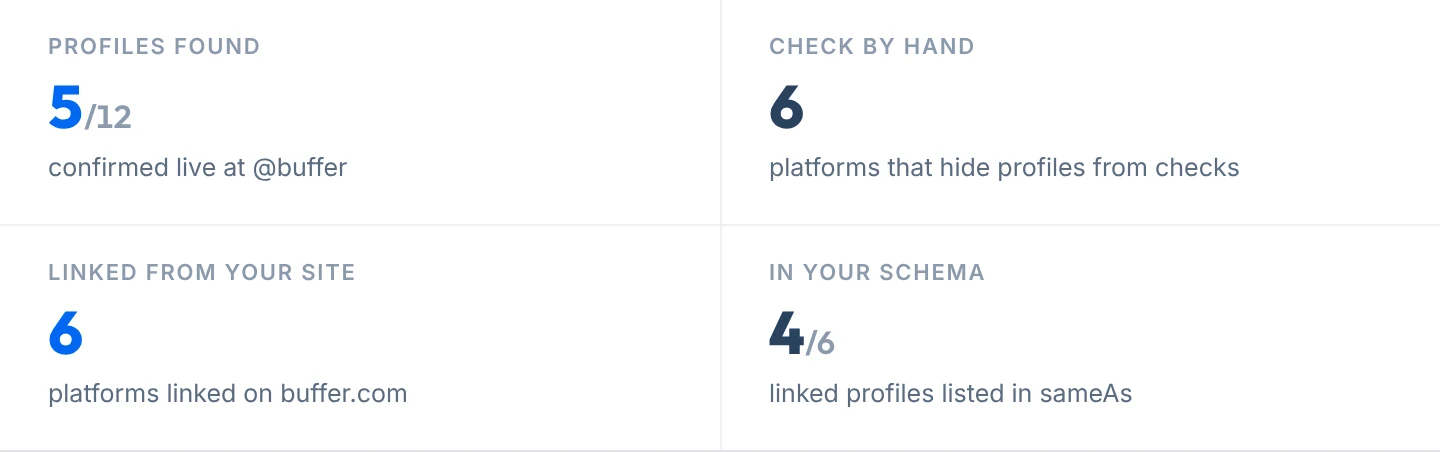
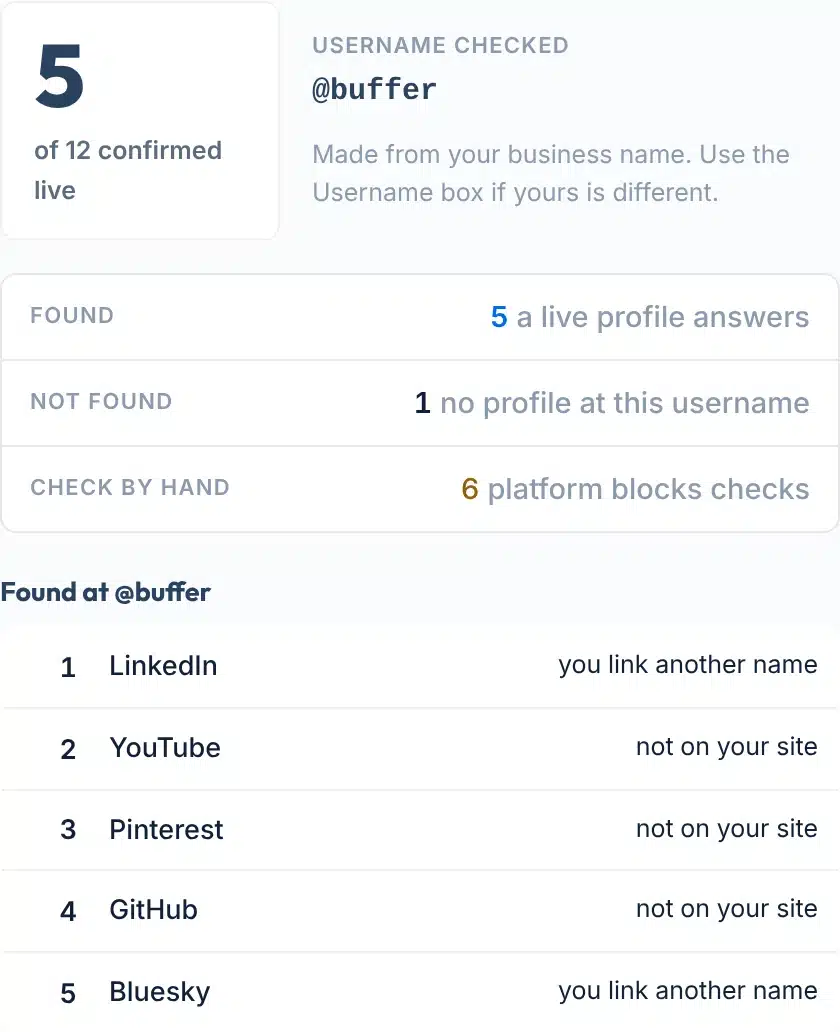
A live check for Buffer with buffer.com, 12 Oct 2026: 5 of 12 profiles confirmed at @buffer.
How to use it
How to find your social media accounts
It takes under a minute, in four steps.
- 1Type your business or brand name
Write it the way customers know it, for example Buffer. We turn it into a username by removing spaces and symbols, so Blue Door Bakery is checked as bluedoorbakery.
- 2Add your website (optional)
Enter yoursite.com and we read that page for links to your social profiles and for the sameAs list in your schema.
- 3Add a username (optional)
If your accounts use a different name than your business, such as bufferapp, type it here and that exact username is checked instead.
- 4Press Find my profiles
The report appears right below the form in a few seconds. Copy the link to share it, or download it as CSV, JSON or PDF.
Your report, explained
What each part of the result means
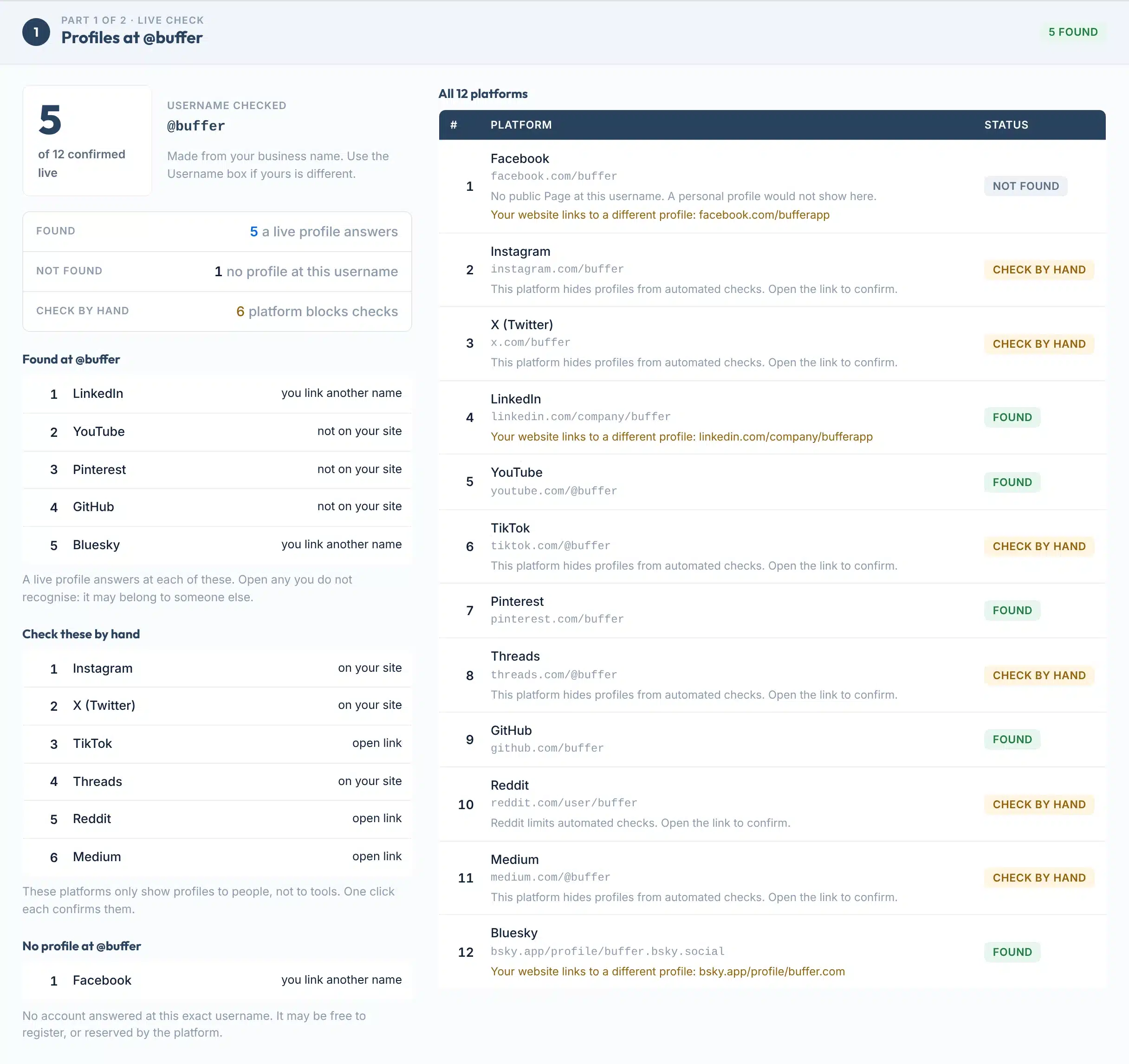
The report has two parts. Here is a real Part 1, with each area numbered.
 123456
- 1The headline count
How many of the 12 platforms confirmed a live profile at the username. It counts only what a platform answered, never a guess.
- 2Username checked
The exact username we looked for. It comes from your business name unless you typed one in the Username box.
- 3Found, not found, by hand
Three separate counts, because they mean different things. Not found is an answer. Check by hand means the platform would not tell us.
- 4Found at this username
The platforms where a profile answered, each with a link. The note on the right says whether your website links to it.
- 5Check these by hand
Platforms that only show profiles to people. Open each link once to confirm. If your site links to one, we say so.
- 6All 12 platforms
Every platform with the address we checked and its status. A warning line appears when your website links to a different profile.
Status labels:
Part 2: what your website links to
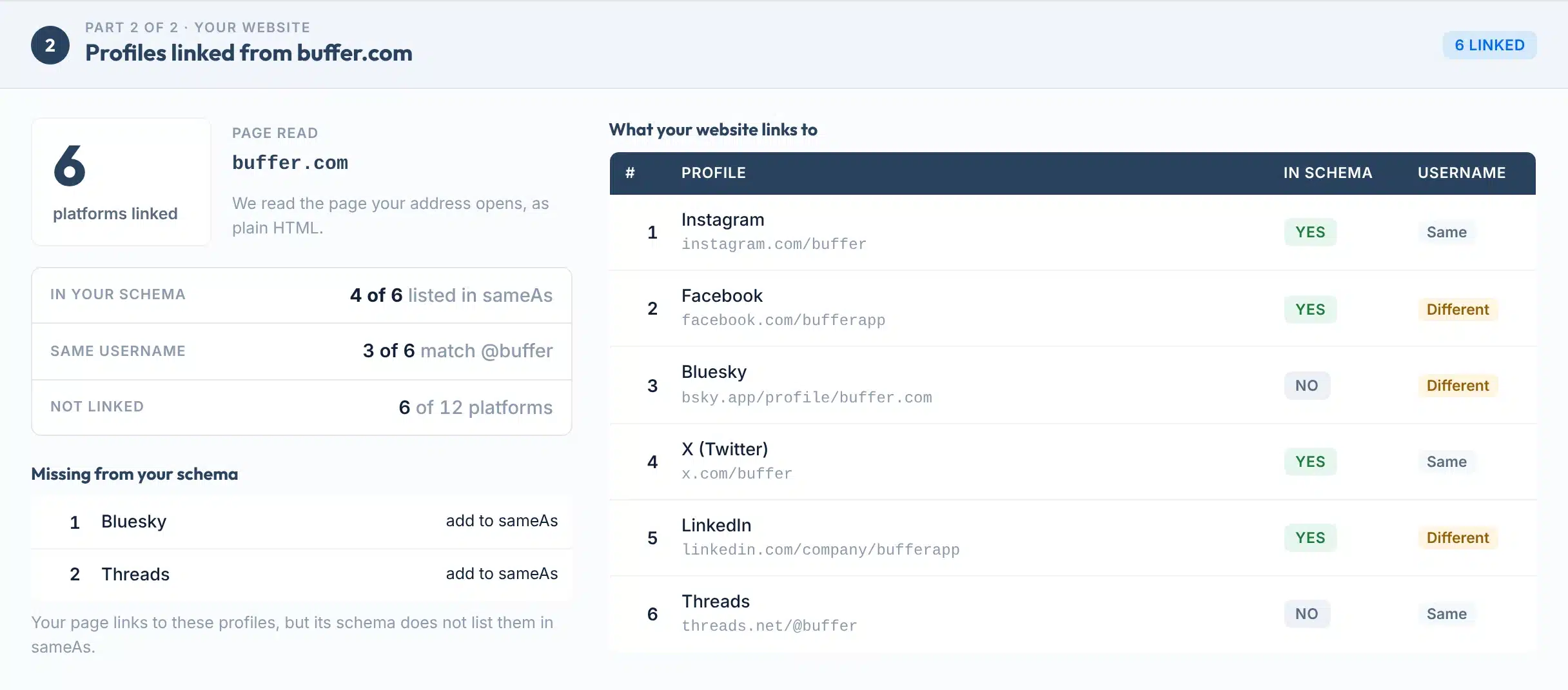
Add your website and the report gains a second part. We read the page as plain HTML and list every social profile it links to.
In schema says whether that profile is also in your schema’s sameAs list. Username says whether the linked profile uses the same username we checked in Part 1. Different is not an error. It tells you to run the check again with that username.
Missing from your schema lists profiles your page links to but your schema leaves out. That is usually a two-minute fix.
Coverage
Features
- Live checks, shown as they areEach platform is asked directly. If it answers, you see Found or Not found. If it will not answer, you see Check by hand.
- Reads your own websiteLists the social profiles your page links to, with the exact addresses.
- Checks your schemaCompares those links with the sameAs list in your schema and names what is missing.
- Flags a different usernameIf your site links to one profile and another exists at your business name, the row says so.
- Share and exportCopy a link to the result, or download it as CSV, JSON or PDF. Every report shows when it was checked.
- Free, no signupNo email, no card, no account. It looks up business profiles, not private people.
Platforms: Facebook, Instagram, X (Twitter), LinkedIn, YouTube, TikTok, Pinterest, Threads, GitHub, Reddit, Medium and Bluesky.

Accuracy
Why some rows say Check by hand
Some platforms show profiles only to signed-in people or turn automated requests away. When that happens we tell you, instead of guessing.
| Searching each app yourself | A username checker | This tool | |
|---|---|---|---|
| What you start with | One app at a time | One exact username | Your business name, plus your website if you add it |
| What a result proves | Exactly what you see, signed in | That some account uses the name, or only a link to open | That a live profile answered, and whether your site links to it |
| Platforms that block tools | You can see them, because you are signed in | Often shown as taken, free or unknown | Marked Check by hand, with the link |
| Your website and schema | Not checked | Not checked | Links and sameAs read and compared |
| Best for | A final check of one profile | Picking a new username | Auditing the accounts a business already has |
Found does not mean it is yours
Found means a live profile answers at that username. It may be your account, an old one a former employee set up, or another business with the same name. Open each one you do not recognise. If your website links to a different profile on the same platform, the report points that out.
Why tools get blocked
Platforms limit automated reading on purpose. X’s automation rules, for example, tell developers not to script the X website (X Help Center). So for Instagram, X, TikTok and Threads we give you the exact link to open, which takes one click and is always right.
Limits
What this tool can’t do
Knowing the limits helps you trust the rows it does confirm.
Use it to
- Find every account that exists under your business name
- Spot a profile you forgot about or do not control
- See which profiles your website actually links to
- Check that your schema lists the same profiles
- Share a dated result with a client or your team
It won’t
- Confirm who owns a profile. It shows that a profile exists, not who runs it.
- See inside login-only platforms. Instagram, X, TikTok and Threads rows are links for you to open. Reddit and Medium often are too.
- Search for a private person. It checks one business username. It is not a people-search tool and shows no personal data.
- Try every spelling. One username per check. Run it again for a variation such as yourbrandhq.
- Read your whole site. One page per check, as plain HTML. Links added later by JavaScript will not appear.
- Find personal profiles on Facebook or LinkedIn. Those two checks look for a business Page or company page only.
Next steps
What to do with your result
Social profiles are often the first place a customer checks that a business is real. DataReportal’s Digital 2026 Global Overview Report counts 5.66 billion social media user identities, equal to 68.7 percent of the world’s population (DataReportal).
The same name everywhere makes you easier to find and harder to copy. The shortest limit decides what fits: an X username cannot be longer than 15 characters (X), while YouTube handles and Pinterest usernames allow 3 to 30 (YouTube, Pinterest).
Keep accounts active too. TikTok says a username may be reset after 180 days of inactivity (TikTok).
Longest username allowed, in characters
Sources: X, YouTube and Pinterest help centres, checked 12 Oct 2026.
Your next step, by result
Open it and make sure you can sign in. If it is yours, link to it from your website footer and add it to your schema.
If an account is posing as your business, report it. X, TikTok, YouTube and Pinterest all have an impersonation report (X, TikTok, YouTube, Pinterest). If it is simply another business with the same name, pick a clear variation.
The username may be free. Register it on the platforms your customers use, so nobody else takes it. X says it cannot release inactive usernames (X), so a taken name can stay taken.
Open the link. If the profile is yours, you are done. If nothing is there, treat it like Not found.
Add the profile address to the sameAs list in your Organization or LocalBusiness schema. Google describes sameAs as a link to your profile page on a social media or review site (Google Search Central).
Link your real profiles from your website, then add them to your Google Business Profile. Google accepts one link each for seven platforms (Google).
Want your business to look consistent everywhere it appears?
Our team sets up profiles, listings and schema for local businesses in the US and UK.
FAQs
FAQs
What is a social profile finder?
A social profile finder looks for the social media accounts that exist under a name. This one is built for businesses: it checks 12 platforms for a profile at your business username, then reads your website to list the profiles it links to and whether your schema names them.
How do I find all the social media accounts for my business?
Type your business name into the tool above and press Find my profiles. It checks Facebook, Instagram, X, LinkedIn, YouTube, TikTok, Pinterest, Threads, GitHub, Reddit, Medium and Bluesky in one go. Add your website to see which profiles your site links to. Open any profile you do not recognise.
Is this social profile finder free?
Yes. It is free and needs no signup, email or card. Each visitor gets 20 checks a day. Repeating the same search within 6 hours shows the saved result, and you can export any report as CSV, JSON or PDF.
Why does a platform say Check by hand?
Instagram, X, TikTok and Threads only show profiles to signed-in people or turn automated requests away, so no tool can confirm them reliably. Reddit and Medium often do the same. Rather than guess, the report marks those rows Check by hand and gives you the link.
Does Found mean the account belongs to me?
No. Found means a live profile answers at that username. It could be yours, an old account set up by a former employee, or a different business with the same name. Open it to check. If your website links to a different profile on that platform, the report flags it.
Can I use it to find a person’s social media accounts?
It is not built for that. It checks one username on 12 platforms and returns only whether a public profile exists. It does not search by email, phone or photo, and it shows no personal data. It is meant for auditing a business’s own accounts.
What is sameAs and why does the report check it?
sameAs is a schema property that links your website to your profiles elsewhere. Google’s Organization documentation describes it as the URL of a page on another website about your organization, such as a social media or review site profile, and says you can provide multiple sameAs URLs.
Which social links can I add to my Google Business Profile?
Google lets you add one link each for seven platforms: Facebook, Instagram, LinkedIn, Pinterest, TikTok, X and YouTube. Google also says some Business Profiles may show social media links automatically. All seven platforms are covered by this tool.
Someone else has my business name on a platform. What can I do?
If the account pretends to be your business, use the platform’s impersonation report. If it is just inactive, options are limited: X says it cannot release inactive usernames, and GitHub does not release names for inactivity. Usually the fastest fix is a clear variation, such as adding your city.
Do social profiles help SEO?
Google’s documentation does not list social profiles as a ranking factor. Its SEO Starter Guide mentions social media promotion as a way for people to discover your site. Profiles still matter for trust: customers check them, and sameAs links help Google connect your website with your profiles.
Sources
- Google Search CentralOrganization structured data: the sameAs property (updated 8 Sep 2026)
- Schema.orgDefinition of sameAs
- Google Business Profile HelpManage social media links on your Business Profile
- Google Knowledge Panel HelpSuggesting social profiles for a knowledge panel
- Google Search CentralSEO Starter Guide: promoting your website
- X Help CenterUsername rules: 15 characters, letters, numbers and underscores
- X Help CenterInactive account policy
- X Help CenterAutomation rules
- YouTube HelpHandle naming guidelines: 3 to 30 characters
- Pinterest HelpUsername rules: 3 to 30 characters
- TikTok SupportInactive account policy: 180 days
- GitHub DocsUsername policy
- BlueskyUsing your own domain as your handle
- DataReportalDigital 2026 Global Overview Report (Oct 2025)
More free tools
More free SEO tools
Once you know which profiles exist, these help you connect them to your business.
Read the guides: Local business schema, explained and The benefits of a Google Business Profile.