
The report
Does your website match Google?
This free NAP consistency checker compares your business name, address and phone number on your own website with what your Google Business Profile shows, page by page. Type the business name and town, press the button, and the answer comes back in about 20 seconds. No signup, no email.
Every report opens with one plain line, such as No issues found or 2 problems to fix, then up to six check tags marked green, amber or red, and a one-line Fix or Improve row for each problem. Nothing is scored by guesswork: each row shows the exact text Google holds and the exact text found on your pages.
Spelling differences do not count against you. St and Street, 0113 and +44 113, brackets and dashes are all read as the same thing, which is how Google reads them too. A different number, a missing address or a wrong name in your page code is what gets flagged.
Use it on your own business before you build listings, after you move or change number, or on a client’s business before a local SEO audit.
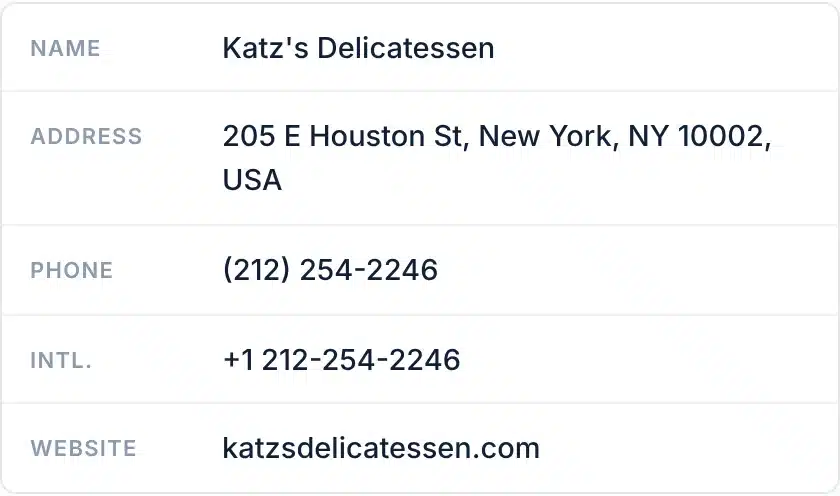
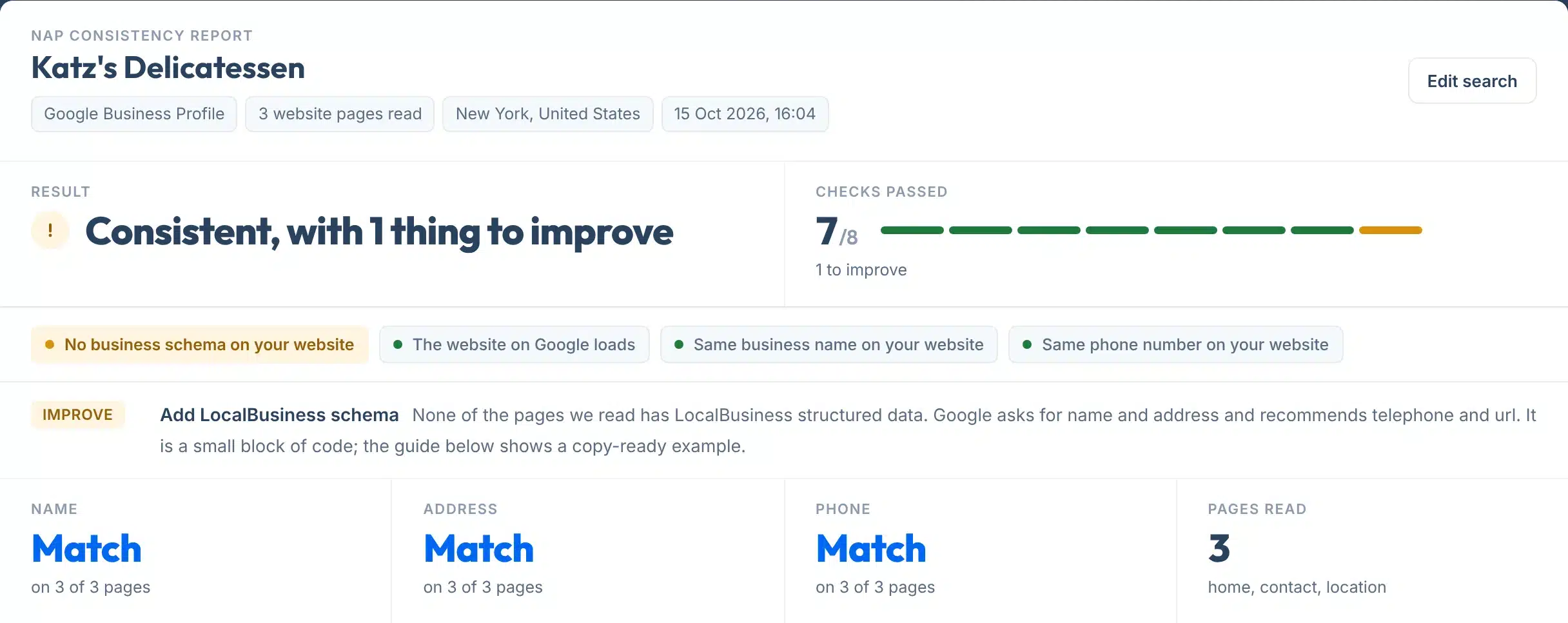
A live check of Katz’s Delicatessen, New York: name, address and phone match on all three pages read; the only thing to improve is missing business schema.
How to use it
How to check your NAP consistency
Two boxes, one button, five small steps.
- 1Type the business name
Write it the way it appears on Google Maps, for example Katz’s Delicatessen. Legal suffixes like Ltd or LLC do not matter.
- 2Add the town or postcode
This picks the right listing when the name is common. If the wrong business comes up, choose yours from the Not this business? line under the report.
- 3Leave the website box empty, unless Google has it wrong
We read the website linked from your Google profile. Type one only if that link is missing or points to the wrong site.
- 4Press Check my details
We fetch the Google record, then read your home page plus the contact, location or about page we find linked from it. Allow 10 to 30 seconds.
- 5Start with the Fix rows
Red means a real difference or something missing. Amber means it works but could be better. Copy the link to send the report to whoever edits your site.
Your report, explained
What each part of the report means
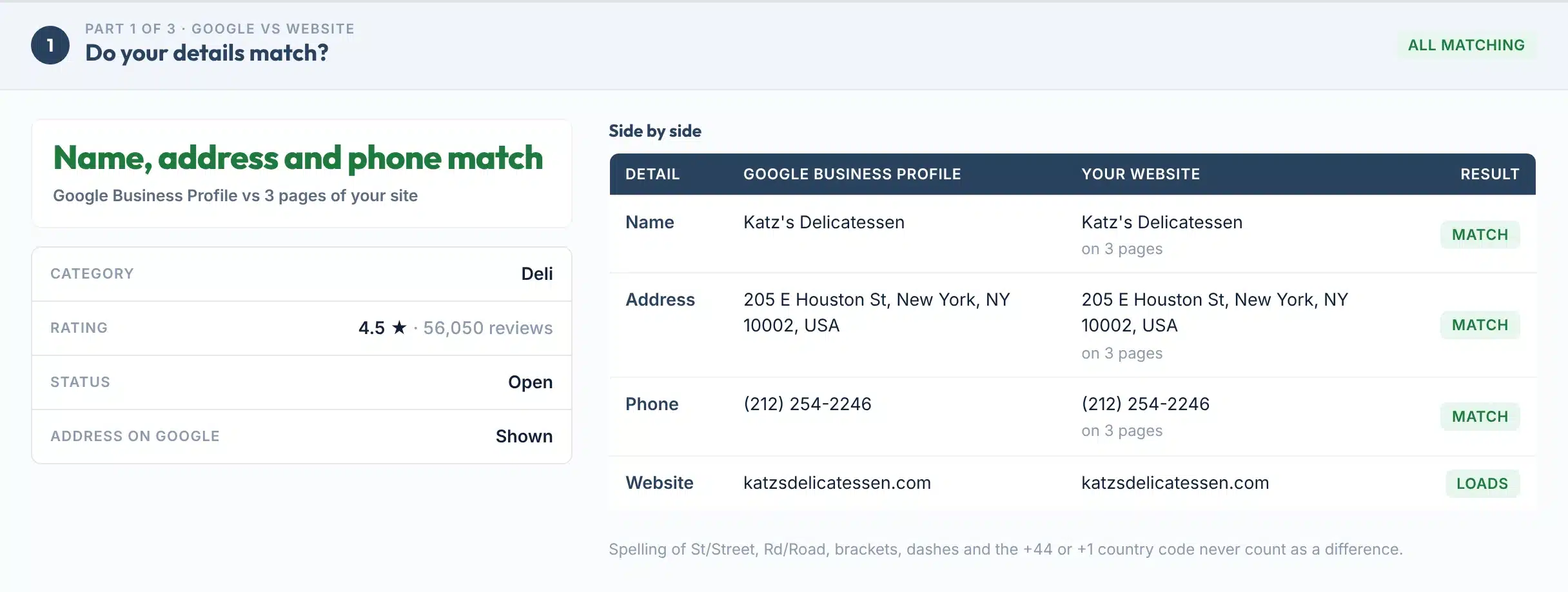
Part 1 compares Google with your site, Part 2 shows where each detail appears page by page, and Part 3 is the record to copy. Here is a real Part 1, with each piece numbered.
 123456
- 1Headline
One line for the whole part: Name, address and phone match, or how many details differ. The chip on the right says the same in one word.
- 2What Google holds
Category, rating and review count, open or closed status, and whether Google shows your street address. A hidden address is normal for a service-area business.
- 3Google Business Profile column
The name, address, phone and website exactly as Google publishes them today. This is the record every other listing should copy.
- 4Your website column
What we found on your pages, with how many pages carry it. If only part of the address appears, it says which part.
- 5Result chips
Match, Partial, Differs or Not found for each detail, judged after spelling and formatting are normalised.
- 6The matching rule
Abbreviations, brackets, dashes and country codes never count as a difference. The guide below lists exactly what is treated as equal.
Result labels:
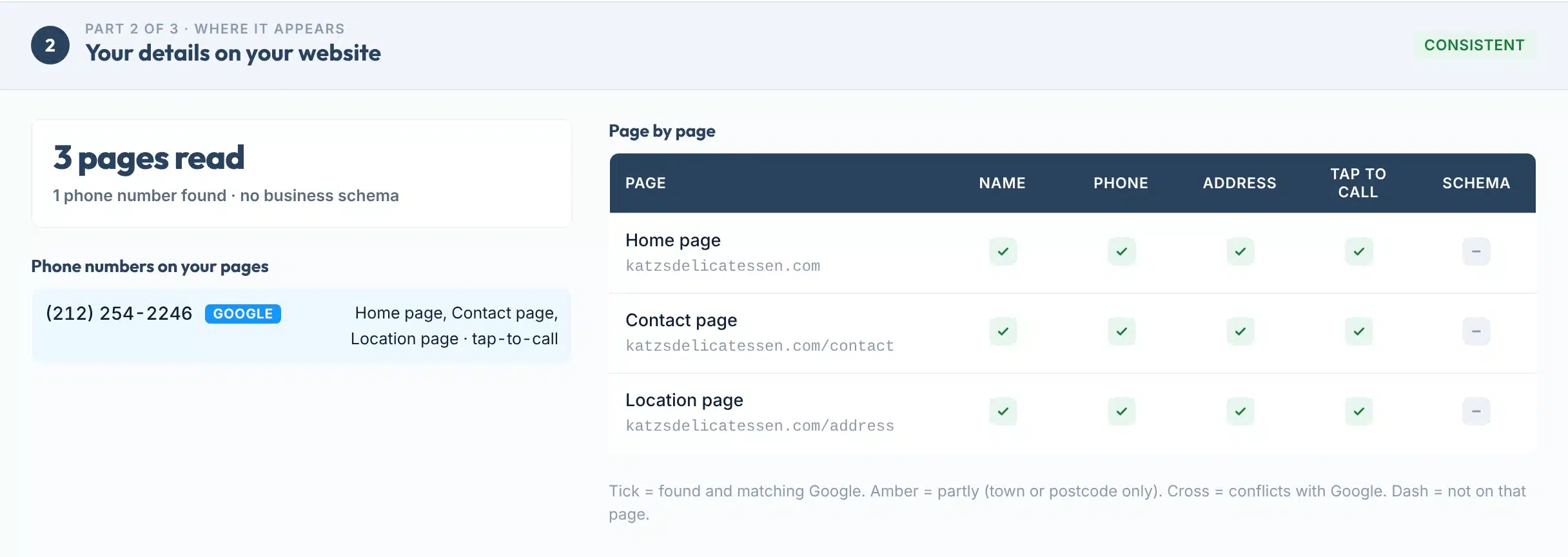
Part 2, page by page: a tick means the detail is on that page and matches Google, amber means only the town or postcode, a cross means the page code says something different, and a dash means it is not on that page at all. The tap-to-call column checks for a tel: link, the schema column for LocalBusiness structured data.
Coverage
Features
- Google vs website, side by sideName, address, phone and website from your Google Business Profile next to what your pages show, with a chip for each.
- Page by pageYour home page plus the contact, location or about page linked from it. You see which page carries which detail.
- Tap-to-call and schema checksWhether your number is a tel: link, and whether your LocalBusiness structured data agrees with Google.
- Other numbers spottedEvery distinct phone number on your pages is listed, so an old line or a tracking number cannot hide.
- Spelling-safe matchingSt and Street, +1 and (212), spaces and dashes are read as the same. Only real differences are flagged.
- Share link and one-page PDFCopy a link to the result, or save it as a one-page PDF. Every report shows when it was checked.
Works anywhere Google Maps does. The business is found through Google’s own business data, so UK, US, Canadian, Australian and most other listings work. Postcodes are matched with or without the space, and US ZIP+4 extensions are ignored.

The rules
What Google asks for, and what counts as the same
Google’s own guidelines decide what your name, address and phone should look like. This tool applies them the same way to your website.
“Your name should reflect your business’s real-world name, as used consistently on your storefront, website, stationery, and as known to customers.” No taglines, keywords, phone numbers or location words.
Google’s own acceptable and not-acceptable examples.
“Use a precise, accurate address and/or service area.” P.O. boxes, remote mailboxes and virtual offices are not eligible, and “if you’re a service-area business, you should hide your business address from customers.”
Treated as equal by this tool: USPS standard suffixes, directions and postcode spacing.
“Use a local phone number instead of a central call center helpline number whenever possible.” The number “must be under the direct control of the business”, and you can add up to two more numbers.
Treated as equal: brackets, dots, dashes, spaces and the country code.
| Detail | Google’s words | Source |
|---|---|---|
| Name | “Including unnecessary information in your business name isn’t permitted, and could result in the suspension of your Business Profile.” Legal terms like LLC or Ltd need real-world proof (signage, invoices) to be included. | Google guidelines |
| Address | “Do not include information in address lines that doesn’t pertain to your business’s physical location, like URLs or keywords.” Suite or mailbox numbers go in Address Line 2. | Google guidelines |
| Phone | “Premium phone numbers are not acceptable regardless of the rate charged to the caller.” Formatting is automatic: “You don’t have to add country code, parentheses, and dashes to phone numbers.” | Google, Add your phone number |
| Website | “Enter the full URL, which includes http:// or https://.” Do not use URLs that “redirect or refer users to landing pages… other than those of the actual business, including pages created on social media sites.” | Google, Edit your profile |
| Duplicates | “You can have only one Business Profile for each business.” A duplicate “won’t show on Google Search or Maps.” If you appeal a suspension, “check that the business name and address match the profile.” | Google, Duplicate profiles · Suspensions |
| Your website matters | Google says profile information “is compiled from a variety of sources” including “crawled web content (e.g., information from a business’ official website)”, and a suggested update may be published if it is “supported by other publicly available information, such as your business website.” | Google, How info is sourced · Google updates |
Why the schema check is in the report
Google’s LocalBusiness structured data documentation lists name and address as required properties and telephone, url, geo and openingHoursSpecification as recommended, and says to “include the country code and area code in the phone number” (Google Search Central). When the code on your page says one number and your profile says another, search engines read both. The example on the right is the minimum block; change the type to the closest LocalBusiness sub-type Google lists.
<script type="application/ld+json">
{
  "@context": "https://schema.org",
  "@type": "Plumber",
  "name": "Joe's Plumbing",
  "address": {
    "@type": "PostalAddress",
    "streetAddress": "12 Park Row",
    "addressLocality": "Leeds",
    "postalCode": "LS1 5HD",
    "addressCountry": "GB"
  },
  "telephone": "+44 113 496 0000",
  "url": "https://www.joesplumbing.co.uk/"
}
</script>
Limits
What this tool can’t do
Knowing the limits helps you trust the result you do get.
Use it to
- Compare your Google Business Profile with your own website in one run
- Find the page that still shows an old number or address
- Check that your phone number is tap-to-call on mobile
- See whether your LocalBusiness schema agrees with Google
- Get the exact record to copy to Apple, Bing, Yelp and Facebook
- Share a dated report with a client or a web developer
It won’t
- Scan directories. It does not read Yelp, Bing, Apple Maps, Facebook or data aggregators. Part 3 of the report links to each one so you can check them by hand, and our Citation Finder shows where listing pages exist.
- Find duplicate Google profiles. Only the one profile matched is compared. If two profiles exist, Google’s duplicate rules apply and you should merge them in your Business Profile.
- Read a blocked website. Some firewalls refuse automated requests. The report then says Blocked by the site and leaves those rows unjudged rather than guessing.
- See text drawn by JavaScript. Details that appear only after scripts run, such as a phone number inside a chat widget, are not visible to us or to most crawlers. Put the details in plain page text.
- Judge a hidden address. A service-area business hides its street address on Google, so there is nothing to compare. The address check is marked not checked, not failed.
- Promise a ranking change. Google says it uses relevance, distance and popularity. Consistent details remove a reason to distrust you; they do not by themselves move you up.
Next steps
What to do with your result
Wrong details cost customers before they cost rankings. In BrightLocal’s Local Citations Trust Report, a March 2018 survey of 1,025 US consumers, 80% said they “lose trust in local businesses if they see incorrect or inconsistent contact details or business names online”, 36% had called a wrong number in the past year, and 22% had visited the wrong location because the online address was wrong (BrightLocal).
On the ranking side, Google says “businesses with complete and accurate info are more likely to show up in local search results” (Google). In Whitespark’s 2026 Local Search Ranking Factors survey of 47 local SEO experts, citation signals carry 6% of the weight for the map pack and 13% for AI search visibility, and “HTML NAP Matching GBP NAP” ranks 15th of 187 factors for the map pack (Whitespark). The survey is expert opinion, not a Google statement, so treat the weights as a guide.
How consumers react to wrong business details
Source: BrightLocal Local Citations Trust Report, 1,025 US consumers, March 2018.
Your next step, by result
Keep it that way. Copy the Part 3 record to Apple Business, Bing Places, Yelp and your Facebook Page, and re-check after any move, rebrand or new number.
Decide which number is right, then change the other one the same day. If you use a tracking number on the site, show the real local number too, and keep the real number on Google.
Put the full address, exactly as Google shows it, in the footer so it is on every page, and on the contact page with a map. Service-area business? Show the town you serve instead.
Usually the postcode is missing or the street is written differently. Write it once, Google’s way, and paste that everywhere.
Add the LocalBusiness block from the rules section above, with the same name, address and phone as Google. Then test it.
Add the full address with https:// to your Business Profile, or fix the site. A profile with no working website loses customers and gives Google nothing to confirm your details against.
Want someone to fix your listings, not just measure them?
Our team works on Google Business Profiles and local rankings every day, for businesses in the US and UK.
FAQs
FAQs
What is NAP consistency?
NAP stands for name, address and phone number. NAP consistency means those three details are the same everywhere a business appears online: its Google Business Profile, its own website, Apple Maps, Bing, Yelp, Facebook and directories. Spelling differences such as St and Street do not break consistency; a different number or an old address does.
How do I check my NAP consistency?
Type your business name and town into the tool above and press Check my details. It fetches your Google Business Profile, reads your home page and the contact or about page linked from it, and compares the name, address and phone on each. The report opens with one line, such as No issues found, and a Fix row for anything that differs.
Is this NAP checker free?
Yes. It is free and needs no signup or email. Each visitor gets 10 checks a day. Your Google record is reused for a week, so repeat checks of the same business are not counted again, and your pages are read fresh each time after a 10-minute pause.
Does NAP consistency affect local rankings?
Google says businesses with complete and accurate info are more likely to show up in local results, and that local ranking is based on relevance, distance and popularity. In Whitespark’s 2026 survey of 47 local SEO experts, citation signals carry 6% of the weight for the map pack and 13% for AI search visibility. Consistency removes doubt; it is not a ranking lever on its own.
Does St versus Street count as an inconsistency?
No. This tool expands standard abbreviations, ignores brackets, dots, dashes and spaces, and treats +44 113 and 0113 as the same number, so formatting never shows as a difference. Google’s profile editor formats phone numbers automatically too. What matters is a different number, a different street or postcode, or a different name.
What if the wrong business comes up?
Businesses with common names can be mixed up. Under the report a line says Not this business? with the other matches Google returned. Click yours and the check runs again for that listing. Adding the postcode instead of the town usually finds the right one first time.
Why does it say my address is hidden?
Google lets service-area businesses hide their street address, and its guidelines say they should. When Google publishes no street, there is nothing to compare, so the address check is marked not checked rather than failed. Your website should still name the towns you serve.
What is LocalBusiness schema and do I need it?
It is a small block of code on your page that tells search engines your business name, address, phone and opening hours in a fixed format. Google’s documentation lists name and address as required and telephone and url as recommended. The tool flags a missing block as something to improve and a block that disagrees with Google as something to fix.
Can it check Yelp, Bing, Apple Maps or Facebook?
No. It compares Google and your own website only, because those are the two records it can read reliably. Part 3 of the report gives the exact details to copy and links to each of those four listings so you can check them by hand. All four are free to claim.
How accurate is it?
The Google side is Google’s own business data, read live. The website side is the visible text and code of up to three pages, read as a browser would, so details drawn by JavaScript or hidden behind a firewall can be missed and are reported as not found or blocked, never as a pass. Every row shows the exact text it compared, so you can verify any result in seconds.
Sources
- Google Business Profile HelpGuidelines for representing your business on Google (name, address, phone, website)
- Google Business Profile HelpTips to improve your local ranking: relevance, distance, popularity; complete and accurate info
- Google Business Profile HelpEdit your Business Profile: website URL, up to two extra phone numbers
- Google Business Profile HelpHow Google sources information, including your official website
- Google Business Profile HelpGoogle updates to your profile, published when supported by your website
- Google Business Profile HelpDuplicate profiles and suspensions
- Google Search CentralLocalBusiness structured data: required and recommended properties
- Whitespark2026 Local Search Ranking Factors (published Nov 2025, 47 experts, 187 factors)
- BrightLocalLocal Citations Trust Report, 1,025 US consumers, March 2018
- USPS Publication 28Standard street suffix abbreviations (St, Ave, Ste)
- ITU-T E.164International numbering: country code plus national number, up to 15 digits
- NANPA and OfcomUS 10-digit NXX-NXX-XXXX format; UK geographic numbers 01 and 02
- Apple, Microsoft, Yelp, MetaApple Business, Bing Places for Business, Yelp for Business and Facebook Pages are free to claim
More free tools
More free SEO tools
Once your details match, these check the rest of your local presence.
Read the guides: how to do local SEO for a small business, week by week, local SEO for multiple locations: keep every branch consistent, website header examples and what to put in yours, Local SEO citations explained and How a local SEO heat map works.