
The result
Your review link, in seconds
This free Google review link generator finds your business on Google and gives you the direct link that opens your review box, a QR code and a printable counter sign. Type your business name and town. No Place ID, no sign-up, no email.
Customers tap the link or scan the code and land straight on the stars, instead of searching for you on Google Maps first. You also see your rating, how many 5-star reviews it takes to reach the next step, and how your review count compares with similar businesses nearby.
It reads Google’s own business data, so the listing, rating and review count are the ones your customers see today.

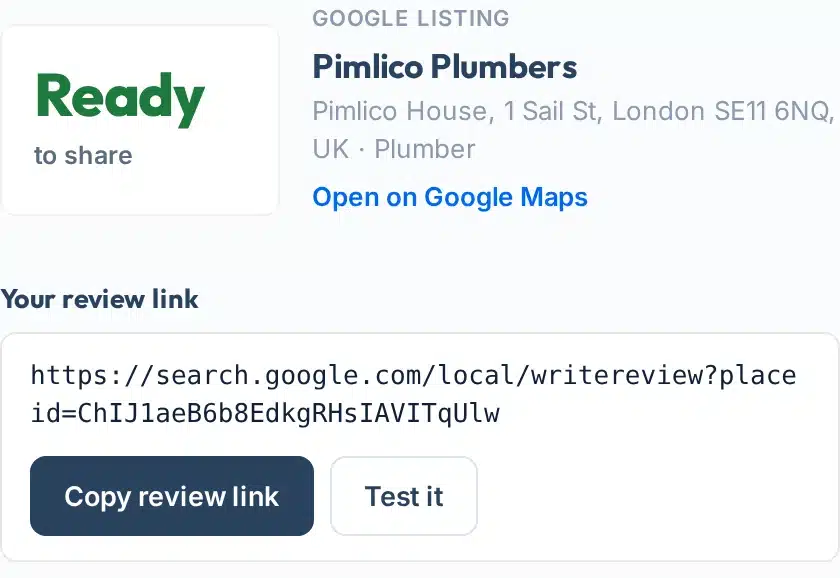
A real lookup for Pimlico Plumbers in London: the listing Google holds and the review link, ready to copy and test.
How to use it
How to get your Google review link
Five steps, about a minute.
- 1Type your business name
Use the name exactly as it shows on Google Maps, for example Pimlico Plumbers. You can also paste a Place ID that starts with ChIJ.
- 2Add your town, city or postcode
This picks the right branch when many businesses share a name. A postcode works best, for example 92126 or SE11.
- 3Press Get my review link
The tool finds your listing. If the wrong place comes first, choose yours under Not this business?
- 4Test the link on your phone
Press Test it. It should open the review box with the stars for your business.
- 5Share it, print it, track it
Copy the link into receipts and thank-you emails, download the QR code or the sign, and use the calculator to set a target.
Your result, explained
What each part of the result means
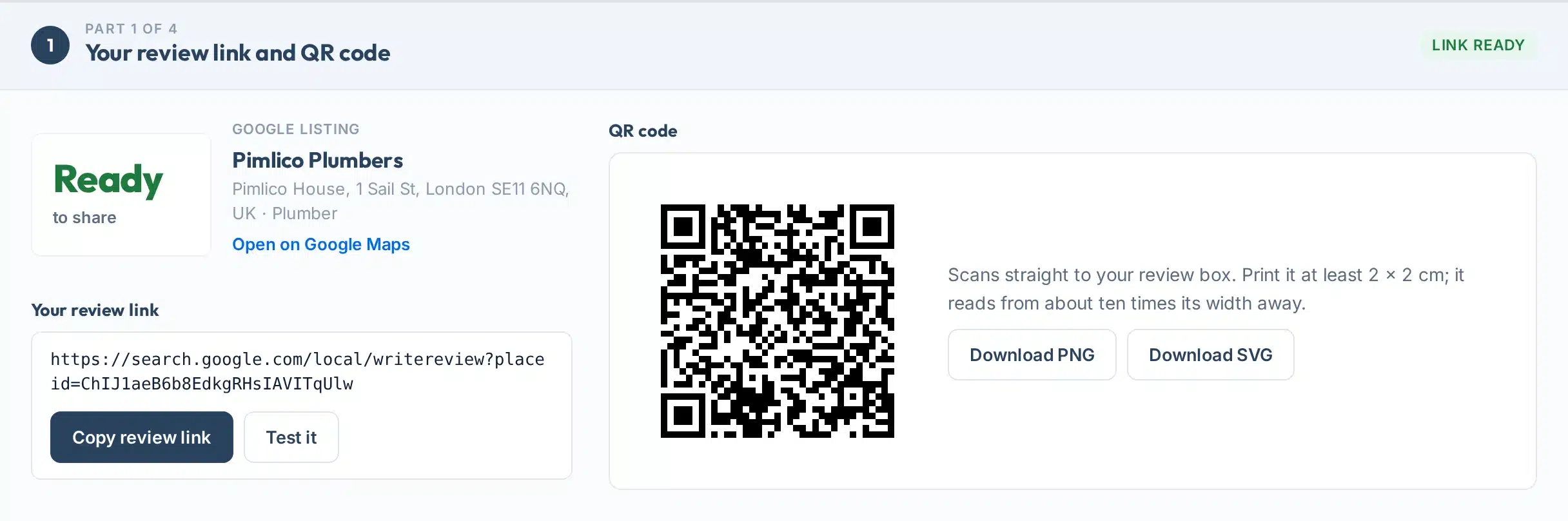
The result has up to four parts. Here is part one, the link and QR code, with each piece numbered.
 123456
- 1Google listing
The business Google holds for your name and town: name, address and category. Open it on Google Maps to be sure it is yours.
- 2Open on Google Maps
Opens the same listing on Google Maps, so you can check the address, photos and reviews before you share anything.
- 3Your review link
The direct address of your review box. It is built from the Place ID Google gives every listing.
- 4Copy and test
Copy the link in one tap, then use “Test it” to open the review box so you can check it on your phone before you share it.
- 5QR code
Made in your browser from the same link. Print it at least 2 × 2 cm; a code reads from about ten times its width away.
- 6PNG and SVG
PNG for documents and social posts, SVG for printers and sign makers because it stays sharp at any size.
The other parts:
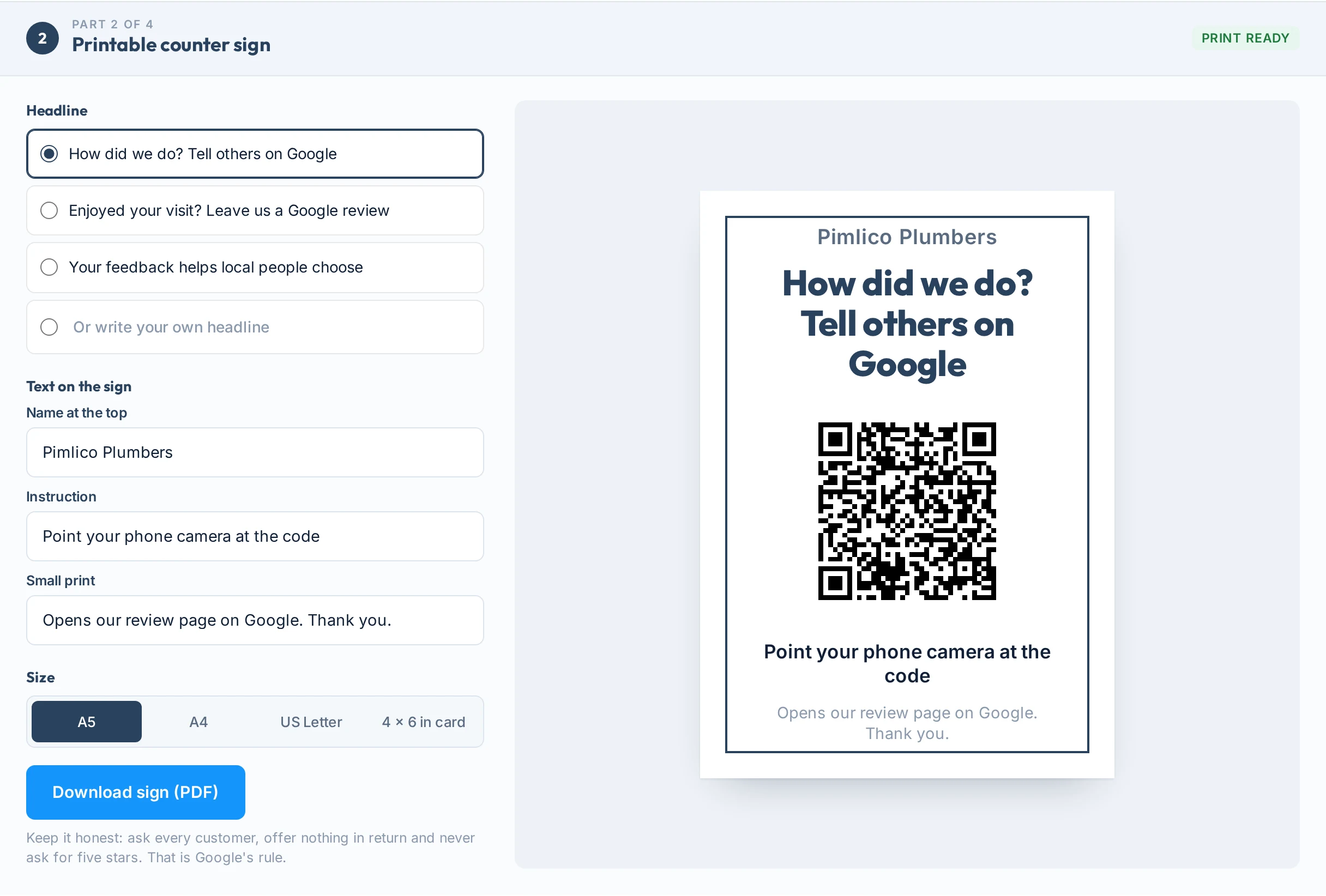
- Printable counter signPick a ready headline or write your own, edit every line of text, choose one of four sizes (A5, A4, US Letter, 4 × 6 in card) and download a print-ready PDF.
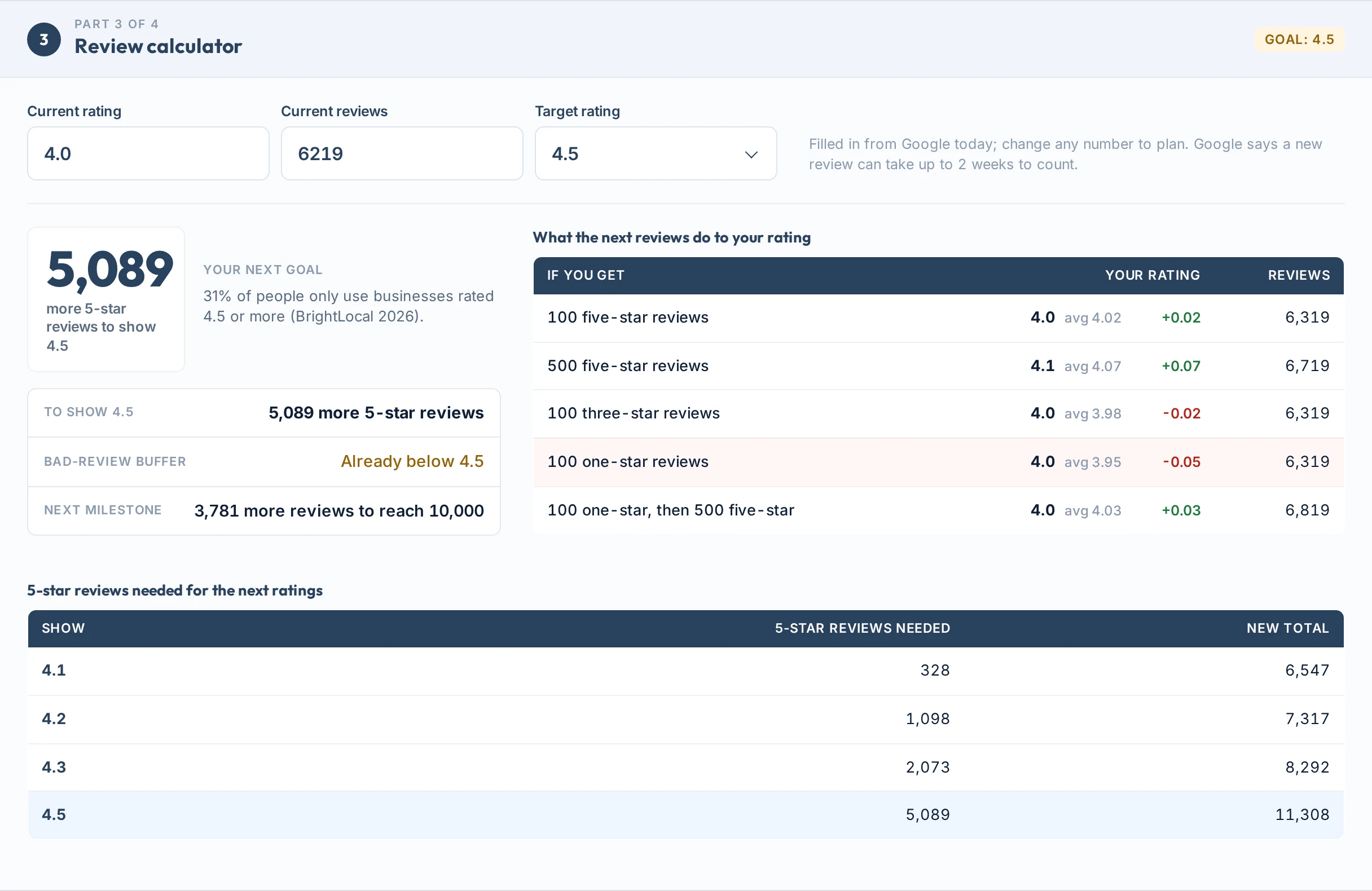
- Review calculatorYour next goal (20 reviews, 4.5 stars or the next step), what the next reviews would do to your rating, how many one-star reviews you can absorb, and the 5-star reviews needed for the next ratings.
- How you compare nearbyUp to ten businesses Google lists as the same type within about 10 km, sorted by reviews, with the median count. Shown when the category is specific enough to compare fairly.
Coverage
Features
- Find by name, no Place IDType the name and town. If several places match, pick yours from the list.
- Review link, testedOne tap to copy, one tap to open the review box on your phone.
- QR code in your browserMade on your device from your link, ready as PNG or SVG.
- Printable signYour own headline and text, four sizes, a ready-to-print PDF.
- Review calculatorYour next goal, what one bad review would do, and the 5-star reviews needed for the next ratings.
- Share the resultCopy a link to this result or save the whole report as a one-page PDF.
The sign builder puts your name, a short honest headline and the QR code on one clean page.
Pick one of three headlines or write your own, change the name, the instruction and the small print, choose a size and download a PDF for home printing or a print shop. If your wording offers a reward or asks for five stars, the tool warns you before you print.

The rules
How to ask for reviews the right way
A review link only helps if the reviews it brings stay up. These are the lines Google and the regulators draw.
| Practice | Verdict | Why |
|---|---|---|
| Ask every customer for an honest review | Allowed | Google allows it without incentives or attempts to influence the rating (Google). The UK regulator says simply emailing customers to ask is not prohibited (CMA). |
| Offer a discount or freebie for a review | Not allowed | Google bans incentives for reviews. The US FTC rule bans incentives conditioned on a positive or negative review (FTC). |
| Ask only the customers you think are happy | Not allowed | Google bans “selectively” soliciting positive reviews, often called review gating. |
| Ask for five stars or for set wording | Not allowed | That is an attempt to influence the rating or the content of the review. |
| Push customers to review while they are with you | Avoid | Google says merchants should not require or pressure people to review on the premises. A sign they can scan later is fine. |
| Staff, family or friends reviewing you | Not allowed | Google removes reviews written with a conflict of interest, including current or former employees. |
The law, not only Google
In the US the FTC rule on fake reviews took effect on 21 October 2024 and lets the FTC seek civil penalties. In the UK, fake reviews and concealed incentivised reviews are automatically unfair under the Digital Markets, Competition and Consumers Act from 6 April 2025, and the CMA can fine up to 10% of global turnover (CMA guidance).
If the link stops working
The review link uses the Place ID of your listing. Google does not document this link format, so test it on your phone before you print. If it ever stops opening the review box, copy Google’s own link from your Business Profile: Read reviews, then Get more reviews (Google).
Limits
What this tool can’t do
Clear limits, so you know what the result is and what it isn’t.
Use it to
- Get a working review link for any business listed on Google
- Make a QR code and a printable sign in a minute
- See your rating and review count as Google shows them today
- Work out how many 5-star reviews you need for a target rating
- Compare your review count with similar businesses nearby
It won’t
- No new listings. If your business is not on Google yet, create a Business Profile first.
- No review replies or monitoring. It does not read, answer or track reviews over time.
- No fake, bought or filtered reviews. It will never help you ask only happy customers or reward reviews.
- Today’s numbers only. Google says a new review can take up to 2 weeks to count in your score (Google).
- Fair comparisons only. The nearby comparison is skipped when Google gives a very general category, such as “Suppliers”.
- No promises. More reviews can help your local ranking, but Google ranks on relevance, distance and popularity together.
Next steps
What to do with your result
Reviews decide whether people pick you. In BrightLocal’s 2026 survey of 1,002 US adults, 97% read reviews for local businesses and 74% look for reviews written in the last three months (BrightLocal).
Asking works too: 83% of people who were asked to leave a review went on to leave one. Google itself says more reviews and positive ratings can help your local ranking (Google).
What US consumers say about reviews
Source: BrightLocal Local Consumer Review Survey 2026, 1,002 US adults.
Your next step, by result
Ask your last ten customers this week with the link, then put the sign where people pay. Your first review sets your rating.
BrightLocal found 47% of people won’t use a business with fewer than 20 reviews. Add the link to every receipt and thank-you email.
Use the calculator to set a realistic target, reply to every review, and fix the issue that keeps coming up before you push for volume.
Nearby rivals have more social proof. Ask every customer, and check your listing is complete so the new reviews turn into calls.
Reviews are one signal. Check where you rank for the searches that matter, and whether your listing details match everywhere.
Choose yours under Not this business, or paste your Place ID. If none match, your listing may not be live on Google yet.
Want more reviews and more calls from Google Maps?
Our team runs Google Business Profile and local SEO work every day for businesses in the US and UK.
FAQs
FAQs
What is a Google review link?
A Google review link is a web address that opens the review box for one business on Google, with the stars ready to tap. Customers do not have to search for you on Google Maps first, so more of the people you ask actually leave a review.
How do I get my Google review link?
Type your business name and town into the tool above and press Get my review link. It finds your listing and gives you the direct link, a QR code and a printable sign. You can also copy Google’s own link from your Business Profile under Read reviews, then Get more reviews.
Is this Google review link generator free?
Yes. It is free with no sign-up, email or card. Each visitor gets 10 new lookups a day, and repeating a lookup you already ran is free. The QR code and the sign are made in your browser.
How do I make a QR code for Google reviews?
Run a lookup and the QR code appears next to your review link. Download it as PNG for documents or SVG for printing. Print it at least 2 by 2 cm; a QR code reads from roughly ten times its own width away.
Do I need my Place ID?
No. The tool finds your listing by name and town. If you already have your Place ID, the code that starts with ChIJ, you can paste it into the business name box instead.
Why did the tool find the wrong business?
Several places can share a name. Add a postcode or town, or choose the right listing under Not this business. If your business never appears, its Google listing may be new, hidden or not verified yet.
Can I offer a discount for a Google review?
No. Google bans incentives such as payments, discounts or free goods in exchange for reviews, and the US FTC and UK CMA treat incentivised or fake reviews as illegal. Ask every customer for an honest review instead.
How many reviews do I need to raise my rating?
Use the calculator in the result. It uses your current rating and review count to show how many more 5-star reviews you need for each target, for example 4.5 or 4.8. Google says a new review can take up to two weeks to count.
Do more Google reviews help local ranking?
They can. Google says local results are based mainly on relevance, distance and popularity, and that more reviews and positive ratings can help your local ranking. Reviews work best alongside a complete, accurate Business Profile.
Where should I share my review link?
Google suggests receipts, thank-you emails, the end of chats and a printed QR code in your store. Send it soon after the job is done, to every customer, and keep the request short and honest.
Sources
- Google Business Profile HelpHow to get your review link and QR code
- Google Maps user-contributed content policyIncentives, review gating, conflicts of interest
- Google Business Profile HelpTips to improve your local ranking
- Google Business Profile HelpHow the review score is calculated
- US Federal Trade CommissionFinal rule banning fake reviews and testimonials (Aug 2024)
- UK Competition and Markets AuthorityFake reviews guidance, CMA208 (Apr 2025)
- BrightLocalLocal Consumer Review Survey 2026
- DENSO WAVEQR code quiet zone
- BitlyMinimum QR code size
More free tools
More free local SEO tools
Reviews are one part of showing up locally. These cover the rest.
Read the guides: is local SEO dead? why every AI answer we tested quoted review counts, the benefits of local SEO, and how to count the calls reviews bring, local SEO for small business: where reviews fit in the 4-week plan, do Google reviews help SEO, and how to get more, what a Google Business Profile actually gets you: 9 benefits with proof, Google Business Profile optimization, Local SEO citations and Local SEO heat maps.