
The result
Is your profile ready?
This free Google Business Profile audit checks your listing against Google’s own data and against the businesses of the same type around you. It tells you what is missing, what is broken and what to fix first. Type your business name and town. No signup, no Google login.
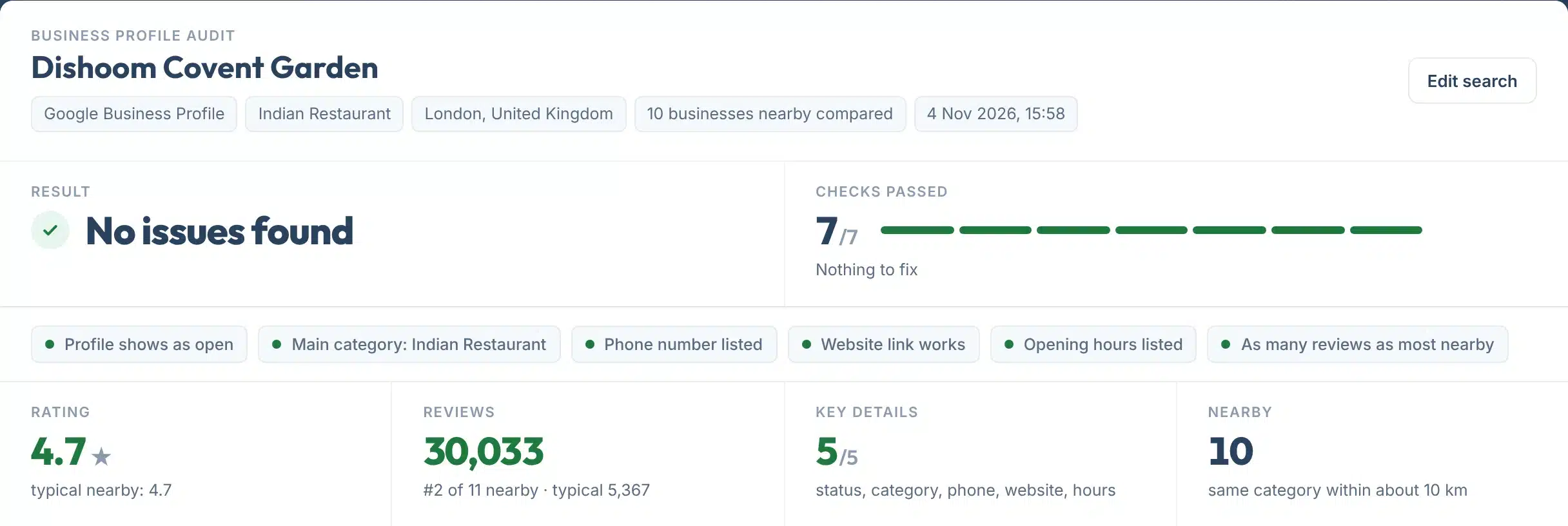
Every report opens with a plain answer and one coloured tag per check, so you know in two seconds whether anything needs work. Underneath, you see the basics Google shows, your reviews next to the typical business nearby, and a table of up to ten competitors.
Nothing is estimated. If Google’s data does not include something, such as your photos or posts, the report says so instead of guessing a score.
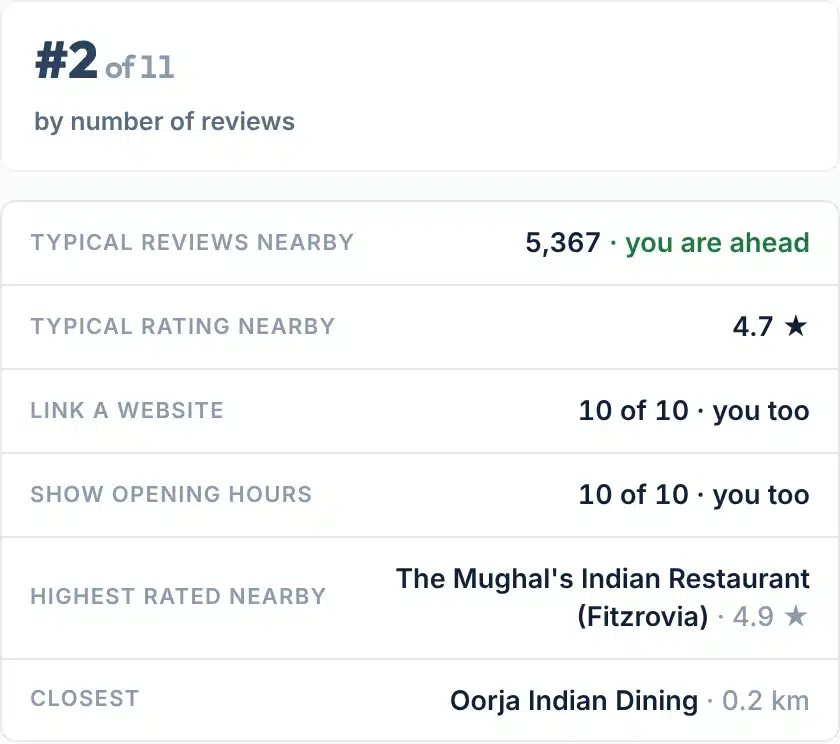
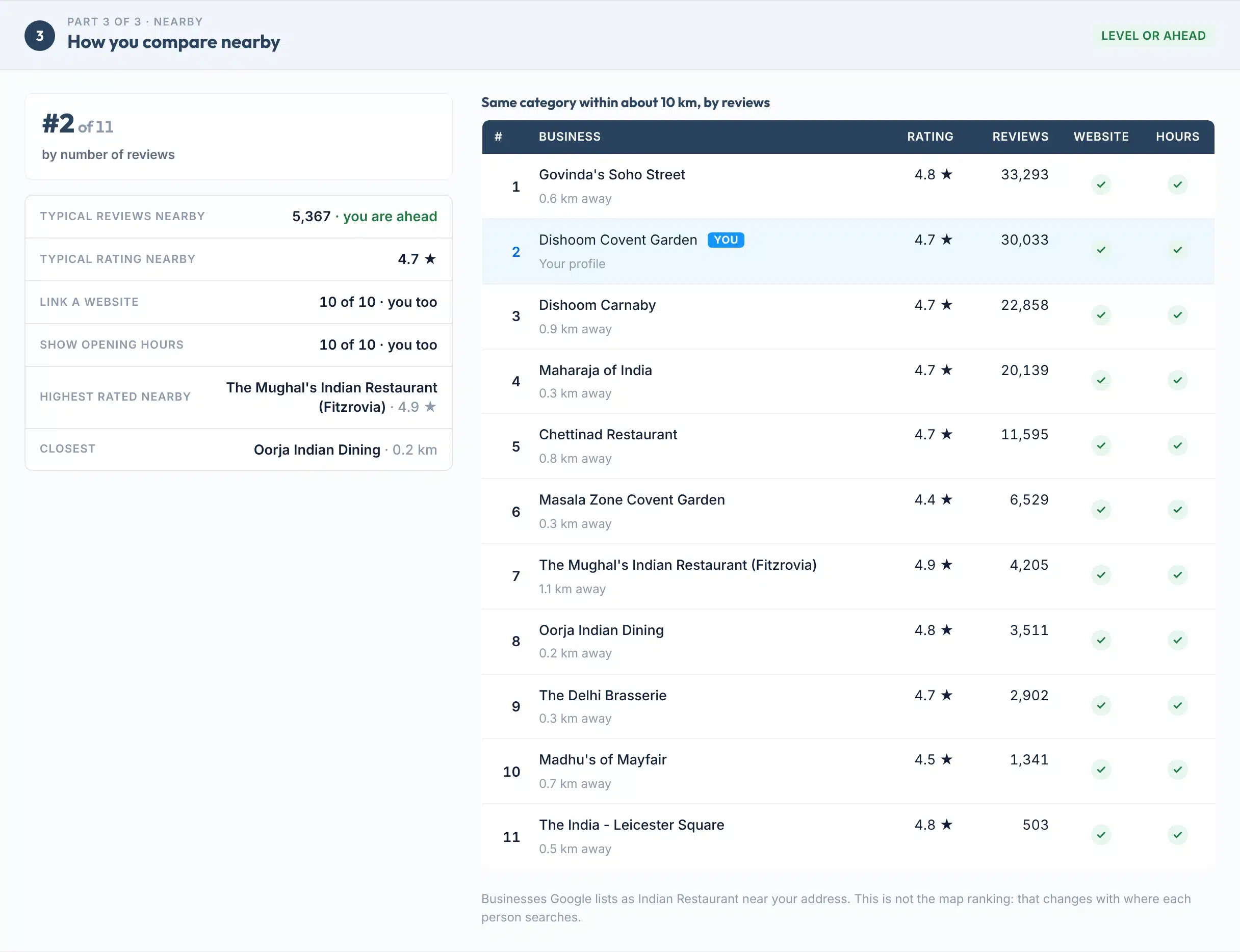
How a busy London restaurant compares with the 10 Indian restaurants Google lists around it.
A real report for Dishoom Covent Garden, London: no issues found, 7 of 7 checks passed.
How to use it
Audit your profile in five steps
About a minute, from name to fixes.
- 1Type your business name
Use the name exactly as it shows on Google Maps, for example Joe’s Plumbing. You can also paste your Place ID.
- 2Add your town or postcode
For example Leeds or LS1 4AP. It helps us pick the right listing when several share a name.
- 3Press Audit my profile
We read your profile, open your website link and look at businesses of the same category within about 10 km. It takes 5 to 20 seconds.
- 4Check it is your business
If another listing comes up, press its name under Not this business? to switch.
- 5Fix the red rows first
Then the amber ones. Copy the link to share the report, or save it as a one-page PDF.
Your report, explained
What each part of the report means
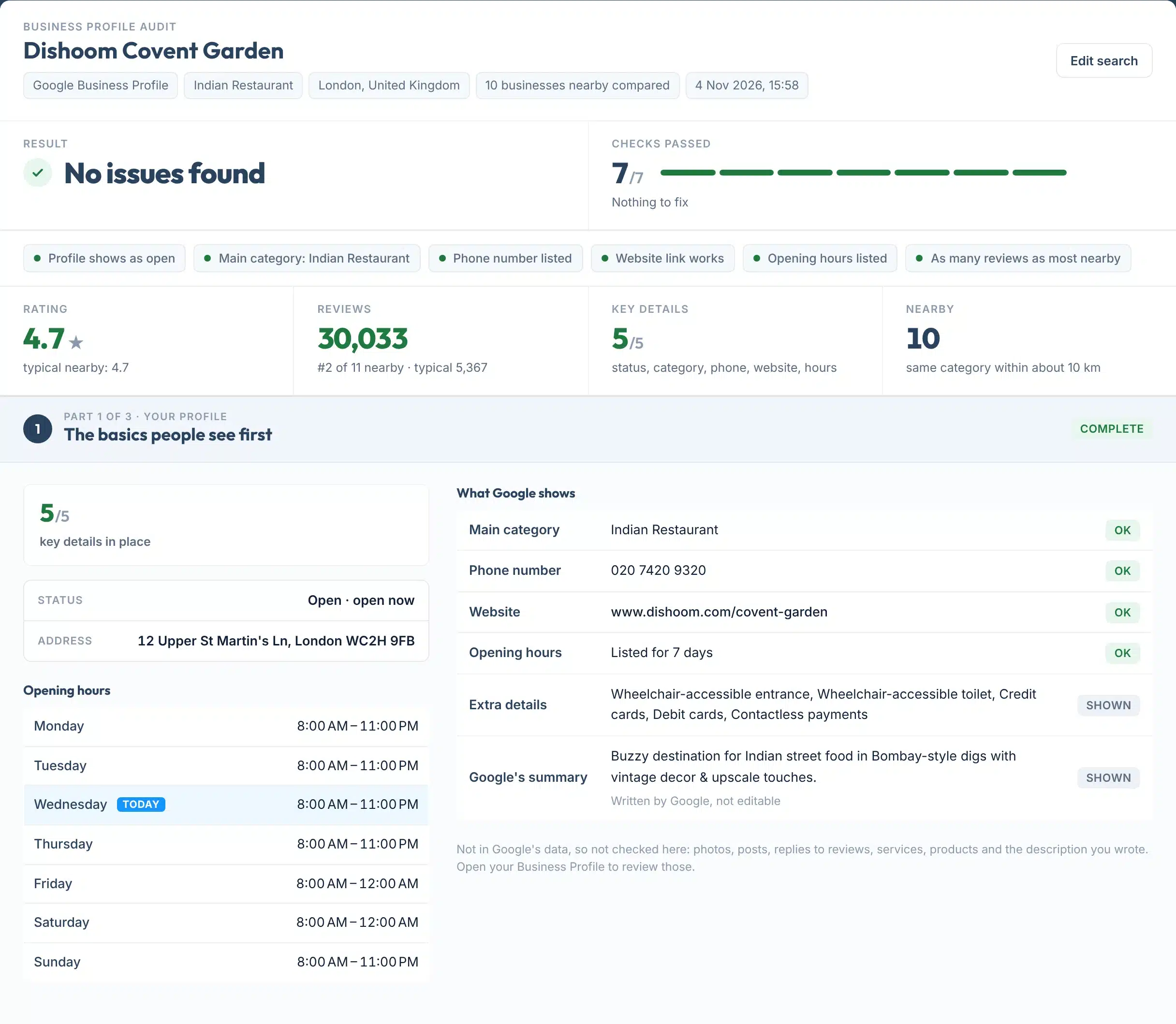
The top of the same report, numbered. Parts 2 and 3 cover reviews and the businesses near you.
 123456
- 1Result
One plain answer: no issues found, things to improve, or problems to fix.
- 2Checks passed
How many of the seven checks passed, with one bar segment per check: green passed, amber improve, red fix.
- 3Check tags
One short tag per check, problems first. Below them, one line per problem says what to change.
- 4Four numbers
Your rating, your review count against the typical business nearby, key details in place and how many businesses we compared.
- 5Key details
Status, main category, phone, website and hours: the basics people look at before they call. Your opening hours sit underneath.
- 6What Google shows
Each detail as Google shows it today, with OK, Improve or Fix. Your website link is opened live to check it works.
How it works
How the profile is checked
Seven yes-or-no checks, every rule shown. There is no made-up score out of 100: you see each fact and what it is compared with.
| Check | Passes when | Why it matters |
|---|---|---|
| Profile shows as open | Google lists the business as operational. Temporarily closed is Improve, permanently closed is Fix | A business marked closed does not get calls or visits from Maps (Google status values) |
| Main category is specific | A category is set and it is not a general one such as “Store” or “Point of interest” | Primary category is the #1 map pack factor in the 2026 Whitespark survey (Whitespark). Google: choose categories “as specific as possible” (Google) |
| Phone number listed | The profile shows a phone number | “Businesses with complete and accurate info are more likely to show up in local search results” (Google) |
| Website link works | The link on the profile opens a working page. A site that blocks our check is not counted | A dead link sends ready-to-buy visitors to an error page |
| Opening hours listed | Regular hours are shown for the week | “Business is Open at Time of Search” ranks #5 in the 2026 Whitespark survey (Whitespark) |
| Reviews compared nearby | At least as many reviews as the typical (median) business of the same category within about 10 km | “More reviews and positive ratings can help your business’s local ranking” (Google) |
| Rating compared nearby | An average rating at or above the typical business nearby | 68% of consumers will only use a business with four or more stars (BrightLocal 2026) |
Nearby means businesses Google lists in the same category as yours, within about 10 km of your address, up to ten of them. With fewer than three, the review and rating checks are left out instead of being guessed.
Features
What you get in every report
- Reviews next to your competitorsYour review count against the typical and the most reviewed business nearby, and how many 5-star reviews lift you to the next rating step.
- A competitor tableUp to ten businesses of your category, with rating, reviews, distance, website and hours.
- Your website link, testedWe open the link on your profile and tell you if it is broken.
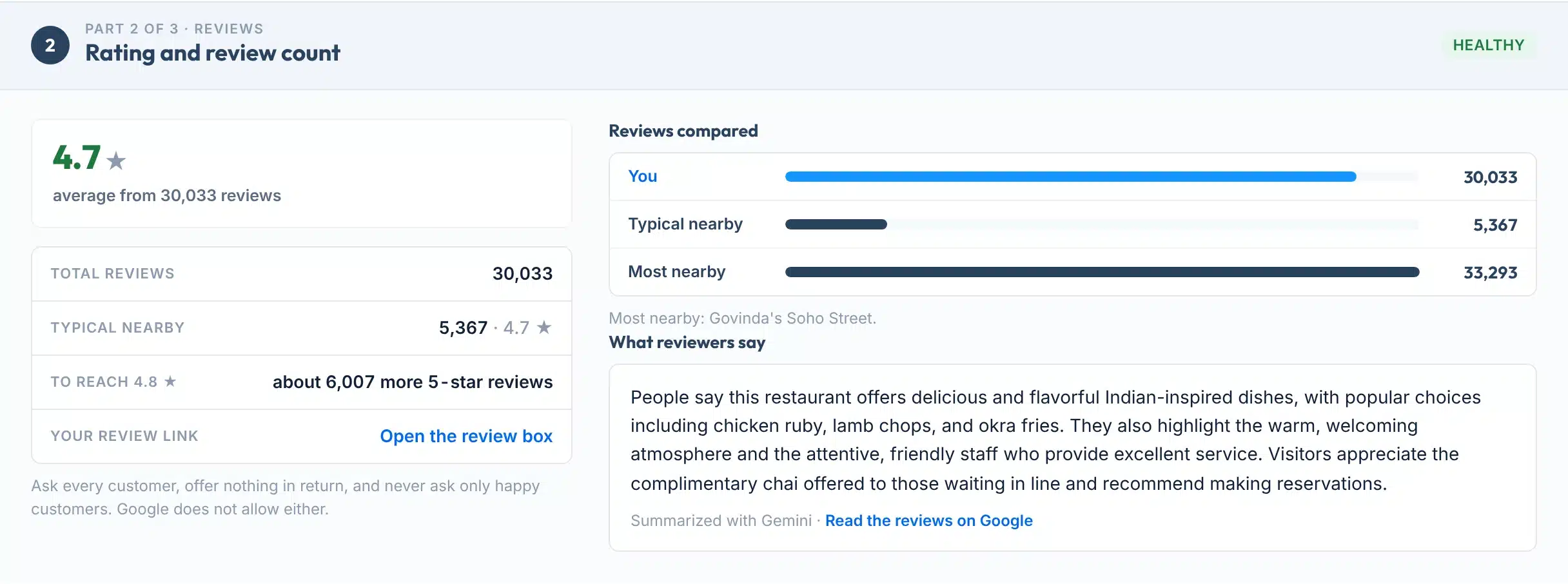
- What reviewers sayGoogle’s own summary of your reviews, with a link to read them all.
- Share and saveCopy a link to the result, or save it as a one-page PDF.
- Free, no signupNo email, no card, no Google login.
Part 2 of the same report: 30,033 reviews against 5,367 for the typical Indian restaurant nearby.
Part 3: every business we compared, sorted by reviews, with yours marked.

The research
What moves you on the map
Google says local results are “mainly based on relevance, distance, and popularity”, and that “there’s no way to request or pay for a better local ranking” (Google Business Profile Help).
Local SEO experts agree on what matters most. In Whitespark’s 2026 Local Search Ranking Factors survey, the primary category came first for the map pack, followed by distance, keywords in the business name and an address in the city searched (Whitespark, Nov 2025).
Two of the top six are things you control in your profile today: the category and your hours. Distance you cannot change. Keywords added to a business name break Google’s rules, which say extra information in the name “could result in the suspension of your Business Profile” (Google).
Top map pack factors, 2026 survey score
Source: Whitespark Local Search Ranking Factors 2026, expert survey scores.
Complete profiles win trust
Google says “Customers are 2.7 times more likely to consider a business reputable if they find a complete Business Profile on Google Search and Maps”, and are “70% more likely to visit” (Google).
Reviews decide the click
BrightLocal’s 2026 survey found that 97% of consumers read reviews for local businesses, 74% look for reviews from the last three months, and 47% won’t use a business with fewer than 20 reviews (BrightLocal, Feb 2026).
Limits
What this audit can’t do
Knowing the limits helps you trust the result you do get.
Use it to
- See in seconds whether the basics on your profile are in place
- Find a broken website link on your profile
- Compare your reviews and rating with the businesses around you
- Audit a competitor’s profile the same way
- Give your team or agency a shareable list of fixes
It won’t
- It can’t see everything in your dashboard. Photos, posts, replies to reviews, services, products and the description you wrote are not in the data Google shares with us, so they are not checked. Open your Business Profile for those.
- It is not your map ranking. Nearby businesses are listed by reviews, not by position. Your map position changes with where each person searches. Use the Local Rank Grid for that.
- It can’t read the dates of your reviews. Google shares the total, the average and a written summary, so freshness is something to check in your dashboard.
- No promises. Google says there is no way to pay for a better local ranking. A complete profile helps; it does not guarantee a spot.
- Edits take time to show. Google says edits “usually take up to 10 minutes to review, but sometimes it can take up to 30 days” (Google). Repeat audits within 6 hours show the saved result.
- Same name, other places. If the wrong listing comes up, pick yours under “Not this business?” or add the postcode.
Next steps
What to do with your result
Start with anything red, then the amber items. Most fixes take minutes inside your Business Profile.
Your next step, by result
Keep the reviews coming and check where you appear across your area, not just at your address.
Ask every customer after the job, with a direct link. Never offer anything in return and never ask only the happy ones: Google does not allow it (Google policy).
Update the link in your Business Profile to a page that loads, then make sure your name, address and phone on that page match Google.
Pick the most specific main category that describes your core business. Google says to use as few categories as possible.
Add your regular hours, plus special hours for holidays, so you show up when people search for places open now.
If your business does not come up at all, it may not be verified or may be listed under another name. Check your listings across the web.
Want your profile to win the map pack?
Our team manages Google Business Profiles every day, for local businesses in the US and UK.
FAQs
FAQs
What is a Google Business Profile audit?
A Google Business Profile audit checks the listing people see on Google Search and Maps: whether it shows as open, has a specific category, a phone number, a working website and opening hours, and how its reviews and rating compare with businesses like it nearby. It ends with a list of fixes.
Is this GBP audit tool free?
Yes. It is free with no signup and no Google login. Each visitor can run 10 audits a day. Repeat audits of the same business within 6 hours show the saved result.
Do I need to log in to Google?
No. The audit reads the public profile through Google’s own business data, the same record Google Maps shows. That also means you can audit any business, including a competitor.
How do I audit my Google Business Profile?
Type your business name as it shows on Google Maps and your town or postcode, then press Audit my profile. Check that the right business came up, then work through the red and amber rows. Each one says what to change in your Business Profile.
What does the audit not check?
Photos, posts, replies to reviews, services, products and the description you wrote are not in the data Google shares with us, so they are not scored. You can review them in your Business Profile dashboard. The report says this instead of guessing.
How many Google reviews do I need?
There is no fixed number. This tool compares you with the typical business of your category within about 10 km. BrightLocal’s 2026 survey found 47% of consumers won’t use a business with fewer than 20 reviews, so treat 20 as a floor, not a goal.
What is the most important part of a Google Business Profile?
The primary category. It came first for the map pack in Whitespark’s 2026 survey of local SEO experts. Google asks you to choose categories that are as specific as possible and to use as few as possible.
Why are the businesses in the table not in map order?
They are sorted by number of reviews, not by map position. The map ranking changes with where each person searches, so one list could not show it fairly. Use the Local Rank Grid to see your position across your area.
How long do Business Profile changes take to show?
Google says edits usually take up to 10 minutes to review, but sometimes up to 30 days. Run the audit again after the change shows on Google Maps. Repeat audits within 6 hours show the saved result.
Can I pay Google to rank higher on the map?
No. Google says there is no way to request or pay for a better local ranking. What helps is complete, accurate details, the right category and a steady flow of genuine reviews.
Sources
- Google Business Profile HelpTips to improve your local ranking on Google
- Google Business Profile HelpGuidelines for representing your business on Google
- Google Business Profile HelpComplete your Business Profile on Google
- Google Business Profile HelpEdit your Business Profile (review times)
- Google Business Profile HelpEditorial summaries
- Google Maps contribution policyProhibited and restricted content (reviews)
- Google Maps PlatformPlaces API (New) place fields
- WhitesparkLocal Search Ranking Factors 2026 (Nov 2025)
- BrightLocalLocal Consumer Review Survey 2026 (Feb 2026)
More free tools
More free local SEO tools
Once the profile is in shape, these show the rest of the picture.
Read the guides: the local SEO checklist: 31 profile, website and review tasks in order, how to choose an SEO company: 12 questions and red flags (with a free interview sheet PDF), Local SEO heat maps and Local SEO citations.