
The report
See where you rank, and why
This free keyword rank checker shows where a website ranks on Google for a keyword: the organic position, the page that ranks, whether it is in the local map pack, and whether an AI Overview links to it. Pick a country or city and a device, and the answer comes back in seconds. No signup.
Each check is a live Google search from the place and device you choose, logged out and with no history, so your own browsing never shapes the result.
Check your own site, one page, or a competitor. It is built for local businesses and for anyone who wants an honest answer to where do I rank?
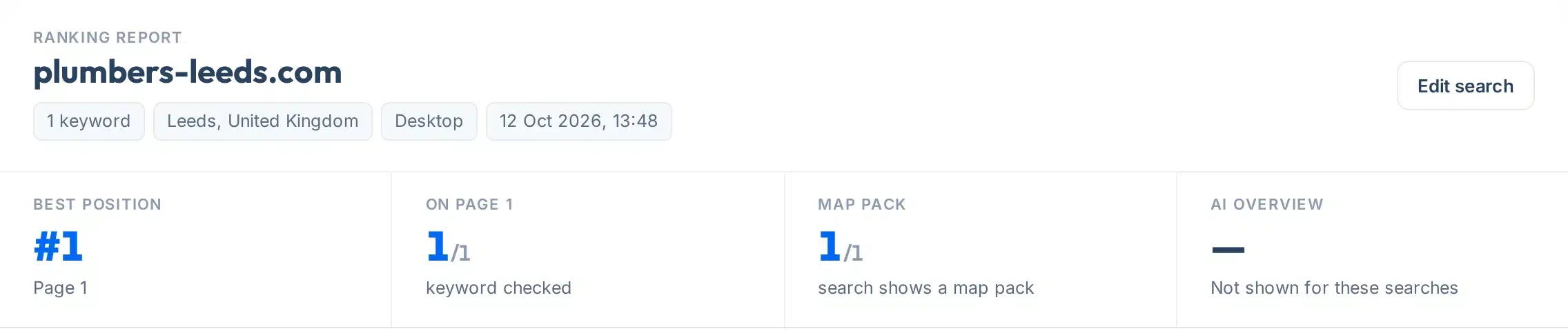
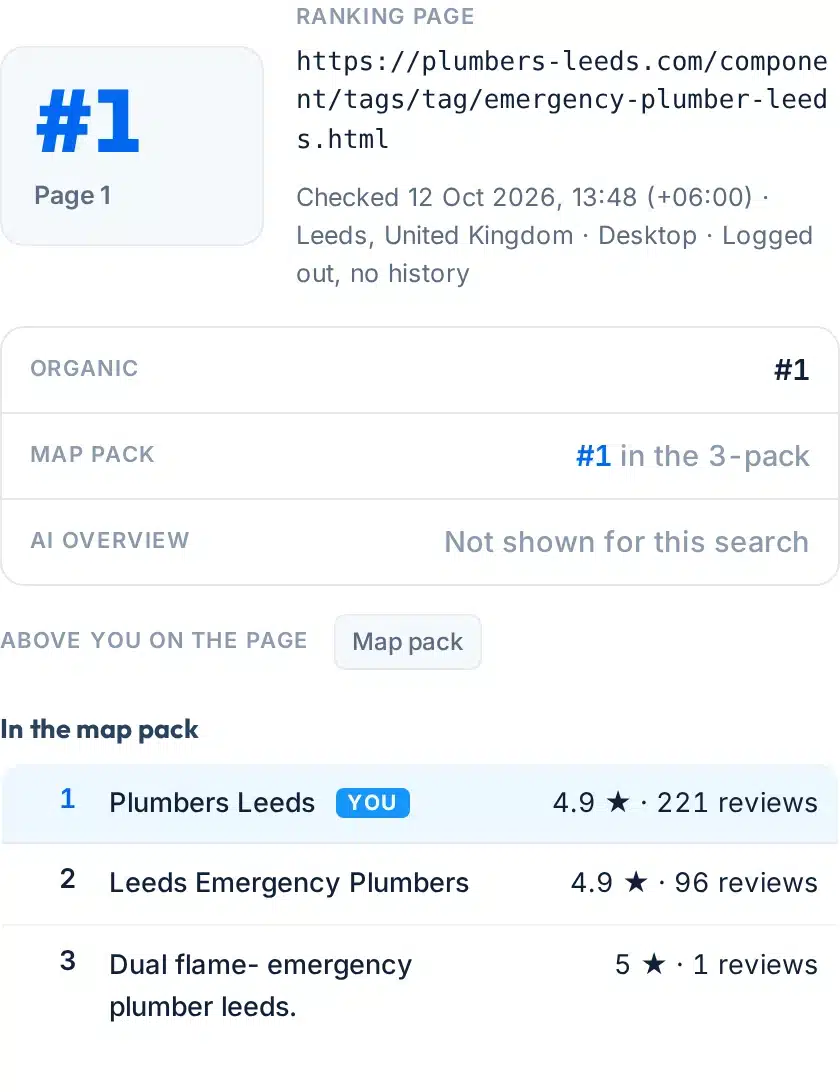
A live check for emergency plumber leeds from Leeds, desktop: #1 organic and #1 in the map pack.
How to use it
How to check your Google ranking
It takes about a minute, in five steps.
- 1Type your keyword
Write it the way a customer would search, for example emergency plumber leeds. Use Add another keyword for up to three.
- 2Enter your website
A domain such as yoursite.com matches any page on that site. A full page address checks that one page only.
- 3Choose the country, and a city if it is local
Leave the city empty for a country-wide check. If we cannot place the city, we check the whole country and tell you.
- 4Pick Desktop or Mobile
Choose the one your customers are more likely to use. Mobile results come from an Android phone.
- 5Press Check my ranking
Your report appears right below the form. Copy the link to share it or check it again later.
Your report, explained
What each part of the result means
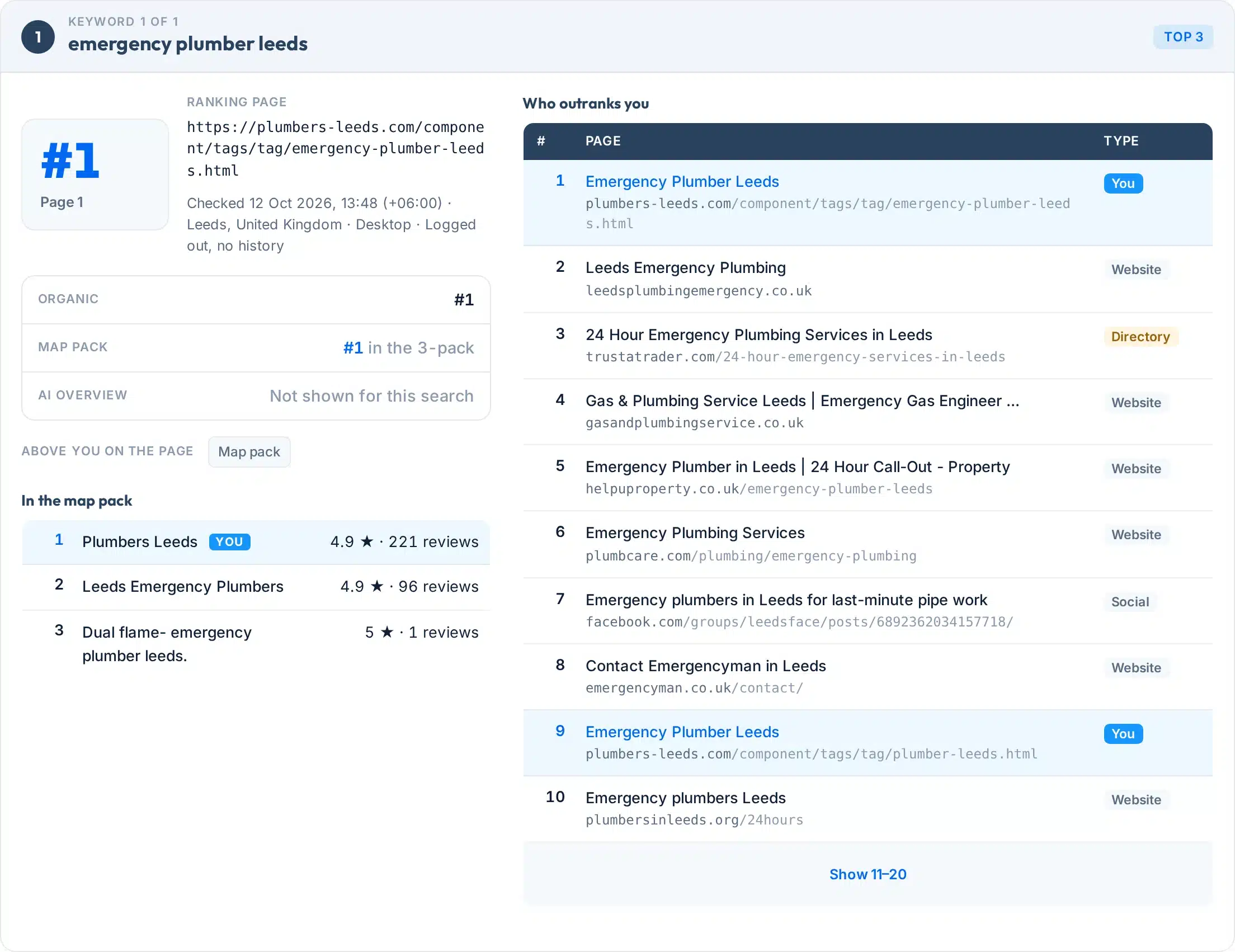
Every keyword gets its own card. Here is a real one, with each part numbered.
 123456
- 1Position and page
Your best organic position, 1 to 100, and the label: Top 3, Page 1, Page 2, Page 3+, or Not found.
- 2Ranking page and check details
The exact page Google showed for your site, plus when, where and on which device the check ran.
- 3Organic, map pack, AI Overview
Three separate results, because Google ranks them separately. You can be #1 organically and missing from the map, or the other way round.
- 4Above you on the page
Features between the top of the page and your result: ads, the map pack, People also ask. They cost clicks even when your position is good.
- 5In the map pack
Who holds the three map spots, with ratings and review counts. Your business is marked.
- 6Who outranks you
The top 20 pages, each labelled website, directory, publisher, social, retailer or video, so you can see what kind of page Google prefers.
Labels:
Coverage
Features
- Organic, map pack and AI Overview in one reportShown as three separate results, because Google ranks them separately.
- Whole site or one pageEnter a domain, or a full page address to check a single page.
- Any websiteCheck your own site or a competitor’s. Nothing to connect or verify.
- Share and exportCopy a link to the result, or save the whole report as a one-page PDF. Every report shows when it was checked.
- Logged out, no historyThe search runs without an account, so the result is not personalised.
- Free, no signupNo email, no card, no trial.
Countries: United States, United Kingdom, Canada, Australia, Ireland, New Zealand, India, Singapore, United Arab Emirates, South Africa, Germany, France, Spain, Italy, Netherlands, Pakistan and Bangladesh.

Accuracy
Why your ranking looks different
If your own search shows another position, nothing is broken. Google says results vary by location, language, device and personalization (Google Search Help).
| Your own search | Search Console | This tool | |
|---|---|---|---|
| Where it comes from | Your device and exact location | Google’s own data for your site | One place and device you choose |
| Personalised? | Yes, by your history and location | Averaged across everyone who saw your site | No, logged out with no history |
| What the number means | One result, for you, right now | Your topmost position, averaged across searches | One live position, top 100 |
| Covers | Any site | Only sites you verify | Any site, including competitors |
| Best for | A quick look | Your long-term trend | Fair, repeatable checks |
Lower positions move more
Ahrefs’ help centre says differences in the top 5 should be very small, while results at #10 to #20 “can easily differ by 5 positions each update” (Ahrefs Help Center). Google also notes that people searching minutes apart can see different results as new content appears.
How to compare fairly
Use the same place and device each time, check logged out, and look at two or three checks before you decide a move is real. Search Console’s average position is explained in Google’s help page, and it keeps 16 months of data (Google).
Limits
What this tool can’t do
Knowing the limits helps you trust the number you do get.
Use it to
- See where a page ranks right now, in one country or city
- Compare desktop with mobile, or one city with another
- Check a competitor’s position for the same keyword
- See whether you appear in the map pack and AI Overview
- Share a dated result with a client or your team
It won’t
- Top 100 only. Beyond that you see Not found.
- One place and one device per check. A city check reflects that city, so a neighbouring town can differ.
- A snapshot, not tracking. No history or alerts. For your own site’s trend, use Search Console.
- No search volume, difficulty or traffic. It answers one question: where do you rank?
- No view inside Google. Google says third-party SEO tools “don’t have access to Google’s internal ranking data” (Google Search Central).
- No promises. Google’s own guidance is that no one can guarantee a #1 ranking.
Next steps
What to do with your result
Position matters because clicks fall away fast. In a Sistrix study of more than 80 million keywords, position 1 got an average click rate of 28.5%, position 2 got 15.7% and position 3 got 11%. Each position on page 2 got “significantly less than one percent” (Sistrix).
The data is mobile-only, from 2020 (updated July 2025), and predates AI Overviews, so treat it as a guide to the shape, not an exact forecast.
Average click rate by Google position
Source: Sistrix, 80M+ keywords, mobile.
Your next step, by result
Protect it. Keep the page accurate and current, keep earning reviews, and check whether an AI Overview links to you.
Look at who sits above you. Make your title and first paragraph match the search more closely, and cover what the pages above you cover.
Google already finds the page relevant, but page 2 gets very few clicks, so a small move matters. Strengthen the title, the opening answer and the links pointing to the page.
First check that Google has indexed the page. Then ask whether you have a page clearly about this exact search.
Google says local results are based mainly on relevance, distance and prominence, and that you cannot pay for a better local ranking (Google). Complete your profile and keep reviews coming.
Google says there are no extra requirements for AI Overviews: the page must be indexed and eligible to show with a snippet (Google Search Central). Clear, direct answers help.
Want someone to find out why you are not on page 1?
Our team works on local rankings every day, for businesses in the US and UK.
FAQs
FAQs
What is a keyword rank checker?
A keyword rank checker shows where a website appears in Google for a search, such as plumber leeds. It runs the search from a set location and device, without your history, and reports your page’s position. It saves you searching by hand and scrolling through pages of results.
How do I check my Google ranking for a keyword?
Type the keyword and your website into the tool above, choose a country (and a city if the search is local), pick desktop or mobile, and press Check my ranking. You see your organic position, the page that ranks, your map pack position and whether an AI Overview links to you.
Is this keyword rank checker free?
Yes. It is free and needs no signup. Each visitor gets five checks a day, and each check can include up to three keywords. Repeating the same search within 24 hours shows the saved result.
Why is my ranking different on Google than in this tool?
Google tailors results to location, language, device and personalization, so your own search is one sample. Search Console’s average position is an average across many searches. This tool shows a neutral, logged-out snapshot, so small differences are normal, especially below the top five.
Does it check the map pack and AI Overviews?
Yes. Each report shows whether a local map pack appears and where your business sits in it, and whether Google shows an AI Overview and links to your site. These are separate from your organic position, so you can do well in one and not appear in another.
Can I check rankings for a city or on mobile?
Yes. Add a city to check from that area, and choose Mobile for phone results. Checks cover 17 countries. If we cannot place the city you type, the tool checks the whole country and tells you.
Can I check a competitor’s ranking?
Yes. Enter any website, not just your own. There is nothing to connect or verify, so you can see where a competitor ranks for the same keyword, place and device, and compare it with your result.
What is a good keyword ranking?
Page 1, positions 1 to 10, is the usual goal, and the top three positions get most of the clicks. In a Sistrix study, position 1 averaged a 28.5% click rate while each position on page 2 got less than 1%. For local searches, being in the map pack matters too.
How accurate is it?
It shows what a live, logged-out Google search returns at that moment for the place and device you chose. It cannot see inside Google, and positions beyond page 1 move more between checks. Treat one result as a snapshot and judge progress over several checks.
How often should I check my rankings?
Once a week or once a month is enough for most small businesses. Rankings move up and down daily, so one change means little. Use the same keyword, place and device each time and look at the trend. Search Console shows your own site’s long-term position.
Sources
- Google Search Console HelpHow average position is calculated, including AI Overviews
- Google Search HelpWhy results differ by location, language, device and personalization
- Ahrefs Help CenterWhy rank tracker positions don’t match Google (Sep 2026)
- SistrixGoogle click-through rates by position (2020, updated Jul 2025)
- Google Business Profile HelpHow local results are ranked
- Google Search CentralAI features and your website
- Google Search CentralDo you need an SEO? (no guaranteed rankings, third-party tools)
- Google Analytics HelpSearch Console keeps 16 months of data
More free tools
More free SEO tools
Once you know your position, these show what is behind it.
Read the guides: How to check your website keyword rankings and How long it takes to rank on Google.