
The report
One page, checked like Google
This free SEO audit tool opens any page the way Google does and checks what decides whether it can be found, understood and shown well in search. It reads the page, its robots.txt and sitemap, opens the other versions of the address and the first 20 internal links, and adds Google’s real-visitor speed data when there is any. No signup.
Every report opens with a plain answer, such as No issues found or 2 problems to fix, the number of checks passed, and coloured tags with problems first. Each problem gets one line that says what to do.
There is no 0 to 100 score. Google says third-party tools “don’t have access to Google’s internal ranking data” (Google Search Central), so we show the checks themselves instead of a made-up number.
A live audit of python.org: what searchers see, measured from the page itself.
How to use it
How to run a free SEO audit
One box, one button, five small steps.
- 1Type the page address
For example yoursite.com for the homepage, or yoursite.com/services for one page. You can paste a full link.
- 2Press Audit my page
We open the page, its robots.txt and sitemap, the http:// and www versions, and up to 20 internal links. It takes 5 to 30 seconds.
- 3Read the result first
The top line and the coloured tags tell you whether anything needs attention, problems first.
- 4Work through the Fix and Improve lines
Each one says what is wrong and what to do. The four parts below show the detail behind every check.
- 5Copy the link or save a PDF
Send the report to your web designer or keep it, then run the audit again after the fixes.
Your report, explained
What each part of the report means
Here is the top of a real report, with each part numbered.
 123456
- 1What was checked
The final address after any redirect, the page status, and when the audit ran. Results are a snapshot of that moment.
- 2Result
One plain answer: no issues, things to improve, or problems to fix. Red means something stops or hurts the page in search.
- 3Checks passed
How many checks passed, with one coloured mark per check. Optional extras, like a canonical tag, are never counted against you.
- 4Check tags
The checks at a glance, problems first: red to fix, amber to improve, green passed.
- 5Fix and Improve lines
One line per problem: what is wrong and exactly what to do. Fix lines come first.
- 6Four numbers
How fast the HTML arrived, how big it is, how many words a reader sees, and how many internal links answered.
Below the summary, the report has four parts. Each has the key facts on the left and its checks on the right.
| Part 1 · Can Google find it | Page status, robots.txt, noindex, canonical, sitemap and HTTPS, plus every version of the address (http://, www) and where it ends. |
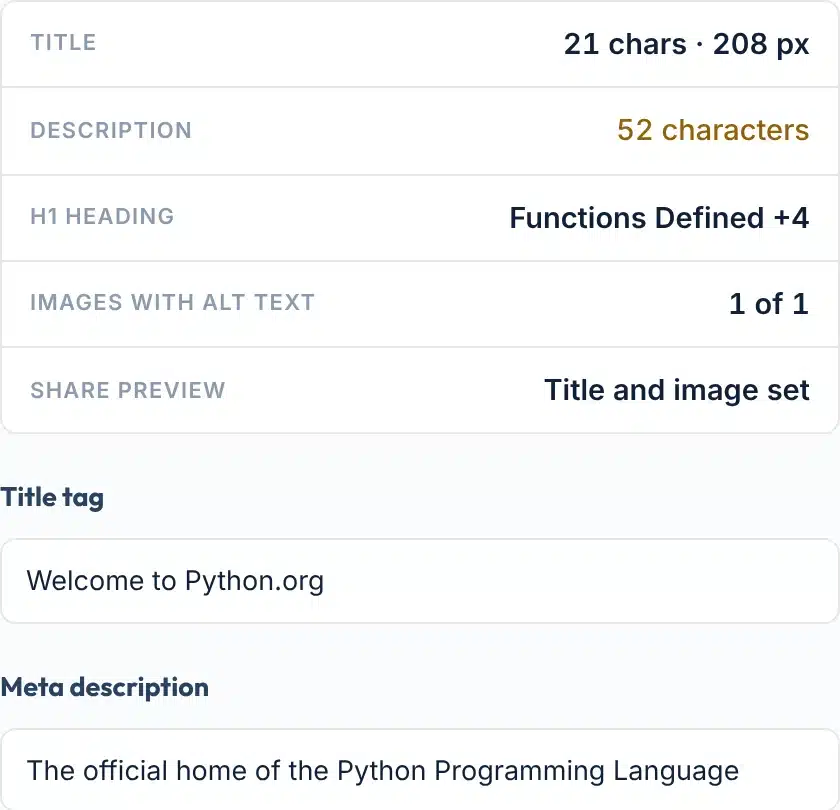
| Part 2 · What searchers see | Title width in pixels, meta description, H1, image alt text, share tags, the title and description text, and the heading outline. |
| Part 3 · Speed and mobile | Viewport, HTML load time and size, compression, what the page loads, and Core Web Vitals from real phone visitors when Google has them. |
| Part 4 · Links and structure | Internal and external links, the links we opened and their status, structured data types, page language and site icon. |
Coverage
Features
- Any page, not only the homepageAudit a service page, a blog post or a landing page. Paste the address and go.
- robots.txt read the way Google reads itThe longest matching rule wins, and Allow wins a tie, so a blocked page is shown with the exact rule that blocks it.
- Sitemap found and searchedWe look in robots.txt, then the usual addresses, and check whether this page is listed.
- Real-visitor speed, never guessedCore Web Vitals come from Google’s Chrome UX Report. If Google has no data, we say so.
- Only checks that matter todayNo meta keywords, no text-to-HTML ratio, no keyword density. Google says it ignores the first (Google).
- Share or save itCopy a link to the result, or save it as a one-page PDF to send to your web designer.
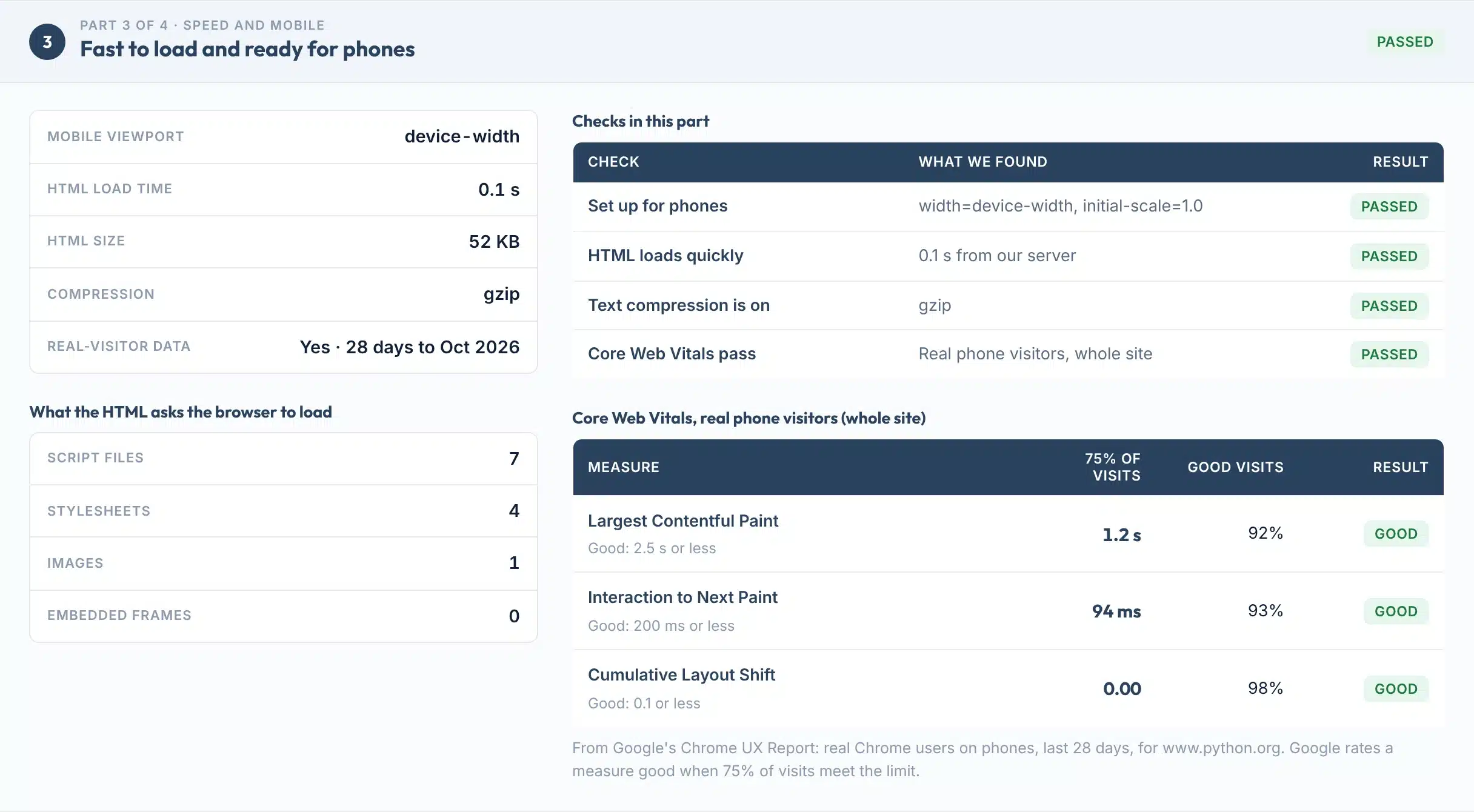
Part 3 of a real report: speed and mobile checks, with Core Web Vitals from real Chrome users on phones.

The rules
What matters to Google, and what doesn’t
Many free checkers still flag things Google ignores. Every check here follows what Google’s own documentation says.
| What Google says | What this audit does | |
|---|---|---|
| Title | No length limit, but titles are cut “to fit the device width” (Google) | Measures the title in pixels and warns past about 600 px |
| Meta description | Snippets come mainly from page text; Google “sometimes uses” the description (Google) | Improve, never Fix, when it is missing or short |
| Headings | Order does not matter for Google Search (Google) | Flags only a missing H1; several H1s pass |
| Word count | “There’s no magical word count target” (Google) | Shows the count, never marks it as a problem |
| robots.txt | “Not a mechanism for keeping a web page out of Google” (Google) | Checks that no rule blocks this page |
| noindex | Works only if robots.txt does not block the page (Google) | Fix line when a meta tag or header says noindex |
| Canonical | “A strong signal”; none of the methods are required (Google) | Optional; warns only when it points elsewhere or there are several |
| Core Web Vitals | Good is LCP 2.5 s or less, INP 200 ms or less, CLS 0.1 or less, at the 75th percentile (web.dev) | Uses Google’s own real-visitor data and limits |
| Meta keywords | “Google doesn’t use the keywords meta tag” (Google, 2009) | Not checked at all |
The basics Google needs
Google’s Search Essentials list three technical requirements: Googlebot isn’t blocked, the page works with an HTTP 200 code, and it has indexable content. Even then, “indexing isn’t guaranteed” (Google Search Central). Part 1 of the report covers all three.
Why there is no score
Every tool weighs its checks its own way, so a 72 here and an 85 elsewhere mean nothing to Google. Google says it “doesn’t evaluate or endorse third-party SEO tools” (Google). A clear list of what passed and what to fix is more useful.
Limits
What this audit can’t do
Knowing the limits helps you trust what it does find.
Use it to
- Check a page before or after a redesign
- Find what stops one page from being indexed
- Spot a missing title, description, H1 or alt text in seconds
- See whether http:// and www land on one address
- Send a dated report to your web designer
It won’t
- One page per audit. Problems that only show across many pages, like duplicate titles, need a site crawl.
- The HTML your server sends. Content added later by JavaScript does not show here.
- 20 internal links. We open the first 20. Our Broken Link Checker tests every link on a page.
- Speed data for the whole site. Core Web Vitals here are site-wide from Google. Small sites often have none yet.
- No view inside Google. Only Search Console shows how Google indexed your site.
- No ranking promise. Passing every check removes obstacles. It does not guarantee a position.
Next steps
What to do with your result
The basics are often missing. In the HTTP Archive’s 2025 study of mobile pages, about 1 in 3 had no meta description and 3 in 10 had no H1. Fewer than half had good Core Web Vitals (Web Almanac 2025).
So a clean audit already puts a page ahead of many others. Fix the red lines first, then the amber ones, and run the audit again to confirm.
Share of mobile pages that have…
Source: HTTP Archive Web Almanac 2025, SEO chapter (Core Web Vitals: June 2025).
Your next step, by result
Start here. Red lines stop or hurt the page in search: noindex, a robots.txt block, no HTTPS, broken links or poor real-visitor speed.
Work through amber lines when you can. A clearer title, a real description and alt text help people pick your result.
The audit shows site-wide data from real visitors. For a page-level lab test and what slows it down, run the page through our speed checker.
If http:// or www load separately, or the page takes several hops, follow each step and fix the redirect.
Optional, but it can make a page eligible for rich results. Google does not guarantee they show (Google).
The page is easy for Google to crawl and read. Now the question is where it ranks and what ranks above it.
Want us to fix what the audit found?
Our team fixes technical SEO for local businesses in the US and UK every day.
FAQs
FAQs
What is an SEO audit?
An SEO audit checks whether a page can be found, crawled and understood by Google, and what searchers will see. This tool checks one page live: crawling and indexing, title and description, headings and images, speed and mobile, and links and structure, then lists what to fix in plain English.
Is this SEO audit tool free?
Yes. It is free with no signup, email or card. Each visitor gets 25 audits a day. Auditing the same page again within 10 minutes shows the saved result, so you can share it; after that, a new audit reads the page again.
How do I check the SEO of my website?
Type your page address in the box above and press Audit my page. Start with the homepage, then audit your main service pages one by one. The report says what passed and gives one line per problem with what to do.
Why is there no SEO score?
Every tool builds its own score from its own weighting, and Google does not use any of them. Google says third-party tools don’t have access to its internal ranking data. This audit shows the checks instead: how many passed and exactly what to fix.
Does it check the whole website?
No. It audits one page per run, plus its robots.txt, sitemap and the first 20 internal links. Problems that only appear across many pages, such as duplicate titles, need a site crawler. Audit your most important pages one at a time.
What should I fix first?
Fix the red lines first. They stop or hurt the page in search: a noindex tag, a robots.txt block, no HTTPS, broken internal links or poor real-visitor speed. Then work through the amber Improve lines, such as a missing description or alt text.
Why does it say there is no Core Web Vitals data?
Google only publishes real-visitor data for sites with enough visits from Chrome users who share data. Many small sites have none, and that is not a problem. Use our Core Web Vitals Checker for a lab test of the page instead.
Does a good audit result mean I will rank on Google?
No. Passing the checks removes technical obstacles and helps Google read the page. Rankings also depend on how useful the content is, links from other sites and competition. Google says no one can guarantee a ranking.
How long should a title and meta description be?
Google sets no length limit for either, but cuts them to fit the screen. This audit warns when a title is wider than about 600 pixels, a common estimate of desktop width rather than a Google rule. Keep the key words first and describe the page truthfully.
How often should I run an SEO audit?
Run it after any redesign, theme or plugin change, after moving to HTTPS, and when you publish an important page. For a stable site, once a month on your key pages is enough to catch problems early.
Sources
- Google Search CentralSearch Essentials: technical requirements
- Google Search CentralDo you need an SEO? (third-party tools)
- Google Search CentralInfluencing your title links
- Google Search CentralSnippets and meta descriptions
- Google Search CentralSEO Starter Guide (headings, length, keywords meta)
- Google Search CentralIntroduction to robots.txt
- Google Search CentralBlock indexing with noindex
- Google Search CentralConsolidate duplicate URLs (canonical)
- Google Search CentralBuild and submit a sitemap
- Google Search Central BlogHTTPS as a ranking signal (2014)
- web.devWeb Vitals thresholds
- Chrome for DevelopersChrome UX Report methodology
- Google Search CentralMobile-first indexing
- Google Search CentralGoogle Images best practices (alt text)
- Google Search CentralStructured data general guidelines
- HTTP ArchiveWeb Almanac 2025, SEO chapter
More free tools
More free SEO tools
Each one goes deeper into one part of the audit.
Read the guide: How to check your website keyword rankings.