
The report
Check your tags in seconds
This free meta tag analyzer opens any page and reads its title, meta description and every other tag in the head. You see how the page may look on Google, on a computer and on a phone, how it may look when someone shares it, and exactly what to fix. No signup.
Google cuts titles and descriptions by screen width, not by a fixed number of characters, so we measure both in pixels and show where the cut would fall.
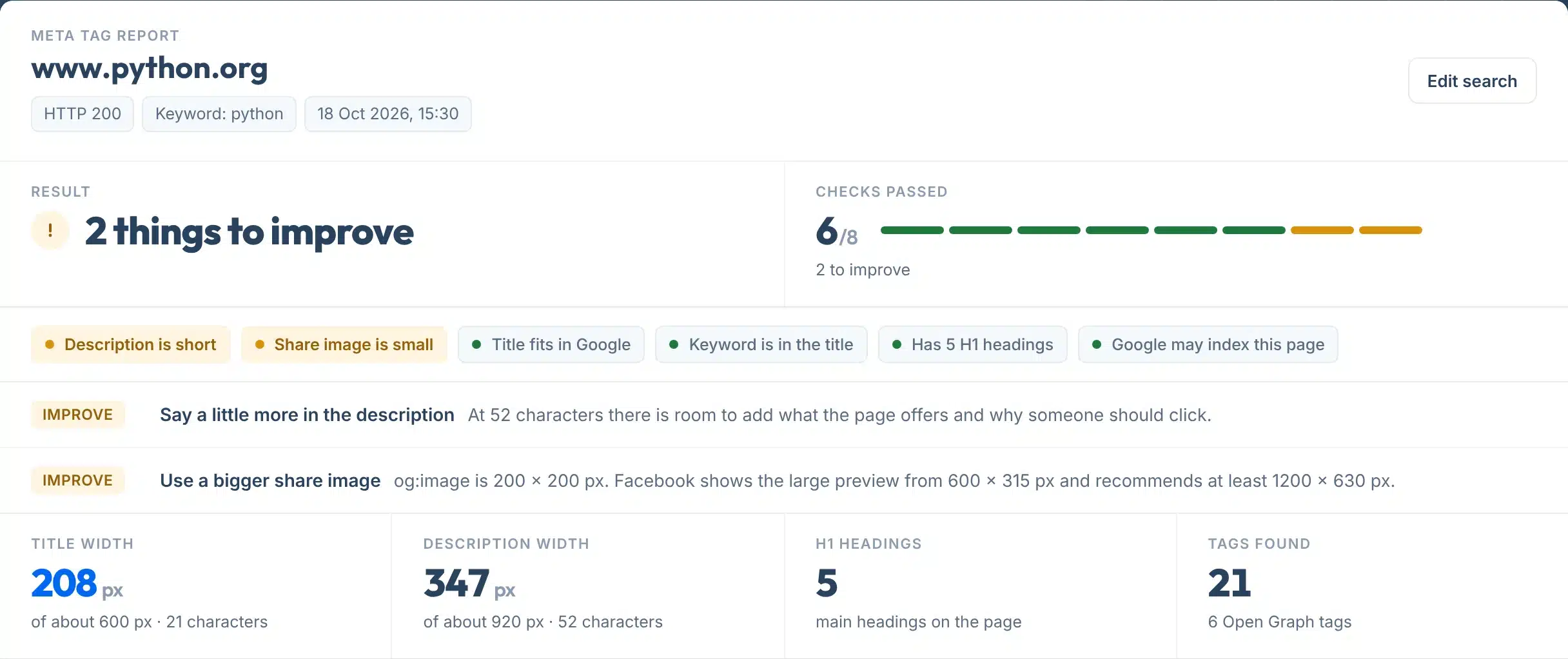
Every report opens with one plain answer: No issues found, things to improve, or problems to fix. Up to nine checks sit under it, each marked green, amber or red, and anything that needs work gets one line saying what to change.
A live check of python.org with the keyword python: the title fits, the description has room to say more.

How to use it
How to check your meta tags
Two boxes, five small steps.
- 1Paste the page address
Type or paste one page, for example yoursite.com/services. Leave out https if you like: we add it.
- 2Add your main keyword, if you have one
Optional. Type the search you want this page to show up for, like emergency plumber leeds. We check whether it appears in the title, the description and the H1.
- 3Press Check my meta tags
We open the page once, read the head and measure the title and description in pixels. It takes a few seconds.
- 4Fix the red and amber lines first
Each one says what to change, in one sentence. Then look at the Google and share previews.
- 5Check again, or share it
Press Edit search to run it again after a fix, or copy the link to send the report to whoever edits the site.
Your report, explained
What each part of the report means
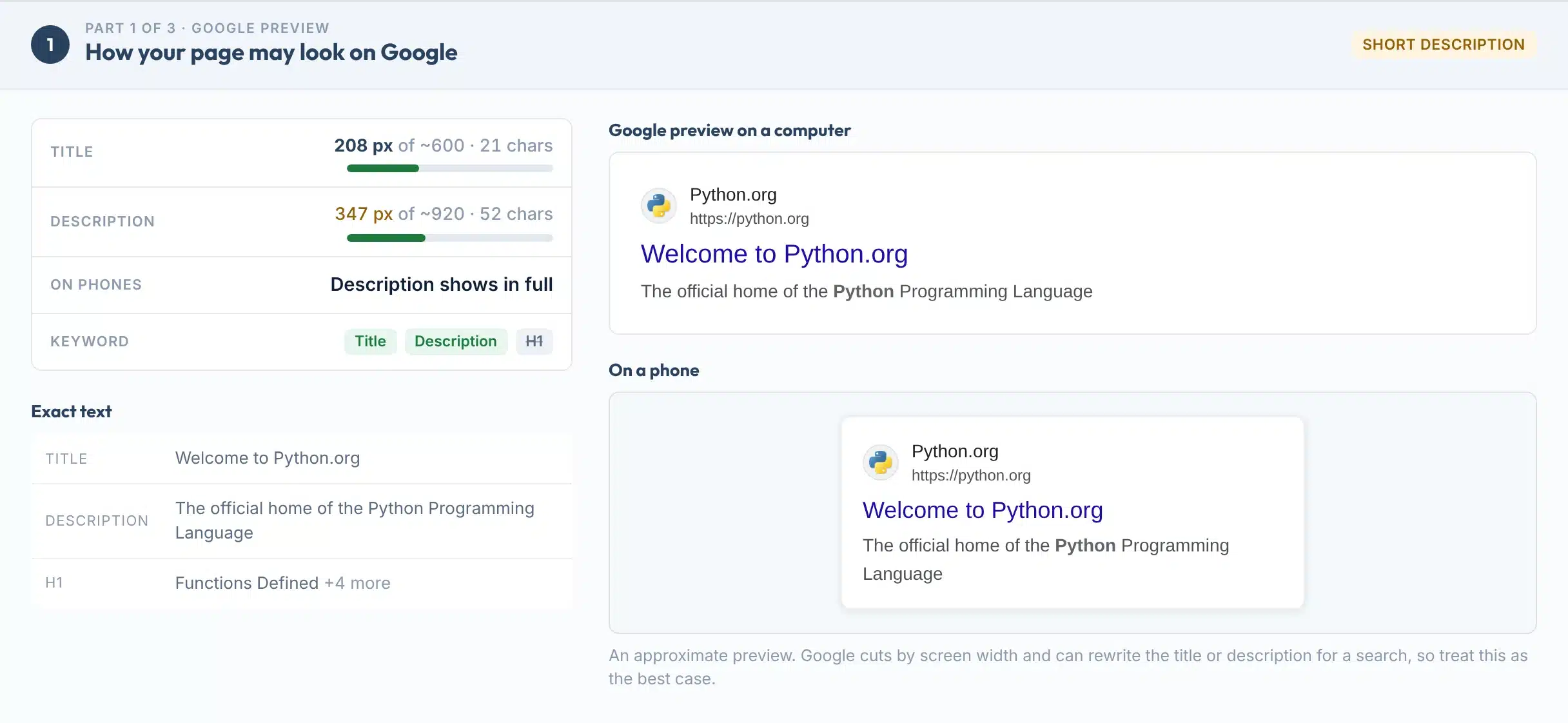
The report has three parts: the Google preview, the share preview, and the tags that control indexing. Here is part 1 for python.org, with each piece numbered.
 123456
- 1Title width
How wide your title is in pixels, against the roughly 600 px Google shows on a computer, plus its length in characters.
- 2Description width
The same for the meta description, against roughly 920 px. Amber means it may be cut off, or that it is very short.
- 3On phones
Phones show less of the description, about 680 px. This line says whether yours fits.
- 4Keyword
Green when your keyword is in the title, the description or the H1. Grey with a line through it when it is missing.
- 5Exact text
The title, description and first H1 exactly as your page has them, so you can copy and edit them.
- 6Google preview
How the result may look on a computer and on a phone, cut where Google would likely cut it, with your keyword in bold.
Labels:
Features
What it checks
- Measured in pixelsA title full of wide letters gets cut sooner than one of narrow letters. We measure the real width and show where the cut would fall.
- Computer and phone previewsBoth previews sit side by side, so you can see what phone users miss.
- Share previewThe card Facebook, LinkedIn and chat apps build from your Open Graph tags, with a check that the image loads and how big it is.
- Keyword placementAdd a keyword to see whether it is in the title, the description and the H1, bolded in the preview the way Google bolds search words.
- Every tag in the headRobots, X-Robots-Tag header, canonical, viewport, language, charset, hreflang and every meta tag, listed in source order.
- Copy link or save a PDFCopy a link to the result, or save it as a one-page PDF to send to whoever edits the site.
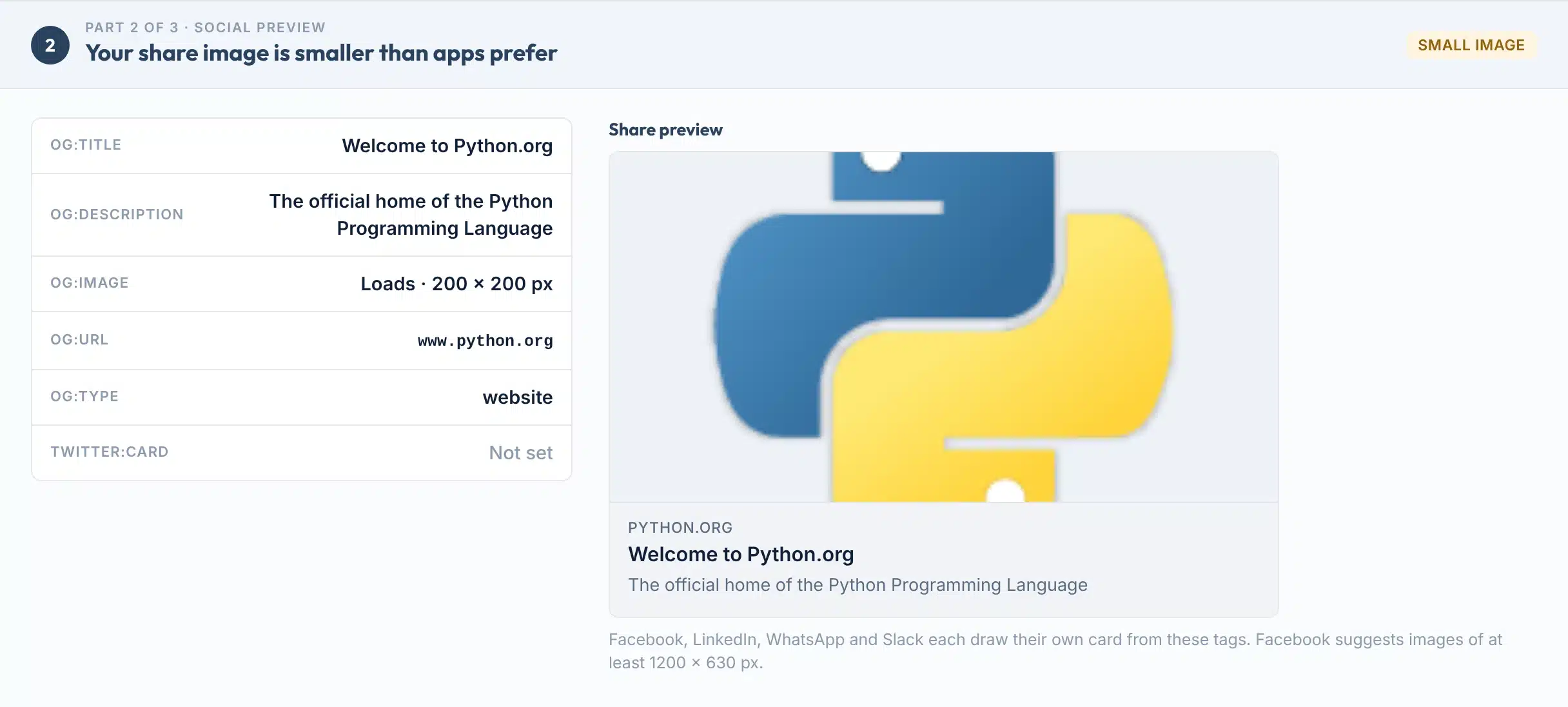
Part 2 for python.org: every Open Graph tag and the share card. Its 200 x 200 px image is below the 600 x 315 px Facebook needs for a large preview.

The rules
The tags that matter, and why
What each tag does, in Google’s own words, and what this tool checks for.
| Tag | What Google or apps do with it | What we check |
|---|---|---|
| Title | Google’s main source for the blue headline. No length limit, but it is cut to fit the screen. | Present, about 600 px or less, not very short |
| Meta description | Used for the snippet when it describes the page better than the page text does. Never a ranking factor. | Present, about 920 px or less, not very short |
| Robots / X-Robots-Tag | noindex keeps the page out of search results. The stricter rule wins when two conflict. | No noindex, unless you meant it |
| Canonical | A strong signal for which address Google should show. Optional: Google picks one itself. | Points at this page, only one tag |
| Viewport | Tells the browser how to fit the page on a phone. Google reads it as a sign the page works on mobile. | width=device-width is set |
| Open Graph | og:title, og:type, og:image and og:url are the required tags. Apps use them for the share card. | Title and image set, image loads |
| Keywords meta tag | Not used by Google at all, for indexing or ranking. | Flagged as safe to remove |
Sources: Google, title links; Google, snippets; Google, robots meta tag; Google, canonical URLs; Google, meta tags it supports; The Open Graph protocol.
Is there a character limit?
Not from Google. Its docs say: “While there’s no limit on how long a <title> element can be, the title link is truncated in Google Search results as needed, typically to fit the device width” (Google Search Central). The 600 px and 920 px guides come from measuring real results, so treat them as a safe target, not a rule.
Do meta tags help rankings?
The title matters most, because it is usually the headline people click. Google said in 2009 that it does not use the description meta tag in ranking, and today says the keywords meta tag “has no effect on indexing and ranking at all” (Google). A good description earns the click, not the position.
Limits
What this tool can’t do
If Google shows something different, one of these is usually why.
Use it to
- See how a page may look on Google, on a computer and a phone
- Catch titles and descriptions that may get cut off
- Find a stray noindex or a canonical pointing elsewhere
- Check Open Graph tags and whether the share image loads
- Check a competitor’s or a client’s page, no access needed
- Share a dated report with whoever edits the site
It won’t
- Promise what Google shows. Google may rewrite your title or description for each search. The preview is the best case.
- See tags added by JavaScript. We read the HTML your server sends. Tags a script or tag manager adds later do not show here.
- Check a whole site. It checks one page per run. Duplicate titles across many pages need a site crawl or Search Console.
- Read pages behind a login. Members-only pages and pages that block robots answer differently to us than to you.
- Render Google’s exact font. Widths use Arial metrics. Google’s own fonts and screen sizes vary, so a few pixels either way is normal.
- Show live social caches. Facebook and LinkedIn keep their own copy of a share card. Use their debuggers to refresh it after a change.
Next steps
What to do with your result
Google often shows its own text instead of yours. In a 2022 study of 80,959 titles, Zyppy found Google rewrote 61.6% of them, and almost every title over 70 characters (Zyppy). Ahrefs found meta descriptions rewritten 62.78% of the time (Ahrefs, 2020).
Titles of 51 to 60 characters were rewritten least. Google’s own figure is that it uses your title element “around 87% of the time” (Google, 2021). The two measure different things, but the lesson is the same: clear, accurate, not-too-long tags get used.
How often Google rewrites what you wrote
Sources: Zyppy title study, 80,959 titles, 2022. Ahrefs meta description study, 20,000 keywords, 2020. Third-party studies, desktop results.
Your next step, by result
If the page should be on Google, remove noindex from the robots tag or the X-Robots-Tag header, then ask Google to recrawl it.
Put the words that matter first, cut filler, and keep your brand short at the end, after a dash or pipe.
Write one or two plain sentences that say what the page offers and who it is for. Make each page’s description different.
If the page is meant to answer that search, say so in the title, once and early. If not, it may need its own page.
Add og:title and an og:image of at least 1200 x 630 px. Then refresh the card in the Facebook Sharing Debugger.
Meta tags tell Google what the page is called. Schema markup tells it what the page is about.
Want every page’s titles and descriptions written for you?
Our team writes and fixes on-page SEO for businesses in the US and UK.
FAQs
FAQs
What is a meta tag analyzer?
A meta tag analyzer reads the hidden tags in a web page’s head, such as the title, meta description, robots, canonical and Open Graph tags, and checks them. This one also measures the title and description in pixels, shows how the page may look on Google and when shared, and says in one line what to fix.
How do I check the meta tags of a page?
Paste the page address into the box above and press Check my meta tags. Add your main keyword if you want to see where it appears. In a few seconds you get a plain answer, up to nine checks, a Google preview for computer and phone, a share preview and every tag on the page.
Is this meta tag checker free?
Yes. It is free with no signup and no email. Each visitor gets 40 page checks a day. Checking the same page and keyword again within 5 minutes shows the saved result, then it is fetched fresh, so you can re-test soon after a fix.
How long should a title tag be?
Google sets no limit, but cuts titles to fit the screen, roughly 600 pixels on a computer. That is about 50 to 60 characters for most titles. In Zyppy’s 2022 study, titles of 51 to 60 characters were rewritten least, 39 to 42% of the time, while titles over 70 characters were rewritten 99.9% of the time.
How long should a meta description be?
Google sets no limit and cuts the snippet to fit the device. About 920 pixels shows on a computer, roughly 150 to 160 characters, and about 680 pixels on a phone, roughly 120. Put the main message in the first 120 characters so phone users see it.
Why does Google show a different title or description?
Google writes title links and snippets automatically. It may use your H1, Open Graph title, link text or page text when it thinks they fit the search better, or when the tag is missing, too long, stuffed with keywords or repeated across pages. Ahrefs found descriptions rewritten 62.78% of the time.
Does the meta description affect rankings?
Not directly. Google said in 2009 that it does not use the description meta tag in ranking, and its current guidance only covers how the description is used for snippets. A clear description can still earn more clicks, because it is often the text people read under your title.
Should I still use the meta keywords tag?
No. Google says the keywords meta tag is not used by Google Search and has no effect on indexing and ranking at all. It does no harm, and our report flags it as safe to remove. Put your effort into the title and description instead.
What are Open Graph tags?
Open Graph tags tell Facebook, LinkedIn, WhatsApp and similar apps what title, description and image to show when someone shares your page. The protocol lists og:title, og:type, og:image and og:url as required. Facebook recommends images of at least 1200 x 630 pixels at a 1.91:1 ratio.
Why don’t I see my new tags here?
We read the HTML your server sends, once. If your site or a cache plugin still serves the old page, clear the cache and check again after 5 minutes. Tags added by JavaScript or a tag manager do not show here, and Google recommends not changing meta tags with JavaScript.
Sources
- Google Search CentralInfluencing your title links in search results
- Google Search CentralHow to write meta descriptions and control snippets
- Google Search CentralRobots meta tag, data-nosnippet and X-Robots-Tag
- Google Search CentralMeta tags and attributes that Google supports
- Google Search CentralHow to specify a canonical URL
- Google Search Central BlogMore info about titles (September 2021)
- Google Search Central BlogGoogle does not use the keywords meta tag in web ranking (2009)
- The Open Graph protocolRequired and optional og: properties
- Meta for DevelopersImages in link shares: sizes and aspect ratio
- ZyppyGoogle title rewrite study, 80,959 titles (2022)
- AhrefsMeta description rewrite study, 20,000 keywords (2020)
- Google Search CentralTell Google about localized versions of your page (hreflang)
More free tools
More free SEO tools
Once the tags are right, these check what sits around them.
Read the guides: city pages SEO: titles and meta descriptions for each town, local SEO keyword research and the title tag formula for service pages, how much it costs to build a website, year 1 vs year 2, web design color theory and a free palette builder, How to check your website keyword rankings.