
The report
Pass or fail, in one line
This free Core Web Vitals checker tells you whether a page passes Google’s three vitals for real visitors, on mobile and on desktop, and what to fix first. Type one address, press the button, and the answer comes back in about half a minute. No signup.
The numbers that matter come from Google’s own record of real Chrome visitors over the last 28 days, the same data Google Search uses. A lab test from Google PageSpeed Insights runs at the same time, so you also see a speed score and the fixes Lighthouse points at.
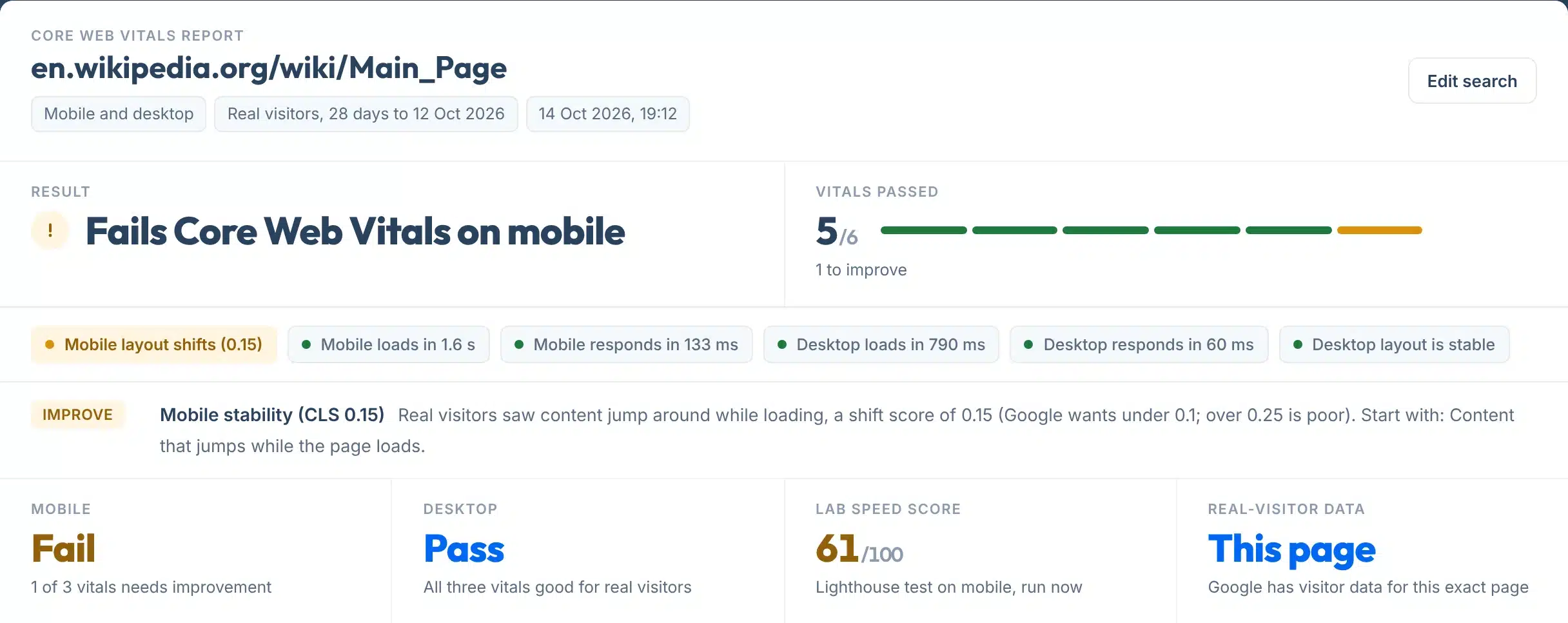
Every report opens with one plain answer, six check tags marked green, amber or red, and a one-line note for anything that needs attention. The detail sits below, one part for mobile and one for desktop.
Use it on your home page, your busiest service page, or a competitor’s page, before and after a speed fix.
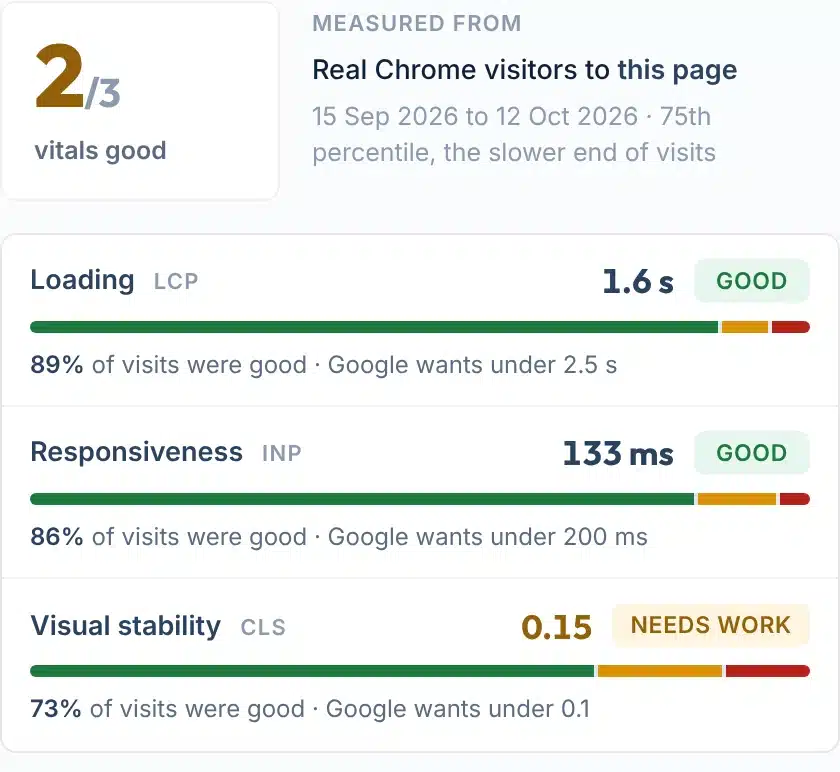
A live check of en.wikipedia.org/wiki/Main_Page on mobile: loading and responsiveness are good, visual stability needs work.
How to use it
How to check Core Web Vitals
One box, four small steps.
- 1Paste the page address
Type any public page, for example yoursite.com/services. Leave out https:// if you like; we add it.
- 2Press Check my Core Web Vitals
Mobile and desktop are tested together, so there is nothing to choose. The real-visitor data is read first, then the lab test runs. Allow 20 to 40 seconds.
- 3Read the first line
Passes Core Web Vitals, Fails on mobile, or Lab estimate when Google has no visitor data yet. The tags under it show which vital is the problem.
- 4Start with the Fix rows
Each amber or red tag gets one line that says what real visitors experienced and what Lighthouse found. Copy the link to send the report to your developer.
Your report, explained
What each part of the report means
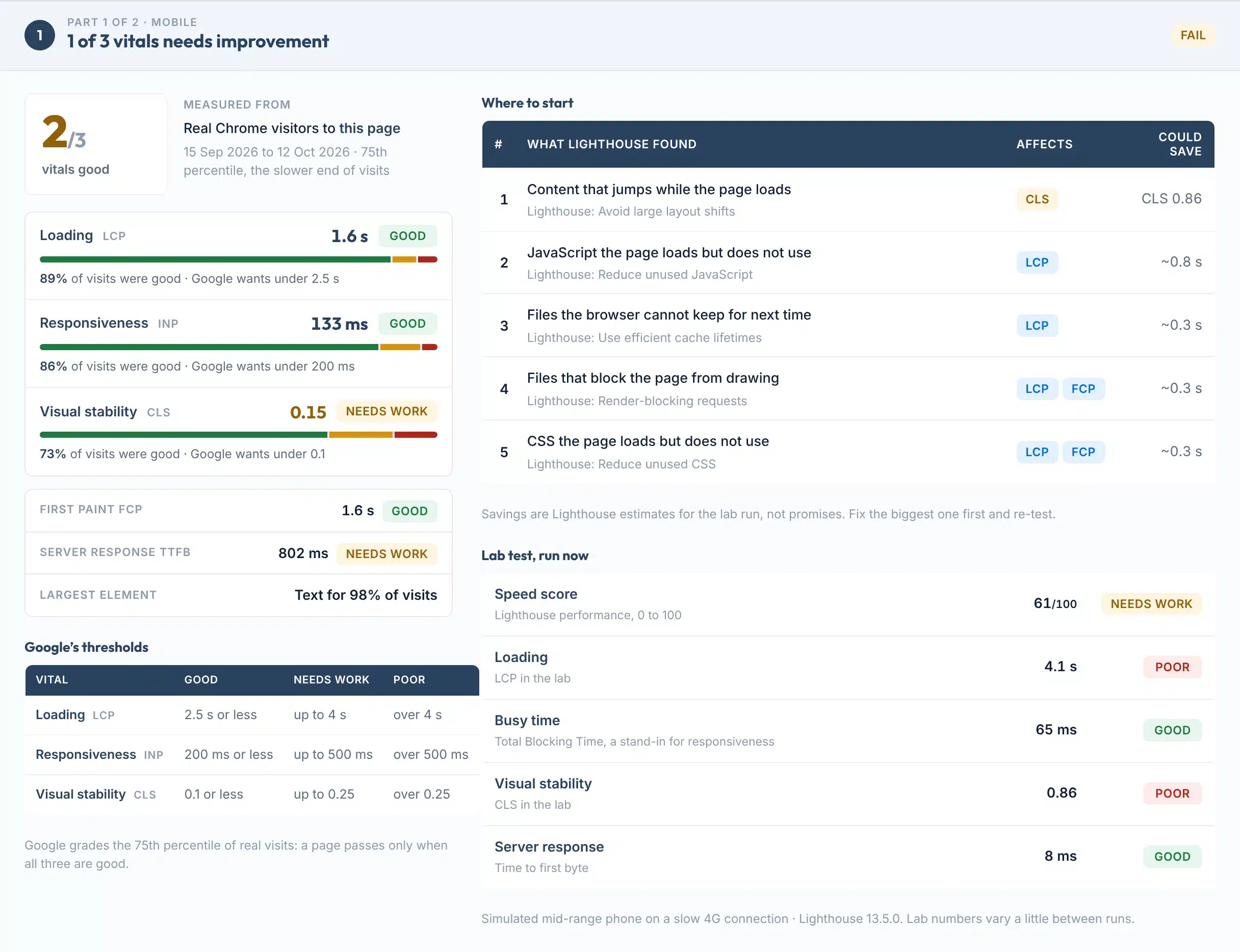
Part 1 is mobile, Part 2 is desktop. Here is a real Part 1, with each part numbered.
 123456
- 1Vitals good
How many of the three vitals are good on this device, out of 3. Google passes a page only when all three are good.
- 2Measured from
Where the numbers come from: real Chrome visitors to this page or to the whole site, with the 28-day window, or a lab test when Google has no visitor data.
- 3The three vitals
Loading (LCP), responsiveness (INP) and visual stability (CLS), each with its value, its grade and the share of visits that were good.
- 4Supporting numbers
First paint, server response time and what the largest element usually is. They are not graded by Google, but they explain the three vitals.
- 5Where to start
What Lighthouse found in the lab run, in plain words, with the vital it affects and the time it estimates you could save. Biggest first.
- 6Lab test, run now
The speed score and lab numbers from the simulated test, plus Google’s thresholds for reference. Lab numbers vary a little between runs.
Result labels:
Under every report: copy a link to the result, or save it as a one-page PDF. Both show when it was checked.

The three vitals
What LCP, INP and CLS measure
Google calls Core Web Vitals “a set of metrics that measure real-world user experience” (Google Search Central). There are three, and each has the same thresholds on mobile and desktop.
How long until the biggest thing on the screen, usually an image or a headline, is visible.
How long the page takes to react when someone taps or clicks, measured across the whole visit.
How much the content jumps around while the page loads, so a button moves just as you tap it.
Why the 75th percentile
Google grades the slower end of visits, not the average: “a good threshold to measure is the 75th percentile of page loads, segmented across mobile and desktop devices” (web.dev). Pass that, and most visits (3 of 4) had that experience or better.
INP replaced FID in 2024
On 12 March 2024 Interaction to Next Paint became a Core Web Vital, “replacing First Input Delay” (web.dev). Tools that still show FID are out of date. INP covers every tap and click in a visit, not just the first.
Google’s own reasoning for the numbers is on Defining the Core Web Vitals metrics thresholds. The same thresholds apply to both devices, and most “are therefore set based on mobile achievability”, which is why mobile fails more often.
Two kinds of data
Why a 90 score can still fail
PageSpeed Insights shows two different things, and people mix them up: a lab score and a real-visitor grade. Google says “having good lab data does not necessarily mean real-user experiences will also be good” (PageSpeed Insights docs).
| Real visitors (CrUX) | Lab test (Lighthouse) | This tool | |
|---|---|---|---|
| Who it measures | Opted-in Chrome visitors to the page, over 28 days | One simulated load on a mid-range phone or a desktop | Both, kept apart and labelled |
| What Google grades | Yes: this is what Search Console and the ranking systems use | No: the 0 to 100 score is not a ranking factor | Grades the real-visitor numbers; the score is for diagnosis |
| When it updates | Daily, as a rolling 28-day average | Every run, so numbers vary a little | Visitor data daily, lab test on every check |
| Small or new sites | Often no data, so no grade | Always available | Says so, then falls back to a lab estimate |
| Best for | Knowing whether you pass | Finding what to fix | One answer, then the fix list |
Where the real-visitor data comes from
The Chrome UX Report is “a 28-day rolling average of aggregated metrics” from Chrome users who opted in, updated daily and about two days behind (Chrome for Developers). A page needs a minimum number of visitors to be included; Google says “an exact number is not disclosed” (CrUX methodology). When a page has too few, Google falls back to data for the whole site, and this tool tells you when that happens.
Why the lab test differs
Google’s own answer: field data “represents anonymized performance data from users in the real-world on a variety of devices and network conditions”, while lab data “is based on a simulated load of a page on a single device and fixed set of network conditions. As a result, the values may differ” (Google). The lab phone is a mid-range device on a slow mobile network, so lab loading times are usually worse than what most of your visitors see.
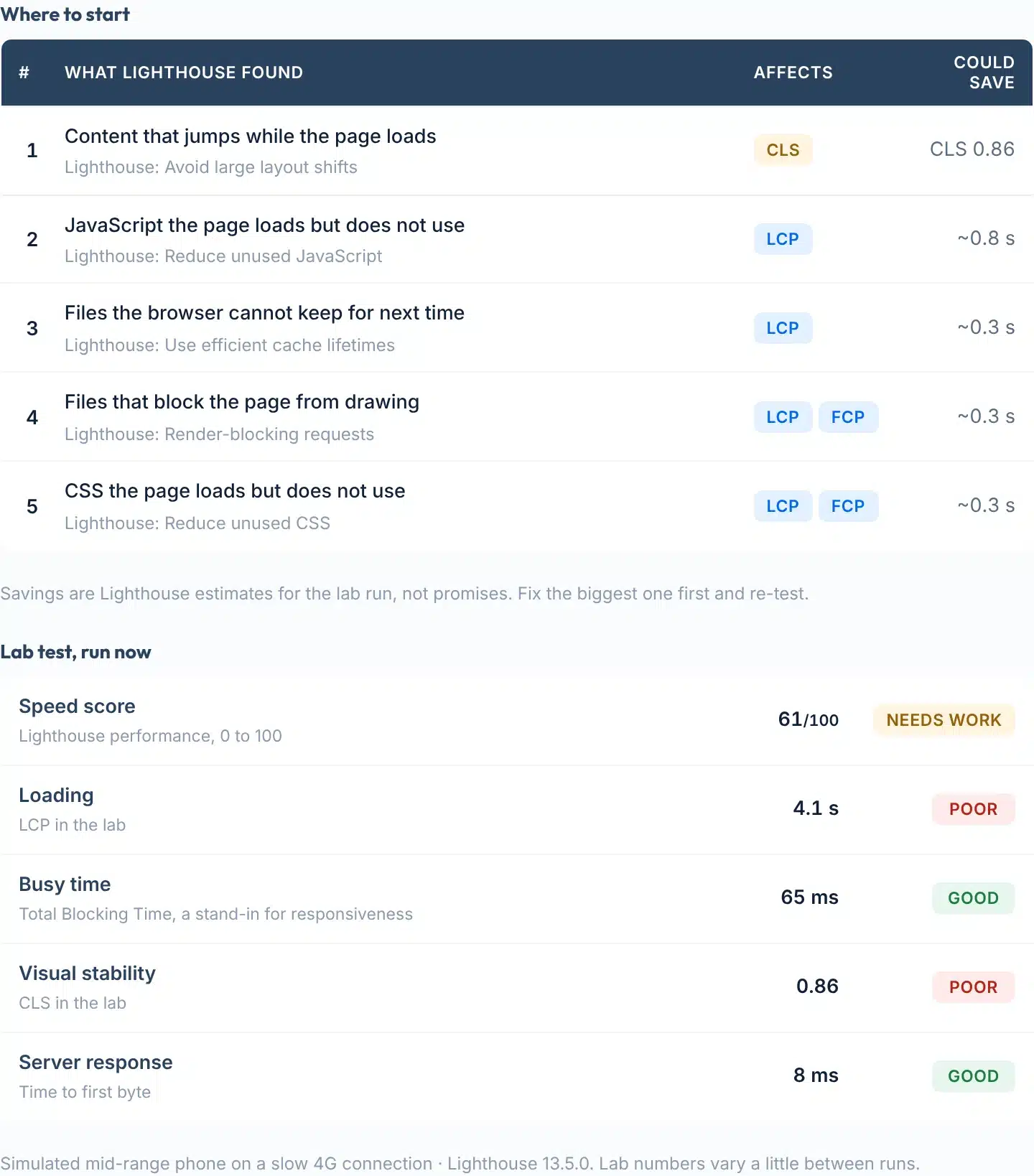
The fix list and lab numbers for the same page. Savings are Lighthouse estimates for that run.
Rankings
Do Core Web Vitals affect rankings?
Yes, in Google’s own words, and with limits that matter.
What Google says
“Core Web Vitals are used by our ranking systems” and “we recommend site owners achieve good Core Web Vitals for success with Search” (Google Search Central). But also: “Google Search always seeks to show the most relevant content, even if the page experience is sub-par”, and “trying to get a perfect score just for SEO reasons may not be the best use of your time.”
Where it tips the balance
From the original announcement: “A good page experience doesn’t override having great, relevant content. However, in cases where there are multiple pages that have similar content, page experience becomes much more important for visibility in Search” (Google, May 2020). For a local business competing with similar pages, that is exactly the situation.
Rollout dates: mobile “beginning in mid-June 2021”, full role by the end of August (Google); desktop from February 2022, complete by the end of March (Google). Pass rates: 53% of mobile and 60% of desktop sites had good Core Web Vitals in the August 2026 dataset of the HTTP Archive Core Web Vitals Technology Report (HTTP Archive); the 2025 Web Almanac put it at 48% mobile and 56% desktop in July 2025 (HTTP Archive).
Limits
What this tool can’t do
Knowing the limits helps you trust the grade you do get.
Use it to
- See whether a page passes Google’s Core Web Vitals for real visitors, mobile and desktop
- Find out which of the three vitals is the problem, and how many visits it affects
- Get a plain fix list from the lab test, biggest saving first
- Check a competitor’s page, or a page you do not own
- Confirm a fix in the lab straight away, and in the real-visitor data four weeks later
- Share a dated report with a developer or a client
It won’t
- Grade a page with few visitors. Google only publishes real-visitor data for pages and sites with enough Chrome visits. Without it you get a lab estimate, clearly labelled, and Google itself has nothing to grade.
- Show history. Each check is a snapshot of the current 28-day window. For a trend, run it monthly or use the Core Web Vitals report in Search Console.
- Test a page behind a login. Google’s data covers public, indexable pages, and the lab test opens the page as a stranger would.
- Replace the lab numbers with yours. The lab run uses a simulated mid-range phone on a slow connection. A fast phone on Wi-Fi will see better numbers; the real-visitor data is the one Google grades.
- Promise a ranking change. Google ranks on relevance first. Good vitals help where competing pages are similar; they do not lift a page that does not answer the search.
- Run bulk lists. One page per check, 10 checks a day. Search Console’s report groups every indexed page of your own site.
Next steps
What to do with your result
Speed is worth money, and the evidence is Google’s own case studies. Vodafone found “a 31% improvement in LCP led to 8% more sales” (web.dev). Rakuten 24 lifted its conversion rate by 33.13% (web.dev), redBus increased sales by about 7% through INP work (web.dev), and Swappie grew mobile revenue by 42% (web.dev).
In the Google and Deloitte study of 37 brand sites, a 0.1 second improvement in mobile speed lifted retail conversions by 8.4% and travel conversions by 10.1% (web.dev). Every business is different, so treat these as the shape of the effect, not a forecast for your site.
What faster pages were worth, in Google’s case studies
Sources: web.dev case studies and the Google/Deloitte Milliseconds Make Millions study. Each figure is that company’s own result.
Your next step, by result
Keep it. Re-check after a theme, plugin or hosting change, and once a month. Then look at what the page says, not just how fast it loads.
Google says the LCP resource “will either be an image or a web font” and that you should “never lazy-load your LCP image”. Make the first image smaller, load it first, remove files that block drawing, and check your server response time.
Long tasks on the main thread delay every tap. Google’s advice is to “do as little work as possible” in event handlers and to break long scripts into smaller tasks. Chat widgets, sliders and trackers are the usual culprits.
Google lists the common causes: “Images without dimensions. Ads, embeds, and iframes without dimensions. Dynamically injected content… Web fonts.” Give every image a width and height, and keep banners out of the way of loaded content.
Too few Chrome visits for Google to grade the page. Fix what the lab test flags anyway, then earn the visits: check the page is indexed and ranking.
Normal, and the one to fix: the thresholds are the same on both, but phones are slower. Test the fix in the lab, then re-check the real-visitor numbers in four weeks.
Want someone to fix it, not just measure it?
Our team works on speed and local rankings every day, for businesses in the US and UK.
FAQs
FAQs
What is a Core Web Vitals checker?
A Core Web Vitals checker tells you whether a page passes Google’s three user-experience measurements: loading (LCP), responsiveness (INP) and visual stability (CLS). The best ones use Google’s own real-visitor data, graded at the 75th percentile over 28 days, because that is what Google Search looks at, and add a lab test to show what to fix.
How do I check my Core Web Vitals?
Paste the page address into the box above and press Check my Core Web Vitals. Mobile and desktop are tested together. The report opens with one line: Passes, Fails on mobile or desktop, or Lab estimate when Google has no visitor data for the page. Each amber or red tag gets a one-line note saying what to fix.
What is a good Core Web Vitals score?
Google grades each vital as Good, Needs improvement or Poor. Good is an LCP of 2.5 seconds or less, an INP of 200 milliseconds or less and a CLS of 0.1 or less, each measured at the 75th percentile of visits. A page passes only when all three are good. The 0 to 100 Lighthouse score is a separate lab number.
Why does PageSpeed Insights say 90 but my page fails?
Because they are two different things. The 0 to 100 score comes from one simulated lab run; the pass or fail comes from real Chrome visitors over 28 days. Google says good lab data “does not necessarily mean real-user experiences will also be good.” This tool grades the real-visitor numbers and uses the lab run for the fix list.
What does ‘Lab estimate’ or ‘no visitor data’ mean?
Google only publishes real-visitor data for pages and sites with enough opted-in Chrome visits in the last 28 days, and does not say how many. Small or new sites often fall below it. The tool then shows the lab test clearly labelled as an estimate. Google itself has nothing to grade until the page gets more visits.
Do Core Web Vitals affect Google rankings?
Yes. Google’s documentation says “Core Web Vitals are used by our ranking systems.” It also says relevance comes first and that page experience matters most where competing pages have similar content. The page experience update rolled out on mobile between June and August 2021 and on desktop in February and March 2022.
What is INP, and what happened to FID?
INP, Interaction to Next Paint, measures how long a page takes to react to taps and clicks across the whole visit. Good is 200 milliseconds or less. It replaced First Input Delay as a Core Web Vital on 12 March 2024. Any tool that still shows FID is out of date.
Why are mobile and desktop results different?
Google grades them separately and the thresholds are identical, so phones fail more often: they are slower and on worse connections. The lab test also uses a mid-range phone on a slow mobile network for mobile and a wired desktop for desktop. Fix mobile first; that is where most local searches happen.
How long until a fix shows in the real-visitor data?
The Chrome UX Report is a rolling 28-day average updated daily and about two days behind, so the full effect of a fix shows roughly four weeks after it goes live. The lab test reflects the fix straight away. Search Console confirms a fix with its own 28-day tracking window.
How accurate is this checker?
The real-visitor numbers are Google’s own, read live, so they match PageSpeed Insights and Search Console for the same page and window. The lab numbers vary a little between runs; Google notes that network and hardware availability cause this. Results are reused for 30 minutes.
Sources
- web.devWeb Vitals: the three metrics, thresholds and the 75th percentile
- Google Search CentralUnderstanding Core Web Vitals and Google search results
- PageSpeed Insights docsField vs lab data, thresholds, the pass rule, why values differ
- web.devDefining the Core Web Vitals metrics thresholds
- web.devInteraction to Next Paint becomes a Core Web Vital (12 March 2024)
- Chrome for DevelopersChrome UX Report API: 28-day rolling average, daily updates
- Chrome for DevelopersCrUX methodology: who is counted, minimum traffic not disclosed
- Google Search CentralPage experience in Google Search results (ranking FAQ)
- Google Search Central BlogEvaluating page experience for a better web (May 2020)
- Google Search Central BlogPage experience rollout on mobile (April 2021) and desktop (November 2021)
- Search Console HelpCore Web Vitals report: groups, statuses, 28-day validation
- web.devOptimize LCP, Optimize INP, Optimize CLS
- web.dev case studiesVodafone, Rakuten 24, redBus, Swappie, Milliseconds Make Millions
- HTTP Archive2025 Web Almanac, Performance: share of sites with good Core Web Vitals
- HTTP ArchiveCore Web Vitals Technology Report (monthly pass rates)
More free tools
More free SEO tools
Once the page is fast, these check what sits behind it.
Read the guides: how much it costs to build a website, year 1 vs year 2, web design color theory and a free palette builder, website header examples and what to put in yours, how to fix a 5xx server error, How to check your website keyword rankings and How a local SEO heat map works.