
The report
Can Google index this page?
This free Google index checker answers two questions for up to 10 pages at once: can Google index the page, and does it show up in Google? When the answer is no, you see the exact reason and the evidence behind it. No signup.
Each page is opened live, once as a browser and once as Googlebot. We read its status and every redirect, its robots.txt rule, any noindex in the robots tag or the X-Robots-Tag header, its canonical, your sitemap and the text in the HTML. Then one live Google search checks whether the address shows up.
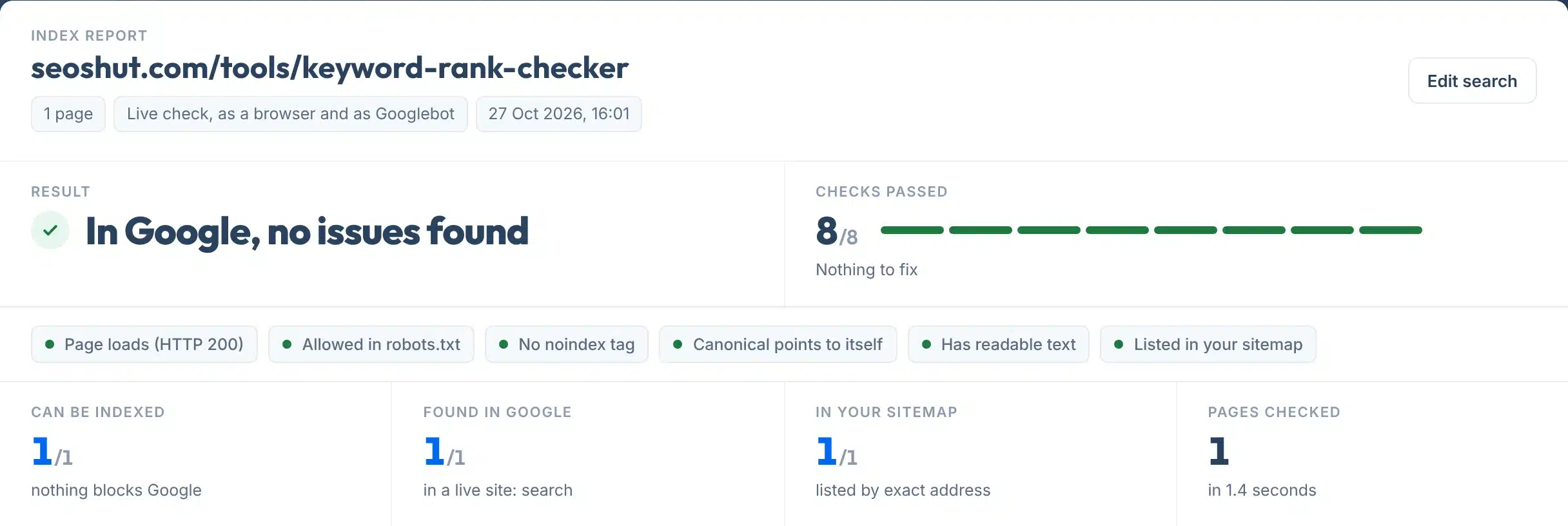
Every report opens with one plain answer, such as In Google, no issues found or Google cannot index this page, then green, amber and red checks, and one line for anything that needs fixing.
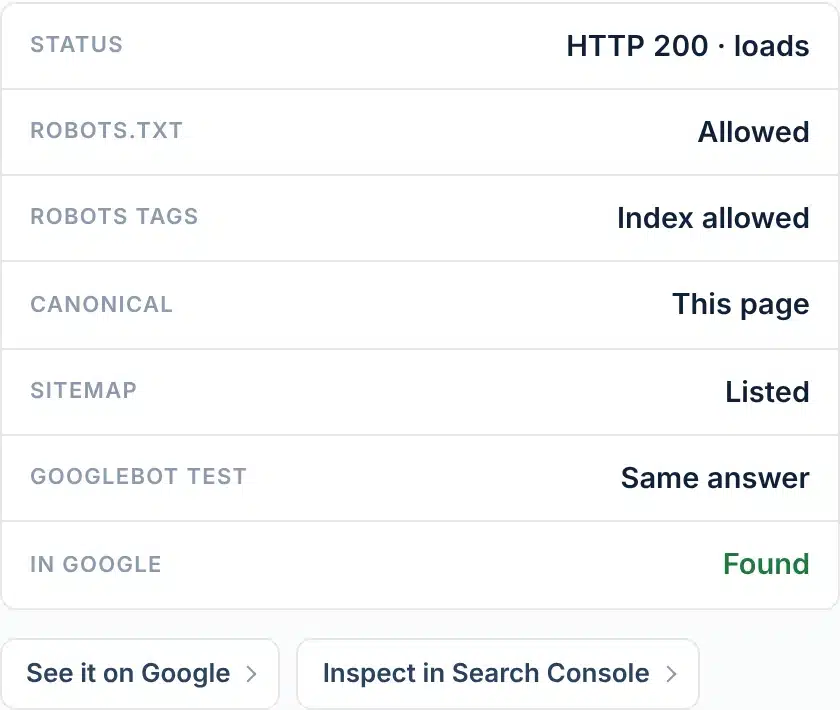
A live check of seoshut.com/tools/keyword-rank-checker: every check passed, and Google shows the page.
How to use it
How to check if a page is indexed
One box, one button, five small steps.
- 1Paste one page, or up to 10
One address per line, for example yoursite.com/services. Leave out https if you like: we add it.
- 2Press Check indexing
We open every page as a browser and as Googlebot, read robots.txt and your sitemap, then search Google. It takes about 5 to 20 seconds.
- 3Read the answer at the top
Green means nothing is stopping Google. Red means something blocks indexing, and the line under it says what.
- 4Fix the red lines first
A noindex tag, a robots.txt rule or a page error keeps the page out completely. Amber lines are worth fixing next.
- 5Confirm in Search Console
For your own site, open URL Inspection from the button on each page, check the live test, and press Request indexing.
Your report, explained
What each part of the report means
Here is a real report for one of our own pages that is set to noindex on purpose, with each part numbered.
 123456
- 1The answer
One plain line: in Google, can be indexed, cannot be indexed, or could not be checked. For several pages it says how many are blocked.
- 2Checks passed
Up to eight checks per page, added up across all pages, with one bar segment per check: green, amber or red.
- 3Check tags
The same checks as short sentences, problems first, so you can see what is wrong without reading further.
- 4Fix and Improve lines
One line per problem, with what to do. Fix means Google cannot index the page. Improve means it can, but something could help.
- 5Page checks
For each page: status, robots.txt, robots tags, canonical, sitemap, the Googlebot test and whether Google shows it, with buttons to Google and Search Console.
- 6What we found
The raw evidence: every redirect step, the exact robots.txt line, the robots tag and header, the canonical, the sitemap and the word count. Red rows are the cause.
Labels:
Features
What it checks
- Indexable and in Google, bothTwo separate answers: whether anything blocks Google, and whether a live Google search shows the address.
- The reason, with evidenceNot just yes or no. You see the exact robots.txt line, the noindex tag or header, the canonical and every redirect step.
- Googlebot testEach page is also opened as Googlebot, so a firewall, CDN or plugin that treats Google differently shows up.
- robots.txt read the way Google reads itThe most specific user-agent group, the longest matching rule, and Allow winning a tie, as Google documents.
- Sitemap checkWe read your sitemaps, including sitemap index files, and look for the exact final address.
- Copy link or save a PDFCopy a link to the result, or save it as a one-page PDF to send to whoever runs the site.

The rules
What stops a page being indexed
The common reasons, what Google does with each one, and what this tool checks.
| What stops it | What Google does | What we check |
|---|---|---|
| Page error (4xx or 5xx) | Not indexed. Pages already in the index that start returning 4xx are removed; persistent 5xx pages are eventually dropped. | Status of the final page, for a browser and for Googlebot |
| Redirect | Google treats the address as a page with redirect and indexes where it ends. 301 and 308 are a strong signal, 302 and 307 a weak one. | Every redirect step and where it ends |
| robots.txt Disallow | Google does not crawl the page. It can still list the address, but without a description. | The exact rule that applies to Googlebot |
| noindex | Google drops the page from results, whether the rule is in a robots meta tag or an X-Robots-Tag header. | Robots and googlebot meta tags, and the header |
| Canonical to another page | A strong hint that the other address is the main one, so Google usually indexes that instead. | HTML canonical and Link header |
| Not in the sitemap | Not a blocker. A sitemap is a hint that helps Google find pages and pick the main version. | Your sitemaps, by exact address |
| Crawled or discovered, not indexed | Google found the page and chose not to index it yet. No outside tool can see this decision. | We say so, and link to URL Inspection |
Sources: Google, HTTP status codes; Google, robots.txt; Google, noindex; Google, canonicalization; Google, sitemaps; Search Console, Page indexing report.
Is a site: search enough?
No. Google says “the site: operator doesn’t necessarily return all the URLs that are indexed” and that bigger sites should not expect to see every URL (Google Search Central). That is why a page we do not see in Google is marked amber, to confirm in Search Console, never red.
robots.txt or noindex?
Use noindex to keep a page out of Google. If robots.txt blocks the page, “the crawler will never see the noindex rule, and the page can still appear in search results” (Google Search Central). Never block a page you are trying to remove.
Limits
What this tool can’t do
Indexable means Google is allowed to index the page, not that it has.
Use it to
- See whether anything stops Google indexing a page
- Find a stray noindex, a robots.txt rule or a page error, with proof
- Check a redirect ends where you expect
- Spot a firewall or plugin that answers Googlebot differently
- Check up to 10 pages in one go, yours or anyone’s
- Share a dated report with whoever runs the site
It won’t
- Confirm the index status. Only URL Inspection in Search Console can, for sites you own. A site: search misses some indexed pages.
- Show the canonical Google chose. Google can pick a different main version than your tag. Search Console shows its choice.
- Explain a quality decision. “Crawled, currently not indexed” is Google’s choice. We can only rule out the technical blockers.
- Run your JavaScript. We read the HTML your server sends. Text or tags added later by scripts are not counted.
- Be the real Googlebot. We send Googlebot’s user agent from our server. Firewalls that verify Google’s IP addresses may answer us differently.
- Get a page indexed. Nobody outside Google can. Google says it “doesn’t guarantee that it will crawl, index, or serve your page”.
Next steps
What to do with your result
Being indexable is only the first step. In an IndexCheckr study of pages its users tracked, 61.94% were not indexed and 37.08% were indexed, and 21.29% of pages in a later sample were indexed and then dropped (IndexCheckr, Feb 2025).
The sample is self-selected, pages people were worried about, so it is not an average for the web. Google itself says not to expect every URL on a site to be indexed, only the main versions of pages (Google).
Index status of pages tracked by IndexCheckr users
Source: IndexCheckr, Google indexing study, about 16 million tracked pages; the deindexed share is from a sample of 310,705 pages. Third-party data, updated 28 Feb 2025.
Your next step, by result
If the page should be on Google, remove noindex from the robots tag or the X-Robots-Tag header (often an SEO plugin switch), then request indexing.
Remove or narrow the Disallow line we show. Check the file with our robots.txt checker before you publish it.
Restore the page, or send it with a 301 to the closest live page. Then fix every link that still points at the old address.
Add the exact final address to your sitemap, then submit the sitemap in Search Console.
Open URL Inspection. If it says the page is not indexed, run the live test and press Request indexing. New pages often take days.
Nothing blocks Google. If it still is not indexed after a few weeks, make the page more useful and link to it from your important pages.
Pages still not showing up on Google?
Our team fixes indexing and technical SEO for businesses in the US and UK.
FAQs
FAQs
How do I check if a page is indexed by Google?
Paste the page into the box above and press Check indexing. You see whether anything stops Google indexing it and whether a live Google search shows the address. For your own site, confirm with URL Inspection in Search Console, which shows Google’s own index status, the canonical it chose and the last crawl.
Is this Google index checker free?
Yes. It is free with no signup and no email. Each visitor gets 15 checks a day, with up to 10 pages in each. Checking the same pages again within 10 minutes shows the saved result, and each Google search result is kept for 24 hours.
Can I check many URLs at once?
Yes, up to 10 pages per check, one address per line. Each page gets its own section with its checks and evidence, and the summary at the top says how many can be indexed, how many show up in Google and how many are in your sitemap.
Why does a site: search not show my page?
Google says the site: operator does not necessarily return every indexed URL, and big sites should not expect to see them all. So a page missing from a site: search may still be indexed. That is why this tool marks it amber and sends you to URL Inspection to confirm.
What does indexable mean?
Indexable means nothing stops Google from indexing the page: it loads, robots.txt allows it, there is no noindex rule, and its canonical does not point elsewhere. It does not mean Google has indexed it. Google says it does not guarantee that it will crawl, index or serve any page.
Why is my page not indexed?
The technical causes this tool finds are a noindex rule, a robots.txt block, a page error, a redirect or a canonical pointing elsewhere. If none apply, Google has usually seen the page and not indexed it yet, shown in Search Console as Crawled or Discovered, currently not indexed. Improving the page and its internal links helps.
Does blocking a page in robots.txt keep it out of Google?
Not reliably. A page blocked by robots.txt can still appear in results without a description, and Google can never see a noindex tag on a page it is not allowed to crawl. To keep a page out of Google, allow crawling and use noindex.
How long does Google take to index a page?
Google says crawling can take anywhere from a few days to a few weeks, and that requesting a recrawl many times will not make it faster. After a request in Search Console, indexing typically takes a day or so but can take much longer, and is never guaranteed.
Can I use the Indexing API to index my pages faster?
Only for job postings and livestream pages. Google’s Indexing API can only be used for pages with JobPosting or BroadcastEvent embedded in a VideoObject. For other pages, use a sitemap and Request indexing in URL Inspection.
Why does the Googlebot test say blocked?
Some firewalls and CDNs block visitors that only claim to be Googlebot, because that user agent is often faked, and let the real Googlebot through after checking its IP address. If our Googlebot test is blocked, run the live test in URL Inspection to see what Google really gets.
Sources
- Google Search CentralThe site: search operator and its limits
- Search Console HelpURL Inspection tool
- Search Console HelpPage indexing report and its reasons
- Google Search CentralBlock indexing with noindex
- Google Search CentralRobots meta tag and X-Robots-Tag
- Google Search CentralIntroduction to robots.txt
- Google Crawling DocsHow Google interprets robots.txt
- Google Search CentralWhat is canonicalization
- Google Search CentralBuild and submit a sitemap
- Google Search CentralHTTP status codes and network errors
- Google Search CentralAsk Google to recrawl your URLs
- Google Search CentralHow Google Search works
- Google Search CentralJavaScript SEO basics
- IndexCheckrGoogle indexing study, 16 million pages (Feb 2025)
More free tools
More free SEO tools
Once Google can index the page, these check what helps it rank.