
The report
Check your schema in seconds
This free schema markup checker opens any page and reads every piece of structured data on it: JSON-LD, Microdata and RDFa. It tells you which Google results the page can earn, which required fields are missing, and whether any code is broken. No signup.
Each item is checked against the fields Google’s own documentation lists as required and recommended, and against what Google still shows today. FAQ and How-to markup, for example, no longer earn a rich result.
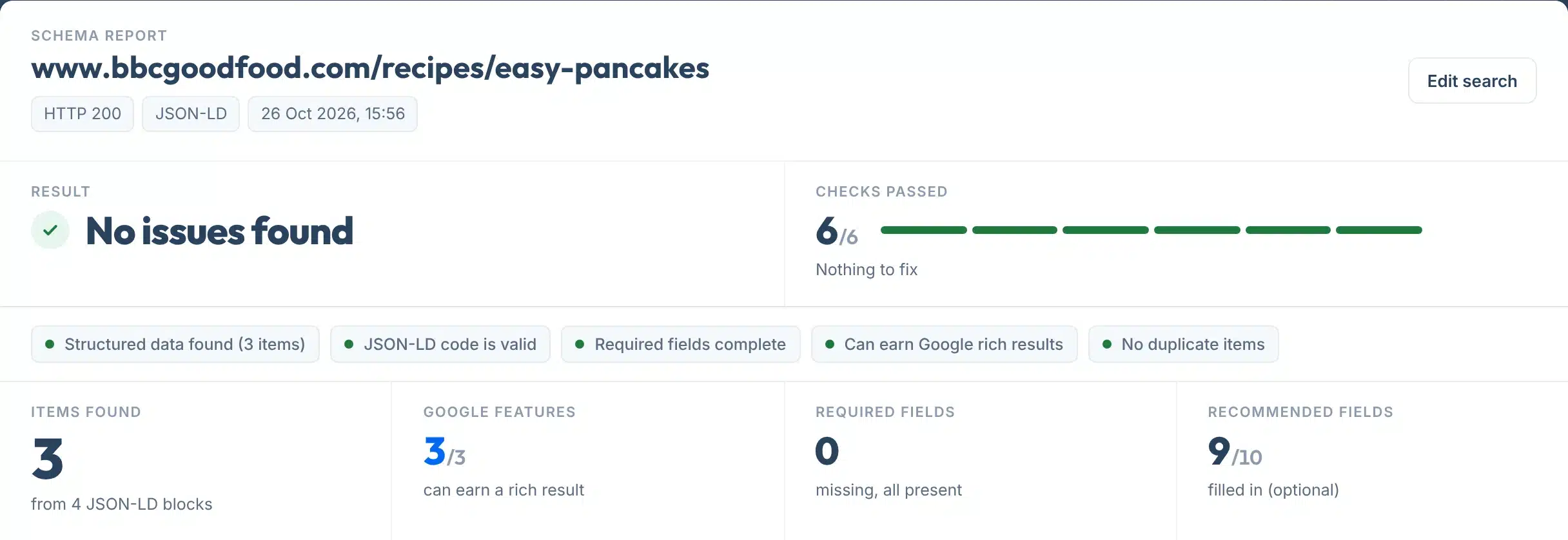
Every report opens with one plain answer: No issues found, things to improve, or problems to fix. The checks sit under it in green, amber or red, and anything that needs work gets one line saying what to change.
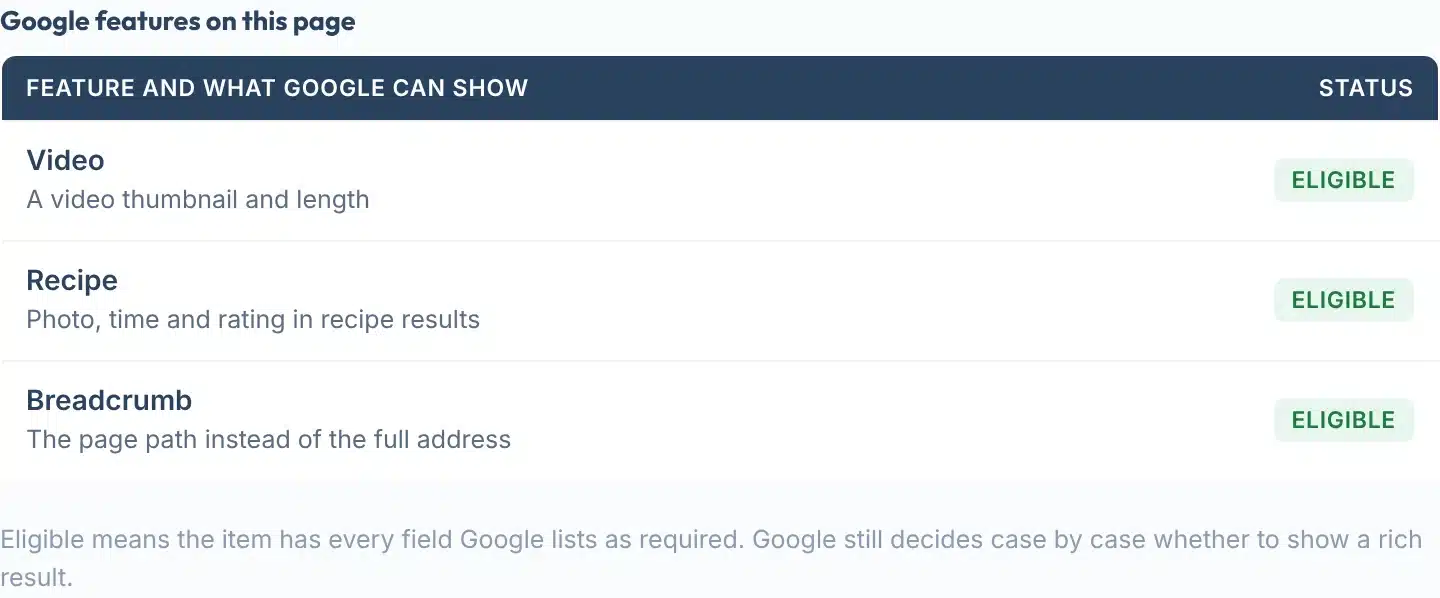
A live check of a BBC Good Food recipe page: Video, Recipe and Breadcrumb markup, all eligible.
How to use it
How to check your schema markup
One box, five small steps.
- 1Paste the page address
Type or paste one page, for example yoursite.com/services. Leave out https if you like: we add it.
- 2Press Check my schema
We open the page once and read every JSON-LD block, Microdata item and RDFa item in the HTML. It takes a few seconds.
- 3Read the answer at the top
One line tells you whether anything is wrong. The coloured checks under it show what passed and what did not.
- 4Fix the red lines first
Broken code and missing required fields stop a rich result. Each line says exactly what to add or change.
- 5Check again, or share it
Press Edit search to run it again after a fix, or copy the link to send the report to whoever edits the site.
Your report, explained
What each part of the report means
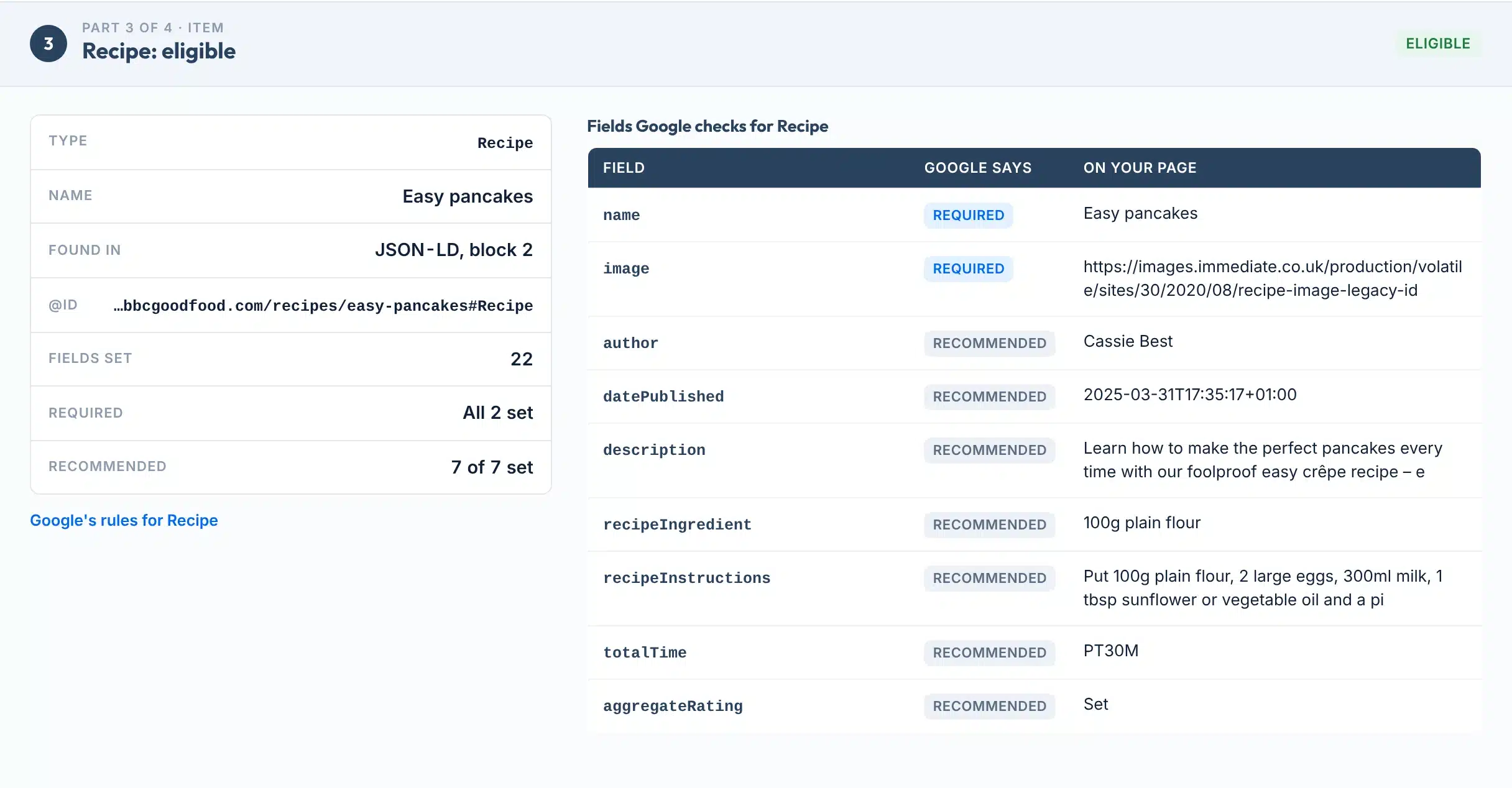
Part 1 lists the Google features on the page. Then every item gets its own part, checked field by field. Here is the Recipe item from the same page, with each piece numbered.
 123456
- 1Status
Eligible means every required field is there. Missing fields means Google cannot use the item for a rich result yet. Retired means Google no longer shows that result type.
- 2Type and where it was found
The schema.org type, its name and @id, and whether it came from a JSON-LD block, Microdata or RDFa.
- 3Required and recommended
How many required fields are set, and how many of the optional recommended ones you have filled in.
- 4Google’s rules
A link to Google’s documentation for that result type, so you can check any field yourself.
- 5Google says
Required fields must be there for a rich result. Recommended fields are optional extras that give Google more to show.
- 6On your page
The value your markup gives for each field, or Missing when it is not there.
Labels:
Features
What it checks
- Plain answer firstNo issues found, things to improve, or problems to fix, with one line per fix saying what to change.
- Google features, not just syntaxEach item is matched to the Google result it can earn, with the required and recommended fields from Google’s docs.
- Retired types flaggedFAQ, How-to and the result types Google dropped in 2025 are marked retired, with the date, so you stop chasing them.
- Broken code, locatedA JSON-LD block that does not parse is shown with its HTML line and the likely reason, such as an unescaped quote mark.
- Duplicates and self-review starsTwo Organization items that disagree, an item with no type, or a business rating itself are all caught.
- Copy link or save a PDFCopy a link to the result, or save it as a one-page PDF to send to whoever edits the site.
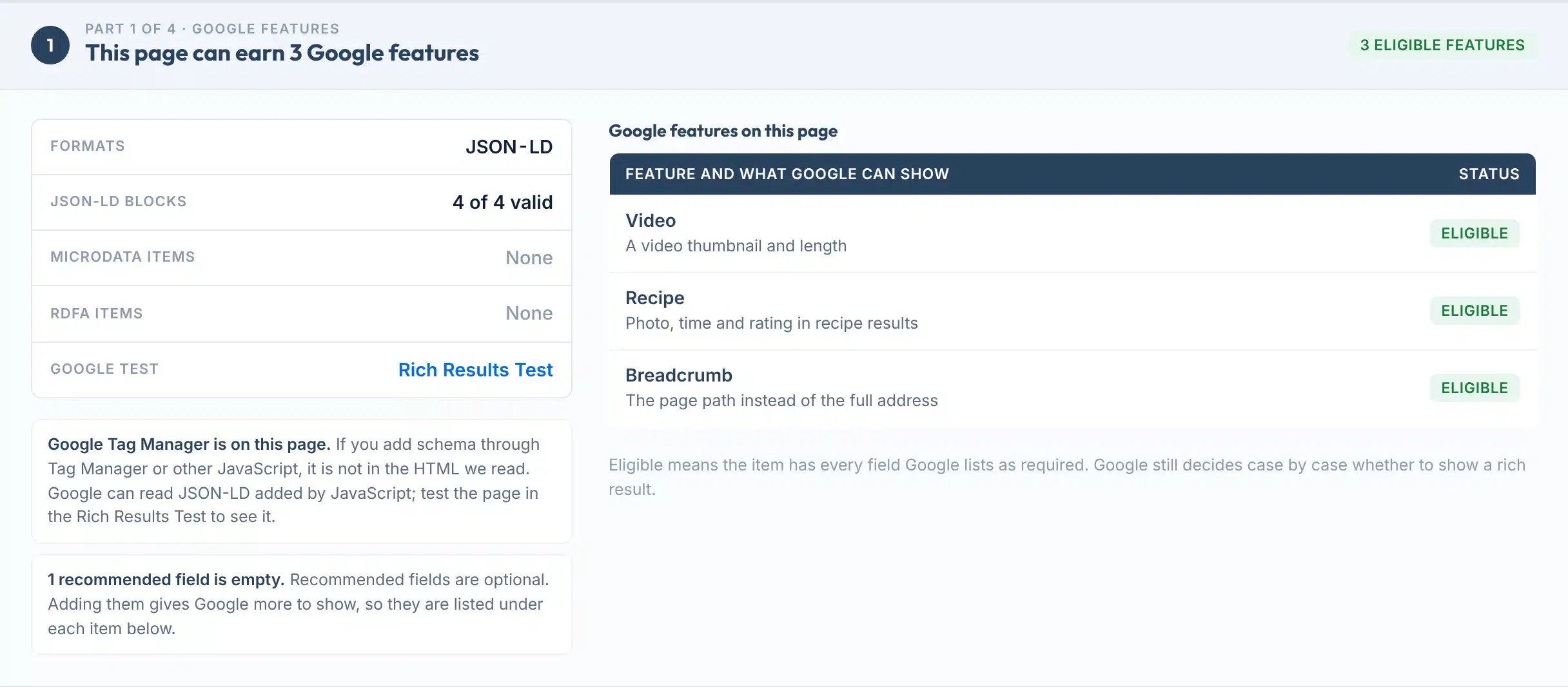
Part 1 for the same page: the formats found, the JSON-LD blocks, and every Google feature with its status.

The rules
What Google requires, by type
The required fields for the result types most sites use, from Google’s Search Central docs (checked 26 October 2026).
| Google feature | Required fields | In Google today |
|---|---|---|
| Article | None. Google recommends headline, image, author and dates. | Shown |
| Organization | None. A logo must be at least 112 x 112 px. | Shown |
| Local business | name and address | Shown |
| Product snippet | name, plus offers, review or aggregateRating | Shown |
| Breadcrumb | itemListElement, with position, name and item on each step | Shown |
| Event | name, startDate and location (with an address) | Shown |
| Review snippet | author, itemReviewed and reviewRating | Shown, not for a business rating itself |
| Recipe | name and image | Shown |
| Video | name, thumbnailUrl and uploadDate | Shown |
| FAQ | No longer used | Retired 7 May 2026 |
| How-to | No longer used | Retired 13 Sep 2023 |
Sources: Google, structured data features; Google, review snippets; Google Search Central updates; Google, FAQ and How-to changes; Google, simplifying search results (2025).
Rich Results Test or Schema Markup Validator?
Google’s Rich Results Test shows which Google rich results a page can earn. The Schema Markup Validator tests “all types of schema.org markup, without Google-specific validation” (Google). This tool does both jobs in plain English, and the report links to Google’s test for a final check.
Does schema help with AI search?
Google says there is “no special schema.org structured data that you need to add” to appear in AI Overviews (Google). Its AI guide still calls structured data “a good idea”, because it helps pages become eligible for rich results (Google). Keep it accurate and matching the page.
Limits
What this tool can’t do
If Google’s own test says something different, one of these is usually why.
Use it to
- See every schema item on a page, in any of the three formats
- Find missing required fields before Google does
- Find broken JSON-LD and the line it breaks on
- Spot retired FAQ and How-to markup
- Check a competitor’s or a client’s page, no access needed
- Share a dated report with whoever edits the site
It won’t
- Promise a rich result. Google says it “does not guarantee that your structured data will show up”, even when it is correct (Google).
- See schema added by JavaScript. We read the HTML your server sends. Markup added later by a script or Tag Manager does not show here.
- Check a whole site. It checks one page per run. Search Console’s rich result reports cover every page Google has crawled.
- Judge every rule. We check the documented required fields and a few policies. Some rules, such as image quality or whether content is genuine, need a person.
- Read RDFa field by field. RDFa items are listed by type, but only JSON-LD and Microdata are checked field by field.
- Read pages that block us. Pages behind a login or a bot shield answer differently to us than to Google.
Next steps
What to do with your result
Rich results can earn more clicks. Google’s own case studies report that Nestlé’s rich result pages had an 82% higher click-through rate, Food Network saw 35% more visits, and Rotten Tomatoes measured a 25% higher click-through rate on pages with structured data (Google).
Structured data is common but far from universal: it was on about half of home pages in 2025, and JSON-LD on 43% of them (HTTP Archive Web Almanac 2025). Correct markup on the right pages is still an edge.
What Google’s case studies measured
Source: Google Search Central, Introduction to structured data. Each company measured its own pages; the figures are not comparable with each other.
Your next step, by result
Open the block the report names. Escape quote marks inside text as \", remove trailing commas, and check it again. A plugin that pastes HTML into JSON-LD is a common cause.
Add the required fields the report lists, using what visitors can already see on the page. Do not invent values.
Start with Organization or LocalBusiness on the home page and Breadcrumb or Article on inner pages.
Two Organization items usually mean an SEO plugin and the theme both add one. Switch one off, or give both the same @id.
Google does not show stars for a business rating itself. Keep the reviews on the page, but do not expect stars from them.
The markup does no harm. Keep the questions on the page for readers; removing the markup is optional.
Want schema set up properly across your whole site?
Our team adds and fixes structured data for businesses in the US and UK.
FAQs
FAQs
What is a schema markup checker?
A schema markup checker reads the structured data on a web page, such as JSON-LD, Microdata or RDFa, and tests it. This one lists every item, matches each to the Google result it can earn, checks the fields Google says are required, and flags broken code, duplicates and retired types in plain English.
How do I check if my schema markup is working?
Paste the page address into the box above and press Check my schema. In a few seconds you see a plain answer, up to eight checks, the Google features the page can earn and every item checked field by field. For the final word, the report links to Google’s Rich Results Test.
Is this schema checker free?
Yes. It is free with no signup and no email. Each visitor gets 40 checks a day. Checking the same page again within 5 minutes shows the saved result, then it is fetched fresh, so you can re-test soon after a fix.
Is this the same as Google’s Rich Results Test?
No. Google’s test shows which Google rich results a page can earn, and the Schema Markup Validator checks schema.org syntax without Google’s rules. This tool reads the page HTML, checks Google’s documented required fields, and adds plain-English fixes, retired types and duplicate checks. Use Google’s test to confirm.
Does valid schema guarantee a rich result?
No. Google says it does not guarantee that structured data will show up in search results, even when it is marked up correctly. Valid markup with every required field makes a page eligible. Google then decides case by case, based on the search, the page and its quality.
Do FAQ and How-to schema still work?
Not in Google Search. Google stopped showing How-to rich results in September 2023 and FAQ rich results on 7 May 2026. The markup does no harm, and other tools may still read it, so removing it is optional. This checker marks both as retired.
Which schema format should I use?
JSON-LD. Google supports JSON-LD, Microdata and RDFa, but recommends JSON-LD because it is the easiest to add and maintain. It sits in one script block, separate from the visible HTML, so a theme change is less likely to break it.
Why does my JSON-LD show as broken?
The code does not parse, so nothing in that block counts. The most common causes are a quote mark inside a text value that is not escaped, a comma before a closing bracket, or HTML pasted into an answer. The report shows the line and the likely reason.
Why don’t I get star ratings for my business?
Google does not show review stars when a business controls the reviews about itself, on its own LocalBusiness or Organization pages. That includes embedded Google or Facebook review widgets. The markup is allowed, but it will not earn stars. This checker flags it.
Does schema markup help with AI search like AI Overviews?
Google says no special schema is needed to appear in AI Overviews or AI Mode. It still recommends structured data, because it helps pages become eligible for rich results and must match the visible page. Treat schema as a clear description of the page, not an AI shortcut.
Sources
- Google Search CentralIntroduction to structured data markup
- Google Search CentralGeneral structured data guidelines
- Google Search CentralStructured data features in Google Search
- Search Console HelpRich Results Test
- Search Console HelpRich result status reports
- Search Console HelpUnparsable structured data report
- Google Search Central BlogRich Results Test and Schema Markup Validator (2020)
- Google Search Central BlogChanges to HowTo and FAQ rich results (2023)
- Google Search Central BlogSimplifying the search results page (2025)
- Google Search CentralLatest updates, including the FAQ retirement (2026)
- Google Search CentralReview snippet and self-serving reviews
- Google Search CentralAI features and your website
- HTTP ArchiveWeb Almanac 2025, SEO chapter
More free tools
More free SEO tools
Once your schema is right, these check what sits around it.