


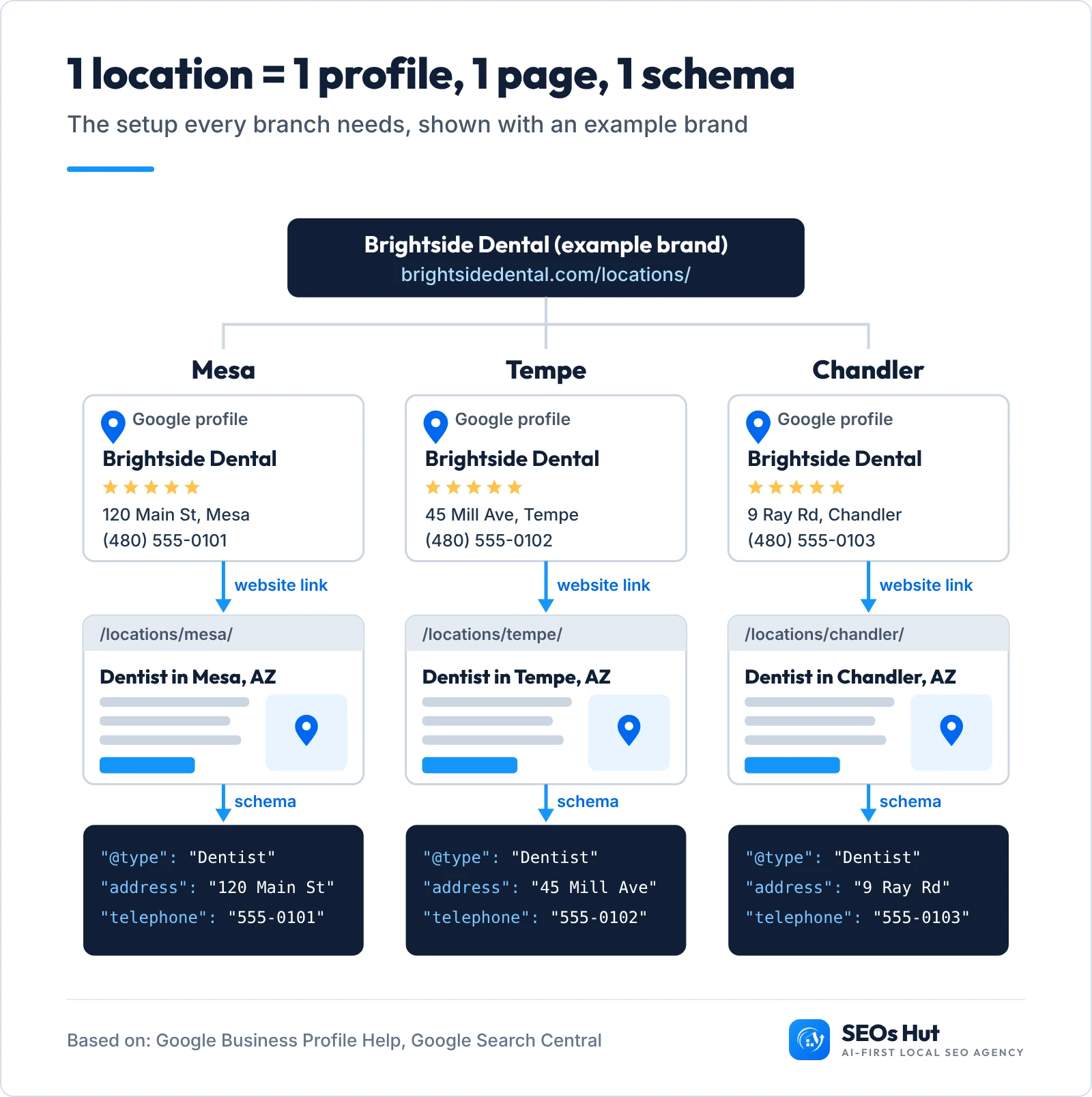
To do local SEO for multiple locations, give every real location its own Google Business Profile, its own page on your website and its own LocalBusiness schema, with the same name, address and phone in all three. Then earn reviews, citations and links for each location on its own, because Google ranks each branch separately, by how close it is to the person searching.
That is the whole idea. The rest of this guide shows you how to do it step by step, whether you run 2 offices or 200, with a free tool that writes the schema and the profile links for you.
In this guide
- How Google ranks each location
- What we found in 34 dental groups
- Step 1. Build one master location sheet
- Step 2. One Google profile per location
- Step 3. One page per location
- Step 4. Link each profile to its own page
- Step 5. Add schema (free generator)
- Step 6. Same details on every directory
- Step 7. Reviews for every location
- Step 8. Track each location on its own
- One website or one per location?
- Cheat sheet
How does Google rank a business with multiple locations?
Google does not rank your brand once. It ranks each location, one search at a time. Google’s own help page says local results are mainly based on relevance, distance and popularity, and adds that there is no way to pay for a better local ranking.
Distance is the part that changes everything for a chain. Your Mesa office can be first for someone in Mesa and invisible to someone ten miles away in Chandler. So every branch needs its own signals: its own profile, its own page, its own reviews.
The experts agree. In Whitespark’s 2026 Local Search Ranking Factors, 47 local search specialists scored the factors that move a business up the map pack. Two of the top five depend on where each location physically is.
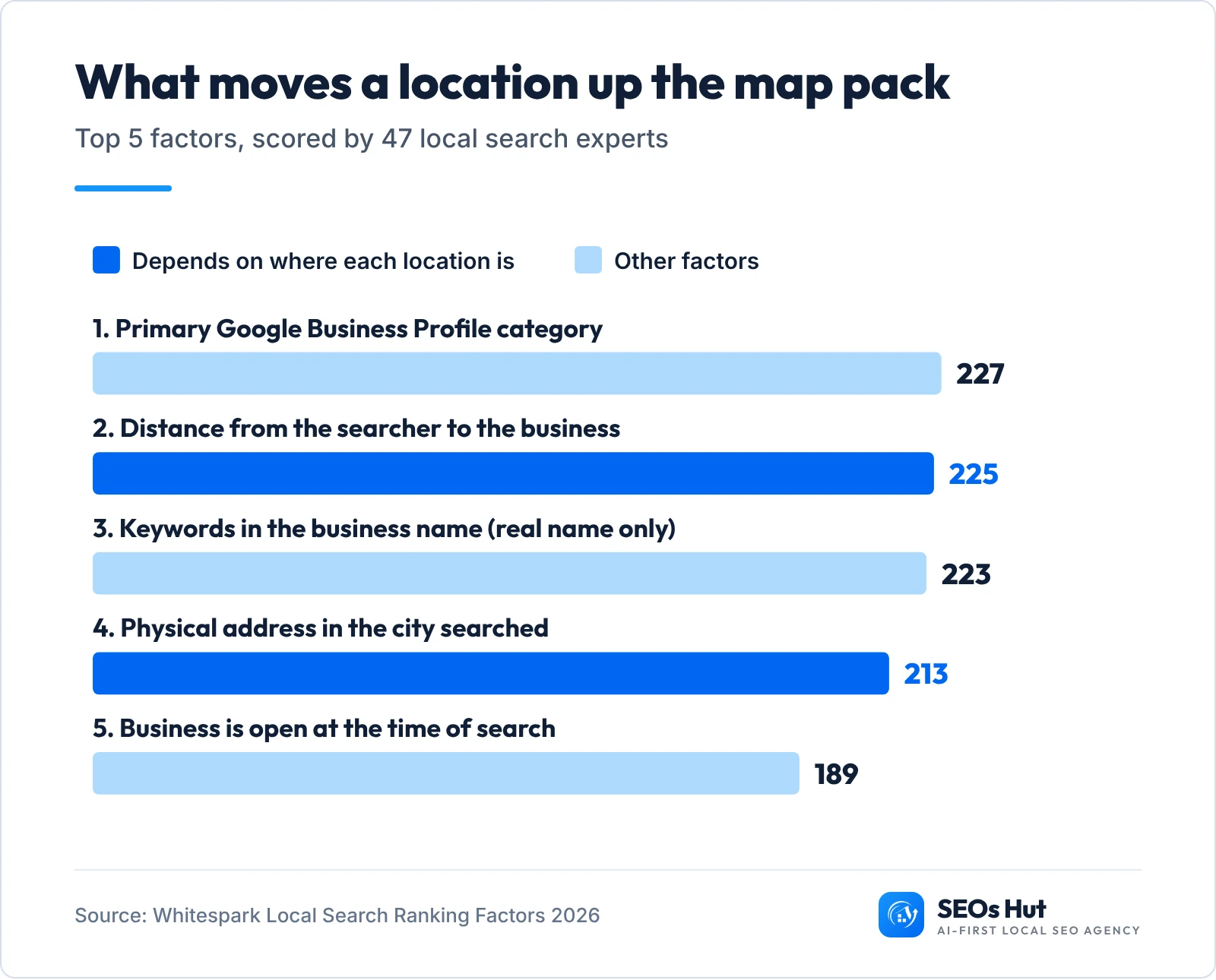
One warning about factor 3. Keywords in the business name help, but Google’s guidelines do not allow you to add them. Only use the name on your sign. More on that in step 2.
What we found when we checked 34 multi-location dental groups
We wanted to know how real multi-location businesses handle this. On 26 October 2026 we pulled Google Maps results for “dentist” in ten Phoenix-area cities (Phoenix, Mesa, Scottsdale, Chandler, Glendale, Tempe, Gilbert, Peoria, Surprise and Goodyear). We kept every practice brand that had at least two separate offices on one website. That gave us 34 dental groups with 106 locations.
For each location we opened the website link on its Google profile and checked where it landed, whether that page showed the location’s address, and whether its structured data carried that address.
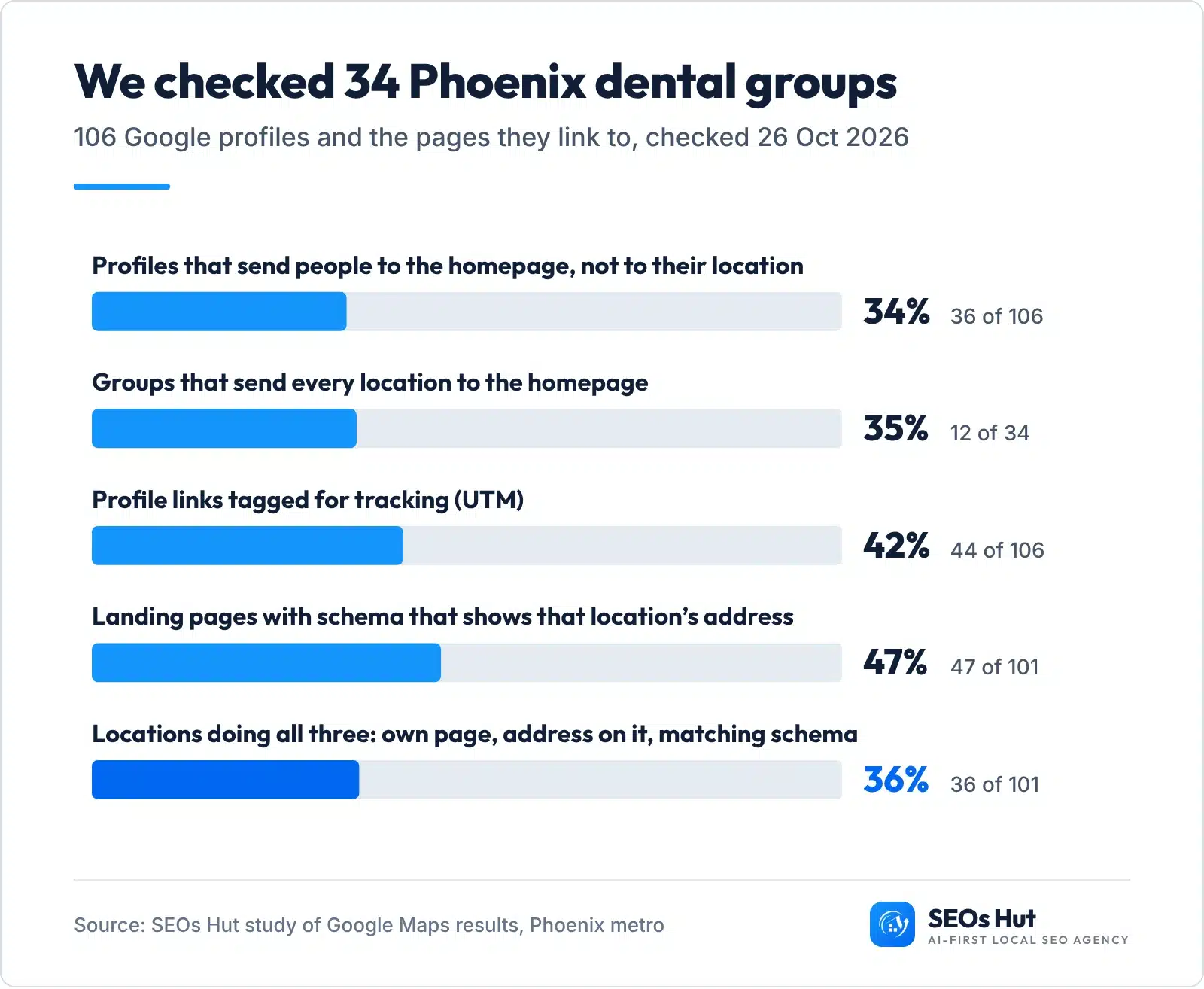
The headline: only 36 of the 101 locations we could load (36%) did all three things right. More than a third of profiles (36 of 106) sent people to the homepage, where a visitor has to hunt for “their” office. And 12 of the 34 groups did this for every single location. Five pages blocked our checker, so the page-level numbers use 101 locations. This is a small sample from one city and one industry, so read it as a snapshot, not an industry average.
The good news: these are fixes you can make in an afternoon. Here is the full process.
Step 1. Build one master location sheet
Before you touch Google, write every location down once. One row per location: name, address, phone, opening hours, a short business code and the URL of its page. This sheet becomes the single source of truth. Every profile, page, schema block and directory listing is copied from it, character for character.
Why bother? Because with three or more locations, small differences creep in. “Suite 105” on Google, “Ste. 105” on Yelp, an old phone number on Apple Maps. A master sheet stops that before it starts.
No email needed. Includes a Locations tab that flags duplicate phones and codes, and a 12-point location page checklist.
For the business code, use something simple like BSD-001, BSD-002. Google requires a unique code for each location in its bulk upload sheet, no longer than 64 characters.
Step 2. Set up one Google Business Profile per location
Every location that serves customers in person gets its own profile. Google’s rule is clear: do not create more than one profile for each location, whether in one account or several. Two quick eligibility checks first:
- A real, staffed place. Google says a business must make in-person contact with customers during its stated hours. Virtual offices are not eligible. A co-working office only counts if it has signage, receives customers and is staffed.
- One business per profile. If two businesses share an address and need different categories, Google asks for two profiles with different names.
How to name each location
This is where chains slip most often. Google says all locations must have the same name unless the sign on the building really varies. Its own example: every Home Depot uses “The Home Depot”, not “The Home Depot at Springfield”. Adding a city or keywords to the name can get the profile suspended.
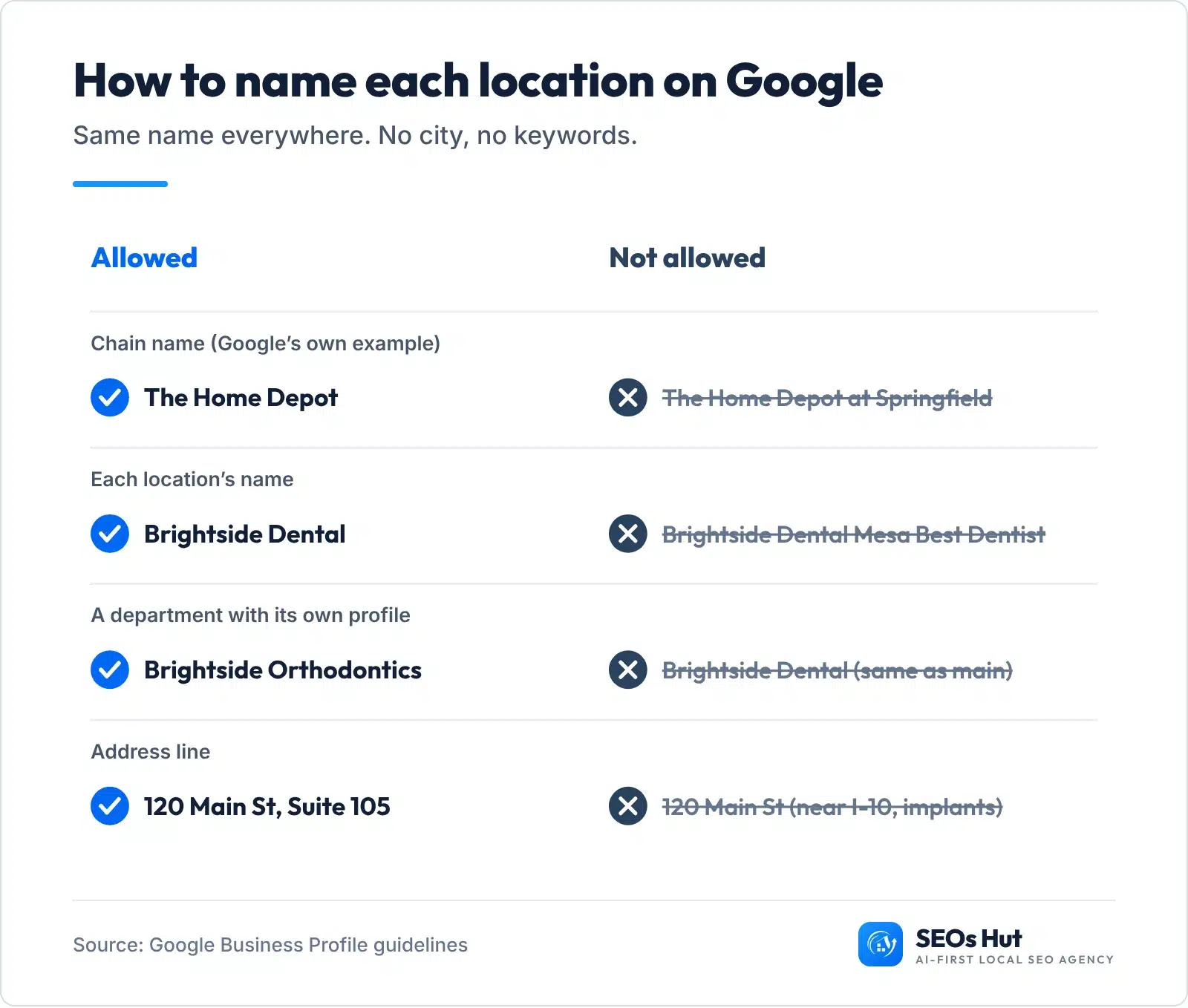
In our Phoenix check, 24 of the 34 groups used different names at different locations, most often by adding a city or neighbourhood after the brand. If your signs say only the brand, your profiles should too. Let the address and the location page do the local work.
Pick the same primary category at every branch (Whitespark’s experts rank it the number one map pack factor). Then fill in hours, services, photos of that office and a description written for that location.
Can you verify all locations at once?
If you have 10 or more locations, Google lets you add, verify and manage them in bulk. Bulk verification has three conditions: the spreadsheet holds 10 or more profiles of the same business, it is not a service-area business, and it is not an agency account holding several businesses. Duplicate, suspended or disabled profiles do not count toward the 10.

To request it, open Business Profile Manager, go to Verifications, choose Chain and click Start. Google may ask for evidence if your chain size differs from the number of profiles in your account. Under 10 locations, you verify each profile on its own.
Organise access before you grow. Put your profiles in a business group (Google calls them location groups in its API). Anyone you add to a group can access all current and future profiles in it. Give each branch manager the Manager role on their own location only, and keep ownership with the head office.
Not sure each profile is complete? Run each location through our free Google Business Profile Audit and fix the gaps it lists.
Step 3. Build one page per location (without making doorway pages)
Each real location needs its own page on your website, at its own URL. A simple structure works for almost everyone:
yourbrand.com/locations/            the store locator hub
yourbrand.com/locations/mesa/        one page per location
yourbrand.com/locations/tempe/
yourbrand.com/locations/chandler/
Two locations in one city? Add the area: /locations/phoenix-arcadia/ and /locations/phoenix-downtown/. The hub links to every location page, and every location page links back to the hub.
Google has long said that for business details, the best information is often on a contact us or branch locator page. So make each one worth reading.
What makes a location page unique enough?
Google’s spam policies list pages targeted at specific cities that funnel users to one page as doorway abuse, along with “substantially similar pages”. The fix is not less pages. It is more local facts on each page.

Use the same design for every location, then fill it with things only that office has: the address and hours, a map with parking and entrance notes, real photos of the building and team, the services that office offers, reviews from its customers and answers to its local questions. Then do the swap test. Replace the city name with another one. If every sentence still reads as true, the page is too thin.
What about towns where you have no office? A page for a town you only drive to is a service-area page, not a location page. Write one only when you really serve that area and have something specific to say about it. Our guide to city pages and SEO covers that in detail.
Step 4. Link each Google profile to its own location page
This is the cheapest fix in this guide, and the one we saw missed most. Open each profile and set its website link to that location’s page, not your homepage. A person who taps “Website” on your Tempe profile should land on the Tempe page, with Tempe’s address, hours and booking button.
Add UTM tags to each link so you can see visits per location in Google Analytics. Only 44 of the 106 profiles in our study did this. A clean pattern:
https://yourbrand.com/locations/tempe/?utm_source=google&utm_medium=organic&utm_campaign=gbp&utm_content=tempe
The generator in the next step writes these links for every location for you.
Step 5. Add LocalBusiness schema to every location page
Schema is a short block of code that tells search engines and AI tools exactly who you are, where and when you are open. Google’s documentation says to define each local business location as a LocalBusiness type and to use the most specific type you can, such as Dentist or Restaurant. Put one block on each location page, with that location’s details only. Keep your Organization schema on the homepage; Google’s Organization guidance points local businesses to LocalBusiness types for their details.
Fill in your brand and locations below. The tool builds the schema for each page, the UTM link for each profile and a master sheet you can paste into Google’s bulk template. Nothing is saved or sent anywhere.
Location Kit Generator
Schema, profile links and a master sheet for every location. Works on your phone. Example data is filled in: replace it with yours.
Set each profile’s website link to these URLs. They point to the location’s own page, with UTM tags.
One row per location in Google’s bulk upload format (hours as HH:MM-HH:MM). Paste the columns into the template you download from Business Profile Manager.
| Code | Name | Address | Phone | Website |
|---|
Checks
Paste each schema block into the head or body of its own location page (on WordPress, a header and footer code plugin or your SEO plugin’s custom schema box works). Then test the page with our free Schema Markup Analyzer. For the full field-by-field explanation, read our local business schema guide.
Step 6. Keep the same details on every directory
Your name, address and phone (NAP) also live on Apple Maps, Bing, Yelp, Facebook and industry directories. Each listing should match the master sheet exactly. Two big platforms make this easier for chains:
- Apple Business lets you add many locations at once with a template file (CSV, TSV or XLSX), up to 10,000 rows per file.
- Bing Places, relaunched in October 2025, improved importing listings from Google, so a clean Google setup carries over.
To find listings that drifted, run each location through our free NAP Consistency Checker, then use the Local Citation Finder to see where each branch is missing. Our guide to local citations explains which directories matter most.
Step 7. Get reviews for every location (the right way)
Reviews belong to each location, not to the brand. A branch with a handful of reviews still sits next to a competitor with hundreds, no matter how well your other offices do. And customers read them: BrightLocal’s 2026 Local Consumer Review Survey found 97% of consumers read reviews for local businesses, and 68% will only use a business with four or more stars.
Make asking part of each location’s routine. Give every branch its own review link (our free Google review link generator makes one per profile in seconds) and ask every customer, not just the happy ones. Google’s policy bans selectively asking for positive reviews and offering incentives for reviews.
Then reply. The same BrightLocal survey found 89% of consumers expect businesses to respond. Only a verified profile can reply, and the reviewer is notified when you do. Let each branch manager answer their own reviews; local details in a reply read far better than a copied script. Our guide on whether Google reviews help SEO goes deeper.
Step 8. Track every location on its own
An average across all branches hides the ones that struggle. Report each location separately, every month:
- Map rankings from different spots. A location can rank first next door and fifth two miles away. Check each branch with our free Local Rank Grid (here is how to read a local SEO heat map).
- Profile actions. Calls, direction requests and website clicks per profile, from the Performance view in each Google Business Profile.
- Website visits per location. Your UTM tags show which profile sent each visit in Google Analytics.
- Search Console by page. Filter the Performance report by each /locations/ URL to see the searches each page shows up for.
Then put your effort where it pays: new branches, branches with strong competitors, and branches whose numbers dropped.
Want a second pair of eyes on every location? Our Google Business Profile management service sets up, verifies and optimises profiles for multi-location businesses, one branch at a time.
Should each location have its own website?
For almost every business, no. Use one website with a page per location. A single domain builds authority for every branch at once, and you manage one site instead of ten. Google’s spam policies even name multiple domain names targeted at specific cities that funnel users to one page as doorway abuse.
Separate sites only make sense when the locations are truly separate businesses with different names, owners or services. Franchises often fall in the middle: keep franchisee pages on the brand’s domain where the franchise agreement allows it.
What if your branches travel to customers?
Plumbers, cleaners and HVAC firms often have several bases but no shopfront. Google says a service-area business should have one profile for the central office or location with a designated service area. So create a profile for each real, staffed base (not for every town you drive to), hide the address if customers do not visit, and set the service area for each base. Keep in mind that service-area businesses cannot use bulk verification, so plan time to verify each base.
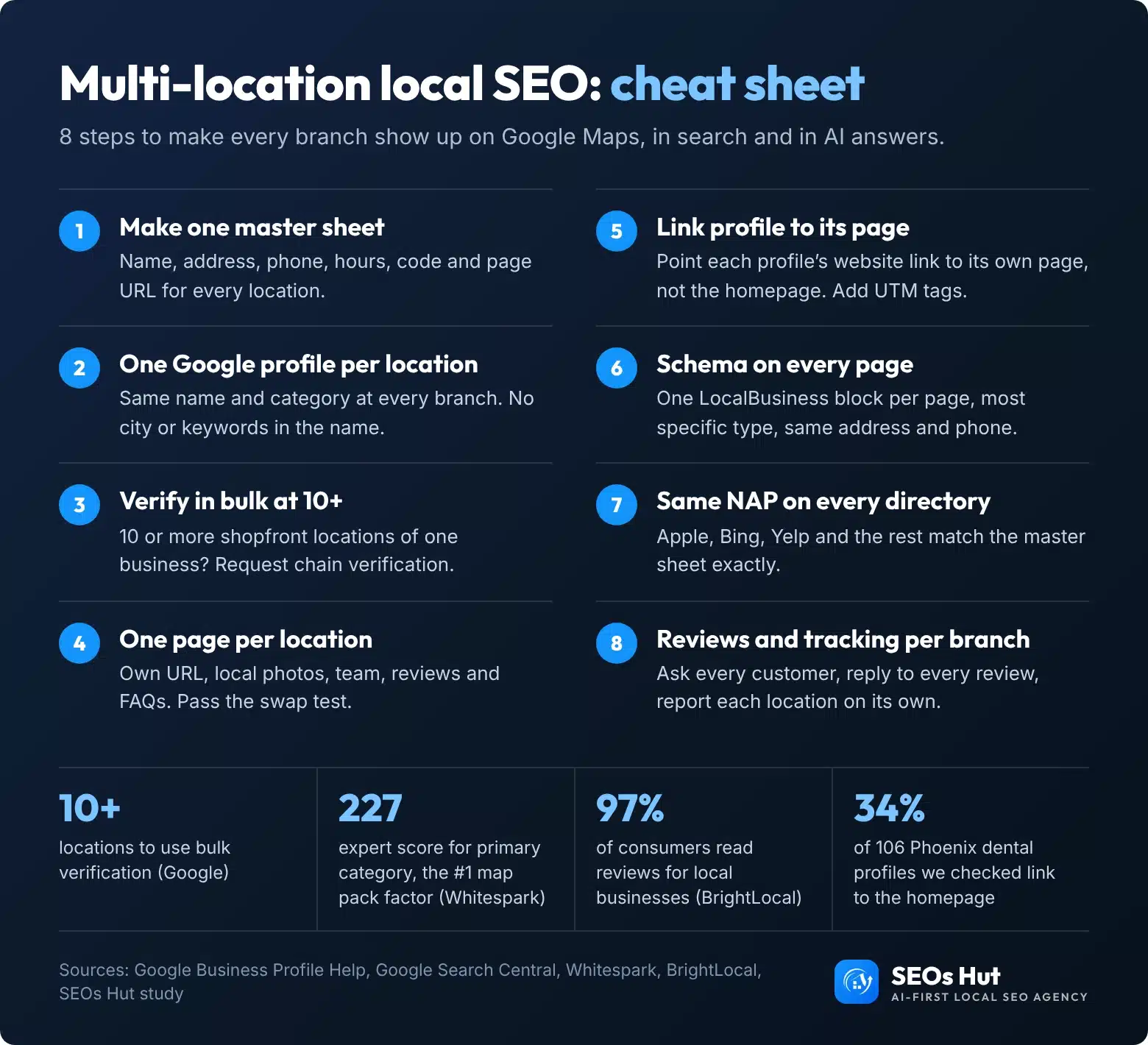
The multi-location local SEO cheat sheet
Everything above on one page. Save it, print it for your branch managers or share it with your team.
Want every location done for you?
Doing this for two or three locations is a weekend project with the master sheet and the generator above. Past ten, most teams want help keeping it all in sync. SEOs Hut is an AI-first local SEO agency that runs exactly this process for multi-location businesses in the US and UK. Start with our local SEO services, or check one location for free with the Google Business Profile Audit first.
FAQs
Do I need a separate Google Business Profile for each location?
Yes. Every location that serves customers in person at a staffed address needs its own profile, and Google allows only one profile per location. Use the same business name and primary category on each one, and link each profile to that location’s own page on your website. Service-area businesses get one profile per real base, not per town served.
Can I add the city to my Google Business Profile name?
No, not unless the city is part of the name on your real-world sign. Google says all locations of a chain must use the same name and gives “The Home Depot at Springfield” as an example of what not to do. Adding a city or keywords can get the profile suspended. Let the address do the local work.
How many locations do I need for bulk verification?
Ten. Google offers bulk verification when your spreadsheet holds 10 or more locations of the same business. Service-area businesses and agency accounts holding several businesses cannot use it, and duplicate or suspended profiles do not count. To request it, go to Business Profile Manager, then Verifications, then Chain, then Start.
Are city pages bad for SEO?
Not when they describe a real location. Google treats near-identical pages made only to rank in different cities as doorway pages. A location page with its own address, hours, photos, team, reviews and local answers is useful and allowed. Run the swap test: if changing the city name leaves the page true, add more local facts.
Should each location page have its own schema?
Yes. Google recommends defining each location as its own LocalBusiness, using the most specific type available, such as Dentist or Restaurant. Put one schema block on each location page with that location’s name, address, phone and opening hours, matching the Google profile exactly. Keep Organization schema on the homepage.