


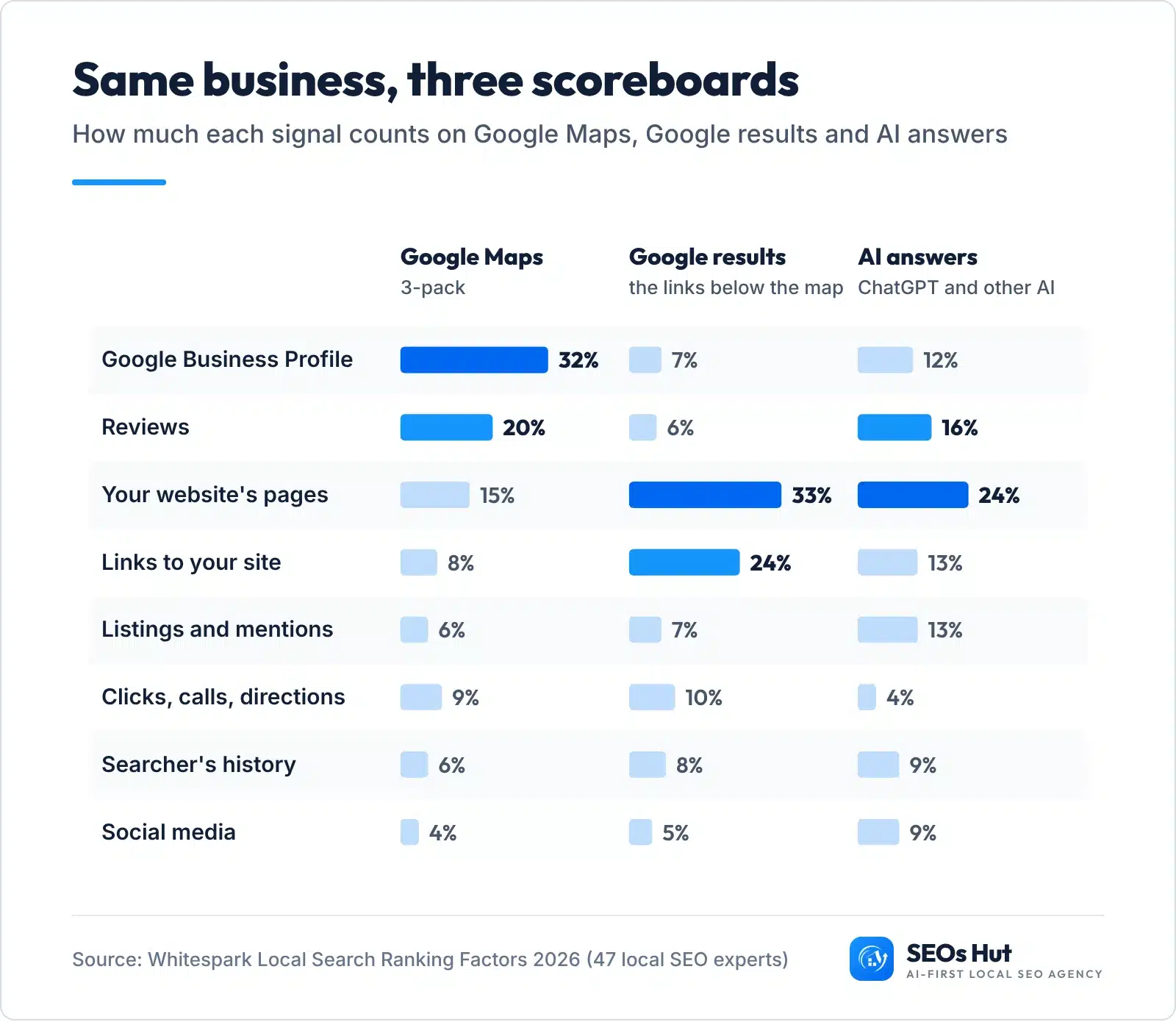
Local SEO is the work that gets your business picked when someone nearby searches for what you sell: in the Google Maps 3-pack, in Google’s normal results, and now in AI answers like ChatGPT. The catch most guides miss: those three places score you differently. Your Google Business Profile carries 32% of the weight on the map but only 7% in the normal results, according to Whitespark’s 2026 survey of 47 local SEO experts.
So this guide works like a scoreboard. Find the place you are losing, then pull the lever that weighs the most there.
What is local SEO?
Local SEO means making your business easy to find, and easy to choose, for people searching in your area. It covers four things you control: your Google Business Profile, your website, your reviews and the other places your business is listed online.
It matters most for businesses that serve a local area: plumbers, dentists, salons, roofers, restaurants, law firms, auto shops. If customers type “near me” or a city name before they buy from you, local SEO decides whether they see you or the shop down the road.
A customer can find you in three places, and each one has its own scoreboard:
- The Google Maps 3-pack: the map with three businesses at the top of the results, plus the Maps app.
- Google’s normal results: the blue links under the map.
- AI answers: ChatGPT, Google’s AI Mode and AI Overviews, Gemini, Perplexity. BrightLocal’s 2026 survey found 45% of US consumers now use ChatGPT or other AI tools for local recommendations, up from 6% a year earlier.
How does Google decide who ranks locally?
Google says it plainly in its own help pages: “Local results are mainly based on relevance, distance, and popularity.” The section that explains it calls the third one prominence. Here is what each one means for you.
- Relevance: “how well a Business Profile matches what someone is searching for.” Your categories, services, description and website words decide this.
- Distance: “how far each business is from the customer who’s searching.” You cannot change it, so you win on the other two.
- Prominence: how well known you are. Google says this is “based on info like how many websites link to your business and how many reviews you have.”
Two more lines from the same Google page are worth knowing before you spend a cent. “Businesses with complete and accurate info are more likely to show up in local search results.” And: “There’s no way to request or pay for a better local ranking on Google.” Ads can buy a spot above the map. They cannot buy a place inside it.
Local SEO ranking factors: what matters most in 2026
Google does not publish weights, so the best public estimate is Whitespark’s Local Search Ranking Factors survey. For the 2026 edition, 47 local SEO experts scored 187 factors. The picture is clear: the map rewards your profile, the normal results reward your website and links.
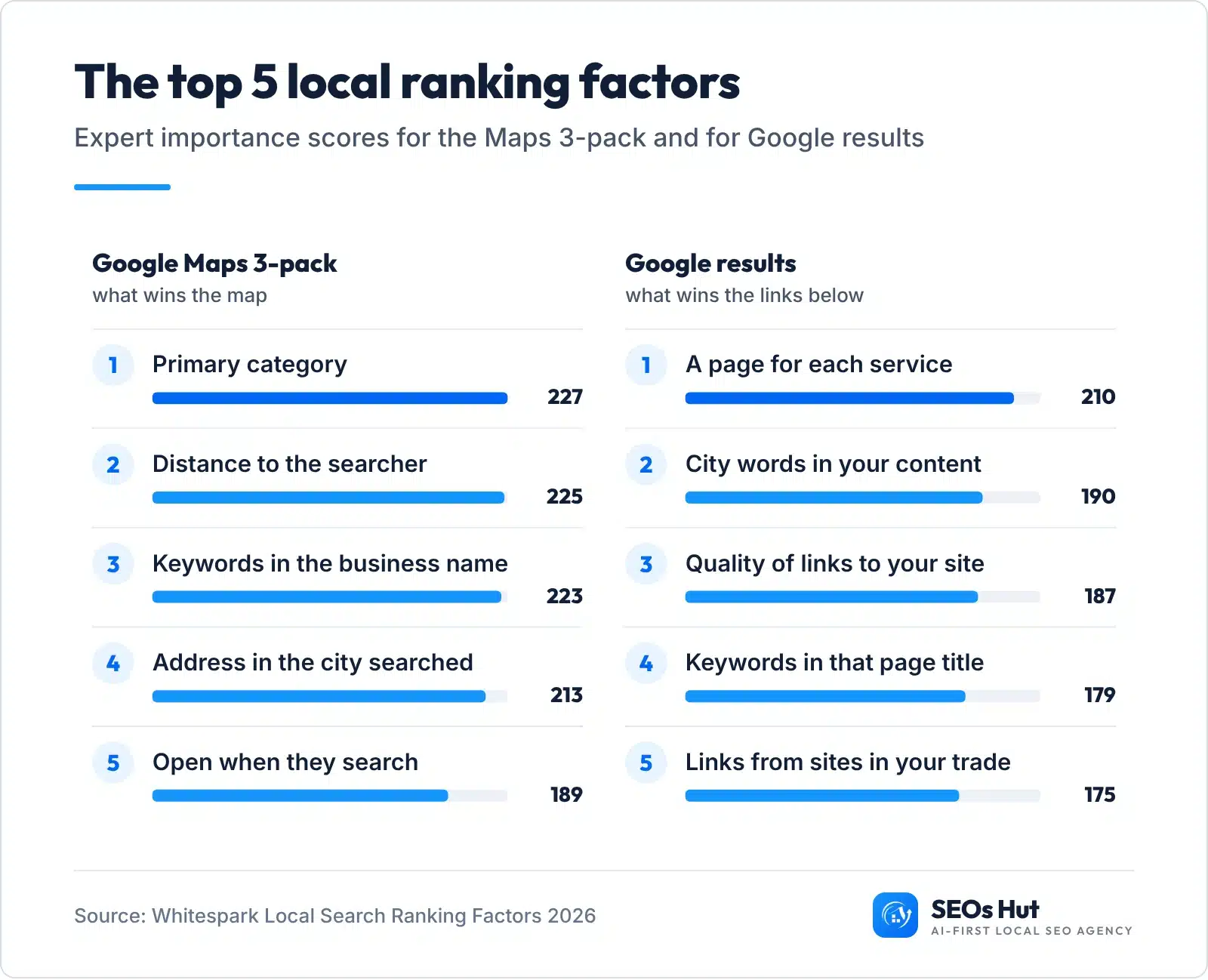
Three things stand out:
- The top three map factors are close. Your primary category (227), distance (225) and keywords in your business name (223) score almost the same. Two of those you set once. Distance you cannot touch.
- Keywords in your name work, but only if they are really your name. Google’s guidelines say your name “should reflect your business’s real-world name” and that adding unnecessary information “could result in the suspension of your Business Profile.” Never add a city or service to your name on Google unless it is on your sign.
- Reviews and behaviour are rising. Whitespark writes: “For 2026, the biggest changes we’re seeing are an increased importance of review signals and behavioural signals.”
How to rank in the Google Maps 3-pack
On the map, your Business Profile is 32% of the score and reviews are another 20%. Do these five things in this order. Each one is free.
Step 1. Set the most specific primary category
This is the single strongest map factor. Open your profile (search your business name on Google while signed in, or go to business.google.com), click Edit profile, then Business category. Google’s rule: “Choose categories that are as specific as possible, but representative of your main business.” So “Emergency veterinarian service”, not “Veterinarian”, if emergencies are your main work. Add a few extra categories only for services you really sell.
Check it worked: search your main service plus your city on Google Maps and click the top three businesses. If their primary category is more specific than yours, change yours.
Step 2. Fill every field with the truth
Add hours (and holiday hours, since “open when they search” is the fifth strongest map factor), phone, website link, services, products, attributes and a description that says what you do and where. Add real photos: outside, inside, your team and your work. Our free Google Business Profile Audit shows which fields are empty.
Step 3. Get your address and service area right
If customers come to you, show your address and check the map pin sits on your door (pin placement is factor number 10). If you go to them, Google says: “If you’re a service-area business, you should hide your business address from customers.” Set your service areas, and keep them within “about 2 hours of driving time” of your base, as Google’s guidelines say.
Step 4. Get new reviews every month and reply to all of them
Reviews are 20% of the map score and 16% in AI answers. Google says: “More reviews and positive ratings can help your business’s local ranking.” Customers agree, and they are picky about how fresh your reviews are:

Make a short review link and a QR code with our Google Review Link Generator, then ask every customer on the day the job ends: at the counter, on the invoice, by text. Ask everyone, not only happy customers. Google bans offering incentives, “such as payment, discounts, free goods and/or services”, and asking only happy customers (businesses may not “selectively solicit positive reviews”). It takes this seriously: in 2024 Google blocked or removed more than 240 million policy-violating reviews and more than 12 million fake Business Profiles.
Reply to every review, good and bad, in a line or two. BrightLocal found 89% of consumers expect owners to respond, and 42% are unlikely to use a business that ignores its reviews entirely. Our guide to Google reviews and SEO has reply examples.
Step 5. Track your map rank from more than one spot
Because distance matters so much, your rank changes as the searcher moves. One search from your office tells you little. Run a free scan with our Local Rank Grid to see where you rank across your area, then repeat it monthly.
How to rank in Google’s normal results for local searches
Under the map, the scoreboard flips. Your website pages are 33% of the weight and links are 24%. Your Business Profile drops to 7%. Four jobs move it:
- Give each service its own page. It is the top organic factor (score 210). A plumber needs separate pages for drain cleaning, water heaters and leak repair, each with real detail, photos and prices if you can.
- Say your city in plain words. Use this title formula on your homepage and the page your profile links to: Service in City, State | Business Name. Example: Plumber in Denver, CO | Your Business. Then say the city again in the main heading and the first paragraph. To pick the service words for that title, use our local keyword research guide.
- Show your name, address and phone on every page, exactly as on your profile, and add LocalBusiness schema so Google reads them as facts. Google’s documentation says this markup can tell it “about business hours, different departments” and more. Our LocalBusiness schema guide has copy-paste code, and the Schema Markup Analyzer checks it.
- Earn local links. Your chamber of commerce, suppliers, local sponsorships, trade associations and local news. Quality beats count (factor 3, score 187). Our local link building guide lists 15 tactics, easiest first.
How do ChatGPT and AI tools pick local businesses?
We wanted to know if ChatGPT simply copies Google Maps. So on 31 October 2026 we asked ChatGPT (with web search on, set to each city) for the 5 best businesses in 12 searches: plumbers, dentists, roofers and auto repair shops in Denver, Charlotte and Phoenix. Then we pulled the Google Maps top 20 for the same 12 searches and matched every name.

What we found, in our sample of 60 ChatGPT picks:
- Only 4 of 60 (6.7%) were in the Google Maps top 3. 23 of 60 (38.3%) were somewhere in the top 20. 37 were not in the top 20 at all.
- 3 of 12 searches had no overlap at all with the Maps top 20.
- ChatGPT’s picks had far more reviews. The 23 picks we found on Maps had a median of 905 Google reviews, against 351 for the Maps top 3 and 224 for positions 4 to 20.
- Every matched pick had 4.5 stars or more and at least 100 reviews (23 of 23). In the Maps top 3, 28 of 36 listings had 100 or more reviews.
- In several answers, the list visibly came from third-party “best of” articles rather than from the map.
Method: 12 searches, one run each, 31 Oct 2026, ChatGPT via its API with web search (not the consumer app). Maps results were set to each city centre, so suburban businesses can rank well for nearby searchers and still miss this top 20. AI answers change from run to run: treat this as a direction, not a law. Download the data (CSV, no business names).
Bigger studies point the same way. SOCi’s 2026 analysis of more than 350,000 locations found “ChatGPT recommends just 1.2% of brand locations”, against an average 35.9% appearance rate in Google’s local 3-pack. Yext’s study of 6.8 million AI citations found 86% came from sources brands can manage: websites (44%) and listings (42%).
The lesson: AI answers lean on reputation and mentions across the web, not just on your map rank. Whitespark’s experts agree: “3 of the top 5 AI Search visibility factors are citation factors. In AI SEO, mentions (citations) are the new link.”
How to show up in AI answers
Google says there are “no additional requirements to appear in AI Overviews or AI Mode, nor other special optimizations necessary”, and it recommends “checking that your Merchant Center and Business Profile information is up-to-date”. So the map and website work above is the base. Then add these:
- Test yourself first. Ask ChatGPT, Gemini and Perplexity the questions below, with your own service and city. Note who they name and which websites they cite.
- Get listed where AI reads. Claim Bing Places for Business and Apple Business Connect (both free), plus Yelp, Facebook and your trade’s main directory, with the same name, address and phone everywhere. Our Local Citation Finder shows where you are missing.
- Get into the “best of” lists the AI cites. If an answer cites a local “best plumbers in Denver” article, contact that site, ask how they choose businesses, and earn a spot honestly.
- Write the facts AI repeats. On your site, state plainly what you do, where, your hours, prices you are happy to share, years in business and what makes you different. AI tools quote clear facts.
- Keep reviews coming. Every pick we matched had 100+ reviews and 4.5+ stars.
Copy these into ChatGPT, Gemini or Perplexity (swap in your service and city)
Who are the best [service] in [city, state]? List the top 5 businesses by name.
I need a [service] near [neighbourhood or zip code] who can come today. Who do you recommend and why?
What do people say about [your business name] in [city]? Which websites are you using?
Compare [your business name] with other [service] businesses in [city]. Which would you choose?
Want the shortcut? Our free AI Visibility Checker asks ChatGPT, Gemini, Perplexity, Claude and Google AI Mode whether they name your business, and shows their real answers word for word. No signup.
Find your biggest local SEO gap
Pick the place you want to show up, rate yourself honestly on each signal, and the tool weighs every gap by how much it counts on that scoreboard (Whitespark 2026 weights). You get your fix list in order. Nothing is sent anywhere.
3. Rate each signal honestly
This tool needs JavaScript. Without it: rate yourself on the seven signals in the chart at the top of this page and fix the weakest one with the biggest weight first.
Weights: Whitespark Local Search Ranking Factors 2026. Distance and searcher history are left out because you cannot change them. Nothing you enter leaves your browser.
Storefront or service-area business: what changes?
Whitespark’s experts rank “physical address in city of search” fourth for the map and “address showing, not a service-area business” seventh. That is why a plumber who hides their address (as Google requires for service-area businesses) often finds it harder to win the map in the city centre than a shop with a door there.
- If customers come to you: show your address, check your pin, and make your opening hours exact. “Open when they search” is a top-five map factor.
- If you go to customers: hide your address, set realistic service areas, and lean harder on the levers you control: category, reviews, a page per service, and pages for the main towns you serve. Our multi-location guide shows how to build location pages without making doorway pages.
What we see in client work
Two of our SEO case studies match the scoreboards above.
- The map. For A1 Tire Shop in Sunrise, FL, we rebuilt and optimized the Google Business Profile with accurate categories, services, hours, photos and consistent name, address and phone details, alongside technical fixes and local content. In about 6 months the shop moved from position #48 to #1, and its Google Business Profile drove 770 phone calls. Read the A1 Tire Shop case study.
- AI answers. For Sugar & Wax Haven, a body sugaring salon in Tempe, AZ, we grew reviews from 67 to 309, posted fresh content every week and replied to every review within 4 hours. It went from page 4 of Google to position #1 in 8 months and is cited by 4 AI tools; in the unedited ChatGPT screenshot on the case page, the salon is ranked #1 of 5 with its 4.9 rating and 330+ reviews quoted in the answer. Read the Sugar & Wax Haven case study.
How long does local SEO take, and what does it cost?
There is no fixed timeline. Some fixes, like a wrong category or missing hours, take minutes to make. Winning a competitive map or AI answers takes months of steady reviews, pages and mentions. Our two case studies above took about 6 and 8 months. Our guide to how long it takes to rank on Google explains what speeds it up.
Doing it yourself costs time, not money: every step in this guide is free. If you hire help, our prices are public (checked 31 Oct 2026): a one-off website audit starts at $297, and our Local SEO plan is $997 a month. For a week-by-week plan you can follow alone, use our 4-week local SEO plan for small businesses, and see affordable local SEO for what each budget buys.
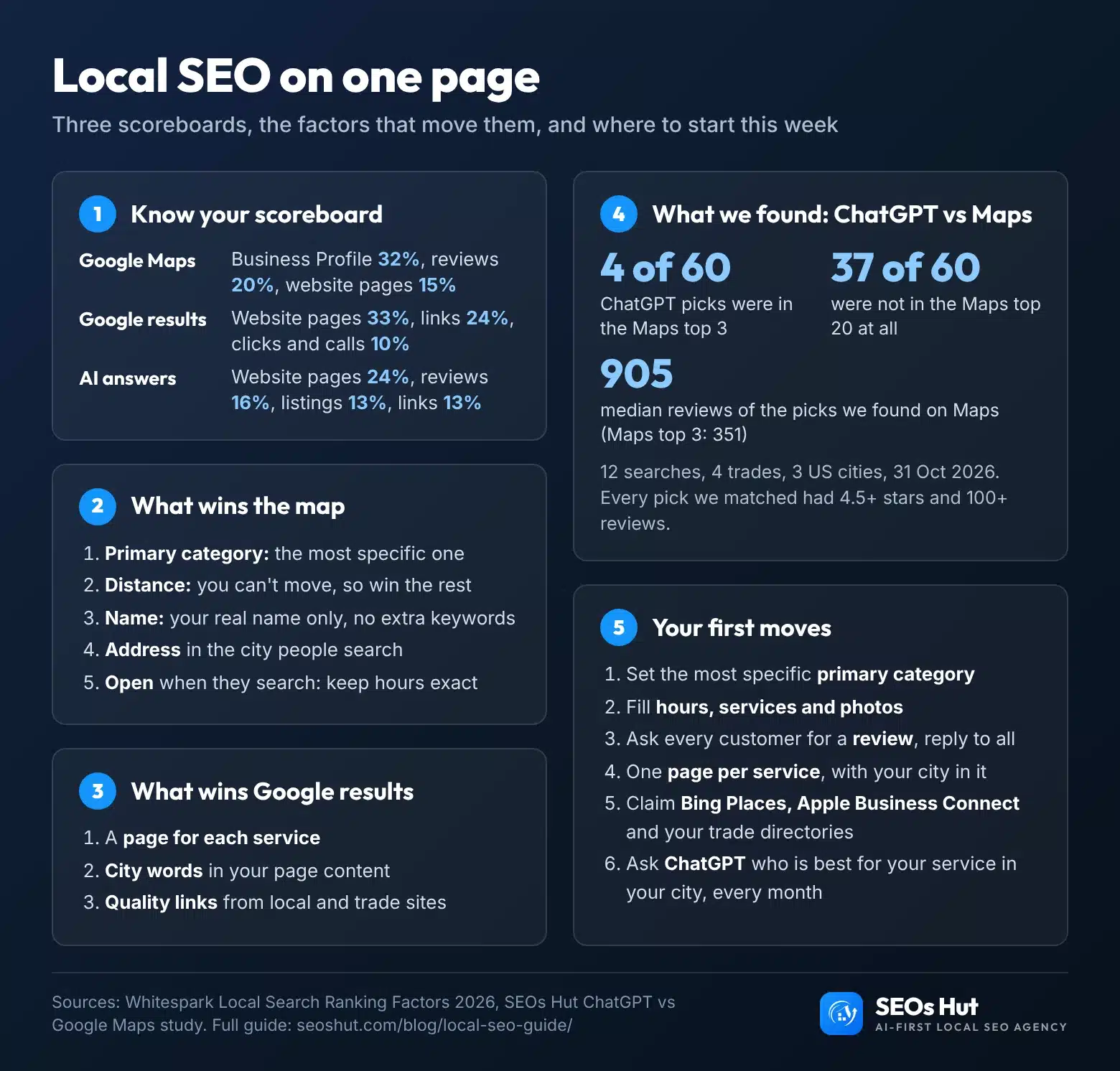
The local SEO guide on one page
Save it, print it, or share it with your team. If you post it on your site, the embed code below credits the source.
Rather have it done for you? We work on all three scoreboards at once: your profile and the map, your website, and AI answers. See our local SEO services, or start with a one-off website audit to see exactly where you stand. As an AI-first local SEO agency, SEOs Hut shows you the plan before you pay for anything.
FAQs
Can I do local SEO myself?
Yes. Everything that moves the map most is free and needs no technical skill: the right primary category, complete profile details, real photos, a steady flow of reviews and replies. Website pages and links take longer but are still doable. Start with the gap finder on this page, fix the top item, then work down the list one job per week.
Do I need a website for local SEO?
You can appear on Google Maps without one, but you will struggle everywhere else. Website pages are the biggest signal group for Google’s normal results (33%) and for AI answers (24%) in Whitespark’s 2026 survey. A simple site with one page per service, your city named clearly and your contact details on every page is enough to start.
Does paying for Google Ads improve my Maps ranking?
No. Google says: “There’s no way to request or pay for a better local ranking on Google.” Ads can place you in a paid spot above or inside the results, marked as sponsored, but they do not change your position in the free map listings. Rankings there come from relevance, distance and prominence.
What is the 80/20 rule in local SEO?
It is not an official rule, but the idea fits: a few levers do most of the work. On the map, your Business Profile (32%) and reviews (20%) carry more than half the weight in Whitespark’s 2026 survey. In Google’s normal results, website pages (33%) and links (24%) do the same. Find your scoreboard, then fix those two first.
How do I get my business recommended by ChatGPT?
Get the basics right first, then build mentions. In our study, every business ChatGPT picked that we found on Maps had 4.5+ stars and 100+ reviews. Claim Bing Places, Apple Business Connect, Yelp and your trade directories with identical details, earn a place in local “best of” lists, and state your services and area clearly on your website. Then test monthly.
Sources
- Google Business Profile Help: Tips to improve your local ranking on Google
- Google Business Profile Help: Guidelines for representing your business on Google
- Google: Fake engagement policy and 2024 fake review enforcement (7 Apr 2025)
- Google Search Central: AI features and your website and LocalBusiness structured data
- Whitespark: Local Search Ranking Factors 2026 (6 Nov 2025)
- BrightLocal: Local Consumer Review Survey 2026
- SOCi: In AI-driven discovery, few brands are chosen (28 Jan 2026)
- Yext: 86% of AI citations come from brand-managed sources (9 Oct 2025)
- Bing: Bing Places for Business; Apple: Apple Business Connect
- SEOs Hut: ChatGPT vs Google Maps study, 12 searches, 31 Oct 2026 (CSV)