


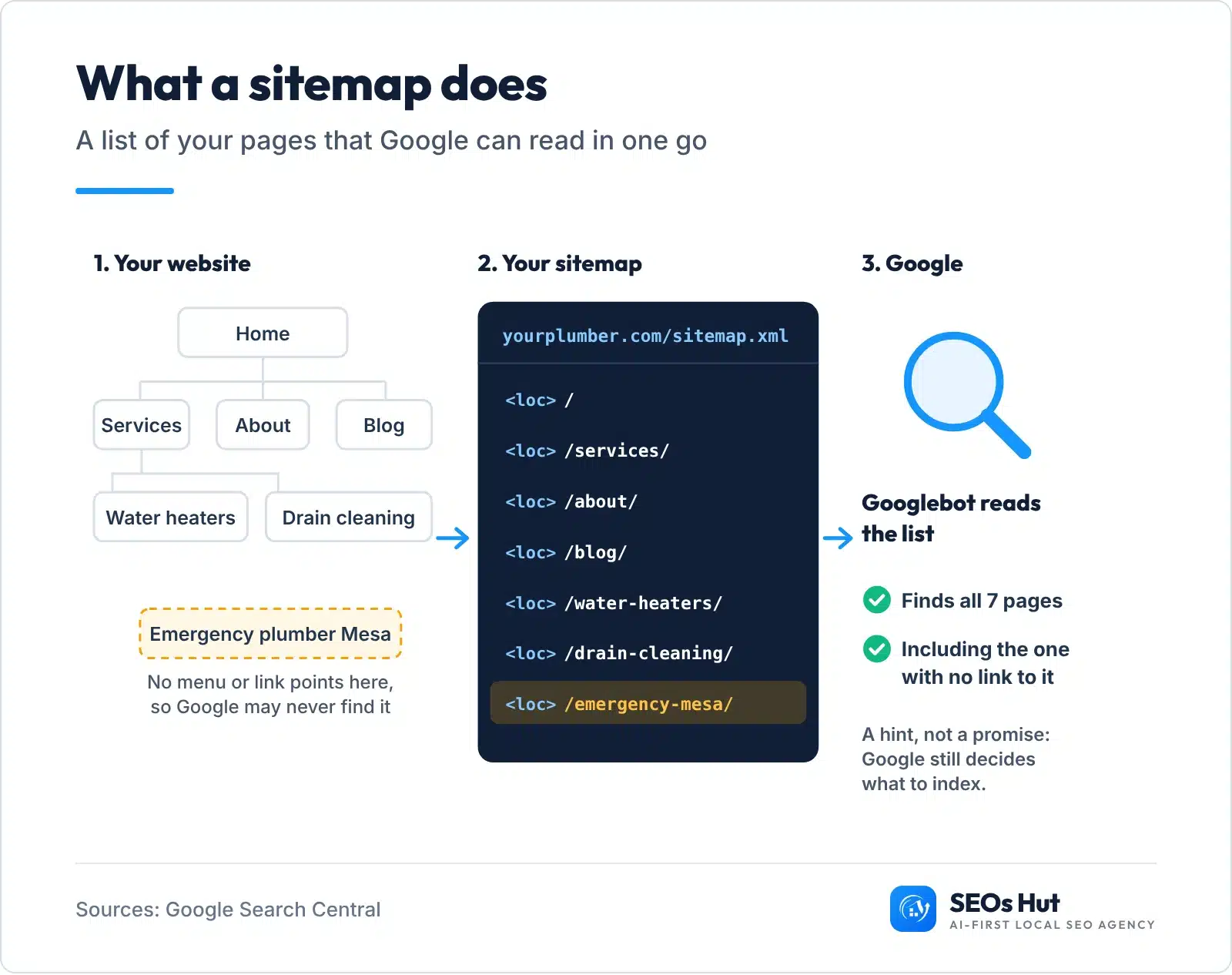
A sitemap is a file that lists the pages on your website you want Google to find, so its crawler can read them all in one go instead of hunting for them link by link. Google’s own definition: “a file where you provide information about the pages, videos, and other files on your site, and the relationships between them.”
Here is the part most guides skip. If your site runs on WordPress, Wix, Squarespace or Shopify, you almost certainly have one already. When we checked 41 Phoenix plumber websites from Google Maps, 40 had a sitemap. So for most business owners the real job is not building one. It is finding it, checking it and handing it to Google. This guide walks you through all four, in about 15 minutes.
The short version:
- A sitemap lives at an address like yoursite.com/sitemap.xml. Type it into your browser to see yours.
- Google says sites of about 500 pages or fewer that link every page might not need one, but “in most cases, your site will benefit from having a sitemap.”
- One sitemap holds up to 50,000 addresses or 50MB. Bigger sites split it into several.
- You submit it in Google Search Console. It is a hint to Google, not a guarantee of indexing.
What is a sitemap?
Think of your website as a building and Google’s crawler as a visitor who only finds rooms by walking through doors. Your menu and internal links are the doors. A sitemap is the floor plan you hand over at reception: every room you want visited, in one list.
That matters most for pages with no door. Google puts it plainly: “Googlebot might not discover your pages if no other sites link to them.” A new landing page you forgot to add to the menu, a city page buried three clicks deep, a fresh blog post: the sitemap points straight at them.
When people say “sitemap” they can mean three different things:
| Type | Who it is for | Do you need it? |
|---|---|---|
| XML sitemap | Search engines like Google and Bing | Yes, in most cases. This guide is about this one. |
| HTML sitemap | Visitors: a normal page full of links | Optional. A clear menu usually does the same job. |
| Visual sitemap | Web designers planning a site | Only when planning or redesigning a site. |
XML sitemaps can also carry extra details about images, videos and news articles. Google confirms you can use a sitemap “to provide information about specific types of content on your pages, including video, image, and news content.” Most small business sites never need those extras.
What does a sitemap look like?
It looks like a list of web addresses wrapped in a few labels. The labels follow a shared standard, published at sitemaps.org, which is why Google, Bing and every website builder read the same file the same way.
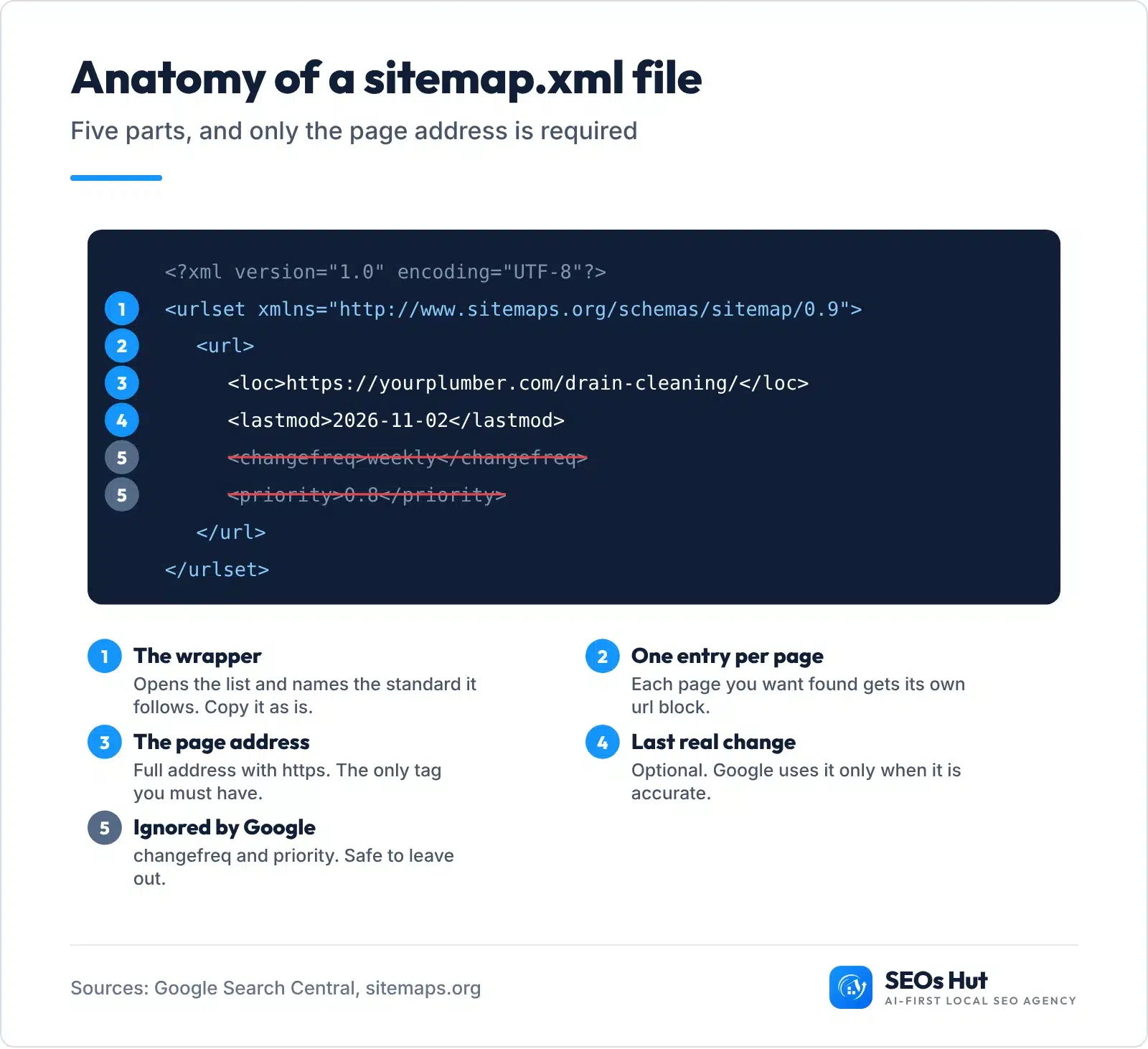
Tap any line of this real example to see what it does:
<?xml version="1.0" encoding="UTF-8"?><urlset xmlns="http://www.sitemaps.org/schemas/sitemap/0.9"><url><loc>https://yourplumber.com/drain-cleaning/</loc><lastmod>2026-11-02</lastmod><changefreq>weekly</changefreq><priority>0.8</priority></url></urlset>Two of those labels are dead weight. Google says it “ignores <priority> and <changefreq> values,” and Bing’s 2025 guidance says the same of its own crawler. The date label, lastmod, is different: Google uses it only if it is “consistently and verifiably” accurate, and Bing warns that if every date always equals today, it “may disregard them.” A date should change when the page really changes, not every time the sitemap is rebuilt. Google adds that a new copyright year in the footer does not count.
Want to see full real-world files from WordPress, Shopify and Wix sites? Our sitemap examples guide shows them side by side.
Do you need a sitemap?
Google gives a clear test. You might not need one only if all three of these are true for your site.
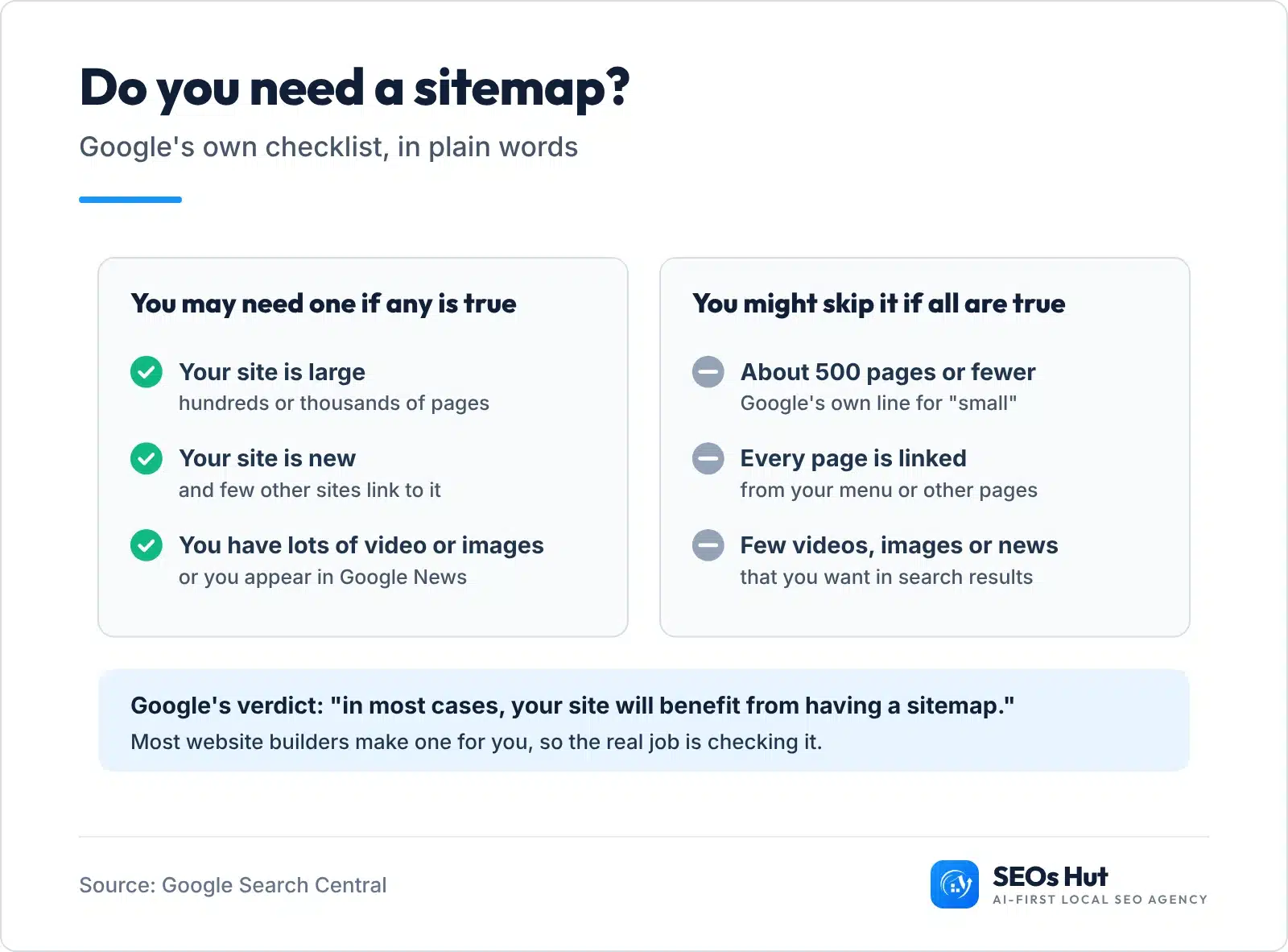
In practice almost every business site benefits, because “small and fully linked” is rarer than it sounds. One orphan page, one landing page built for ads, one service area page left out of the menu, and the test fails.
There is a newer reason too. In a July 2025 post about AI-powered search, Bing wrote that “sitemaps remain a foundational signal for ensuring comprehensive URL coverage across your site.” If you want your pages to show up in AI answers, they have to be found first. A clean sitemap is the cheapest way to make sure nothing is missed.
You probably already have one: what we found on 41 plumber websites
To see what real small business sitemaps look like, we checked the plumbers in Google Maps for Phoenix, Arizona on 15 November 2026. We took the top 50 results, kept one website per business, and checked robots.txt, the sitemap itself and a random sample of 10 links from each sitemap. Nine sites did not respond to our checker, which left 41.

The headline is good news: 40 of 41 had a sitemap, almost always made by their platform without anyone thinking about it. 28 of the 41 ran on WordPress. Every one of the 361 links we sampled opened directly, with no redirect and no error.
But “has a sitemap” is not the same as “has a healthy sitemap.” 14 of the 40 sitemaps had at least one gap:
| What we found | Sites | Why it matters |
|---|---|---|
| No page dates (lastmod) | 7 of 40 | Google and Bing get no signal about which pages changed. |
| Sitemap not listed in robots.txt | 5 of 41 | Crawlers that check robots.txt first will not be pointed to it. |
| Sitemap lists one page or none | 3 of 40 | The file exists but tells Google almost nothing. |
| Addresses use the wrong www version | 1 of 40 | Every listed address points at a version the site does not use. |
Small sample, one city, one trade: treat it as a snapshot, not an industry rate. It does show the pattern we see on audits. The sitemap is rarely missing. It is just never checked.
How to find your sitemap
Your sitemap’s address depends on what your site is built with. Type your domain, add the ending from this table, and press Enter.
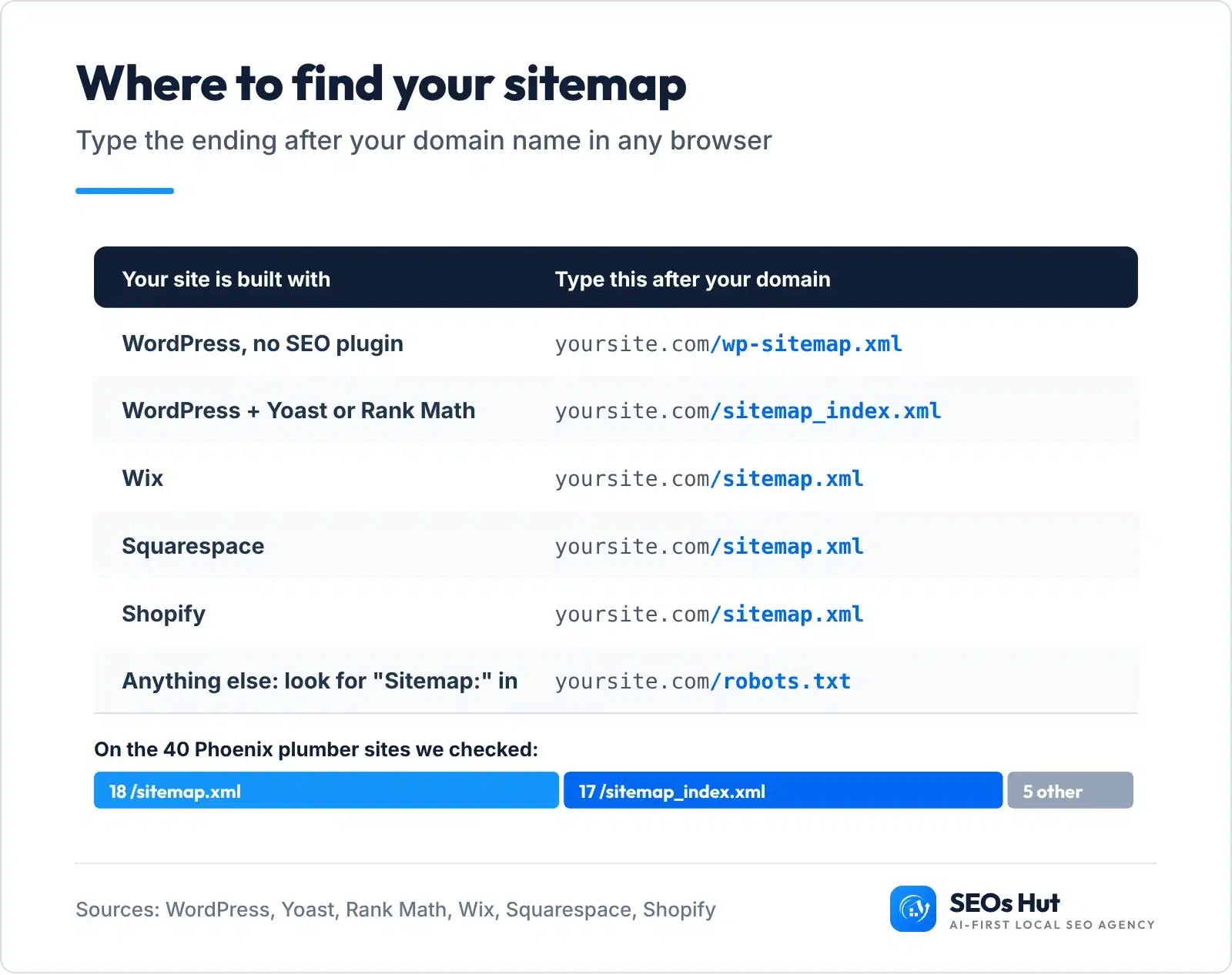
- WordPress with no SEO plugin: since version 5.5, WordPress creates “a sitemap index at /wp-sitemap.xml” by itself.
- WordPress with Yoast SEO or Rank Math: both use their own index at /sitemap_index.xml. Rank Math “automatically creates a Sitemap Index for your website.”
- Wix: “Every Wix site comes with a sitemap index” at /sitemap.xml, updated automatically.
- Squarespace: generated automatically at /sitemap.xml. One catch: sitemaps “aren’t available for trial sites or parking pages.”
- Shopify: every store generates sitemap.xml automatically at the root of the domain.
- Anything else: open yoursite.com/robots.txt and look for a line that starts with Sitemap:. That is the address.
Still nothing? Our step-by-step guide on how to find the sitemap of any website covers the less common places, including sites that hide it under a custom name.
How to check your sitemap in 5 minutes
These five checks come straight from the gaps in our study. Open your sitemap in one tab and your website in another.
- It opens and lists your real pages. Pass: you see your homepage, service pages and recent posts, not an error or an empty list. If your sitemap is an index (a list of sitemaps), click into each one.
- robots.txt points to it. Pass: yoursite.com/robots.txt has a line like Sitemap: https://yoursite.com/sitemap.xml. Google says this line can go “anywhere in your robots.txt file.” Our robots.txt guide shows where to edit it on each platform.
- The addresses match your site. Pass: every address starts with https and uses the same www or non-www version your site loads on. Google asks for “fully-qualified, absolute URLs.”
- Only pages you want in Google are listed. Google’s rule: “Include the URLs in your sitemap that you want to see in Google’s search results.” No thank-you pages, test pages, redirects or copies of other pages. If you have copies, read our canonical tag guide.
- Dates are honest. Pass: lastmod dates differ from page to page and match when you last edited each page. If every date is today, Bing may ignore them.
Short on time? Type your website into our free Sitemap Checker. It finds your sitemap the way search engines do, checks the size limits, addresses and dates, opens a sample of the pages inside, and tells you in plain words what to fix. Free, no signup.
How to create a sitemap
There are three ways, and you should use the first one that fits. Google lists the same three: let your website platform make it, use a generator, or write it yourself.
Step 1. Let your platform make it (most sites)
Google’s advice is blunt: if you use a website builder, “it’s likely that your CMS has already made a sitemap available to search engines and you don’t have to do anything.” On Wix, Squarespace and Shopify it is always on. On WordPress, either keep the built-in /wp-sitemap.xml or let Yoast or Rank Math make /sitemap_index.xml. Pick one setup and stick with it, so there is one sitemap address to submit.
Step 2. Use a generator (custom-built sites)
If your site was hand-coded or built on a system with no sitemap, an online sitemap generator can crawl your pages and give you a file. The catch: a crawler only finds pages that are linked, so it will miss exactly the orphan pages a sitemap is meant to rescue. Check the list before you upload it.
Step 3. Build it by hand with our free sitemap builder
For a small site, writing the list yourself is the most accurate option, because you decide what goes in. Paste your page addresses below, one per line. Add a date after a comma if you know when the page last changed. The builder cleans the list, flags problems and gives you a ready sitemap.xml.
Step 4. Upload it to your site’s main folder
Upload sitemap.xml to the top folder of your website (often called public_html) using your host’s file manager or FTP, so it opens at yoursite.com/sitemap.xml. Location matters: Google notes that “a sitemap posted at the site root can affect all files on the site, which is where we recommend posting your sitemaps.” A sitemap tucked inside a sub-folder only covers that folder. Then add the Sitemap line to robots.txt.
How to submit your sitemap to Google
Submitting tells Google where the file is. You do it once for each sitemap address.

Step 5. Submit it in Search Console and Bing
- Open Google Search Console and pick your website. No account yet? Setting one up and verifying your site is free.
- In the left menu, click Indexing, then Sitemaps.
- Under Add a new sitemap, type the ending of your sitemap address (for example sitemap.xml or sitemap_index.xml) and click Submit.
- Check back later. Success means Google read it. Couldn’t fetch usually means a typo in the address or a blocked file.
- Repeat in Bing Webmaster Tools under Sitemaps. Bing says it will “revisit your sitemap on a regular basis, typically at least once per day.”
Three things worth knowing. First, “You cannot actually upload a sitemap to Google,” as Search Console Help puts it: you give the address and Google fetches it. Second, submission is “merely a hint”: Google still decides what to crawl and index. To see whether a specific page made it in, use our free Google Index Checker or follow our guide on checking if a page is indexed. Third, ignore old guides that tell you to “ping” Google with your sitemap address. Google retired that endpoint in 2023 and it no longer works. Bing instead recommends IndexNow for instant updates.
Sitemap rules and limits
You only need these if your platform does not handle them, or something looks off.
| Rule | What Google says |
|---|---|
| Size | One sitemap: up to 50,000 addresses or 50MB uncompressed. Larger sites split into several and list them in a sitemap index file. |
| Format | XML, RSS/Atom or a plain text list of addresses all work. Google “doesn’t have a preference.” |
| Encoding | The file must be UTF-8. |
| Addresses | Full addresses with https and your domain, never just /page/. |
| Location | Root folder, so it covers the whole site. |
| What to list | Only the main version of pages you want in search results. |
| Dates | lastmod only when accurate. changefreq and priority are ignored. |
WordPress keeps each of its built-in sitemaps to 2,000 entries by default and splits automatically, so you will never hit the 50,000 limit there by hand.
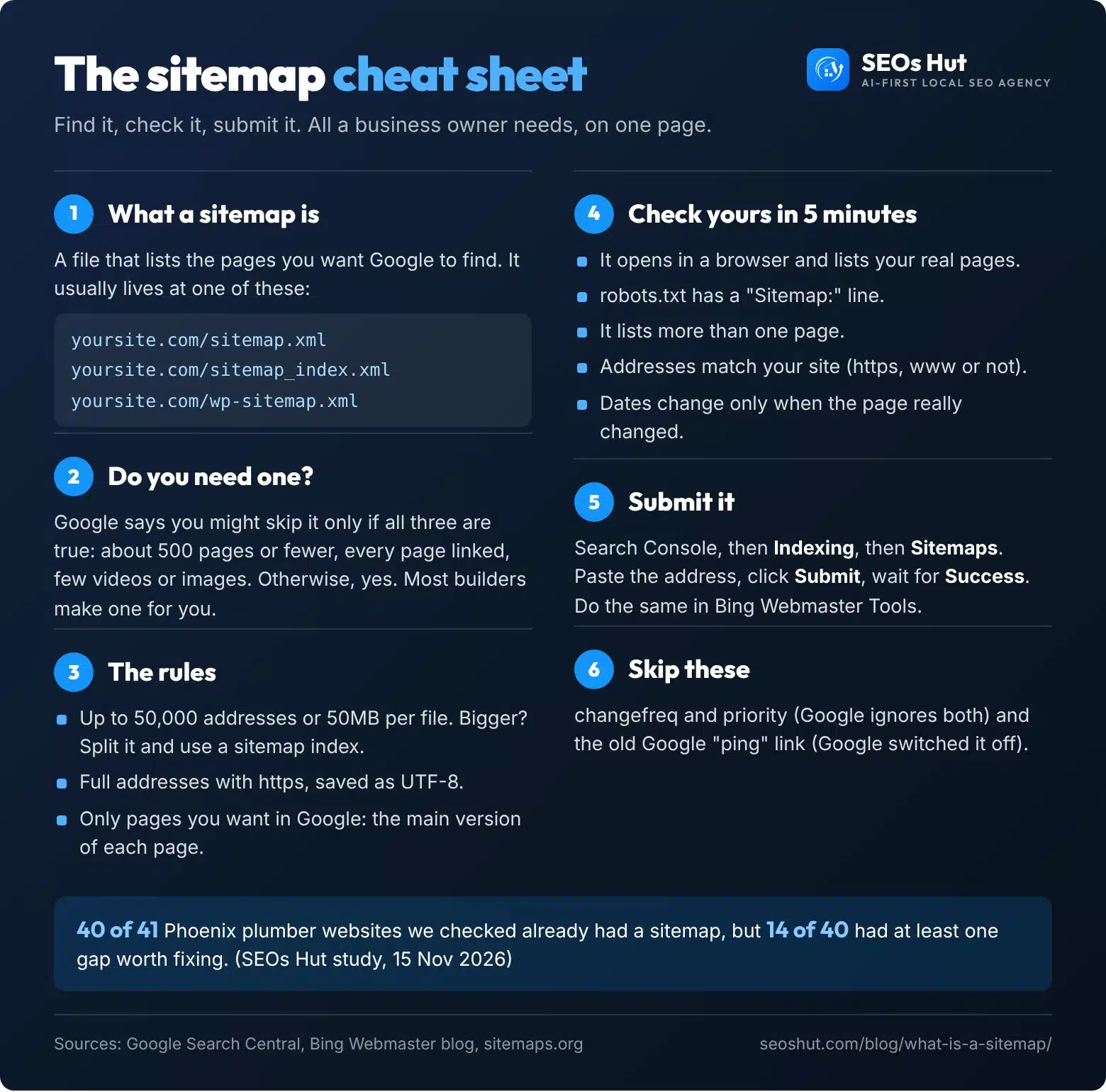
The sitemap cheat sheet
Everything above on one page. Save it, print it or send it to whoever looks after your website.
FAQs
Is a sitemap necessary for SEO?
Not strictly, but it helps most sites. Google says a small site of about 500 pages or fewer, with every page linked and few media files, might not need one. Everyone else benefits, and Google adds that “in most cases” a site will benefit. Since most website builders create one for free, there is little reason to go without.
Does a sitemap help my website rank higher?
No, not directly. A sitemap helps Google find and crawl your pages, which they need before they can rank at all. Ranking itself depends on your content, relevance, links and reviews. Think of the sitemap as making sure every page gets into the race, not as something that makes a page run faster.
How often should I update my sitemap?
Every time you add, remove or meaningfully change a page. If your website builder or an SEO plugin creates the sitemap, this happens automatically. If you built it by hand, update the file and its lastmod dates whenever pages change, and keep the same address and robots.txt line. Bing says it rechecks a submitted sitemap typically at least once a day.
What is the difference between an XML sitemap and an HTML sitemap?
An XML sitemap is a file written for search engines like Google and Bing. An HTML sitemap is a normal web page full of links, written for human visitors. Search engines care about the XML one. An HTML sitemap is optional and mainly useful on very large sites where the menu cannot show everything.
How do I know if Google has read my sitemap?
Open Google Search Console, go to Indexing, then Sitemaps. Your sitemap shows a status, the date Google last read it and how many pages it found. Success means Google read it. “Couldn’t fetch” or “Has errors” means something needs fixing, often a wrong address or a blocked file.
Want a second pair of eyes? A sitemap is one of many things we check in a website SEO audit, alongside indexing, speed, redirects and AI visibility. If your pages are not showing up in Google or AI answers, that is where we would start. You can also see how SEOs Hut works as a local SEO agency for service businesses.
Sources
- Google Search Central: Learn about sitemaps (updated 10 Dec 2025)
- Google Search Central: Build and submit a sitemap (updated 8 Jul 2026)
- Google Search Central: Manage your sitemaps with a sitemap index file
- Google Search Central blog: Sitemaps ping endpoint is going away (26 Jun 2023)
- Google Search Console Help: Manage your sitemaps using the Sitemaps report
- sitemaps.org: Sitemaps XML format
- Bing Webmaster blog: The importance of setting the lastmod tag (1 Feb 2023)
- Bing Webmaster blog: Keeping content discoverable with sitemaps in AI-powered search (31 Jul 2025)
- WordPress: New XML sitemaps functionality in WordPress 5.5
- Rank Math: Configure sitemaps; Yoast: Submit your sitemap
- Wix: Understanding your site’s sitemap; Squarespace: View your site map; Shopify: Finding your sitemap (all checked 15 Nov 2026)
- SEOs Hut study: sitemaps on 41 Phoenix plumber websites from the top 50 Google Maps results for “plumber”, checked 15 Nov 2026.