


Local SEO keyword research is finding the exact words people in your area type when they need what you sell, then giving each of those words one home: your Google Business Profile, a page on your website, or an answer in an FAQ. Do it once, properly, and every title, heading and profile field you write afterwards has a reason to exist.
We pulled Google’s own search numbers for 80 local keywords in four US cities to see how people really search. The headline: half of all searches used the words “near me”, and almost nobody typed “best plumber in [city]”. That changes where your keywords should go, and it is the backbone of this guide.
Jump to: What we found · The 7 steps · Free keyword map builder · Where to use local keywords · Free tools · FAQs
What is local keyword research?
It is normal keyword research with a place attached. You are not trying to rank for “plumber” across America. You want the person three streets away who types “plumber”, “plumber near me” or “emergency plumber austin” to find you.
Local keywords come in two kinds:
- Explicit local keywords name the place: “dentist denver”, “roofer in round rock”, “hair salon 85004”.
- Implicit local keywords do not name a place, but Google still shows local results because the need is local: “dentist”, “plumber near me”, “hair salon open now”.
Google picks local results on three things it describes plainly: “Relevance is how well a Business Profile matches what someone is searching for”, distance from the searcher, and prominence, which is “how well-known a business is” (Google Business Profile Help). Keyword research feeds the first one. You cannot move your shop, but you can make sure Google knows exactly what you do.
How local customers actually search: what we found in 80 keywords
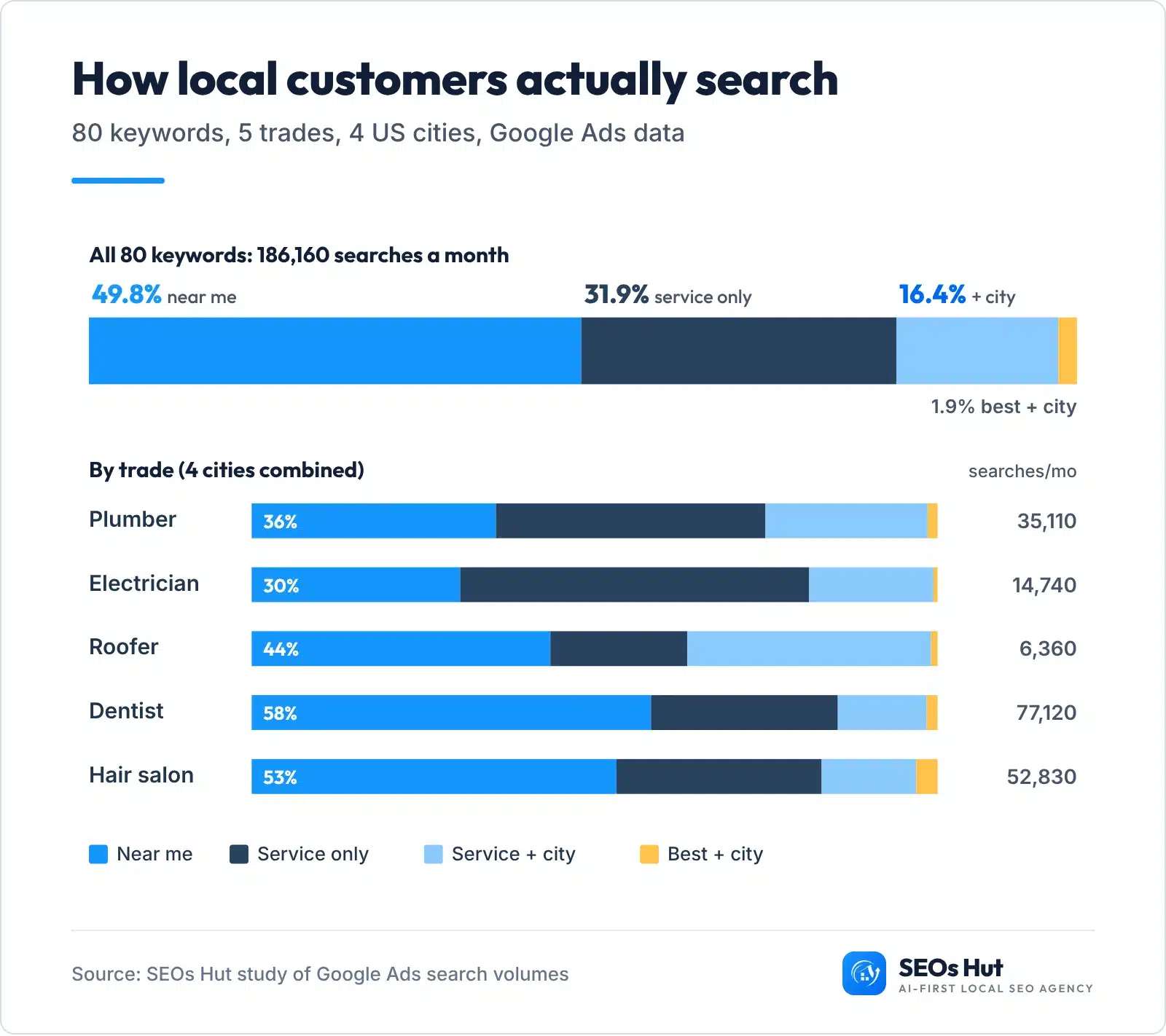
On 1 November 2026 we pulled Google Ads search volumes for 5 trades (plumber, electrician, roofer, dentist, hair salon) in 4 cities (Phoenix, Austin, Denver, Columbus), in 4 patterns each: the service on its own, the service + “near me”, the service + city, and “best” + service + city. Each number is the average monthly searches over the last 12 months, with the location set to that city. Here is what our sample showed:
- 49.8% of the 186,160 monthly searches used “near me”. The service on its own took 31.9%, service + city 16.4%, and “best” + service + city only 1.9%.
- “Near me” beat “service + city” in 19 of the 20 trade-city pairs. The one exception was roofers in Austin (“roofer austin” 1,300 vs “roofer near me” 1,000).
- The mix depends on the trade. City names made up 36% of roofer searches but only 13% of dentist searches. People compare roofers; they just want a dentist close by.
- 5 of the 20 “best” keywords were too small for Google to report at all, such as “best roofer phoenix” and “best plumber columbus”.
- A click is worth very different amounts by trade. Google’s suggested cost per click for “plumber + city” ran from $38.43 to $87.85 across the four cities; for “hair salon + city” it was $1.57 to $3.17. It is a rough guide to what a customer from that search is worth.
- Google treats “plumber phoenix” and “plumber in phoenix” as one keyword. Both returned exactly 2,400 searches and the same cost per click.
So what? Since the words “near me” can’t be put on a page in any useful way, the biggest share of local demand is won by your Google Business Profile and how close you are, not by stuffing phrases into your website. Your website wins the city-named searches and the questions. That split is the whole method below. Download our raw data (CSV).
How to do local keyword research in 7 steps
You need a spreadsheet, about an hour, and free Google tools. Use our free local keyword map template (Excel) to follow along. No email needed.
Step 1. List your services in your customers’ words
Write down every service you sell, then rewrite each one the way a customer would say it. You call it “hydro jetting”; your customer types “drain cleaning”. Google makes the same point in its own starter guide: “Users who know a lot about the topic might use different keywords in their search queries than someone who is new to the topic”, with the example of “charcuterie” versus “cheese board” (Google SEO Starter Guide).
- Read your last 20 reviews, emails and call notes. Copy the words customers used.
- Look at your Google Business Profile categories, and the categories of the top 3 competitors in the map pack. Each category is a keyword theme.
- Add the problems, not just the services: “burst pipe”, “toothache”, “roof leak”.
Done when: you have 5 to 15 services, each written in plain customer words.
Step 2. List the places you really serve
Add your city, then the towns and neighbourhoods you actually cover. If customers come to you (a salon, a dentist), keep it to your city and the areas next to you. If you go to them (a plumber, a roofer), list the towns you drive to every week.
Be honest here. A town you never work in is not a keyword opportunity; it is a future thin page. Google’s spam policies list “Having multiple domain names or pages targeted at specific regions or cities that funnel users to one page” as doorway abuse (Google Search Central).
Step 3. Mix services and places into a keyword list
Now combine them in the patterns people use. From our study, these are the ones that matter, in order of size:
- Service + near me: “drain cleaning near me”
- Service only: “drain cleaning”
- Service + city or town: “drain cleaning austin”, “plumber round rock”
- Need words: “emergency”, “24 hour”, “same day”, “cost”, “open now”
- Questions: “how much does drain cleaning cost in austin”
Doing this by hand gets boring fast. The free builder below does it for you and sorts every keyword into its home.
Local Keyword Map Builder
Free, no signup. Type your details, get every keyword sorted into its home.
Step 4. Check the numbers in Google Keyword Planner
Keyword Planner is Google’s own tool for advertisers, and it is the only free place to see search volume for your city. Google says it helps you “discover new keywords related to your business and view estimates of the searches they receive” (Google Ads Help). Google asks you to enter billing information before you can get keyword ideas (checked 1 Nov 2026).
- Go to Google Ads, then Tools, then Keyword Planner.
- Choose Discover new keywords for ideas, or Get search volume and forecasts to paste your list from Step 3.
- Change the location from the country to your city. Google allows “countries, territories, regions, and cities”, and Nearby suggests places close to yours (Google Ads Help).
- Read Avg. monthly searches and copy it into your template.
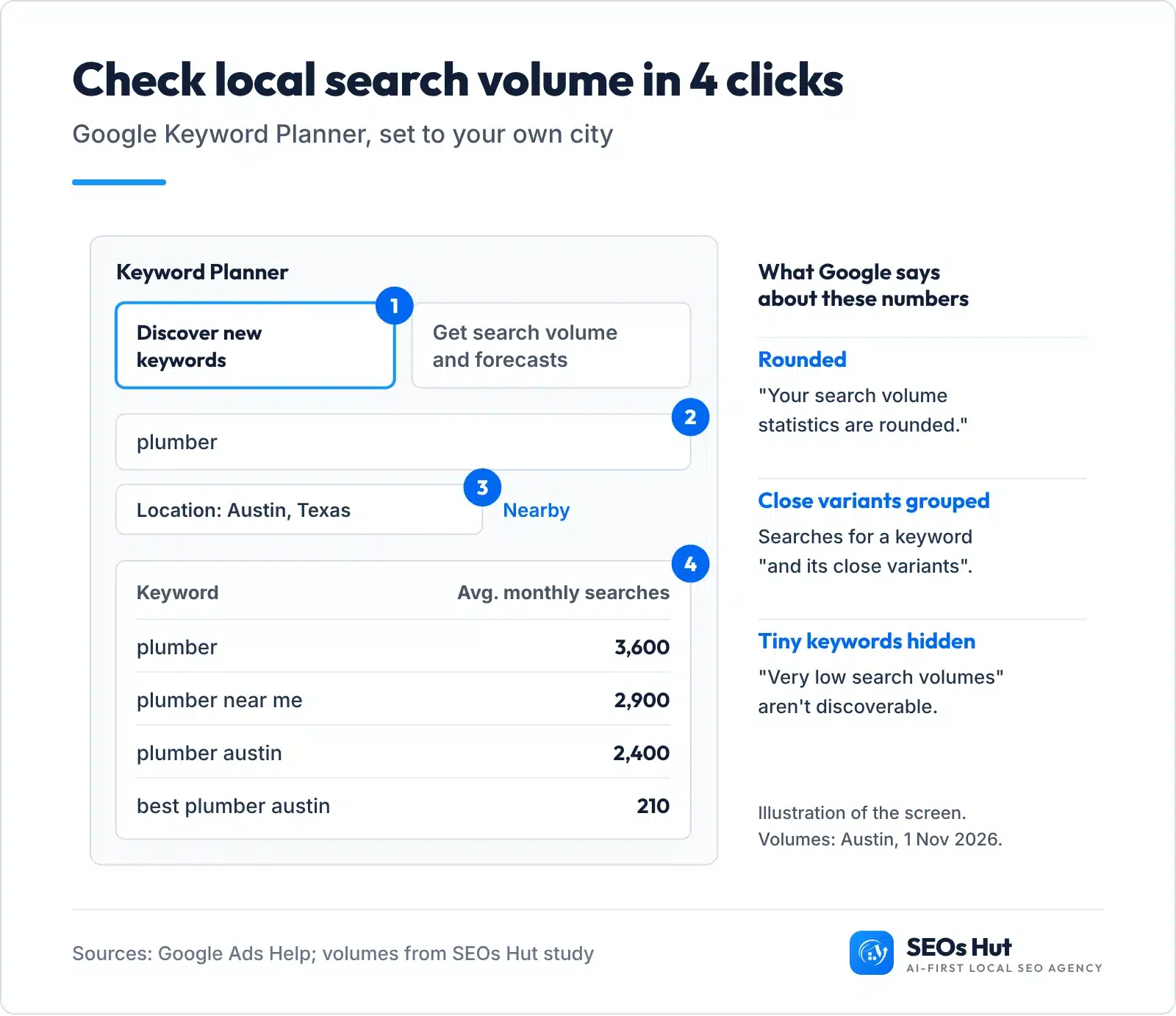
Three things Google says about these numbers will save you from bad decisions (Google Ads Help):
- They are rounded. 2,400 and 2,900 are buckets, not exact counts. Compare sizes, don’t do maths on them.
- They include close variants. That is why “plumber phoenix” and “plumber in phoenix” showed the same 2,400 in our study. Pick the one that reads naturally and move on.
- Tiny keywords are hidden. Google says keywords with very low search volumes “aren’t discoverable” (Google Ads Help). A blank does not mean nobody searches it. Keep a blank keyword if it describes a service you sell; drop it if it was a guess.
Step 5. Add the words people already type
Keyword Planner shows what Google thinks people search. These four free sources show what real people typed:
- Google Search Console (if your site has one): open Performance, then the Queries tab. Google says it shows “which queries are bringing traffic to your site”; the default view is the past three months (Search Console Help), and you can switch to the last 16 months (Google Search Central). Queries with impressions but no clicks are your quickest wins.
- Google autocomplete and People Also Ask: type your service and your city slowly into Google and note every suggestion. Open the “People also ask” box; each question is a ready-made FAQ.
- Google Trends: shows when people search, scaled “on a range of 0 to 100” (Google Trends Help). Seasonal trades should publish and fix pages before the rush, not during it.
- AI questions: BrightLocal found the share of US consumers using AI to find local business recommendations rose from 6% in 2025 to 45% (BrightLocal, March 2026). People ask AI tools full questions, so collect those too. Our free AI Prompt Miner lists the questions people ask about a service.

The chart is why seasonality belongs in keyword research. In our data, “plumber” in Phoenix went from 2,400 searches in December 2025 to 14,800 in August 2026, more than six times higher. The yearly average (5,400) hides that completely.
Step 6. Look at the results page for each keyword
Search each main keyword on Google, in a private window, and look at what fills page one:
- A map pack with three businesses: Google treats it as a local search. Your Google Business Profile does most of the work here.
- Local business websites below the map: a service page on your site can rank here.
- Directories (Yelp, Angi, Thumbtack) everywhere: hard to win with a page; make sure your listings on those sites are complete instead.
- Guides and articles: people want an answer, not a business. That keyword belongs in an FAQ or guide.
Write what you saw next to each keyword in the template. It decides Step 7.
Step 7. Give every keyword one home
This is where most keyword research stops short. A list of keywords does nothing until each one is assigned to the one place that will rank for it. Two pages chasing the same keyword compete with each other.

| Keyword type | Example | Its home |
|---|---|---|
| Near me, service only | plumber near me | Google Business Profile: primary category, services, reviews |
| Service + city | drain cleaning austin | One service page per service |
| Service + nearby town | plumber round rock | An area page, only with real work there |
| Best, top, reviews | best plumber austin | Your reviews and replies on Google |
| Cost, how, why | drain cleaning cost austin | An FAQ on the service page, or a guide |
Done when: every row in your template has one home, and no two rows point at the same page with the same main keyword.
What we see in client work
Keyword research only pays when it lands in the right home. Two of our case studies show it. For Sugar & Wax Haven, a body sugaring salon in Tempe, we “optimized every page for the body sugaring keywords customers are searching in Tempe” while growing reviews from 67 to 309; the salon went from page 4 of Google to #1, and the wins came on “queries that actually pay rent: body sugaring, Brazilian wax, leg waxing” (full case study).
For A1 Tire Shop in Sunrise, Florida, we rebuilt the Google Business Profile with “accurate categories, services, hours, photos” and “optimized every page for the tire and service keywords Sunrise drivers actually search”. The shop climbed from position 48 to #1 for its core local search, and the profile drove 770 phone calls in six months (full case study). Same method both times: profile for the near-me demand, pages for the named searches.
Where to use local keywords (without breaking Google’s rules)
Here is exactly where each keyword goes once it has a home.
On your Google Business Profile
- Primary category: pick the most specific match for your main keyword. Google says “The categories you select affect your local ranking on Google”, and a primary category of “Pizza restaurant” can show you for “Restaurants”, “Italian Restaurants” or “Pizza” (Google Business Profile Help).
- Services: add every service from Step 1, in customer words.
- Business name: your real name only. Whitespark’s 2026 expert survey ranks “Keywords in GBP Business Title” third among map pack factors (Whitespark), but Google’s rules say “Including unnecessary information in your business name isn’t permitted, and could result in the suspension of your Business Profile” (Google). If the keyword isn’t in your legal, real-world name, don’t add it.
On your website
- Title tag: Service in City, ST | Business Name. Example: “Drain Cleaning in Austin, TX | Smith Plumbing”.
- H1 and URL: the service phrase, written naturally: “Drain cleaning in Austin” and /drain-cleaning/.
- Body copy: write the way you talk. Google’s starter guide says varying your words gives you “more chances to show up in Search simply because you are using more keywords”, and that it ignores the keywords meta tag (Google).
- Area pages: one only for a town where you can show real jobs, photos and a local review. Our city pages guide shows what goes on one.
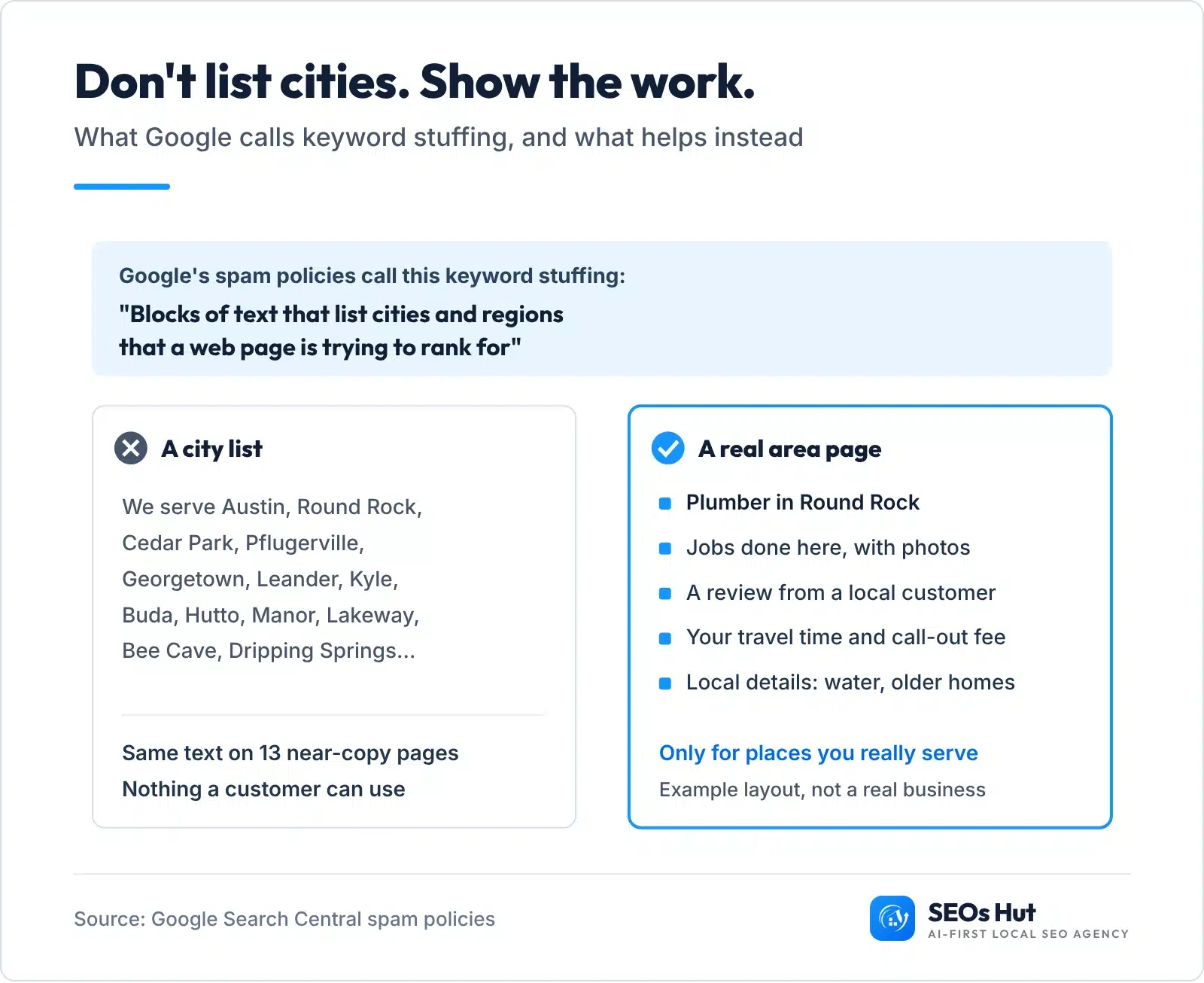
One rule surprises most owners: Google’s spam policy names “Blocks of text that list cities and regions that a web page is trying to rank for” as keyword stuffing (Google Search Central). That “areas we serve” paragraph of 30 town names in your footer is exactly what it describes. A short line with your main area, plus real area pages for the few towns that matter, does the job.
Want a second pair of eyes on the result? Our free Google Business Profile Audit checks your categories and services in a couple of minutes.
Free local keyword research tools
You can do everything in this guide without paying for software. Paid tools mainly add competitor data and difficulty scores.
| Tool | What it gives you | Cost |
|---|---|---|
| Google Keyword Planner | Search volume for your city, keyword ideas | Free; billing details required |
| Google Search Console | The real searches that already show your site | Free |
| Google Trends | When searches rise and fall, by region | Free |
| Google autocomplete and People Also Ask | How people phrase needs and questions | Free |
| SEOs Hut Keyword Map Builder (above) | Your keyword list, sorted into homes, as a CSV | Free, no signup |
| SEOs Hut Keyword Rank Checker | Where you rank today for each keyword | Free |
Can ChatGPT do local keyword research?
Partly. ChatGPT is good at Step 1 and Step 3: ask it for every way a customer might describe your service, or for questions people ask before hiring a roofer. It cannot see Google’s search numbers, so it will guess volumes if you ask. Use it to brainstorm, then check every number in Keyword Planner.
AI search is also a reason to do this research well. Google says AI Overviews and AI Mode may use “query fan-out”, issuing several related searches across subtopics to build an answer, and that there are no special optimizations needed to appear in them (Google Search Central). Pages that clearly answer the related questions from Step 5 give those searches something to find. Our AI SEO agency work starts from the same keyword map.
How to know your local keywords are working
- Rankings for named searches: check your service + city keywords monthly with the Keyword Rank Checker. Write the position in the template’s “Rank today” column now, so you can compare in 90 days.
- Map pack for near-me searches: your position changes street by street. The Local Rank Grid shows it across your area.
- Real demand: in Search Console, watch impressions and clicks for the queries you mapped. In your Business Profile, watch calls and direction requests.
Most of that demand starts on Google: BrightLocal found 52% of US consumers started their latest local business search on Google Search and 9% on Google Maps (BrightLocal, July 2026).
Local keyword research cheat sheet
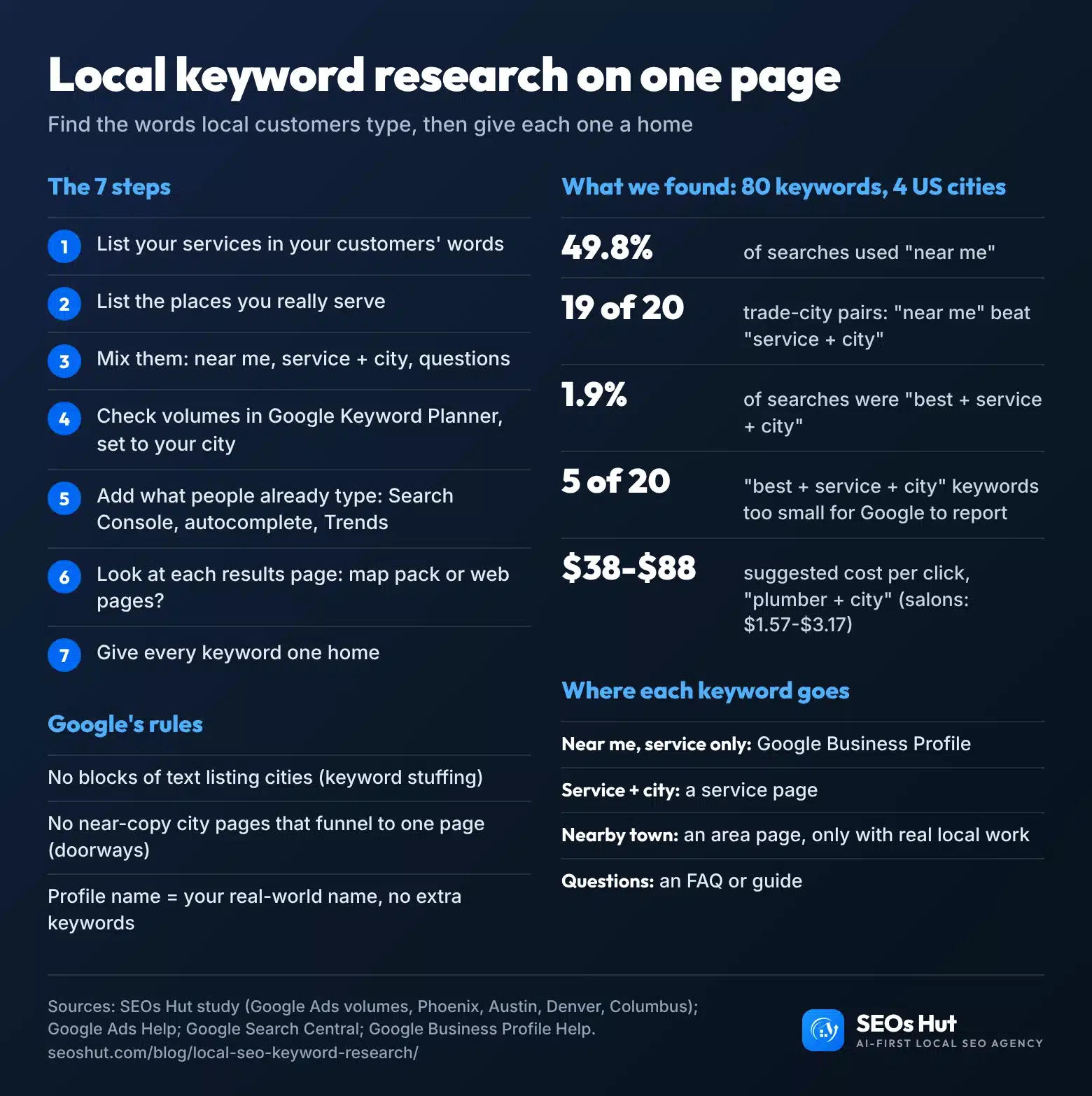
The whole method on one image. Save it, print it, or embed it on your site with a credit link.
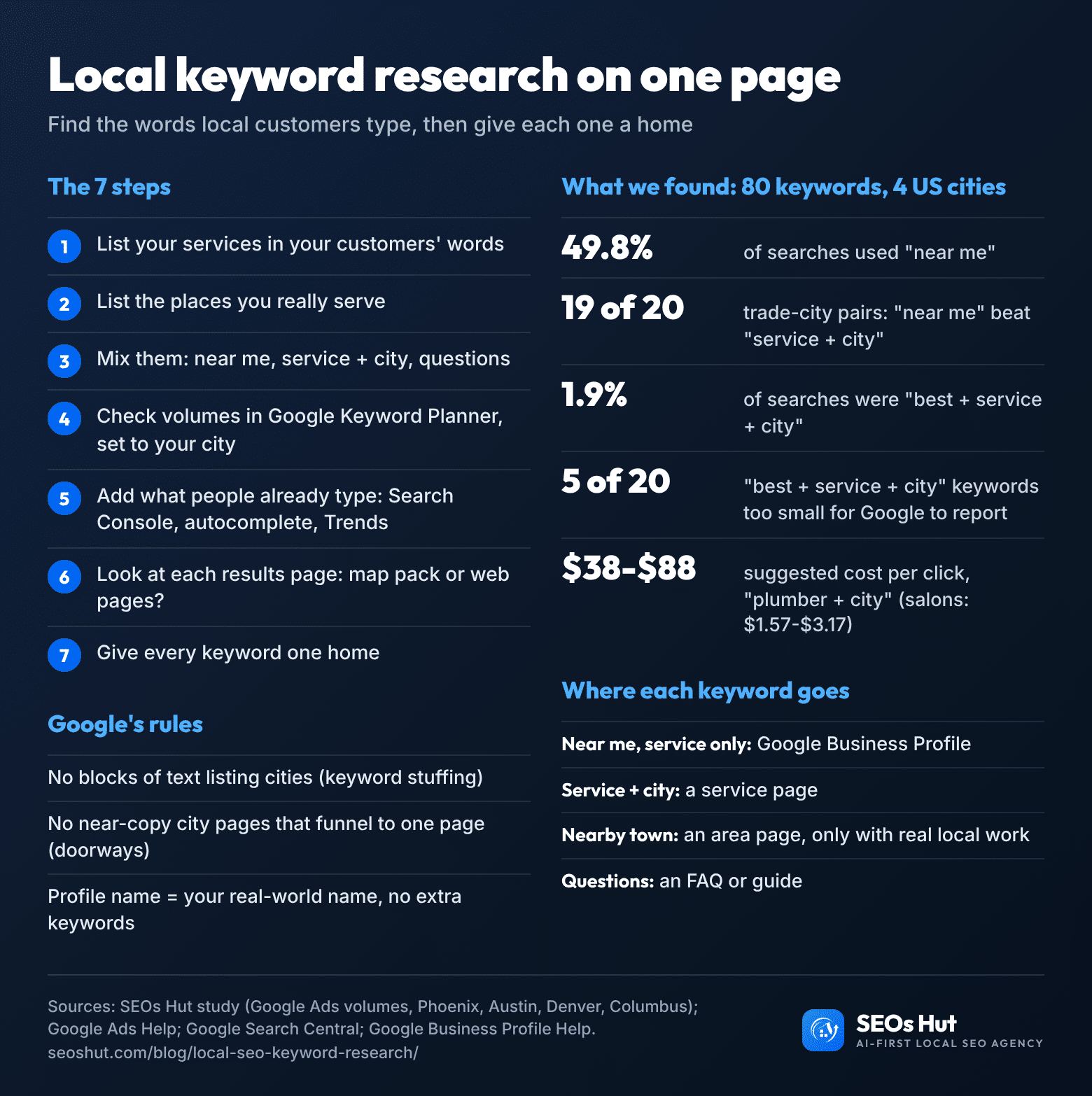
Rather have it done for you? Our local SEO services start with exactly this keyword map, then build the profile and pages around it. If your Google profile is the weak spot, see our Google Business Profile service, or start with SEOs Hut and book a free strategy call.
FAQs
What are local keywords?
Local keywords are searches with a local need behind them. Some name a place, like “dentist denver” or “roofer round rock”. Others don’t, like “plumber near me” or just “dentist”, but Google still shows nearby businesses because the need is local. In our 80-keyword study, searches without a city name made up over 80% of the volume.
How do I find local keywords for free?
Use Google’s own tools. List your services and towns, combine them, then check volumes in Google Keyword Planner with the location set to your city. Add real searches from Search Console, autocomplete suggestions and People Also Ask questions. Google Trends shows the busy months. Our free keyword map builder on this page does the combining for you.
Should I put “near me” on my website?
No. “Near me” searches are matched by distance and by how well your Google Business Profile fits the search, not by the phrase on a page. Writing “plumber near me” in your text reads oddly and does not make you nearer. Put your effort into your primary category, services, reviews and a clear address or service area.
Do I need a separate page for every city?
Only for places where you have something real to say: jobs done there, photos, a local review, travel times. Google’s spam policies call near-copy pages aimed at different cities doorway abuse, and lists of town names keyword stuffing. Most local businesses need one strong page per service, plus a few genuine area pages.
How many keywords should a local business target?
There is no magic number. Most local businesses end up with one main keyword per service, each with a few close variations, plus a handful of town and question keywords. A plumber with eight services might map 30 to 60 keywords. What matters is that each keyword has one home and each page has one main job.
Sources
- Google Ads Help: Use Keyword Planner · Refine keyword ideas · Keyword Planner statistics
- Google Business Profile Help: Tips to improve your local ranking · Business categories · Guidelines for representing your business
- Google Search Central: Spam policies · SEO Starter Guide · AI features and your website · Debugging traffic drops
- Search Console Help: Performance report · Google Trends Help
- BrightLocal: Consumer search behavior and channels (July 2026) · BrightLocal: Local Consumer Review Survey, AI and trust (March 2026)
- Whitespark: Local Search Ranking Factors 2026
- SEOs Hut study, 1 Nov 2026: Google Ads average monthly searches and suggested CPC for 80 keywords in Phoenix, Austin, Denver and Columbus (CSV).