


A canonical tag is one line of code in a page’s <head> that tells Google which web address is the main version of that page, so the copies at other addresses are combined and only the main one shows in search. It looks like this:
<link rel="canonical" href="https://yourdentist.com/">You need it because one page almost never lives at just one address. Your homepage opens with and without www, over http and https, and with the tracking tags your Google Business Profile, ads and Facebook add to links. To you that is one page. To Google, each is a separate URL that has to be sorted out.
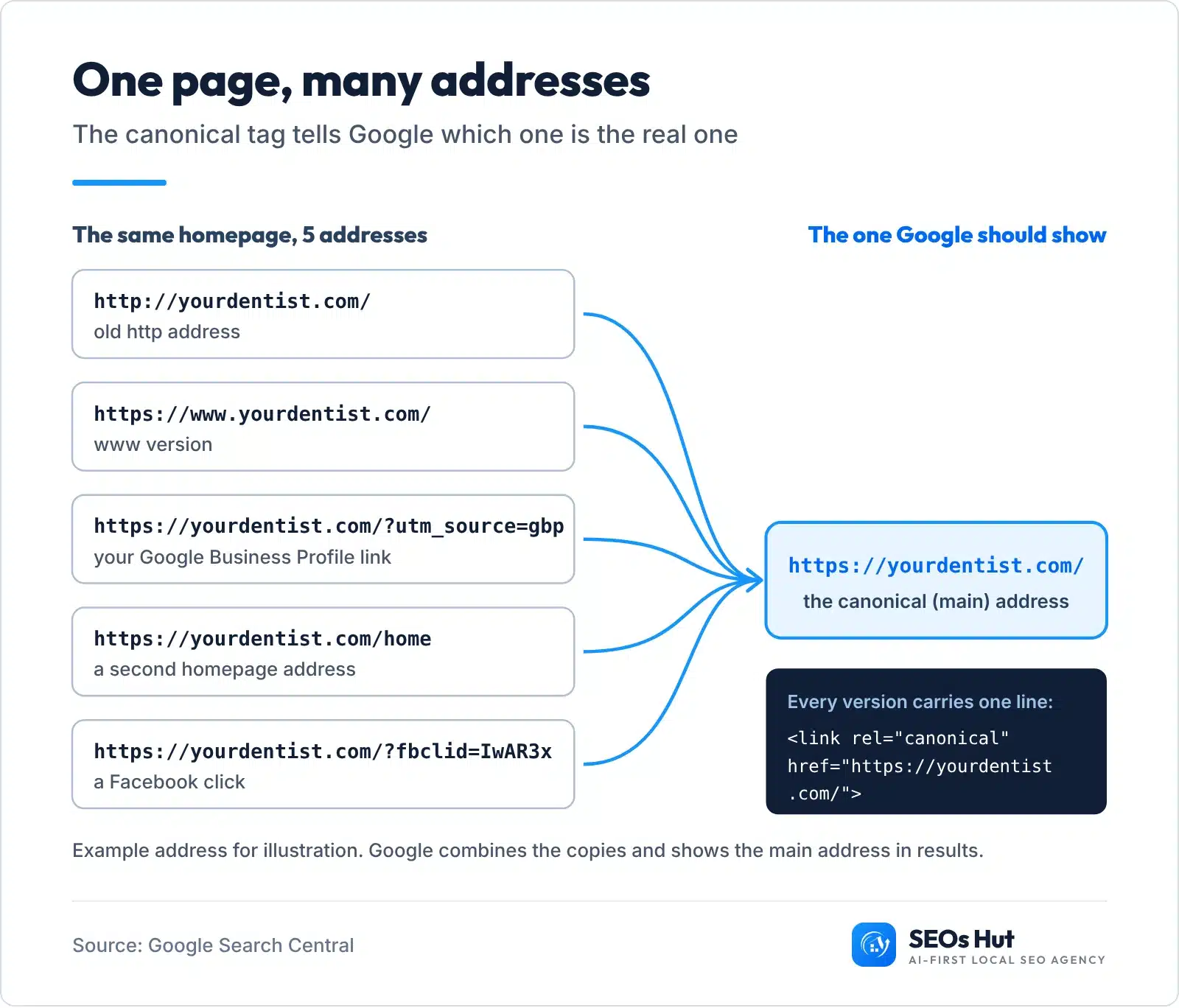
This guide shows what the tag does, when you need it (and when a redirect is the better fix), how to add it on WordPress, Shopify, Wix, Squarespace or plain HTML, how to check it in 10 seconds, and how to clear the canonical messages in Google Search Console. There is a free canonical tag maker in the middle, and a one-image cheat sheet at the end.
What is a canonical tag? (with an example)
Google defines canonicalization as “the process of selecting the representative –canonical– URL of a piece of content”. The canonical tag is how you tell Google your choice. Here is the tag again, piece by piece:
<link rel="canonical" href="https://yourdentist.com/"><link>A link element. It sits in the page’s <head>, so visitors never see it.rel="canonical"Says what kind of link this is: “this is the main version of me”.href="https://yourdentist.com/"The full main address, with https:// at the start. On the main page itself it points to itself.
Two ideas make the rest of this guide easy:
- It is a hint, not an order. Google says “indicating a canonical preference is a hint, not a rule”. If your links, sitemap and redirects all say something else, Google may pick a different page.
- It does not hide anything from visitors. People can still open every version. The tag only tells search engines which one to show and give credit to.
The word “canonical” just means “the official one”. The tag itself is an open web standard, RFC 6596 from April 2012, which says the canonical address must hold the same content as the page or a bigger version of it. So you can point a copy at the original. You cannot point a page about fillings at your page about braces.
Do canonical tags help SEO?
Yes, in a quiet way. A canonical tag does not push a page higher by itself. It stops your own pages from competing with each other and makes sure the address you want is the one Google shows and credits. Google lists four things it weighs when it picks a main version: “whether the page is served over HTTP or HTTPS, redirects, presence of the URL in a sitemap, and rel=”canonical” link annotations.”
Three facts from Google that clear up most of the myths:
- Duplicate content is not a penalty. “Some duplicate content on a site is normal and it’s not a violation of Google’s spam policies.” The risk is not punishment. It is the wrong address showing in results, and links split across copies.
- Redirects beat canonical tags. Google ranks its methods by strength: redirects first, then rel=canonical, then being in your sitemap, which is only a weak signal. The methods add up when they agree.
- You are not forced to use one. Google says none of the methods are required, and your site “will likely do just fine without specifying a canonical preference.” Google will simply choose for you. Most owners would rather choose.
Most of the web has caught on. The HTTP Archive’s Web Almanac, which scans millions of sites each year, found the share of mobile pages with a canonical tag climbing from 48.3% in 2019 to 67% in 2025.
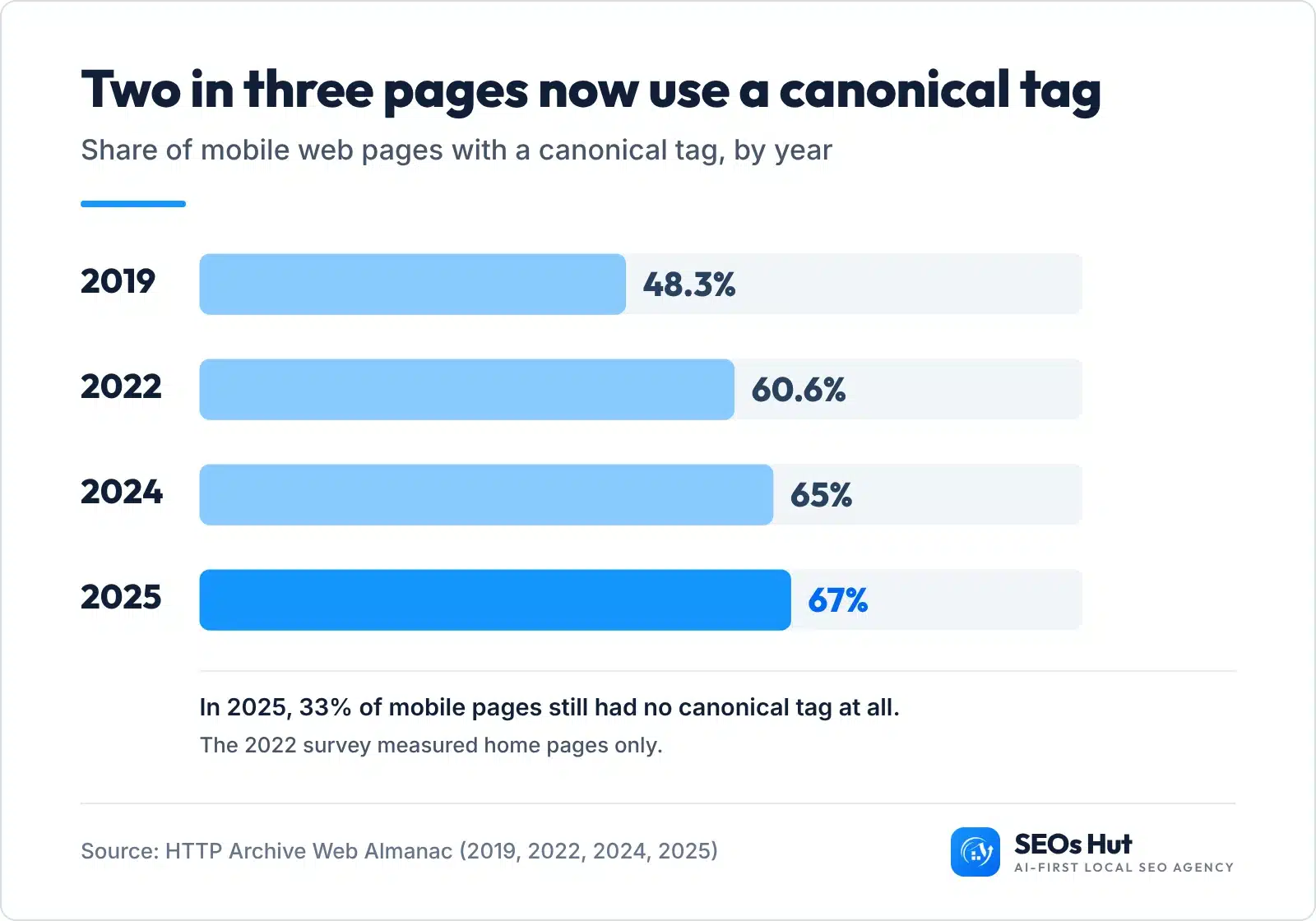
That still leaves a third of pages letting Google guess. For a local business, the guess matters most on one page in particular: the page your Google Business Profile sends people to. So we went and checked.
Our study: canonical tags on 57 Denver dentist websites
On 13 November 2026 we took the top 60 Google Maps results for “dentist Denver CO”. 57 listed a website. We opened the exact link each Business Profile uses and read the page’s code. Six sites blocked our checks or were down, which left 51 we could test. Here is what we found:

- 18 of the 57 profile links (32%) carry tracking tags such as
?utm_source=google,?utm_campaign=gmbor a listings-tool code. Every one of those is a separate address in Google’s eyes. - 48 of 51 sites (94%) have a canonical tag on the homepage. All 48 used a full address, sat in the <head> and appeared only once. Website builders and SEO plugins do this well.
- 45 of 51 (88%) point it at the page’s own clean address. Of the three that point somewhere else, one names the non-www version while the site opens on www, one names an https address on a page still served over http, and one names a completely different website.
- The 3 sites with no canonical are the only ones where a tagged visit (we added
?utm_source=google) gives Google no clean address to fall back on. - 4 of 51 (8%) do not send http:// visitors on to https://. Google prefers https as the main version, so this is a redirect job, not a canonical one.
The lesson for a local business: the tag is usually there, but you should check that it names the right address, and that your redirects agree with it. Sample: one city, one trade, homepages only, raw HTML. We list business totals only and never name a site.
Canonical tag vs 301 redirect: which one do you need?
Use a canonical tag when the copy has to stay reachable. Use a 301 redirect when nobody needs the copy any more. Google says to use permanent redirects “only when deprecating a duplicate page”, and Bing gives the same advice: redirect variants into one preferred address, and “apply canonical tags when multiple versions must remain accessible.”

Here is how that plays out on a typical local business website:
| Situation | Example address | Fix |
|---|---|---|
| Business Profile, ad or social tracking links | yourdentist.com/ |
Canonical tag. The page's own self-canonical already names the clean address. |
| http and https | http:/ |
301 redirect to https. |
| www and non-www | www.yourdentist.com |
301 redirect to the one you picked. |
| A second homepage address | / |
301 redirect if your platform allows it, otherwise a canonical to the root. |
| Sort or filter pages | / |
Canonical to the page without the parameter. |
| Your article republished on another site | partner.com/ |
A canonical on their copy, pointing to your original. |
| Page 2 of your blog or project gallery | / |
Each page points to itself. Never to page 1. |
| Near-identical city pages | / |
Not a canonical job. Write each page for its own town (see city pages that rank). |
| A PDF copy of a page | / |
A canonical in the HTTP header (set on the server). |
Notice what is missing from the right-hand column: robots.txt and noindex. Google is direct about it: “Don’t use the robots.txt file for canonicalization purposes”, and it does not recommend noindex for choosing a canonical within a site, because that “will completely block the page from Search.”
Free canonical tag maker
Paste any address, even a messy one copied from your Business Profile or an ad. The maker strips the tracking tags, applies your www and slash choice, writes the tag, and tells you exactly where it goes on your platform.
How to add a canonical tag in 5 steps
Most sites already have a canonical tag from their platform, so for many owners this is a 10-minute check rather than a build. Work through it once for your homepage, then for your main service pages.
Step 1. Pick the one main address
Decide four things once and use them everywhere: https (always), with or without www, with or without a trailing slash, and no tracking tags. The address your site already redirects to is usually the right answer. Type your domain into a browser bar and copy where it lands.
Step 2. Write the tag
Use the full address, starting with https://. Google asks for “absolute paths rather than relative paths”, and a link written without the https part, like yourdentist.com/page, is read as a path on your own site, which breaks it. Each page gets a tag that points to itself unless it is a copy. The maker above writes it for you.
Step 3. Add it to the page’s <head>
Google only accepts the tag in the <head> section. On most platforms you never touch code. Here is where the setting lives (checked 13 Nov 2026 in each platform’s help pages):
| Platform | Adds one for you? | Where to change it |
|---|---|---|
| WordPress (no SEO plugin) | Yes, on posts and pages | WordPress adds one to single posts and pages. To change it you need an SEO plugin. |
| WordPress + Rank Math | Yes | Edit the page, open Rank Math, Advanced tab, Canonical URL. Turn on Advanced Mode first if you can’t see the tab. |
| WordPress + Yoast | Yes | Edit the page, Yoast sidebar, Advanced, Canonical URL. Enter the full address. |
| Shopify | Yes | Themes print it with {{ canonical_url }} in the head. Leave it unless a developer has a reason. |
| Wix | Yes, points to itself | Page settings, SEO basics, Advanced SEO, Additional tags, canonical. Wix warns a changed canonical can remove the page from your sitemap. |
| Squarespace | Handles its own duplicate | Squarespace asks Google to index your root address instead of /home. No action needed for that. |
| Plain HTML | No | Paste the tag inside <head> on every page, each pointing to its own full address. |
Step 4. Check that it is live
Open the page in Chrome, press Ctrl+U (Mac: Option+Cmd+U) to see its code, then Ctrl+F and search for canonical. You want exactly one result, inside the <head>, with the full address you picked. Google ignores every canonical on a page that has more than one, and it ignores one placed in the <body>.
Quicker still, our free Meta Tag Analyzer lists every tag in a page’s head, canonical included, and flags a canonical that points somewhere else.
Step 5. Confirm Google agrees in URL Inspection
In Google Search Console, paste the page address into the search bar at the top. Open Page indexing and compare two lines: User-declared canonical (your tag) and Google-selected canonical (Google’s choice). If they match, you are done. One catch from Google’s help: the canonical shows only in the indexed data, and “the live test cannot predict” it, so give a new tag a few days.
Not sure Google can even see the page?
Our free Google Index Checker reads a page’s canonical alongside its status, robots rules, noindex and sitemap, then runs a live Google check, so you see in one place why a page is or is not showing. Free, no signup.
How to fix canonical errors in Google Search Console
The Page indexing report uses three canonical messages. Only one of them usually needs work.
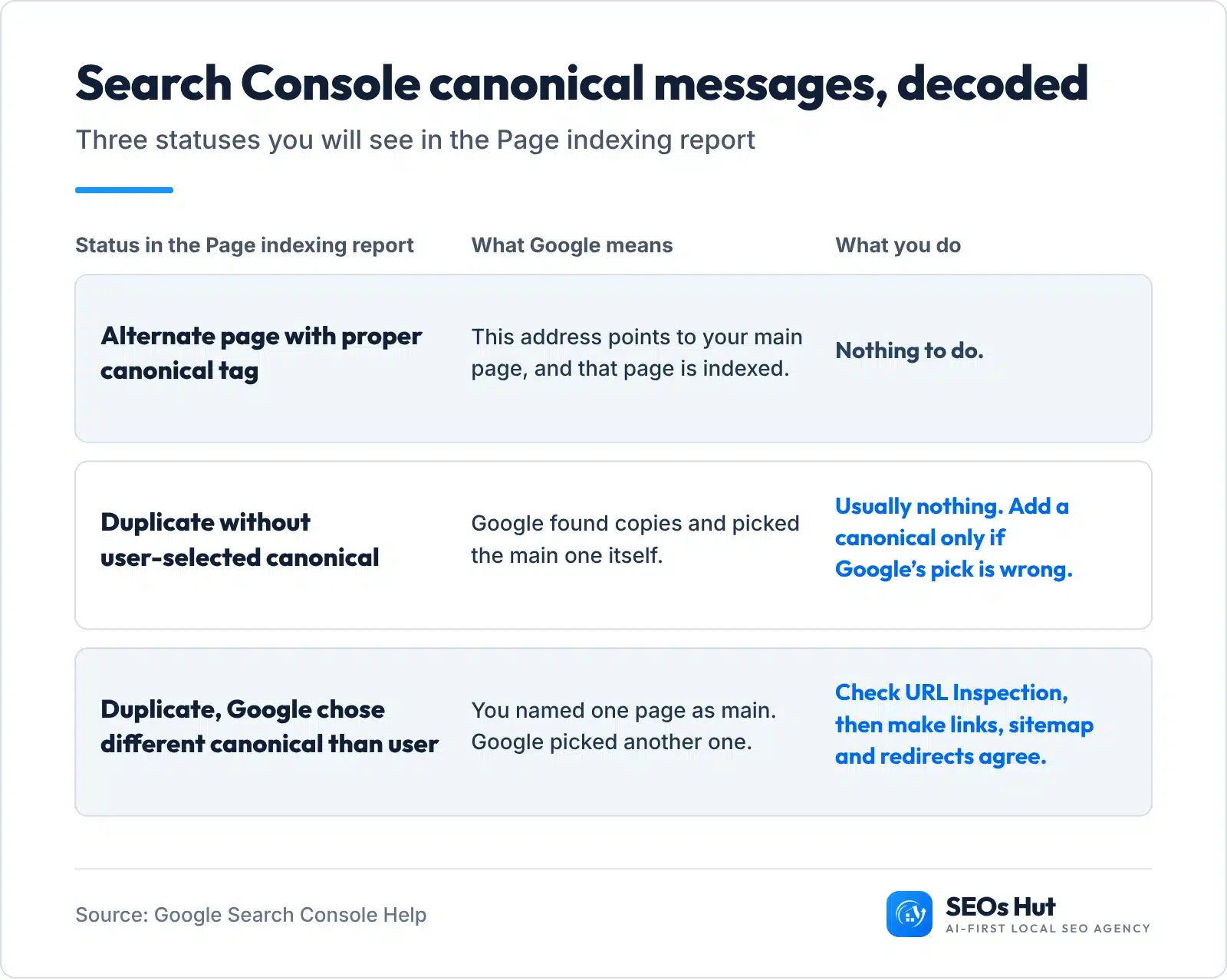
“Alternate page with proper canonical tag”
Good news dressed up as an error. Google’s help says “there is nothing you need to do.” These are the tracking-tag and duplicate addresses doing exactly what your tag told them to. Squarespace sites see this for /home, because Squarespace asks Google to index only the root address.
“Duplicate without user-selected canonical”
Google found copies with no tag and picked a main one itself. Google calls this “not an error”. Open URL Inspection for the main page. If Google’s pick is the address you want, leave it. If not, add a canonical tag (step 3) on the copies pointing to your choice.
“Duplicate, Google chose different canonical than user”
You named one page and Google chose another. Fix it by making every signal say the same thing:
- Run URL Inspection on the page and note the Google-selected canonical.
- Decide whether Google is right. Sometimes the “duplicate” really is the better page. If so, point your tag at Google’s choice.
- If your choice stands, update internal links to use it. Google asks you to “link to the canonical URL rather than a duplicate URL.”
- List only the main address in your sitemap. Our Sitemap Checker shows what yours contains.
- Redirect copies nobody needs (http, www) with a 301, and check for loops with the Redirect Checker.
- Make sure the pages really are different if they should both rank. Two city pages that differ only by the town name look like copies.
- Click Validate fix in the report and give Google a few weeks.
7 canonical tag mistakes that quietly cost you
Most of these come straight from Google’s guidance. The rest follow from how the tag works:
- Two canonical tags on one page. Often a theme and an SEO plugin both add one. Google ignores them all.
- A canonical without https://.
yourdentist.com/pageis read as a path on your own site, not as your page’s address. - Pointing at a page that redirects, breaks or is set to noindex. The main address must open normally with a 200 status.
- Every page pointing at the homepage. That tells Google your other pages are copies of the homepage, so they can drop out of search.
- Page 2, 3 and 4 of a list pointing at page 1. Google says “give each page its own canonical URL”. Otherwise the items on later pages are not indexed.
- Mixed signals. One address in the tag, another in your sitemap, a third in your menu links. Google says not to name different canonicals through different methods.
- JavaScript that rewrites the canonical after the page loads. Google asks you to make sure scripts don’t change it, and the Web Almanac 2025 calls a static, server-side tag “the safer option”.
Canonical tags also have a bigger relative: the redirect. If your audit turns up long hops between addresses, our guide to redirect chains shows how to flatten them.
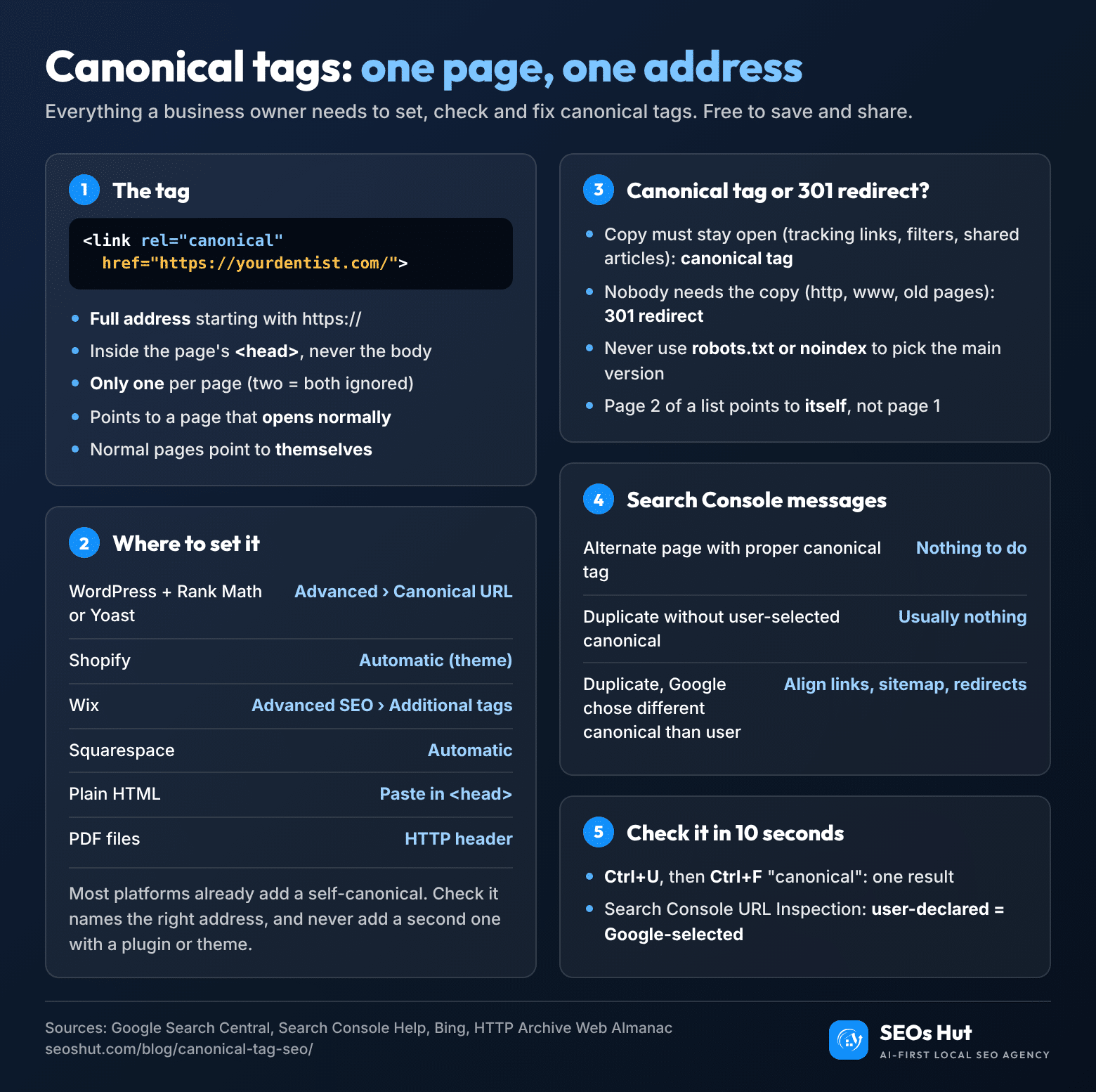
Canonical tag cheat sheet
The whole guide on one image: the tag and its rules, where to set it on each platform, canonical vs redirect, the Search Console messages and the 10-second check. Free to save, print and share.
FAQs
Does every page need a canonical tag?
No, but it is good practice. Google says you can do fine without one, because it will pick a main version for you. Its ecommerce guide still recommends a self-referencing canonical on every indexable page, and Google’s main docs agree. Most platforms (WordPress, Shopify, Wix) already add one, so the real job is checking it names the right address.
What is the difference between a canonical tag and a 301 redirect?
A 301 redirect sends people and Google to the main page, so the copy disappears. A canonical tag leaves the copy open to visitors and only tells search engines which version to show. Google counts redirects as the stronger signal. Redirect copies nobody needs, like http or www versions, and use a canonical tag for tracking links, filters and shared articles.
Does Google always follow the canonical tag?
No. Google treats it as a hint, not a rule, and weighs it against redirects, your sitemap, https and internal links. When those disagree, Google may pick a different page and Search Console shows “Duplicate, Google chose different canonical than user”. Make every signal point to the same address and Google almost always follows your tag.
Can a canonical tag point to another website?
Yes. Google has supported cross-domain canonical tags since 2009. The common use is syndication: when a partner republishes your article, ask them to add a canonical pointing to your original, which Bing also recommends. The two pages must hold the same content. Pointing at an unrelated site, as one site in our Denver study did, sends your credit away.
Do canonical tags matter for ChatGPT and AI search?
Indirectly, yes. In a December 2025 post on SEO and AI search visibility, Bing wrote that duplicate content does not trigger penalties on its own but does reduce visibility by diluting authority. One clear main address per page makes it more likely that search engines and AI answers cite the page you want. Check AI access separately with our AI Crawler Checker.
Want someone to check every page for you?
Canonical problems rarely come alone. They travel with redirect loops, mixed http and https, and pages Google quietly ignores. Our website audit checks every page your Business Profile, ads and menus link to, and gives you a plain-English fix list. SEOs Hut is a local SEO agency for businesses in the US and UK.
Sources
- Google Search Central: What is URL canonicalization
- Google Search Central: How to specify a canonical URL
- Google Search Central: Fix canonicalization issues
- Google Search Console Help: Page indexing report
- Google Search Console Help: URL Inspection tool
- Google Search Central: URL structure for ecommerce sites
- Google Search Central: Pagination best practices
- Google Search Central Blog: 5 common mistakes with rel=canonical (2013)
- Google Search Central Blog: Cross-domain rel=canonical (2009)
- Bing Webmaster Blog: Does duplicate content hurt SEO and AI search visibility? (Dec 2025)
- HTTP Archive Web Almanac 2025: SEO chapter
- HTTP Archive Web Almanac 2022: SEO chapter
- IETF RFC 6596: The Canonical Link Relation (2012)
- WordPress developer docs: rel_canonical()
- Rank Math: How to change the canonical URL
- Yoast: Canonical URLs in Yoast SEO
- Shopify developer docs: canonical_url
- Wix Help: Changing the canonical tags for your site's pages
- Squarespace Help: Understanding Google SEO emails and console errors
- SEOs Hut: canonical tag study of 57 Denver dentist websites, 13 Nov 2026 (anonymous totals in this article)