
The result
Which AI bots really visit you?
This free AI crawler log analyzer reads your server access log and shows which AI bots visited your site: ChatGPT, Claude, Perplexity, Google, Bing, Apple and more. You see what each one read, which pages failed, which visits came from fake bots, and how many people the AI assistants sent you. No signup.
Your log is read inside your browser and is never uploaded. Only the addresses of visits that claim to be a known bot are checked against the address lists the bot owners publish, so you know which visits are genuine.
Every report opens with a plain answer and one coloured tag per check. Underneath are three parts: the bots, the pages they read, and the timeline with the visitors AI assistants sent.
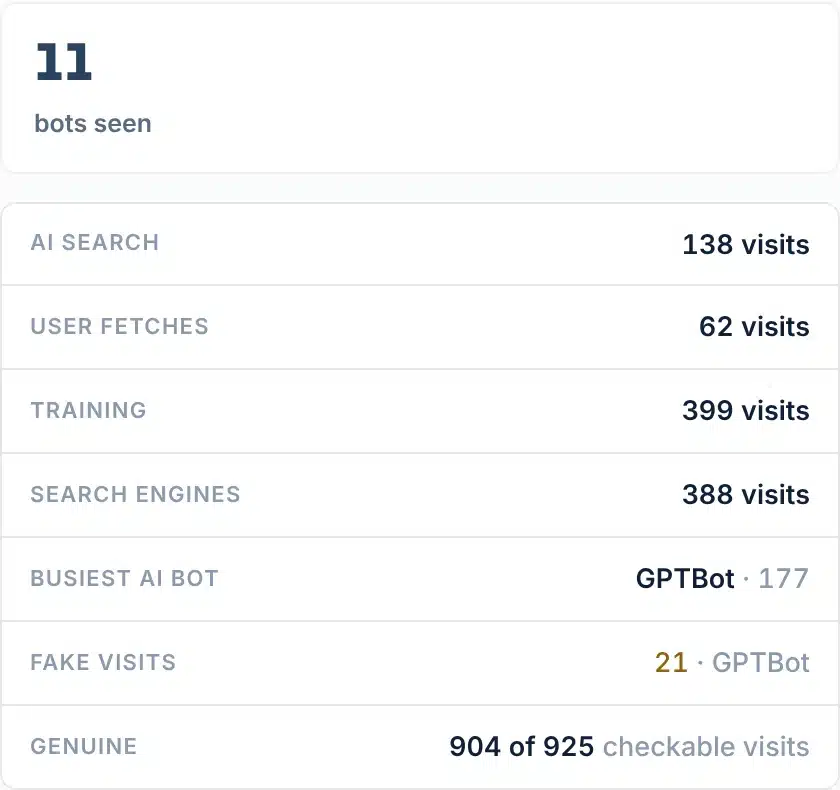
Part 1 of a report: visits by type of bot, and 21 visits that only pretended to be GPTBot.
The top of a report for a 7-day test log: it works, with 2 things to improve.
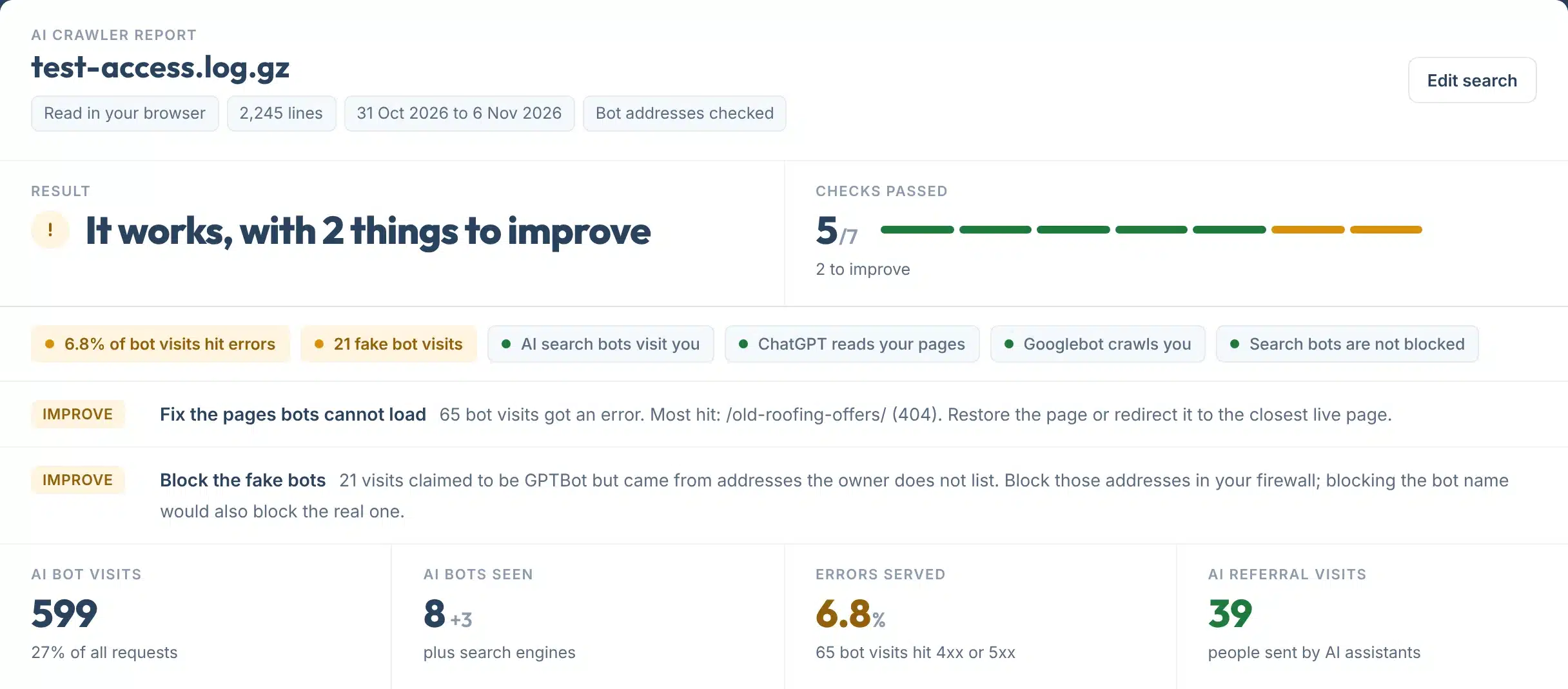
Screenshots on this page come from a 7-day test log we built from each bot’s documented user agent and published address list, plus made-up visitors and two fake GPTBot addresses. It is not a real site’s traffic.
How to use it
Check your log in five steps
About two minutes, most of it finding the file.
- 1Download your access log
From your hosting panel, for example Raw Access in cPanel or Logs in MyKinsta. A full day or a week works best. The table below shows where to look.
- 2Drop the file on the box
Or press Choose a log file. Plain .log and .txt files and zipped .gz files up to 2 GB work. You can also paste lines.
- 3Press Analyze my log
The log is read in your browser. Then the bot addresses are checked against the owners’ lists. A week of log for a small site takes a few seconds.
- 4Read the result first
One line tells you whether anything is wrong. Red tags are problems, amber ones are worth improving.
- 5Fix, then check again
Work through the rows under the tags. Save the report as a one-page PDF to compare with next month.
Where to find your access log
| Host | Where |
|---|---|
| cPanel hosting | Metrics → Raw Access. Each download is a zipped .gz file of the last day or so (cPanel docs). |
| Hostinger | Hosting dashboard → Traffic → Access logs → Download logs (Hostinger). Check the download includes the user agent. |
| Kinsta | MyKinsta → your site → Logs → access.log, or the logs folder over SFTP (Kinsta docs). |
| WP Engine | User Portal → Logs → Access. Origin logs hold the last 1,500 requests; edge logs up to 72 hours (WP Engine). |
| Cloudflare | HTTP request logs through Logpush. The docs list it on all plans, with usage pricing (Cloudflare docs). Logpush files work here too. |
| Your own server | Apache and Nginx write the “combined” format by default, usually /var/log/apache2/access.log or /var/log/nginx/access.log. |
Formats it reads: Apache and Nginx combined and common logs (Apache, Nginx), the same with a site name in front, IIS (W3C) logs, and Cloudflare Logpush files. Analytics exports such as Google Analytics do not hold bot visits, so they will not work.
Your report, explained
What each part of the report means
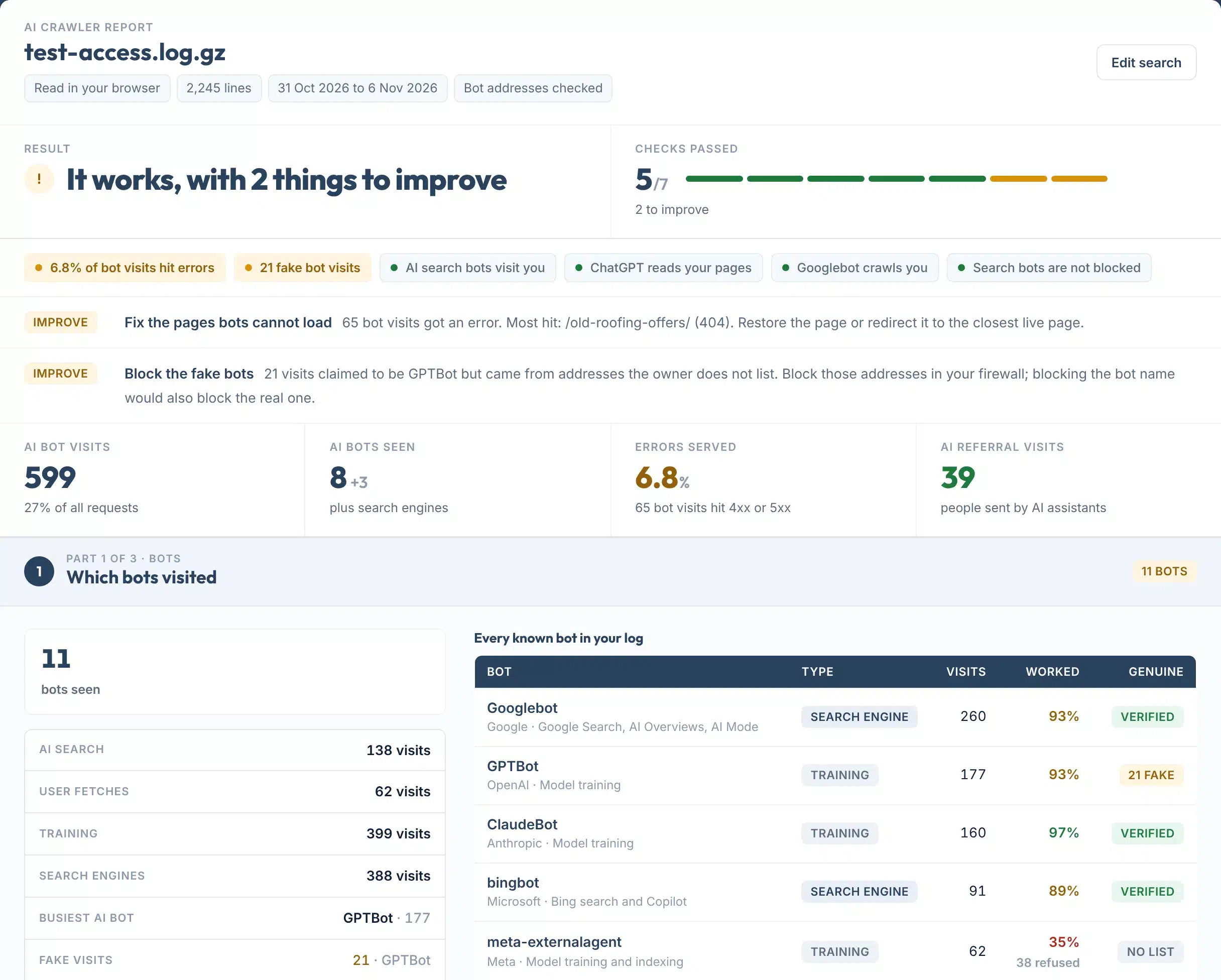
The top of the same report, numbered. Parts 2 and 3 cover the pages bots read and when they came.
 123456
- 1Result
One plain answer: no issues found, things to improve, or problems to fix.
- 2Checks passed
How many of the seven checks passed, one bar segment per check: green passed, amber improve, red fix.
- 3Check tags
One short tag per check, problems first. Grey checks that could not be judged are left out of the count.
- 4What to do
One line per problem, saying what to change. A clean report has none.
- 5Four numbers
AI bot visits and their share of all requests, how many AI bots came, the error rate bots met, and visitors sent by AI assistants.
- 6Every bot
Each bot with its owner, its type, visits, how often the page worked, and whether its address is on the owner’s list.
Bot types:
How it works
How your log is checked
Seven yes-or-no checks, every rule shown. No made-up score out of 100: you see each fact and what it is compared with.
| Check | Passes when | Why it matters |
|---|---|---|
| AI search bots visit you | OAI-SearchBot, Claude-SearchBot, PerplexityBot, DuckAssistBot or Amazon’s search bot appears at least once | OpenAI: sites opted out of OAI-SearchBot “will not be shown in ChatGPT search answers” (OpenAI) |
| ChatGPT reads your pages | OAI-SearchBot or ChatGPT-User appears | ChatGPT is the assistant most people use; these are its two ways of reading a page |
| Googlebot crawls you | Googlebot appears | Google crawls for Search and its AI features with its normal crawlers: Google-Extended “doesn’t have a separate HTTP request user agent string” (Google) |
| Bots get working pages | Under 5% of bot visits end in a 4xx or 5xx error. 5 to 15% is Improve, more is Fix | Every error is a visit that found nothing to read or cite |
| Search bots are not blocked | No search, user or engine bot gets a 403 or 429 on half or more of its visits (with at least 3 visits) | Firewalls and bot-protection settings often block AI bots without the owner knowing. Blocking training bots is your choice and is not counted |
| Bot visits are genuine | Every checkable bot visit comes from an address on its owner’s published list | User agents are easy to copy. Common Crawl says it is “aware of crawlers falsely identifying themselves as CCBot” (Common Crawl) |
| AI assistants send you visitors | At least one visit has ChatGPT, Perplexity, Claude, Gemini, Copilot or another assistant as the referrer, or utm_source=chatgpt.com | Shown, never counted against you: many apps strip the referrer |
Genuine or fake: the tool checks each address against the lists OpenAI, Anthropic, Perplexity, Google, Microsoft, Apple, DuckDuckGo, Mistral, Amazon and Common Crawl publish. Google also documents a reverse DNS check you can run yourself (Google). Meta and ByteDance publish no list, so their visits show as claimed.
The bots
The AI bots in your log, and what they want
Each company runs several bots with different jobs. Blocking one does not block the others: OpenAI says “Each setting is independent of the others” (OpenAI).
| Bot | Owner | What it does | Follows robots.txt |
|---|---|---|---|
| OAI-SearchBot | OpenAI | Finds pages for ChatGPT search answers | Yes |
| ChatGPT-User | OpenAI | Opens a page when a ChatGPT user asks | “May not apply” |
| GPTBot | OpenAI | Collects pages that may train OpenAI’s models | Yes |
| Claude-SearchBot | Anthropic | Improves Claude’s search results | Yes |
| Claude-User | Anthropic | Opens a page when a Claude user asks | Yes |
| ClaudeBot | Anthropic | Collects pages that may train Claude | Yes |
| PerplexityBot | Perplexity | Finds pages for Perplexity answers, not training | — |
| Perplexity-User | Perplexity | Opens a page when a Perplexity user asks | “Generally ignores” |
| Googlebot | Google Search, including AI Overviews and AI Mode | Yes | |
| Google-Extended | A robots.txt rule only. Never appears in logs | Not a bot | |
| Applebot | Apple | Siri, Spotlight and Safari; may help train Apple models | Yes |
| meta-externalagent | Meta | Training AI models and indexing content | — |
| meta-externalfetcher | Meta | Fetches a link when a user asks | “May bypass” |
| CCBot | Common Crawl | Open web dataset widely used to train AI | Yes |
From the owners’ own pages, checked 7 Nov 2026. A dash means the page we checked does not say. The tool also knows OAI-AdsBot, DuckAssistBot, MistralAI-User, Google-Agent, GoogleOther, Google-CloudVertexBot, bingbot, Amazon’s three bots and Bytespider: 24 bots in all.
Features
What you get in every report
- Fake bots caughtEach bot address is checked against the list its owner publishes, so a scraper calling itself GPTBot shows up as fake.
- Errors bots hitEvery page that gave a bot a 404 or a server error, and every refusal from a firewall.
- Visitors AI sent youVisits with ChatGPT, Perplexity, Claude, Gemini or Copilot as the referrer, and the page they landed on.
- A day-by-day timelineBot visits by day, split into AI search, user fetches, training and search engines.
- Private by designThe log is read in your browser. Nothing you drop or paste is stored.
- Share and saveCopy a link to the tool, or save the report as a one-page PDF.
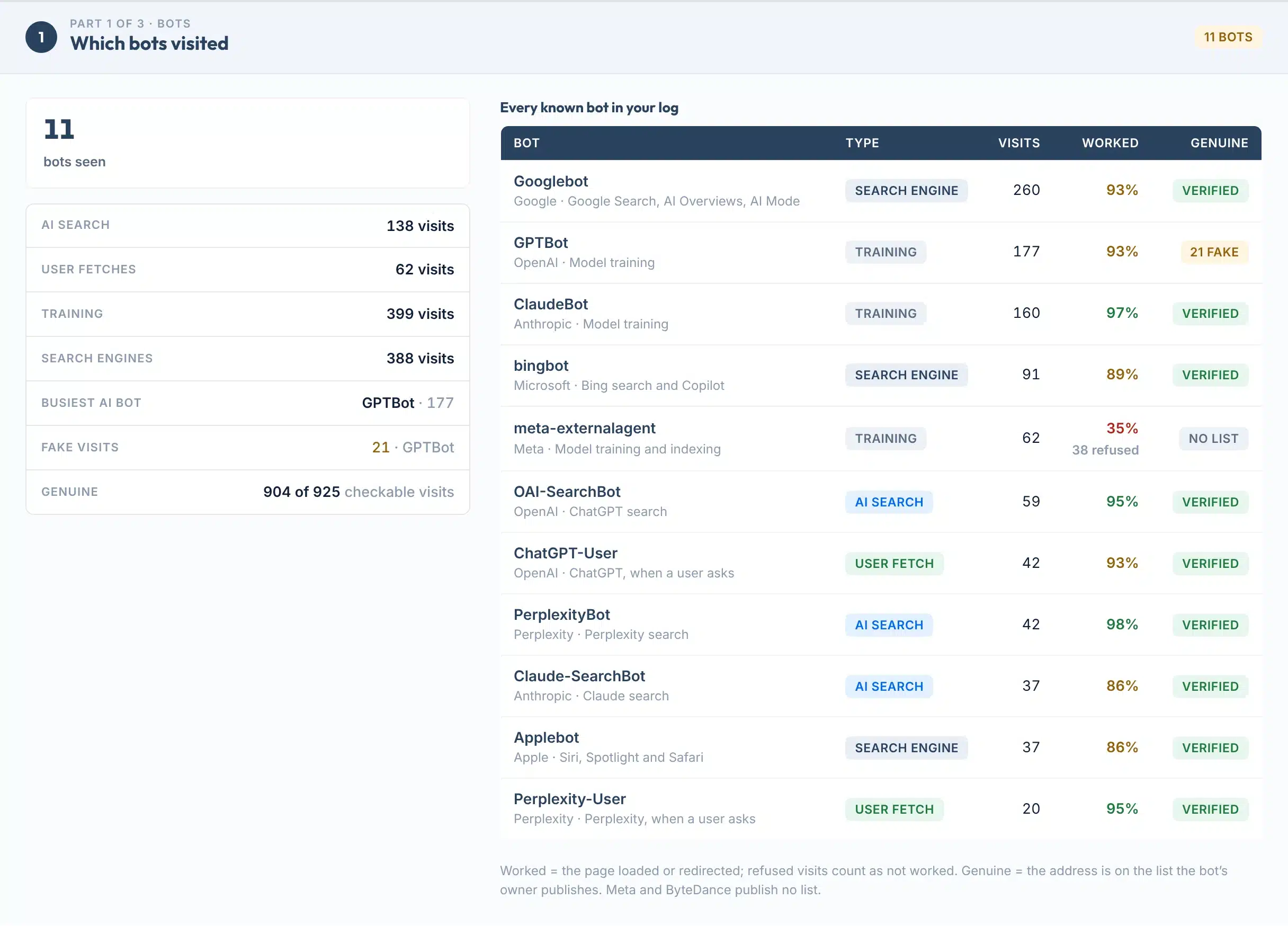
Part 1: every bot in the test log, with 21 fake GPTBot visits flagged.
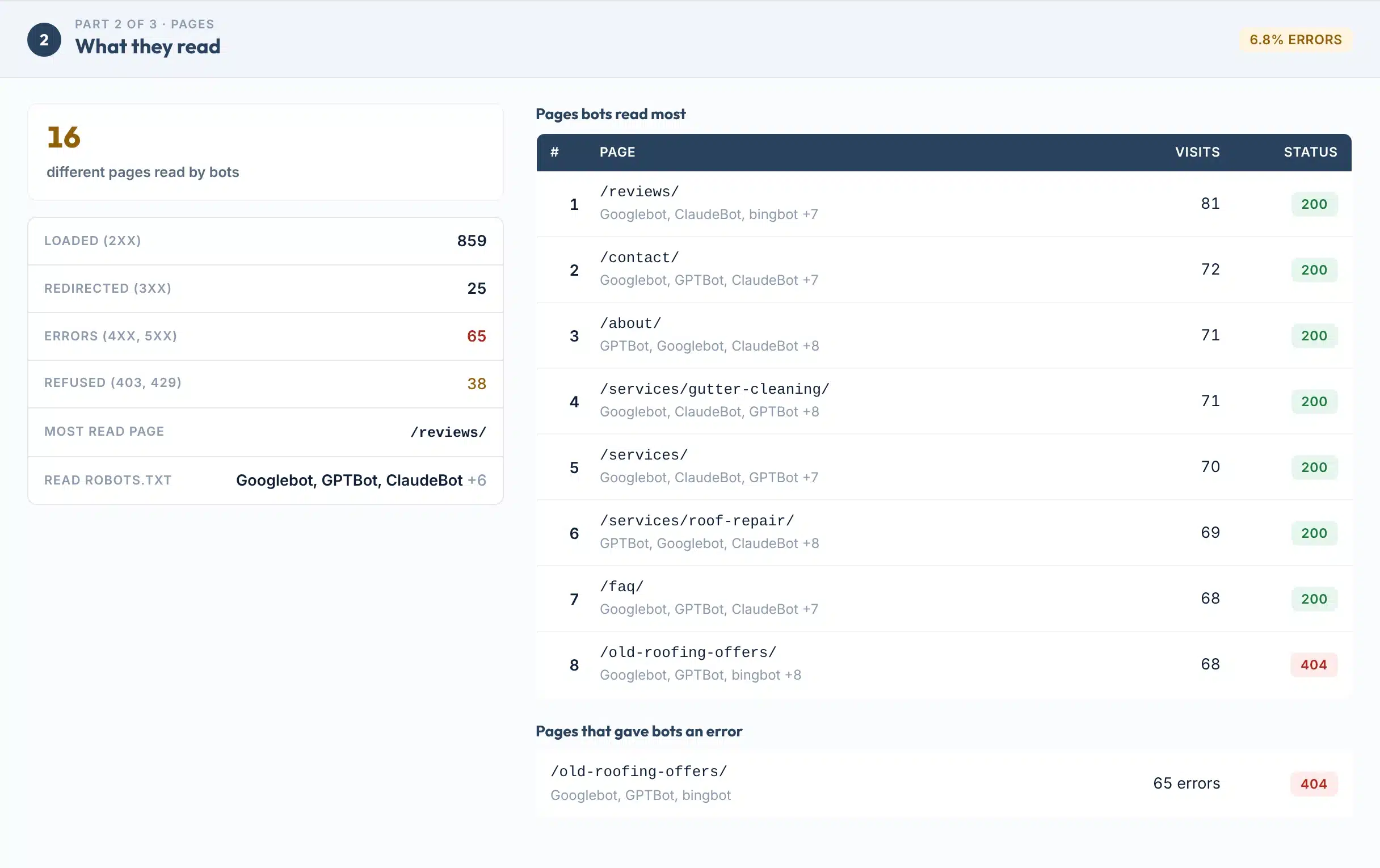
Part 2: the pages bots read, and the one old page that keeps sending them a 404.
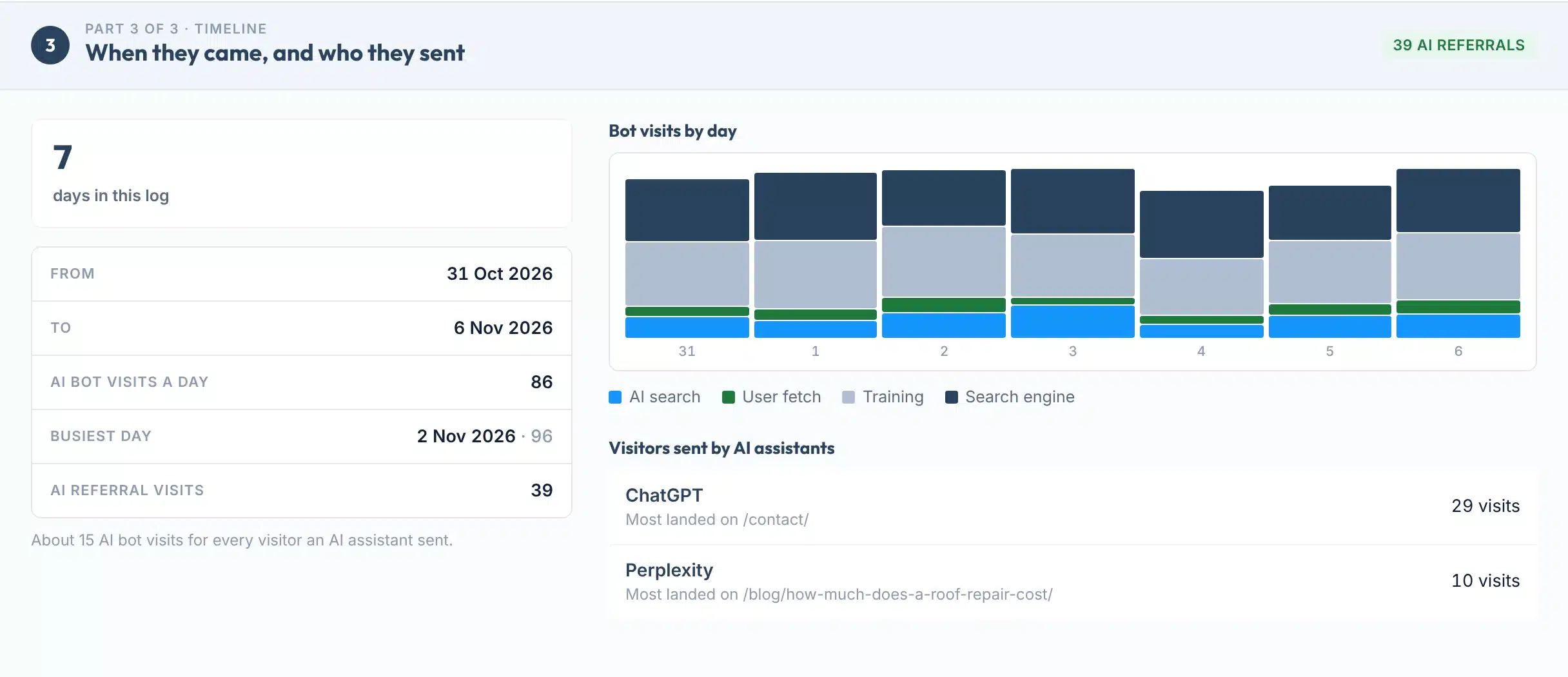
Part 3: bot visits by day and the visitors ChatGPT and Perplexity sent.

Limits
What this tool can’t do
Knowing the limits helps you trust the result you do get.
Use it to
- See whether ChatGPT, Claude and Perplexity can reach your pages
- Find the pages that give bots an error
- Catch scrapers pretending to be well-known bots
- Spot a firewall or plugin that blocks AI search bots
- Count the visitors AI assistants already send you
It won’t
- It can’t see a log it was not given. If your host only keeps one day, you see one day. Pages served from a CDN cache may never reach your server log.
- It can’t verify every bot. Meta and ByteDance publish no address list. If your log records your CDN’s address instead of the visitor’s, no bot can be checked, and the report says so.
- It can’t see AI answers. A visit shows a bot read the page, not that an assistant cited you. Use the AI Visibility Checker for that.
- It undercounts AI referrals. Many apps strip the referrer. OpenAI adds utm_source=chatgpt.com to ChatGPT links, which helps (OpenAI).
- It does not read stealth crawlers. Bots that pose as a normal browser look like people. Cloudflare reported one crawler doing this 3 to 6 million times a day (Cloudflare).
- Very large logs. The first 5 million lines are read. Split bigger files.
Next steps
What to do with your result
Most AI crawling takes and gives little back. Cloudflare found that “80% of AI crawling was for training, compared with 18% for search and just 2% for user actions” over the 12 months to July 2025 (Cloudflare).
In July 2025 Anthropic’s bots crawled about 38,066 pages for every visitor Claude sent, OpenAI’s about 1,091 and Perplexity’s about 195. Google’s figure was 5.4 (Cloudflare). That is why this tool keeps search bots and training bots apart: only the first kind can send you customers.
What AI crawling is for
Source: Cloudflare, share of AI crawling by purpose, 12 months to July 2025.
Your next step, by result
Keep it that way: check again each month, and make your pages easy to quote.
Look at your firewall, CDN bot settings and security plugin for rules that refuse the bot. Then check robots.txt.
Restore the page or redirect it to the closest live page. Fix internal links that still point to it.
Block the listed addresses in your firewall. Do not block the bot’s name, or you block the real one too.
Make sure robots.txt does not block OAI-SearchBot, Claude-SearchBot or PerplexityBot, then check a longer log.
Bots reading you is step one. See whether assistants actually name you when buyers ask.
Want AI assistants to recommend you, not just read you?
Our team works on AI search visibility every day, for businesses in the US and UK.
FAQs
FAQs
What is an AI crawler log analyzer?
It reads your server access log, the file your host keeps of every request, and picks out the visits from AI bots such as GPTBot, ClaudeBot and PerplexityBot. It shows how often each bot came, what it read, which pages failed and whether the bot was genuine.
How do I check if GPTBot crawled my site?
Download your access log and drop it on the tool above. GPTBot shows in the bot table with its visits and dates. To be sure it was really OpenAI, the tool checks each address against the list OpenAI publishes at openai.com/gptbot.json.
Is my log uploaded or stored?
No. The log is read inside your browser. Only the addresses of visits that claim to be a known bot are sent to our server, to check them against the owners’ published lists. Nothing is stored, and your visitors’ addresses are never sent.
Where do I find my server access log?
In your hosting panel: Raw Access in cPanel, Logs in MyKinsta, Logs then Access in WP Engine, or Traffic then Access logs in Hostinger. On your own server, Apache and Nginx usually keep it in /var/log. A few days of log or more works best.
What is the difference between GPTBot, OAI-SearchBot and ChatGPT-User?
GPTBot collects pages that may train OpenAI’s models. OAI-SearchBot finds pages for ChatGPT search answers. ChatGPT-User opens a page when a person asks ChatGPT to. OpenAI says each setting is independent, so you can block training and still appear in ChatGPT search.
How can I tell if a bot is fake?
Check its address. OpenAI, Anthropic, Perplexity, Google, Microsoft, Apple and others publish the addresses their bots use. A visit that says GPTBot but comes from another address is not OpenAI. The tool does this check for you and labels each bot Verified or Fake.
Why is Google-Extended not in my log?
Google-Extended is only a robots.txt rule, not a bot. Google says it has no separate user agent string; crawling is done by Google’s normal crawlers. Blocking it does not affect your Google Search ranking, Google says.
Should I block AI training bots?
It is your choice. Blocking GPTBot, ClaudeBot or CCBot stops them collecting pages for training; it does not remove you from ChatGPT or Claude search, which use other bots. Blocking the search bots, such as OAI-SearchBot, can stop you appearing in AI answers.
Why do so few visitors come from ChatGPT?
AI bots read far more than they send back. Cloudflare measured about 1,091 OpenAI crawls per referral in July 2025. Many apps also strip the referrer. OpenAI adds utm_source=chatgpt.com to its links, which this tool counts.
Is this AI crawler log analyzer free?
Yes, with no signup. It reads logs up to 2 GB and the first 5 million lines, including zipped .gz files. Each visitor can check 60 logs a day.
Sources
- OpenAIOverview of OpenAI crawlers
- AnthropicDoes Anthropic crawl data from the web?
- PerplexityPerplexity crawlers
- Google Search CentralGoogle’s common crawlers and Google-Extended
- Google Search CentralVerifying Googlebot
- AppleAbout Applebot
- MetaMeta web crawlers
- Common CrawlCCBot
- Apache HTTP ServerLog files and the combined format
- Nginxngx_http_log_module
- CloudflareThe crawl-to-click gap (Aug 2025)
- CloudflareStealth, undeclared crawlers (Aug 2025)
- OpenAI HelpPublishers and developers FAQ
- cPanelRaw Access
More free tools
More free AI search tools
Once you know who reads your site, these show what they make of it.