


Crawl budget is the set of URLs Google can and wants to crawl on your website. Two things set it: how much your server can handle, and how much Google wants your pages. For most small business websites it is not a problem at all: Google says sites with fewer than a few thousand URLs are usually crawled efficiently. Below you will find out in 10 minutes whether your site is the exception, and how to fix the six things that do waste crawling, even on small sites.
Quick answer if you are in a hurry: if your site has under 1,000 pages and new pages show up in Google within a day or two, crawl budget is not why you are missing from search. If you run a big store, a directory or a site that adds hundreds of pages a day, keep reading.
What is crawl budget, in plain words?
Think of Googlebot as a delivery driver with a fixed shift. The driver can only knock on so many doors before your street gets too busy (your server), and the driver chooses which doors matter most (your pages). Crawl budget is the list of doors that get a knock.
Google’s own definition, from its guide Optimize your crawl budget: “Google defines a site’s crawl budget as the set of URLs that Google can and wants to crawl.” It has two parts.

Crawl capacity limit: what your server can take
Google limits how long it keeps connections open to your server so it never slows your site down for real visitors. Every site starts with the same cautious limit. If your pages answer fast and reliably, the limit goes up. If your server slows down or returns server errors (5xx) or “too many requests” (429), Google says “the limit goes down and Google crawls less.”
Crawl demand: how much Google wants your pages
Demand depends on your site’s size, how often it changes, page quality and relevance. Google is clear that even with spare capacity, “if crawl demand is low, Google will crawl your site less.” Duplicate and low-value URLs pull demand down because they waste Google’s time.
Three details most guides skip:
- Every hostname has its own budget. www.yoursite.com and shop.yoursite.com are counted separately.
- Files count too. Google says CSS, JavaScript and alternate URLs (like hreflang versions) “may have to be crawled and will consume a site’s crawl budget.”
- Crawling is not a ranking signal. In Google’s words: “while crawling is necessary for being in the results, it’s not a ranking signal.” More crawling does not mean higher rankings.
If crawling itself is new to you, our guide to what crawling is in SEO explains the find, fetch and index steps first.
Does crawl budget matter for small websites?
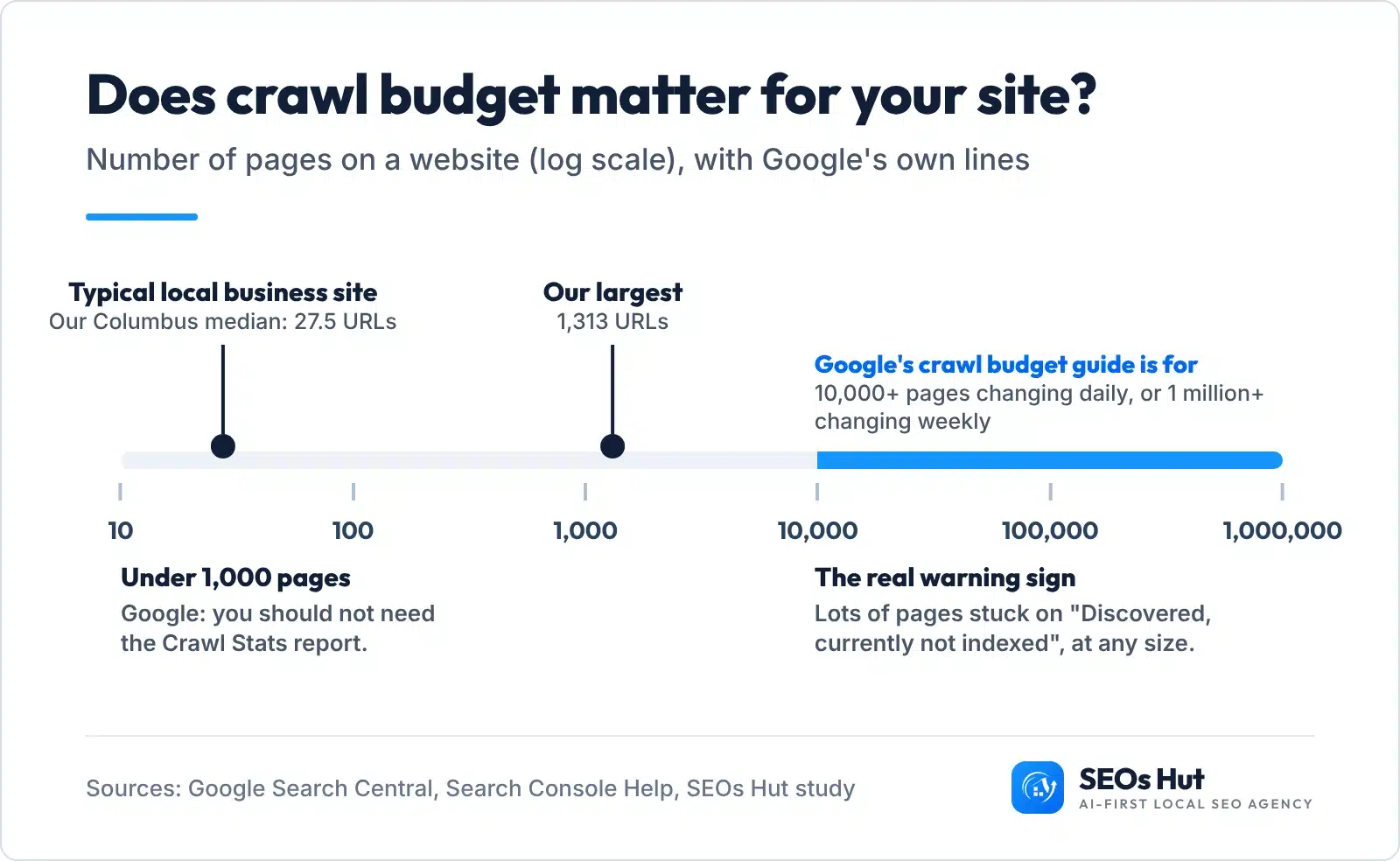
Usually not, and Google says so itself. Its crawl budget guide is written for three kinds of sites:
- Large sites with 1 million+ unique pages whose content changes about once a week
- Medium or larger sites with 10,000+ unique pages that change daily
- Sites with “a large portion of their total URLs classified by Search Console as Discovered – currently not indexed”
Google adds that “these are not exact thresholds.” For everyone else: “If your site doesn’t have a large number of pages that change rapidly, or if your pages seem to be crawled the same day that they are published, you don’t need to read this guide.” Search Console’s help page goes further: if your site has “fewer than a thousand pages, you should not need to use this report” (the Crawl Stats report).
So the honest answer for a plumber, dentist or salon with 20 to 200 pages: crawl budget is almost never the reason a page is missing from Google. The third bullet is the one to watch at any size, and the next section shows how common the other two really are.
What we found on 37 local business websites
We wanted real numbers, not theory. On 24 November 2026 we took the electricians Google Maps shows for “electrician” in Columbus, Ohio, kept those with their own website, and checked 37 of them the way a crawler would: sitemap size, redirects, server speed and what happens when you ask for a page that does not exist.

- Size is not the issue. Of the 30 sites whose sitemap we could read, 29 listed fewer than 1,000 URLs and none came near 10,000. The median was 27.5 URLs; the largest had 1,313.
- Waste is. 8 of those 30 sitemaps listed tag, category or other archive URLs. On one site, 175 of its 270 sitemap URLs were archives.
- 9 of 37 needed two or more redirects to get from http://domain to the home page. One needed five.
- 4 of 37 answered “200 OK” for a page that does not exist, which Google can treat as a soft 404.
- 7 of 37 had no sitemap we could read at all.
The takeaway for a local business: you do not have a crawl budget problem, but you may have crawl waste. Waste does not need a big site to hurt. It slows down how fast Google sees your new service page, and the fixes take minutes. The anonymised data is free to download as a CSV (Site 01 to Site 37, no names).
How to check your crawl budget (in about 10 minutes)
You need Google Search Console access. If you can see your site there, you can do all five steps.
Step 1. Count the pages you want on Google
Open yoursite.com/sitemap.xml (on WordPress with Yoast or Rank Math, try /sitemap_index.xml) and count the URLs, or paste your domain into our free Sitemap Checker, which counts them for you. This is your real page count. If you see tag pages, author pages or old redirects in there, write that down: it is waste.
Step 2. Check how many pages are stuck before crawling
In Search Console, go to Indexing > Pages and look at “Why pages aren’t indexed.” The line to look for is Discovered – currently not indexed. Google explains it as: “The page was found by Google, but not crawled yet. Typically, Google wanted to crawl the URL but this was expected to overload the site.” A handful is normal. A large share of your pages is the crawl budget warning sign.
Do not confuse it with Crawled – currently not indexed. That one means Google did crawl the page and chose not to index it, which points to page quality, not crawl budget. Google calls it “a common message for many sites.”
Step 3. Open the Crawl Stats report
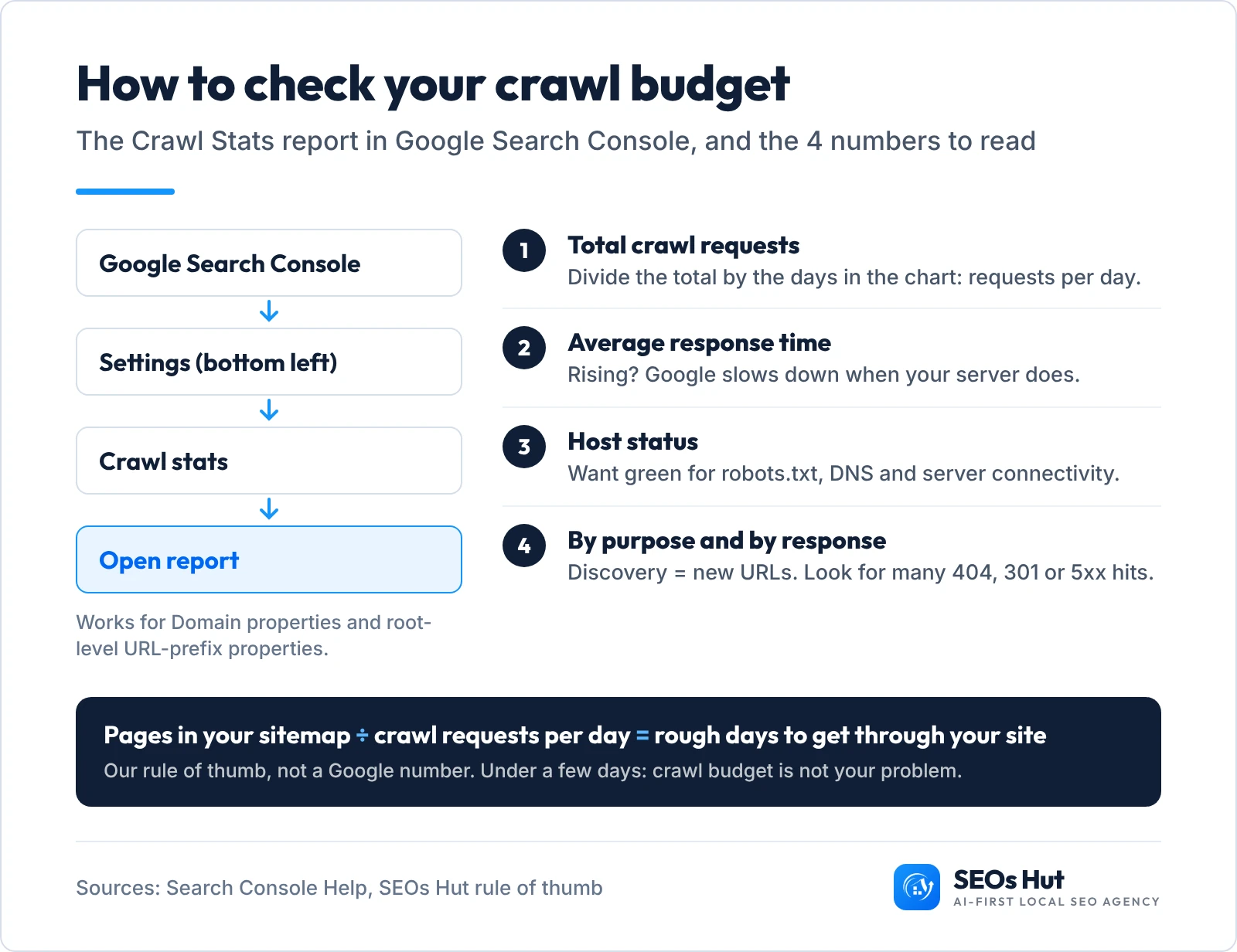
Go to Settings > Crawl stats > Open report. Note four things:
- Total crawl requests. Divide by the number of days in the chart to get crawl requests per day.
- Average response time. If it keeps rising, Google will crawl less: “If your site is responding slowly to requests, Googlebot will throttle back its requests.”
- Host status. Google says “Ideally your host status should be Green.” Red here means robots.txt, DNS or server problems.
- By response and by purpose. Lots of 404, 301 or 5xx hits show where crawling goes to waste. “Discovery” means new URLs; “Refresh” means recrawls of known pages.
Step 4. Do the simple math
Divide the pages from Step 1 by the crawl requests per day from Step 3. The answer is roughly how many days Google needs to get through your site once. This is our rule of thumb, not a Google formula, but it tells you a lot fast. A 60-page site with 40 crawl requests a day: about a day and a half. A 200,000-page store with 5,000 requests a day: 40 days.
Step 5. Test your newest page
Paste your newest page into the URL Inspection bar at the top of Search Console. If it was crawled within a day or two of going live, you are fine. Google’s own test: “If new pages tend to be crawled the same day they’re published, crawl budget is not something webmasters need to focus on.” You can also run it through our Google Index Checker to see if it is in Google yet.
Want to see exactly which URLs Googlebot spends its time on? Upload your server log to our free AI Crawler Log Analyzer: it splits visits by bot, including Googlebot, so you can spot wasted hits on old or junk URLs.
What wastes crawl budget (and how to fix each one)
Google lists the same culprits again and again. Here they are in plain words, with the fix next to each.
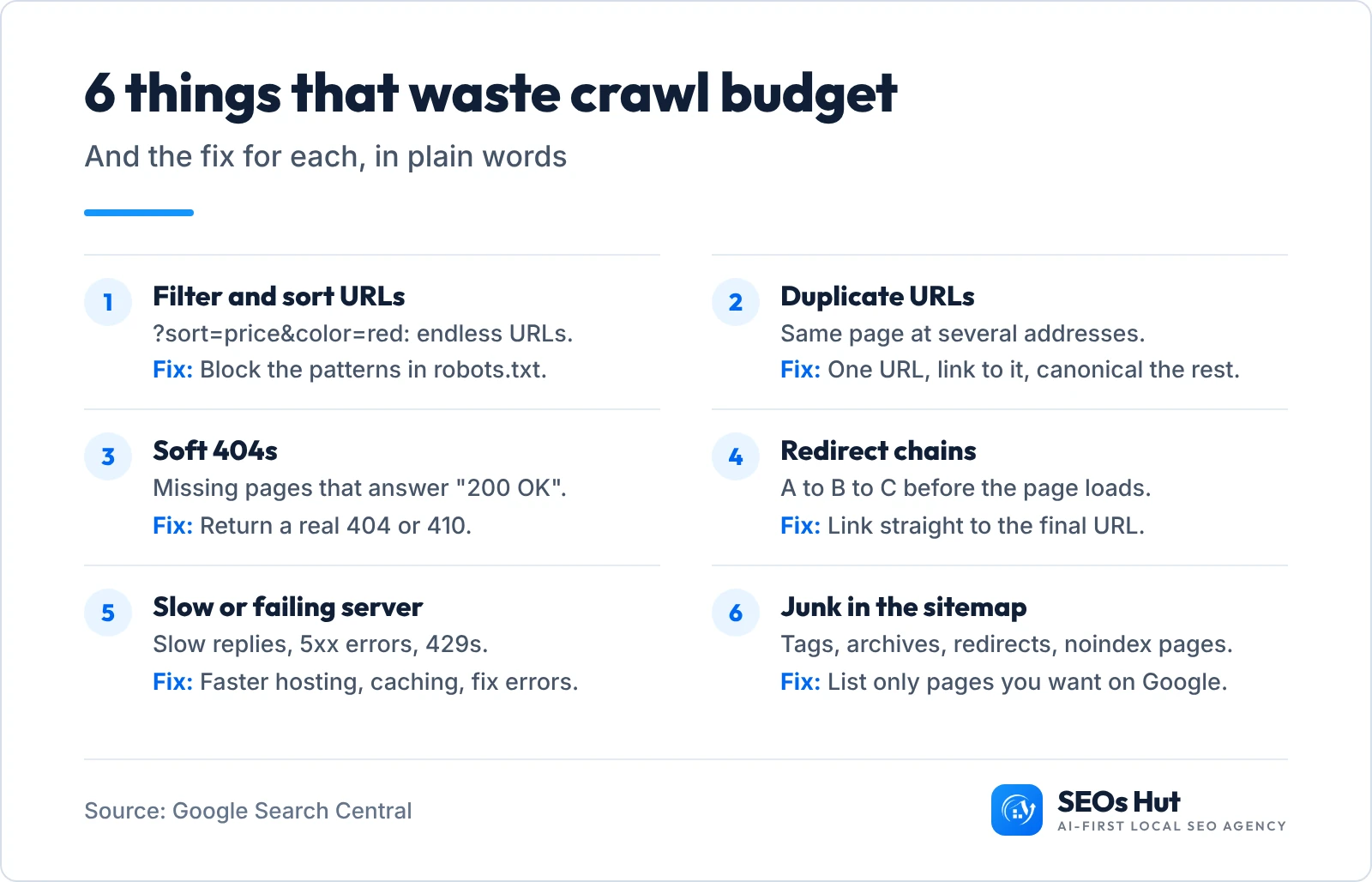
- Filter and sort URLs. Online stores and directories create endless versions of one page (?color=red&sort=price). Google calls faceted navigation “by far the most common source of overcrawl issues site owners report to us.” Fix: block those URL patterns in robots.txt (example below).
- Duplicate URLs. The same page at http and https, with and without www, or with tracking parameters. Google says duplicates waste “a lot of Google crawling time on your site.” Fix: pick one version, redirect the others once, link only to the one you picked and add a canonical tag.
- Soft 404s. Pages that are gone but still answer “200 OK”, or show a “nothing found” page. Google: “soft 404 pages will continue to be crawled, and waste your budget.” Fix: return a real 404 or 410 for pages that are gone for good.
- Redirect chains. Page A goes to B, which goes to C. Google says to “avoid long redirect chains, which have a negative effect on crawling.” Fix: update links to point straight at the final URL. Our free Redirect Checker shows every hop, and our guide to redirect chains walks through the cleanup.
- A slow or failing server. Slow answers, 5xx errors and 429s all lower the crawl capacity limit. Fix: better hosting, page caching and fixing whatever throws the errors. Google: “If Google can load and render your pages faster, we might be able to read more content from your site.” Our guide on page speed and SEO covers the quick wins.
- Junk in your sitemap. Tags, archives, redirected URLs and noindex pages. Fix: list only pages you want on Google, and keep the lastmod date honest. Google uses lastmod only “if it’s consistently and verifiably” accurate, and it “ignores <priority> and <changefreq> values.”
How to optimize crawl budget, step by step
Only do this if Steps 1 to 5 showed a real problem. Work in this order, because each step removes the most waste for the least effort.
1. Block URLs you never want crawled with robots.txt
Google: “Blocking URLs with robots.txt prevents Google from crawling them.” A typical store setup that keeps Googlebot off filter, sort and internal search URLs looks like this (change the parameter names to the ones your site uses):
User-agent: *
Disallow: /*?*sort=
Disallow: /*?*color=
Disallow: /*?*filter_
Disallow: /search/

Sitemap: https://www.yoursite.com/sitemap_index.xml
Never block pages you want on Google, and never block CSS or JavaScript files your pages need. Our robots.txt guide shows how to test a rule before it goes live.
2. Do not use noindex to save crawl budget
This is a common myth. Google is blunt: “Don’t use noindex, as Google will still request, but then drop the page when it sees a noindex meta tag or header in the HTTP response, wasting crawling time.” Use noindex to keep a page out of results; use robots.txt to stop the crawling.
3. Return 404 or 410 for pages that are gone
“A 404 status code is a strong signal not to crawl that URL again.”
4. Link straight to final URLs
Update menus, footers and internal links so none of them point at a redirect. Then update your sitemap to match.
5. Make your server faster and let Google reuse what it already has
Fast hosting and page caching help most. On bigger sites, ask your developer to support ETag or Last-Modified headers: when nothing changed, a 304 answer “tells Google to reuse the cached version, saving your server bandwidth and resources.” Google’s crawling team writes: “We strongly recommend using ETag.”
Not sure where your waste is? Run our free Website SEO Audit: it flags redirect chains, broken links and sitemap problems in one pass.
Can you increase crawl budget or force Google to crawl?
Not directly. Google’s crawl rate page says: “You cannot request an increase in crawl rate.” The non-standard crawl-delay rule in robots.txt is ignored by Googlebot too. Google names just two ways to earn more crawl budget: give your server more resources so it can handle more, and improve the quality of your content so Google wants more of it.
What you can do for a single page is ask. In URL Inspection, click Request indexing after publishing or updating an important page. For the whole site, keep your sitemap clean with accurate lastmod dates. Google has said it uses lastmod “as a signal for scheduling crawls to URLs that we previously discovered.”
What about IndexNow? It lets you tell search engines about changed pages instantly, and its official site lists Microsoft Bing, Naver, Seznam.cz, Yandex and Yep as supporters. Google is not on that list, so it can help with Bing, but it does nothing for Google’s crawl budget.
What we see in client work
Crawl problems on small sites rarely come from size. They come from broken plumbing. On our Walker Wood Gifts case study, the store’s case page says “Poor site performance and technical errors blocked search engines from crawling,” and Google had started deindexing pages. The first phase was an emergency fix: “We resolved server errors, cleared crawl blocks, corrected the robots.txt configuration, and submitted pages for reindexing.” After that recovery and a 3-month campaign, traffic went from 100 visitors a month to past 800, and the owner reports “90-120 sales a month instead of barely 30-50.”
The lesson matches Google’s guide: server errors and bad robots.txt rules cut crawling long before page count does.
Crawl budget cheat sheet
Everything above on one page. Free to download, print or share with your web developer.
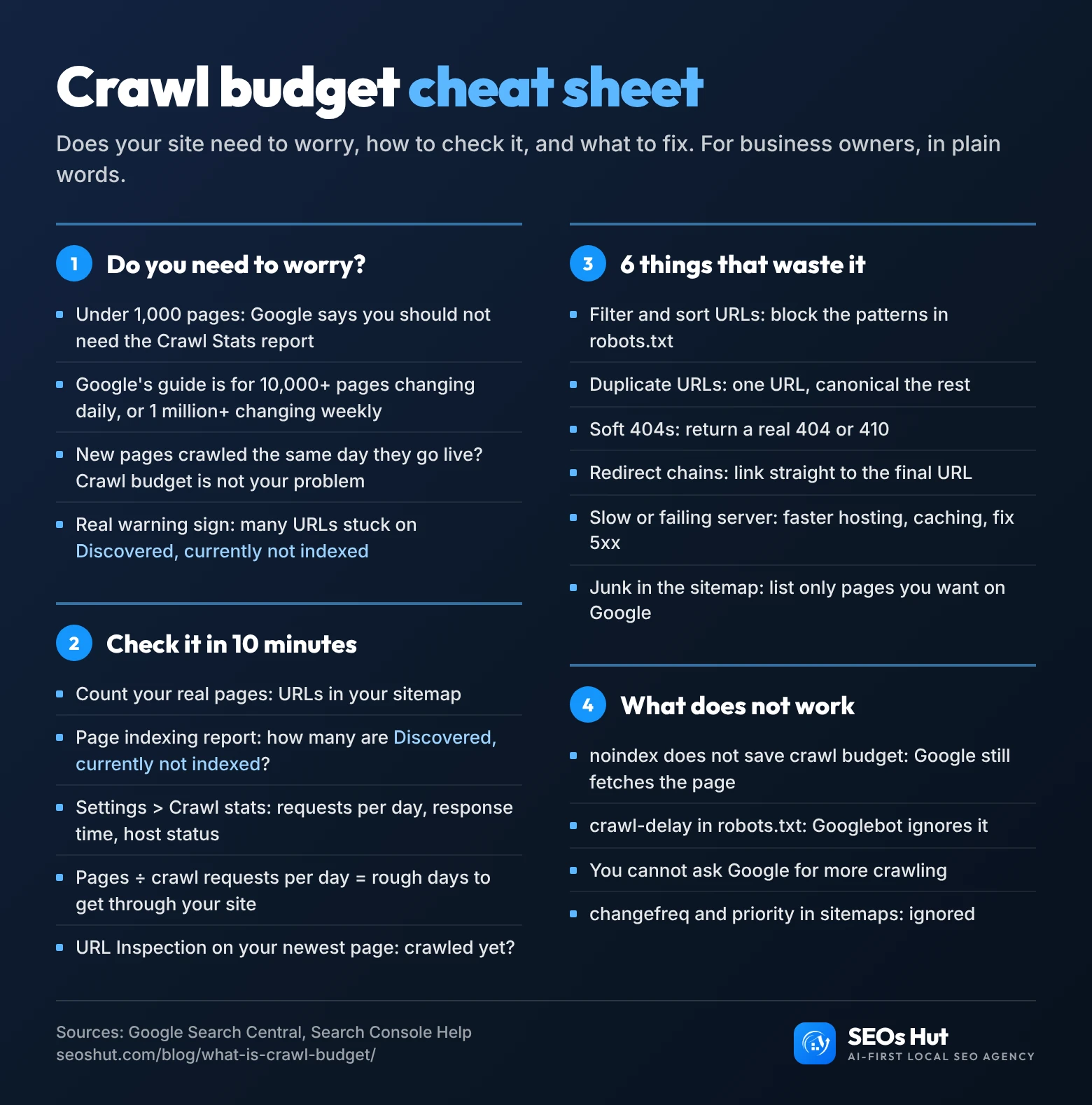
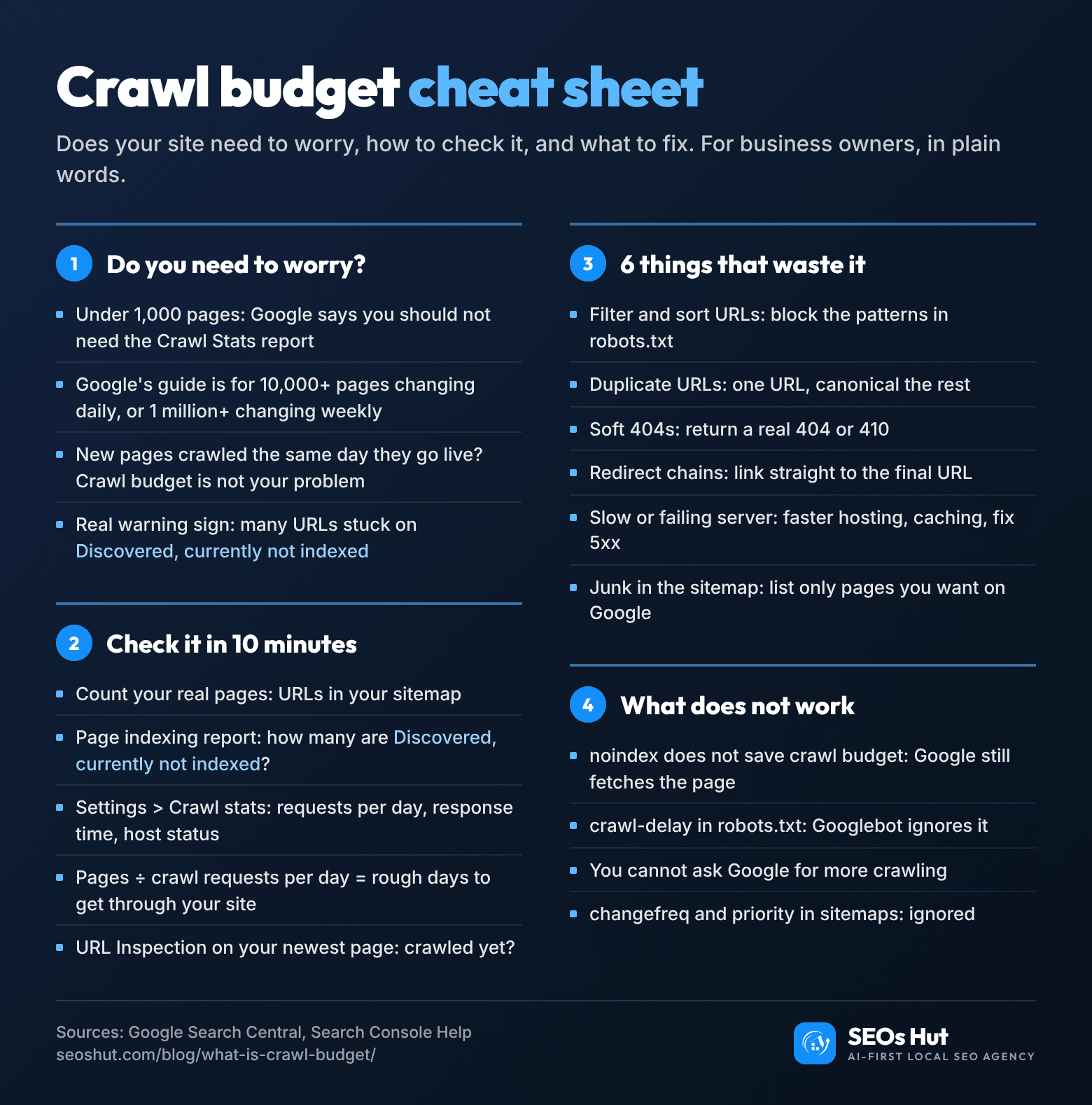
Prefer a checklist you can fill in? Get the one-page PDF: Crawl budget, the 10-minute check (no email needed).
Want a second pair of eyes? Our website audit service checks crawling, indexing, redirects, speed and sitemaps by hand and gives you a fix list in plain English. It is the same technical work behind the results on our case studies at SEOs Hut.
FAQs
Is crawl budget a ranking factor?
No. Google says crawling is necessary to appear in results, but “it’s not a ranking signal,” and a higher crawl rate “will not necessarily lead to better positions.” Crawl budget only matters when it stops Google from seeing pages you want found. Fix crawl waste so new and updated pages get seen quickly; rankings come from relevance, quality and links.
Does noindex save crawl budget?
No. Google still fetches a noindex page, reads the tag and then drops it, so the crawl is spent anyway. Google’s guide says not to use noindex for this. If you want Google to stop crawling a group of URLs, such as filter or search pages, block them in robots.txt instead and keep noindex for pages you only want out of search results.
Do pages blocked by robots.txt use crawl budget?
No. Google’s crawl budget FAQ says “disallowed URLs do not affect the crawl budget,” which is why robots.txt is the right tool for URLs you never need crawled. The catch: Google cannot read a blocked page, so it cannot see a noindex tag or canonical on it. Only block URLs you are sure you never want crawled.
How long does it take Google to crawl a new page?
On a small, healthy site, often within a day or two, and Google treats same-day crawling as the sign crawl budget is not your problem. Speed it up by linking to the new page from your home page or menu, adding it to your sitemap and using Request indexing in URL Inspection. Weeks of waiting usually means discovery or quality problems.
What is the difference between crawl rate and crawl budget?
Crawl rate is how fast Googlebot requests pages from your server; Google says that for most sites it “shouldn’t access your site more than once every few seconds on average.” Crawl budget is the bigger idea: the set of URLs Google can and wants to crawl, set by your server’s capacity and Google’s demand for your pages.
Sources
- Google: Optimize your crawl budget (last updated 22 July 2026, checked 24 Nov 2026)
- Google Search Central blog: What crawl budget means for Googlebot (2017)
- Search Console Help: Crawl Stats report
- Search Console Help: Page indexing report
- Google: Reduce the Google crawl rate
- Google: Crawling December, faceted navigation and HTTP caching (2024)
- Google: Build and submit a sitemap and Sitemaps lastmod update (2023)
- Google: Googlebot
- IndexNow.org
- SEOs Hut study: 37 Columbus, Ohio electrician websites from Google Maps, checked 24 Nov 2026 (anonymised data)