


Local SEO for small business means getting your business to show up when people nearby search Google, Google Maps or an AI app for what you sell. You can do most of it yourself, for free, in four weeks: one job a week.
Google says it ranks local results on three things: relevance, distance and prominence. You cannot move your shop closer to every customer, so this plan spends your time on the two you can change. Below you will find the plan, a free tool that builds your own to-do list, and what the businesses already winning in one US city actually do.
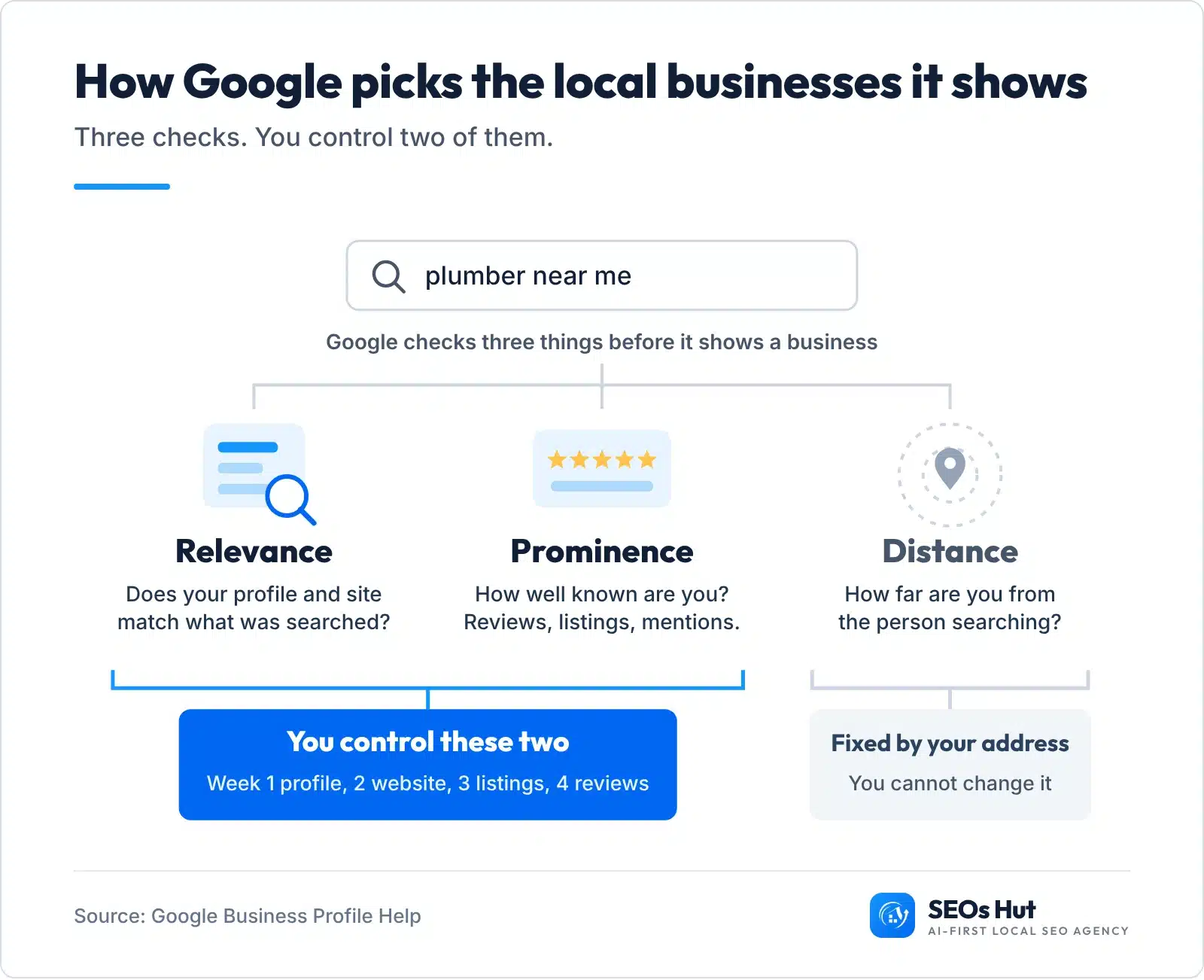
In Google’s words, relevance is “how well a Business Profile matches what someone is searching for”, distance “refers to how far each business is from the customer who’s searching”, and “prominent places are more likely to show up in search results” (Google Business Profile Help). Your profile and website build relevance. Listings and reviews build prominence.
Can you do local SEO yourself?
Yes. Nearly everything in this plan is free and needs no technical skill: a Google account, your website login and your phone. The tools you need are free too. Google Business Profile costs nothing, and so do Apple Business Connect and Bing Places for Business.
What it does take is order. Most guides give you twenty tactics at once. This one gives you one job a week, starting with the job that moves the most.
- Week 1, Google Business Profile. Claim it, verify it and fill in every part.
- Week 2, your website. Make every page say what you do and where.
- Week 3, listings. Put the same name, address and phone on Apple, Bing, Yelp and your trade sites.
- Week 4, reviews. Start asking every customer and reply to every review.
- Every month after. A short routine that keeps you there.
Build your local SEO plan in the page
Answer the questions below with a tap. The tool skips what you already have done and gives you only the jobs left, in week order, each with where to click. Nothing is sent anywhere and there is no signup.
Local SEO Plan Builder
Tap Yes or No. Your plan updates as you go and lists only what is left to do.
Do customers come to you, or do you go to them?
What do the top local businesses actually have?
We wanted to see the bar you are up against, so we checked the businesses Google Maps shows first in one ordinary US city. On 27 October 2026 we searched “plumber”, “dentist”, “hair salon” and “auto repair shop” in Columbus, Ohio, took the first 20 results for each, removed national chains and duplicates, and checked the 73 independent businesses left: their Google profile, their newest 10 reviews and the website their profile links to.
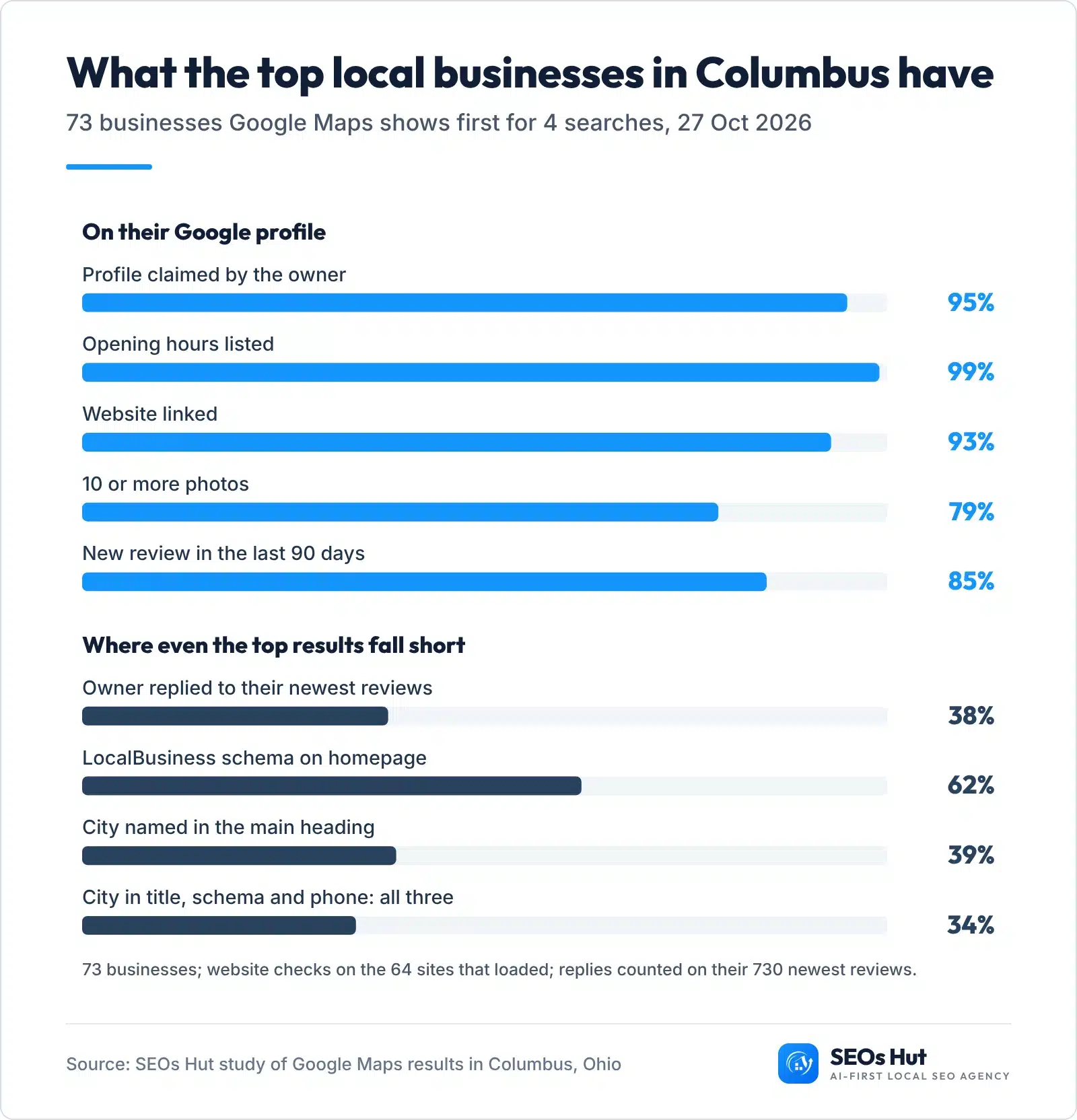
Two things stand out. First, the basics are table stakes: of the 73, 95% had claimed their profile, 99% listed opening hours, 93% linked a website and 79% had 10 or more photos. If your profile is missing any of these, you are behind every business above you.
Second, even the winners leave gaps you can beat. Owners replied to only 38% of their 730 newest reviews, and 31 of the 73 had not replied to any of their latest 10. On the 64 websites that loaded, 62% had LocalBusiness schema, 39% named the city in the main heading, and only 34% had the city in the title, schema and the profile’s phone number on the homepage. Those are exactly the jobs in weeks 2 and 4. The full method and every row are in the anonymised study spreadsheet (Excel).
Week 1: set up your Google Business Profile
This is the biggest single job, because your profile is what appears in the map results and the “Call” and “Directions” buttons. Google says “businesses with complete and accurate info are more likely to show up in local search results” (Google).

- Find or create your profile. Search your business name on Google Maps. If it is there, click “Own this business?” to claim it. If not, go to business.google.com and add it.
- Verify it. Google will ask you to prove it is your business, usually by video, phone, text or email. Verification tells Google you can represent the business, and Google notes that “verification reviews take up to 5 business days” (Google).
- Use your real name. Write it exactly as it appears on your sign and invoice. Google’s rules say “including unnecessary information in your business name isn’t permitted” (Google guidelines). Adding “Best Plumber Columbus” can get a profile suspended.
- Pick the most specific primary category. “Plumber”, not “Contractor”. Local SEO experts rank the primary category as the number one factor for the map results (score 227 in Whitespark’s 2026 Local Search Ranking Factors). Google asks you to “choose the fewest number of categories it takes to describe your overall core business.”
- Address or service area. Customers come to you? Show your address. You go to them? Google says “you should hide your business address from customers” and set a service area instead.
- Hours, phone, website, services. Use your main local number, add holiday hours, link the website to your homepage (or the matching service page) and list every service you sell.
- Photos. Add the outside, the inside, your team and real jobs. For the outside, Google’s tip is to “capture a photo from each direction that customers might approach your business” (Google).
Check it worked: search your business name on your phone in Google Maps. Every field should show, with no “Suggest an edit” warnings. Then run the free Google Business Profile Audit to see anything you missed. For every field in more depth, see our Google Business Profile optimization guide.
One warning: the same Whitespark survey ranks keywords in the business name as the third strongest map factor (score 223). It works because it breaks Google’s rules, which is also why profiles get suspended for it. Keep your real name.
Week 2: make your website say what you do and where
Your profile tells Google where you are. Your website tells Google, and AI tools, exactly what you do there. Five changes cover it.
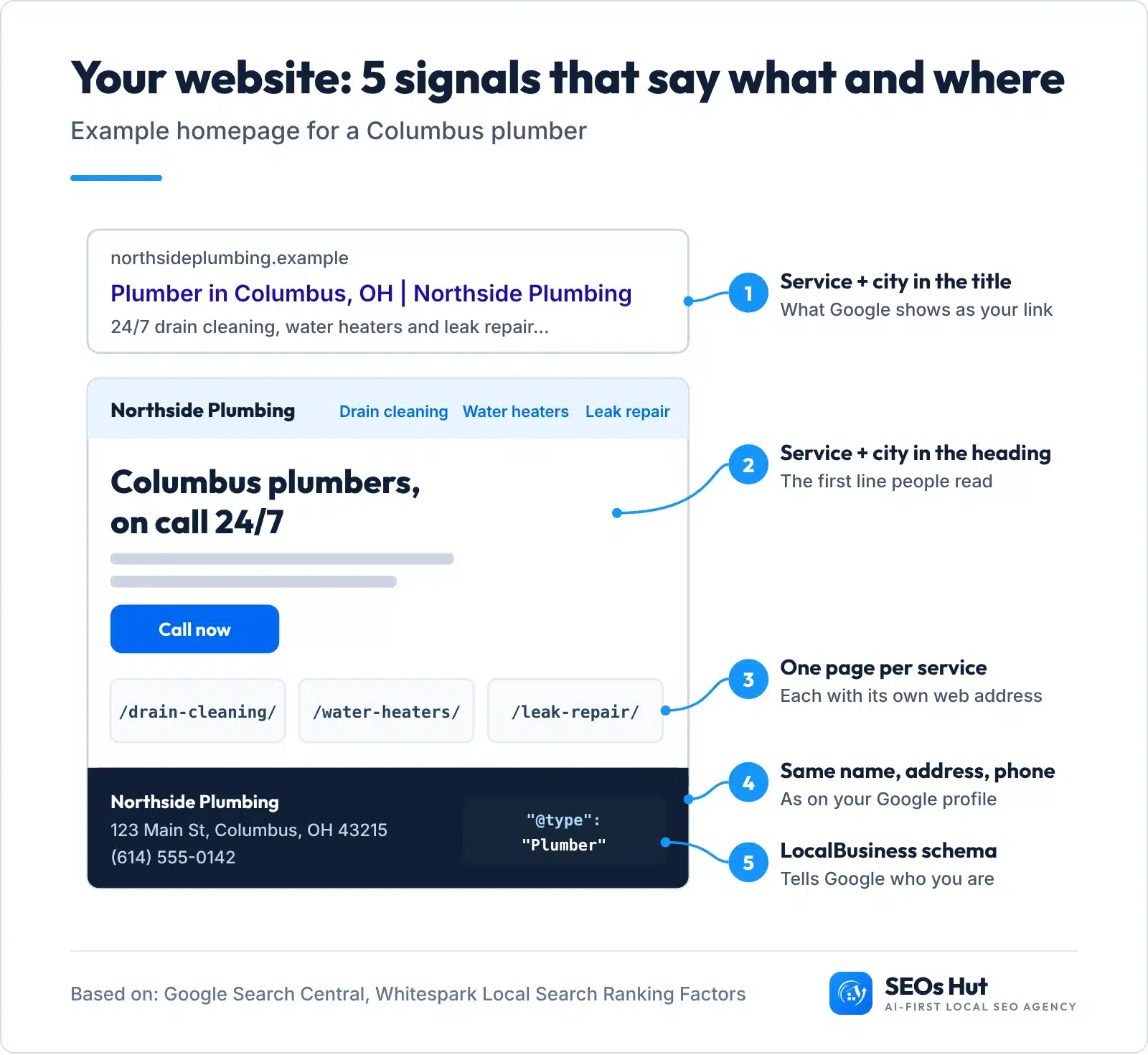
- Homepage title: main service + city + name, like “Plumber in Columbus, OH | Northside Plumbing”. In our Columbus sample, 73% of the top businesses already do this. Not sure which service words to use? Our local SEO keyword research guide shows how to find them for free.
- Main heading (H1): say the service and the city in plain words. Only 39% of the sample did.
- One page per service. Drain cleaning, water heaters and leak repair each get their own page with real detail, prices if you can and photos. Whitespark’s experts rank a “dedicated page for each service” as the number one factor for local organic results (score 210) and the second strongest for showing up in AI search (score 170).
- Same name, address and phone in the footer of every page, written exactly as on your Google profile. The phone should be tap-to-call on mobile.
- LocalBusiness schema on the homepage. Schema is a short block of code that tells Google your name, address, phone and hours in a format it reads directly.
Copy this schema and change the details
Google’s LocalBusiness documentation only requires name and address, and recommends telephone, url, openingHoursSpecification, geo and priceRange. This template has all of them. Change “Plumber” to your type (Dentist, HairSalon, AutoRepair, or LocalBusiness if none fits) and every detail to yours.
<script type="application/ld+json">
{
  "@context": "https://schema.org",
  "@type": "Plumber",
  "name": "Northside Plumbing",
  "url": "https://northsideplumbing.example/",
  "telephone": "+1-614-555-0142",
  "image": "https://northsideplumbing.example/storefront.jpg",
  "priceRange": "$$",
  "address": {
    "@type": "PostalAddress",
    "streetAddress": "123 Main St",
    "addressLocality": "Columbus",
    "addressRegion": "OH",
    "postalCode": "43215",
    "addressCountry": "US"
  },
  "geo": { "@type": "GeoCoordinates", "latitude": 39.9612, "longitude": -82.9988 },
  "openingHoursSpecification": [{
    "@type": "OpeningHoursSpecification",
    "dayOfWeek": ["Monday","Tuesday","Wednesday","Thursday","Friday"],
    "opens": "08:00",
    "closes": "17:00"
  }]
}
</script>
Where to paste it: on WordPress, use your SEO plugin’s local business settings or a header-code plugin; on Squarespace, the Code Injection header box; on Wix, Custom Code in your site settings, set to load in the head of your homepage. Prefer a form? The free AI-Ready Schema Generator writes it for you.
Check it worked: paste your homepage address into Google’s Rich Results Test or our Schema Markup Analyzer. You should see your business type with no errors. Our local business schema guide covers every property.
Week 3: list your business in the places that matter
A listing (also called a citation) is any site that shows your name, address and phone: Apple Maps, Bing, Yelp, Facebook, your trade association, the local chamber. They help Google trust your details, and they matter even more for AI answers. Whitespark’s 2026 report found “3 of the top 5 AI Search visibility factors are citation factors” and puts it simply: “In AI SEO, mentions (citations) are the new link.” To see how much each signal weighs on Google Maps, in Google results and in AI answers, read our local SEO guide.
- Apple Business Connect. Free, and it is how you claim and edit your place card on Apple Maps.
- Bing Places for Business. Free, and it is where you manage how your business shows on Bing.
- Yelp and Facebook. Claim both, even if you never post.
- Your trade’s main directory (for example a dental association, a trade body or a booking site your customers use) and your local chamber of commerce.
- Clean up. Search your old phone number and old address. Fix or close every listing that shows them, and merge duplicates.
The rule for all of them: copy your details from one master sheet, character for character. “Suite 4” on one site and “Ste. 4” on another is how mismatches start. The free checklist below has a box to write your master details once.
Check it worked: the free Local Citation Finder shows where you are listed and where competitors are that you are not, and the NAP Consistency Checker flags listings that do not match. Our local citations guide lists the sites by industry.
Week 4: get reviews every week and reply to all of them
Reviews are the part of prominence you can grow fastest, and customers read them closely. BrightLocal’s 2026 survey of US consumers found 97% read reviews for local businesses, and Google itself says “more reviews and positive ratings can help your business’s local ranking” (Google).

The gap in that chart is your opening. 89% of consumers expect owners to reply, yet the top businesses in our Columbus sample replied to 38% of their newest reviews, and to only 21 of their 75 newest one and two star reviews. Freshness matters too: 74% look for reviews from the last three months (BrightLocal, 2026).
- Make your review link. Google allows you to “ask customers to visit a Google link or scan a QR code”. Our free Google Review Link Generator makes both.
- Ask every customer. At the till, on the invoice, in a text after the job. It works: 83% of people asked to leave a review went on to leave one (BrightLocal).
- Never pay or filter. Google’s policy bans reviews “paid for, directly or in kind” and asking only happy customers (“selectively solicit positive reviews”) (Google).
- Reply to every review within a day or two. Google’s advice: keep it short, respond promptly and be “conversational, not promotional” (Google). Write each one fresh: BrightLocal found templated replies put off 50% of consumers.
Review reply examples you can adapt
5 stars: “Thanks, Janet. Glad the new water heater is keeping up with three teenagers. Mike enjoyed the job, and we are here if you ever need us.”
3 stars: “Thanks for the honest review, Dev. You are right that we arrived later than the window we gave you. We have changed how we text arrival times so it does not happen again.”
1 star: “Sorry, Laura, this is not the visit we want anyone to have. I would like to put it right. Please call me directly on 614 555 0142 and ask for Sam, the owner.”
Check it worked: after four weeks you should see new reviews every week and a reply under every one. Our guide on whether Google reviews help SEO goes deeper.
What we see in client work
The same four jobs are behind our own local results. For Sugar & Wax Haven in Tempe, the case study says: “We grew reviews from 67 to 309, post fresh content every week, and reply to every review within 4 hours.” Monthly visitors went from 492 to 3,400 in 8 months (read the salon case study).
For A1 Tire Shop in Sunrise, Florida, the case study describes rebuilding the Google profile with accurate categories, services, hours, photos and consistent name, address and phone. The shop went from #48 to #1, with 770 phone calls from Google (tire shop case study).
After week 4: the monthly local SEO routine
Once the four weeks are done, local SEO becomes upkeep. Put a reminder in your calendar for the first Monday of each month.
- Add a few new photos of real work to your Google profile.
- Reply to every review you have not answered yet.
- Check your hours (holidays especially), phone and website link on Google, Apple and Bing.
- Post an update or offer on your Google profile.
- Check where you rank for your main service plus your city with the free Local Rank Grid, which shows your position across your area, not just at your front door.
Free 4-week local SEO checklist (PDF). One page, every box from this plan, plus a space for your master details. No email needed.
How do you show up in ChatGPT and AI answers?
More customers now ask AI. BrightLocal found 45% of consumers used AI tools for local business recommendations, up from 6% the year before, and ChatGPT was used by 31% (BrightLocal, 2026).
The good news: you do not need a separate plan. AI tools lean on the same signals. Consistent listings (week 3) are the strongest, reviews (week 4) give them something to quote, and clear service pages with schema (week 2) tell them what you do. Ask ChatGPT “best [your service] in [your city]” today and again after the four weeks. The free AI Recommendation Checker runs that test for you.
How long until you see results?
Google does not publish a timeline, and it depends on how strong your competitors are. Profile changes appear once Google has reviewed them. Ranking moves take longer: in the two client cases above, the climbs took about 6 months and 8 months. Track three numbers each month: calls, direction requests and website clicks in your Google profile’s Performance tab. Our guide on how long it takes to rank on Google explains what speeds it up.
How much does local SEO cost for a small business?
Doing it yourself costs nothing but time: every platform in this plan is free. Paying for help makes sense when you do not have that time, when you are in a competitive city, or when you have tried and stalled.
For reference, SEOs Hut’s own prices (checked 27 October 2026) are a one-off website audit from $297, Google Business Profile management from $299 a month and the full local SEO plan from $997 a month. Whoever you hire, ask them which of the four weeks above they will do, and how they will report calls, not just rankings. Our affordable local SEO guide shows what fair pricing looks like.
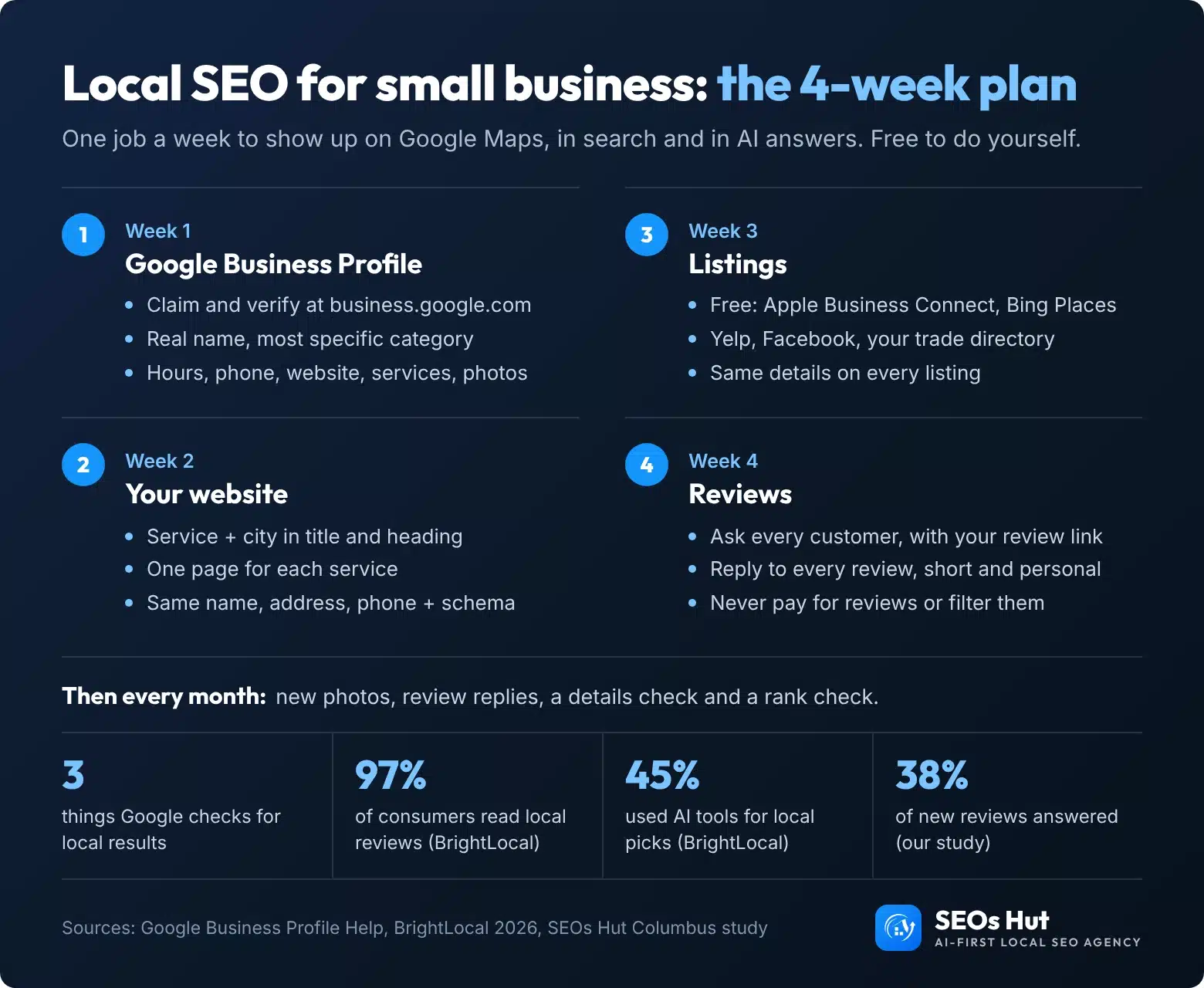
The 4-week plan on one page
Save it, print it or share it with whoever helps you. You are welcome to put it on your own site with a link back.
Want it done for you?
If you would rather spend the four weeks running your business, our team does all of it: the profile, the website fixes, the listings and the review system, with a monthly report of calls and bookings. See the local SEO plan, or start with a one-off audit that shows exactly what is holding you back. SEOs Hut is an AI-first local SEO agency working with small businesses in the US and UK.
FAQs
Can I do local SEO myself?
Yes. Most local SEO is free and needs no technical skill: claiming and filling in your Google Business Profile, adding your city and services to your website, listing your business on Apple, Bing and Yelp, and asking for reviews. Do one job a week for four weeks, then keep a short monthly routine. Hire help only if you lack the time.
What is the most important local SEO factor?
Your Google Business Profile, and in it your primary category. Experts in Whitespark’s 2026 survey rank the primary category as the top factor for the map results, just ahead of distance to the searcher. Google says it ranks on relevance, distance and prominence, so a complete profile, matching website and steady reviews cover the parts you control.
Is Google Business Profile free?
Yes. Creating, verifying and managing a Google Business Profile costs nothing, and so does posting updates, adding photos and replying to reviews. Apple Business Connect and Bing Places for Business are free too. You only pay if you choose to hire someone to manage them or buy Google Ads, which are a separate product.
Do I need a website for local SEO?
You can rank in the map results without one, but a website makes it much easier. In our study of 73 top Google Maps businesses in Columbus, Ohio, 93% linked a website from their profile. Your site is where you show each service, your city and your schema, which helps Google and AI tools understand what you do.
How long does local SEO take to work?
Profile changes appear once Google reviews them, but ranking gains usually take months and depend on how strong your competitors are. In two of our client case studies, the climb to the top took about 6 and 8 months. Measure calls, direction requests and website clicks in your profile’s Performance tab every month.
Sources
- Google Business Profile Help: Tips to improve your local ranking on Google
- Google: Guidelines for representing your business on Google
- Google: Verify your Business Profile
- Google: Business Profile photo tips
- Google: Read and reply to reviews
- Google Maps user contributed content policy: fake engagement
- Google Search Central: LocalBusiness structured data
- Whitespark: Local Search Ranking Factors 2026
- BrightLocal: Local Consumer Review Survey 2026
- BrightLocal: AI and local business recommendations (2026)
- Apple: Introducing Apple Business Connect
- Bing: the new Bing Places for Business
- SEOs Hut study: 73 top Google Maps businesses in Columbus, Ohio, 27 October 2026 (anonymised data, Excel)